


惯性聚合 高效追踪和阅读你感兴趣的博客、新闻、科技资讯
阅读原文 在惯性聚合中打开

推荐订阅源

Forbes - Security
Forbes - Security
GbyAI
GbyAI
OSCHINA 社区最新新闻
OSCHINA 社区最新新闻
S
SegmentFault 最新的问题
Y
Y Combinator Blog
Recorded Future
Recorded Future
博客园 - Franky
I
InfoQ
T
The Blog of Author Tim Ferriss
Recent Announcements
Cyber Security Advisories - MS-ISAC
博客园_首页
阮一峰的网络日志
阮一峰的网络日志
T
Tailwind CSS Blog
Cyberwarzone
Cyberwarzone
The Register - Security
H
Hackread – Cybersecurity News, Data Breaches, AI and More
Threat Intelligence Blog | Flashpoint
雷峰网
雷峰网
P
Palo Alto Networks Blog
G
GRAHAM CLULEY
Cloudbric
Cloudbric
CTFtime.org: upcoming CTF events
MongoDB | Blog
MongoDB | Blog
F
Full Disclosure
Google DeepMind News
Recent Commits to openclaw:main
C
Check Point Blog
爱范儿
爱范儿
The GitHub Blog
The GitHub Blog
cs.AI updates on arXiv.org
W
WeLiveSecurity
T
Threat Research - Cisco Blogs
U
Unit 42
N
Netflix TechBlog - Medium
The Cloudflare Blog
Spread Privacy
Spread Privacy
Microsoft Azure Blog
美团技术团队
T
Troy Hunt's Blog
Engineering at Meta
Engineering at Meta
H
Heimdal Security Blog
TaoSecurity Blog
TaoSecurity Blog
C
Cybersecurity and Infrastructure Security Agency CISA
T
Tenable Blog
B
Blog
S
Securelist
H
Hacker News: Front Page
Google Online Security Blog
G
Google Developers Blog

子痕的博客

Windows端RSS阅读利器——Fluent Reader 更换主力截图工具到Pixpin 2025年我一直在用的软件 这个博客已经20年了 Creative Cloud无法连接到Adobe服务器 Edge浏览器升级了AI 让Windows 10在晃动窗口时不再最小化其它窗口 微信是听劝的 Spotify声破天APP一直显示正在登录 解决PS跳出弹窗提示软件未经授权将被禁用方法
解决Photoshop 2022 This unlicensed Adobe app has been disabled 正版弹窗 100%成功
子痕 · 2025-06-21 · via 子痕的博客

6月11日写了一篇文章《解决PS跳出弹窗提示软件未经授权将被禁用方法》,我的Adobe Photoshop安静了一段时间。

就刚才想用Photoshop标记下方框,结果又弹窗 This unlicensed Adobe app has been disabled。

网上解决方法比较多是使用Windows防火墙阻止一切Adobe的.exe应用程序。

按理使用了火绒的联网控制,也是一样的效果。但是我设置后,问题依旧。
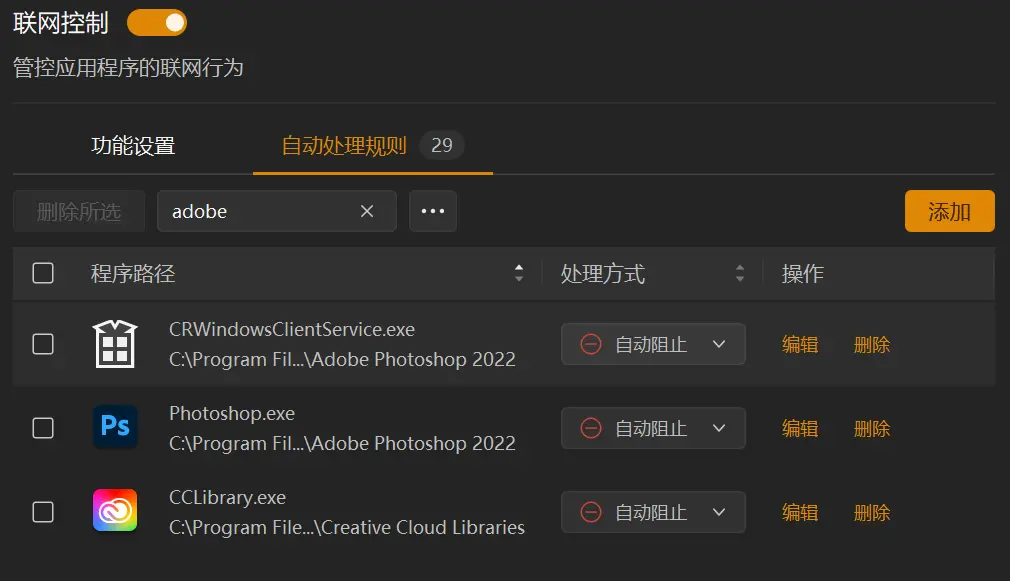
火绒联网控制阻止Adobe Photoshop

火绒联网控制阻止Adobe Photoshop

看网友的评论,阻止Adobe联网后还是有问题的,皆使用了魔法、科学上网,Adobe直接走代理,本地联网阻止不起作用。

这给了我提示,立即查看代理软件,原来其中一个打开了“自动配置系统代理”,换成“清除系统代理”,重开Photoshop,火绒提示“CRWindowsClientService.exe”联网,赶紧点击阻止。
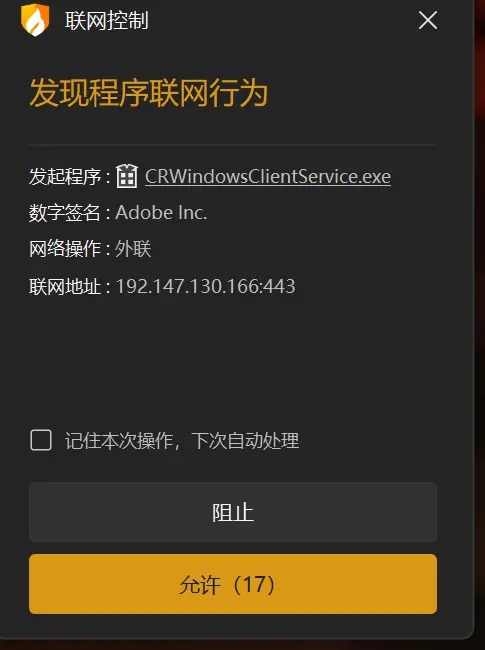
crwindowsclientservice.exe

crwindowsclientservice.exe

Photshop终于不再弹窗“This unlicensed Adobe app has been disabled”。

为了多加一个保险,在Proxifier将以下进程“AdobeGCClient.exe;photoshop.exe;dreamweaver.exe;AdobeIPCBroker.exe;CCLibrary.exe;CCXProcess.exe;Photoshop.exe;crwindowsclientservice.exe”全部Block。

这个方法应该也适用于Photoshop2024,2025,据说安装Beta版更容易弹窗。