



惯性聚合 高效追踪和阅读你感兴趣的博客、新闻、科技资讯
阅读原文 在惯性聚合中打开

推荐订阅源

博客园 - 【当耐特】
Help Net Security
Help Net Security
P
Proofpoint News Feed
J
Java Code Geeks
爱范儿
爱范儿
Last Week in AI
Last Week in AI
钛媒体:引领未来商业与生活新知
钛媒体:引领未来商业与生活新知
F
Full Disclosure
Google DeepMind News
H
Help Net Security
G
Google Developers Blog
Jina AI
Jina AI
Vercel News
Vercel News
cs.AI updates on arXiv.org
L
Lohrmann on Cybersecurity
S
Schneier on Security
Microsoft Azure Blog
IT之家
IT之家
Security Archives - TechRepublic
阮一峰的网络日志
阮一峰的网络日志
N
News and Events Feed by Topic
GbyAI
GbyAI
B
Blog
O
OpenAI News
博客园_首页
Cisco Talos Blog
Cisco Talos Blog
K
KPMG report finds enterprise disconnect between AI and its ROI | CIO
Hacker News: Ask HN
Hacker News: Ask HN
TaoSecurity Blog
TaoSecurity Blog
腾讯CDC
MongoDB | Blog
MongoDB | Blog
M
MIT News - Artificial intelligence
C
Cybersecurity and Infrastructure Security Agency CISA
Cyberwarzone
Cyberwarzone
Webroot Blog
Webroot Blog
Simon Willison's Weblog
Y
Y Combinator Blog
C
Cisco Blogs
A
Arctic Wolf
CTFtime.org: upcoming CTF events
T
The Exploit Database - CXSecurity.com
Security Latest
Security Latest
AI
AI
W
WeLiveSecurity
aimingoo的专栏
aimingoo的专栏
The Register - Security
Project Zero
Project Zero
H
Hackread – Cybersecurity News, Data Breaches, AI and More
N
Netflix TechBlog - Medium
Blog — PlanetScale
Blog — PlanetScale

阁主学习小站

win11更新报错:net start wuauserv 发生系统错误 1290-电脑技术-阁主学习小站 Docker 常用命令大全,方便日常查阅-服务端兮-阁主学习小站 Debian13 Linux系统无法关闭swap、无法完全禁用的问题和解决方案-服务端兮-阁主学习小站 minio服务器上文件访问不了-编程教程-阁主学习小站 MINIO 最新版无法通过页面的控制台配置accesskey-编程教程-阁主学习小站 centos9无法启用ssh服务-服务端兮-阁主学习小站 关闭浏览器访问http时自动转https-编程教程-阁主学习小站 前端图片<img>、链接<a>等去除referer标记,绕过防盗链-前端开发-阁主学习小站 原生PHP实现单图、多图文件批量上传-PHP教程-阁主学习小站
Linux系统磁盘挂载管理工具-服务端兮-阁主学习小站
阁主 · 2026-02-20 · via 阁主学习小站
摘要:

该脚本用于挂载(卸载)全新云服务器、物理机上新加的数据盘,可以指定挂载目录,默认是根据宝塔的安装目录/www挂载。理论支持Centos、Ubuntu、Debian等Linux系统,切勿轻易在有数据的服务器上执行此工具,数据自行备份!丢失不负责!

说明:
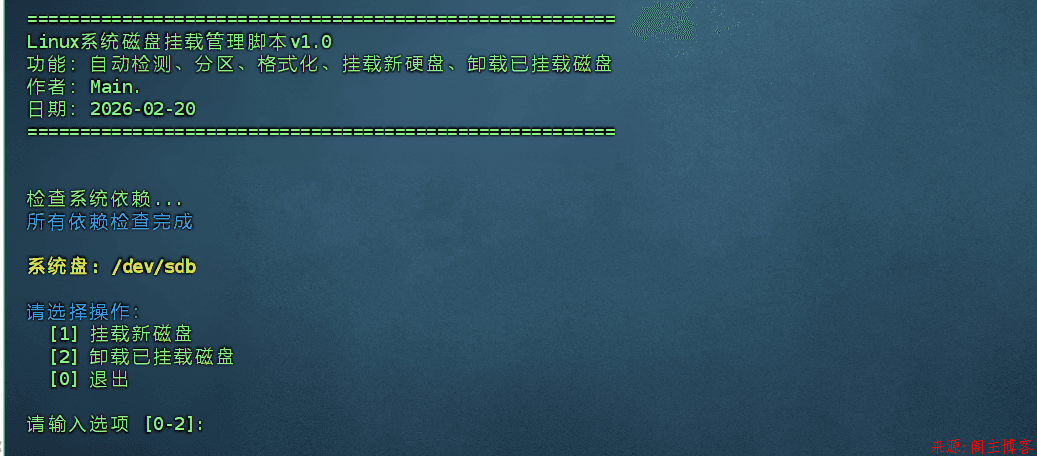
Snipaste_2026-02-20_16-33-07.png

1.本工具默认不对系统盘磁盘进行操作,也无法操作,仅能对加装的数据盘进行操作。

2.有重要数据的数据盘请不要使用本工具

2.本工具默认将整块数据盘分成一个分区并格式化后挂载到/www目录

3.若您的磁盘是新磁盘,工具会自动分区并格式化成/ext4文件系统

4.请使用root用户使用工具。

使用方法 :根据系统选择命令后进入SSH执行命令即可

已安装宝塔或数据盘有数据 务必先做快照或数据备份

挂载后建议重启服务器检查是否挂载成功

使用方式

在执行前请使用下面的换源工具将系统的源更换好,换源命令:

bash <(curl -sSL https://linuxmirrors.cn/main.sh)

Centos/Rocky系统

yum install -y util-linux parted e2fsprogs && wget -O auto_disk.sh http://www.mainblog.cn/tools/auto_disk.sh && bash auto_disk.sh

Debian/Ubuntu系统系统:

apt update && apt install -y util-linux parted e2fsprogs && wget -O auto_disk.sh http://www.mainblog.cn/tools/auto_disk.sh && bash auto_disk.sh

更新记录

【v1.0】更新(2026年2月20日):

  1. 发布第一个版本的磁盘挂载工具

  2. 挂载方式使用UUID绑定,防止出现Device出现/dev/sdb重启后变成/dev/sdc导致挂载出错。