







TL;DR
Months after Android 17 began beta testing, Google is finally ready to release Android 17 stable to the world. As Google announced in a blog post, Android 17 stable is rolling out now to Pixel 6 and later devices, along with the June 2026 Pixel Drop. Along with the stable release, the Android 17 source code will also be pushed to the Android Open Source Project shortly.
317 votes
Platform-wide, Android 17 stable will include all changes that Google introduced with the Android 16 QPR releases for Pixels. This includes the more visibly different Material 3 Expressive changes, as well as new Live Updates-related changes that were missing from the first Android 16 release and were introduced with Android 16 QPR1 and beyond.
However, Pixel users have had these changes for months now. For them, the new changes are those Google announced and introduced in the Android 17 beta releases (as you’d expect).
Here are some of the bigger changes that are coming with Android 17, as highlighted by Google:
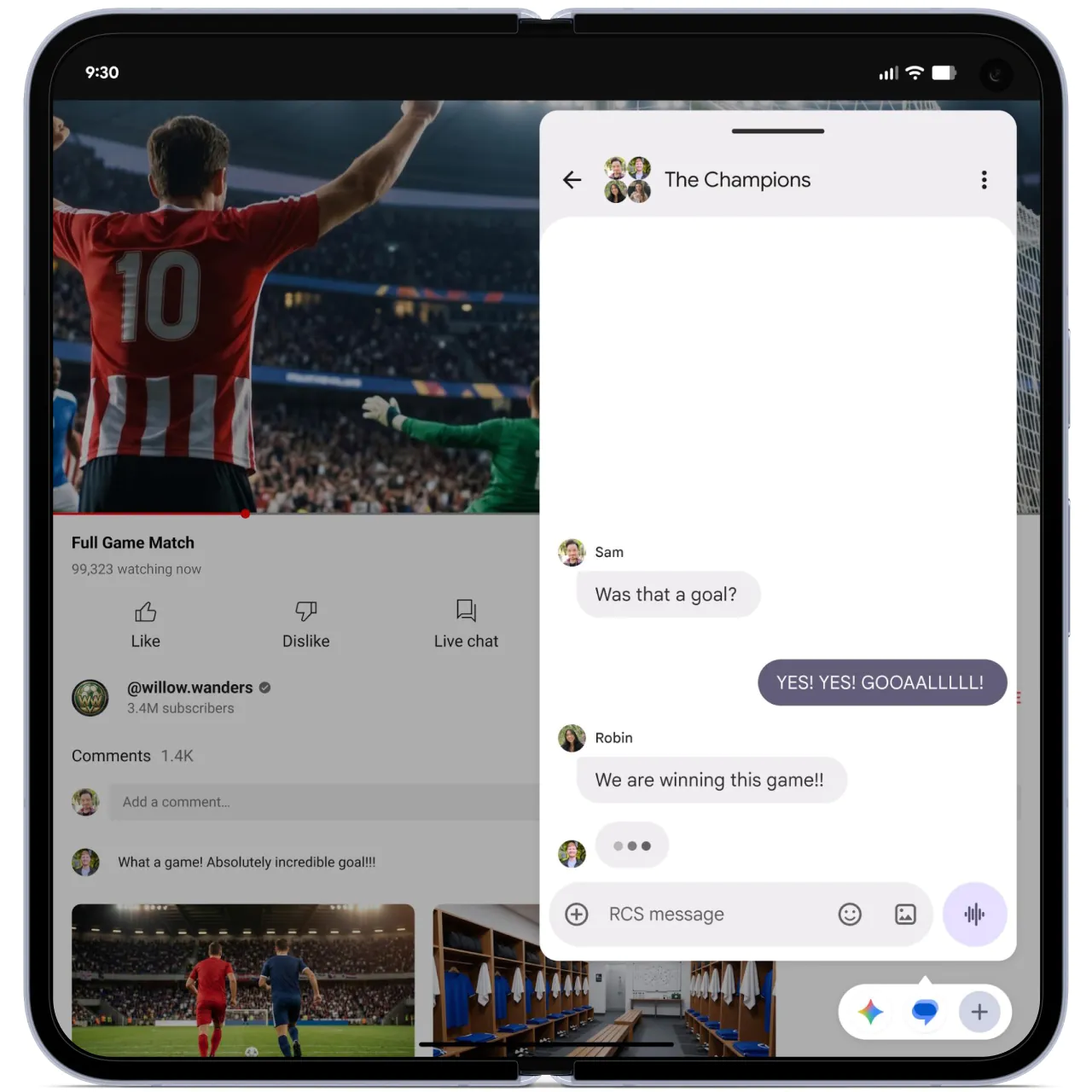
App Bubbles is Android 17’s new windowing feature that offers a new floating UI experience. The floating window sits on top of other apps, so you can quickly access and interact with the information within it.
Users can create an app bubble on their phone, foldable, or tablet by long-pressing an app icon on the launcher. On large screens, there is a bubble bar in the taskbar where users can organize, move between, and move bubbles to and from anchored points on the screen.

Google demoed Screen Reactions at the Android Show: I/O Edition 2026. This new Android feature makes it dead simple to create reaction videos without needing extra apps, multiple devices, or even a green screen.
Screen Reactions lets you record your screen and yourself at the same time. It can then overlay your face directly onto this screen recording. You’ll be able to use Screen Reactions on both photos and videos.
To use Screen Reactions, start a screen recording, then switch to “Entire screen” and select the “Show selfie camera” option. Android will then show your face in a floating window on top of the screen. It will also cut out the background, eliminating the need for a green screen. However, you’re still in control, so you can move or resize the camera view, and even change the background color using the color picker before or during the recording.
With Android 17, Google is introducing a new “one-time precise location” button that apps can use to request the user’s precise location for one session (i.e., until you close the app). Once consent is provided, this session-based access eliminates the need for repeated prompts for location-dependent features.
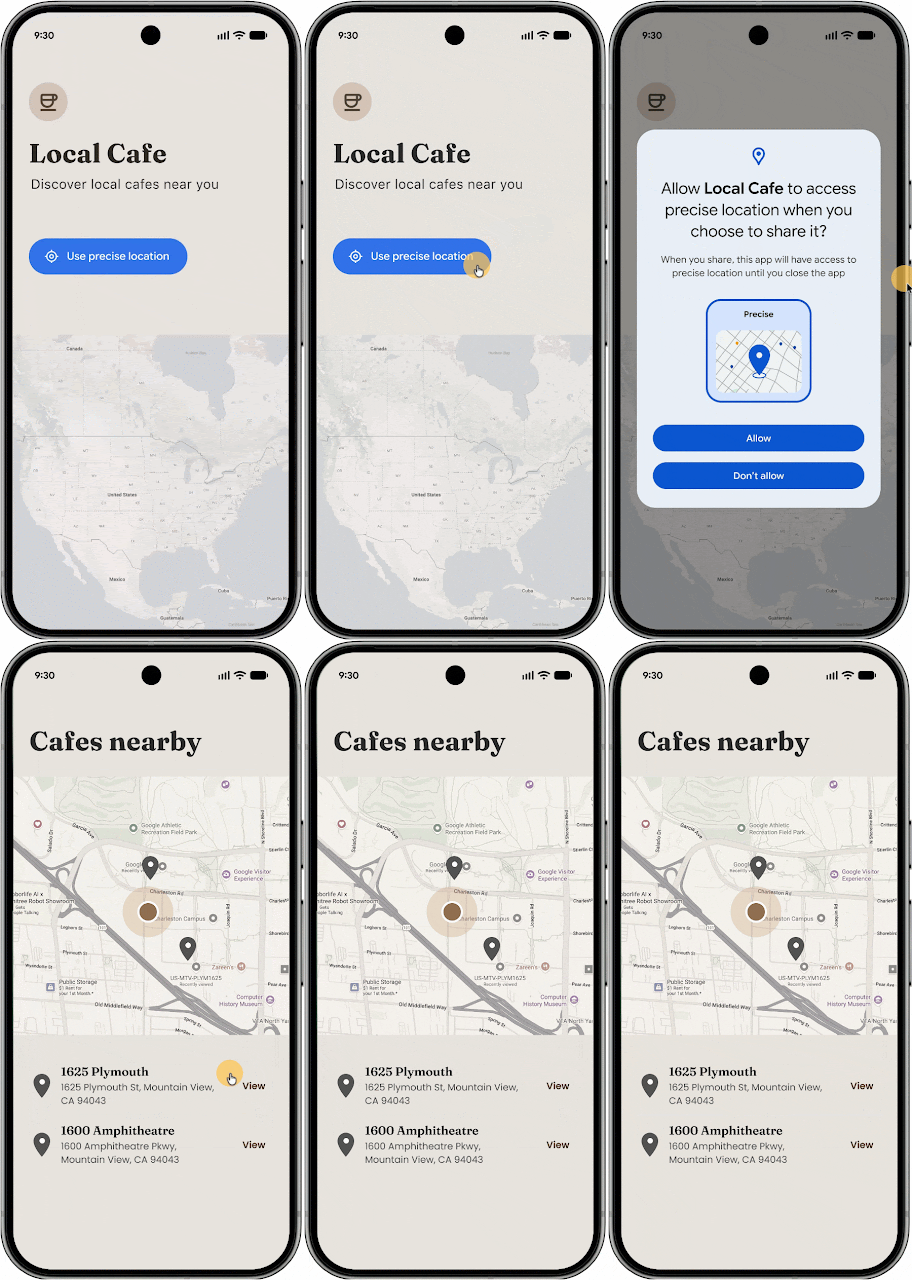
Android 17 also realigns Location permission transparency with the high standards already set for the Microphone and Camera. A persistent indicator will now appear whenever a non-system app accesses a user’s location. Users can tap the indicator to see exactly which apps have recently accessed their location and manage those permissions immediately through a “Recent app use” dialog.
Further, Android 17 is also improving the algorithm for approximate (coarse) locations to better account for population density. Previously, coarse locations used a static 2 km-wide grid, which in low-population areas may not be sufficiently private, since a 2km square could often contain only a handful of users. The new approach replaces this fixed grid with a dynamically-sized area based on local population density.
Aamir Siddiqui / Android Authority
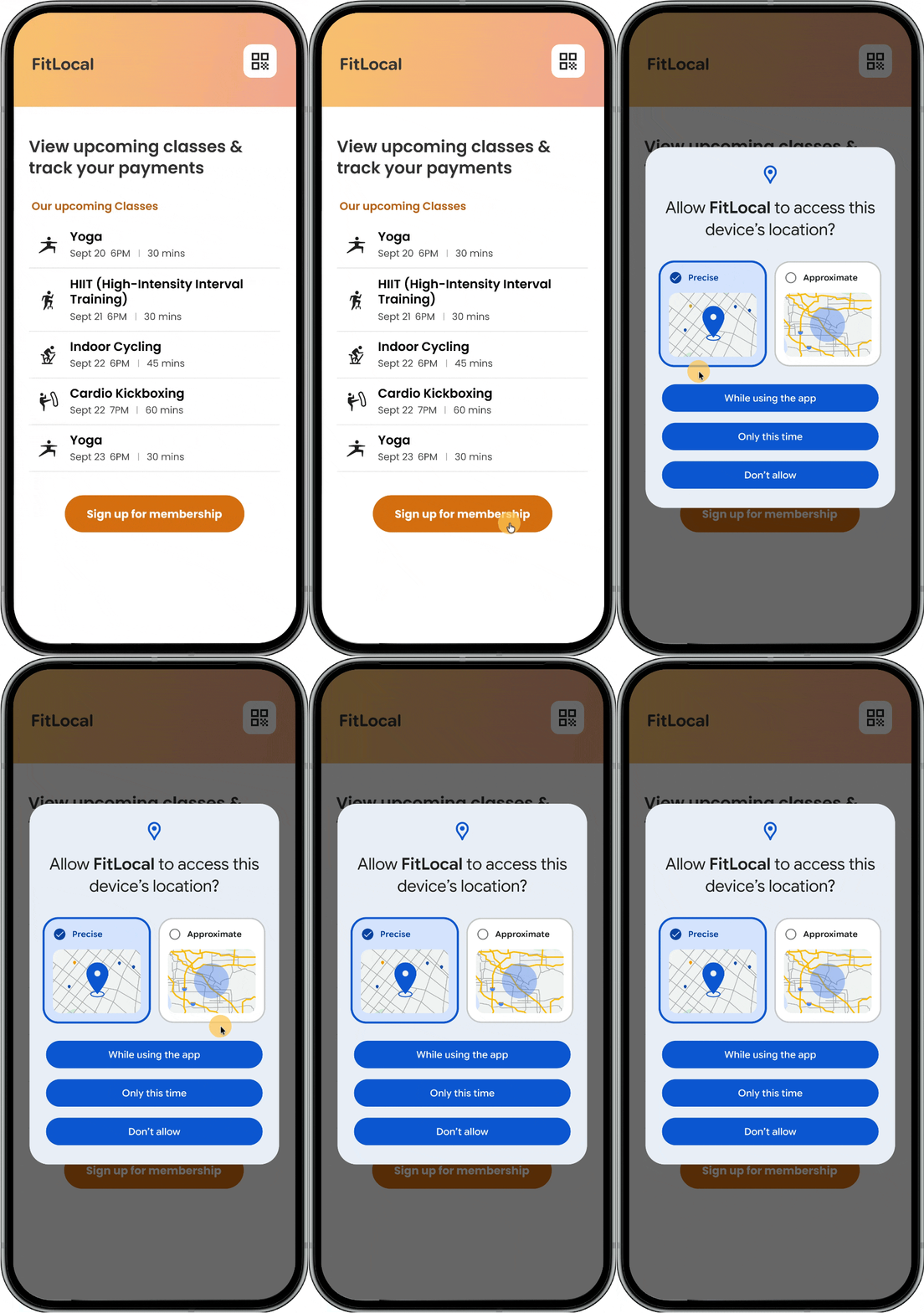
As a garnish, Android 17 also includes a redesigned Location permission dialog that makes the “Precise” and “Approximate” options more visually distinct.
Contacts Picker is a new system-level tool that grants temporary, session-based read access to only the specific data fields requested by the user, reducing the need for broad READ_CONTACTS permissions. It also allows for selections from the device’s personal or work profiles.
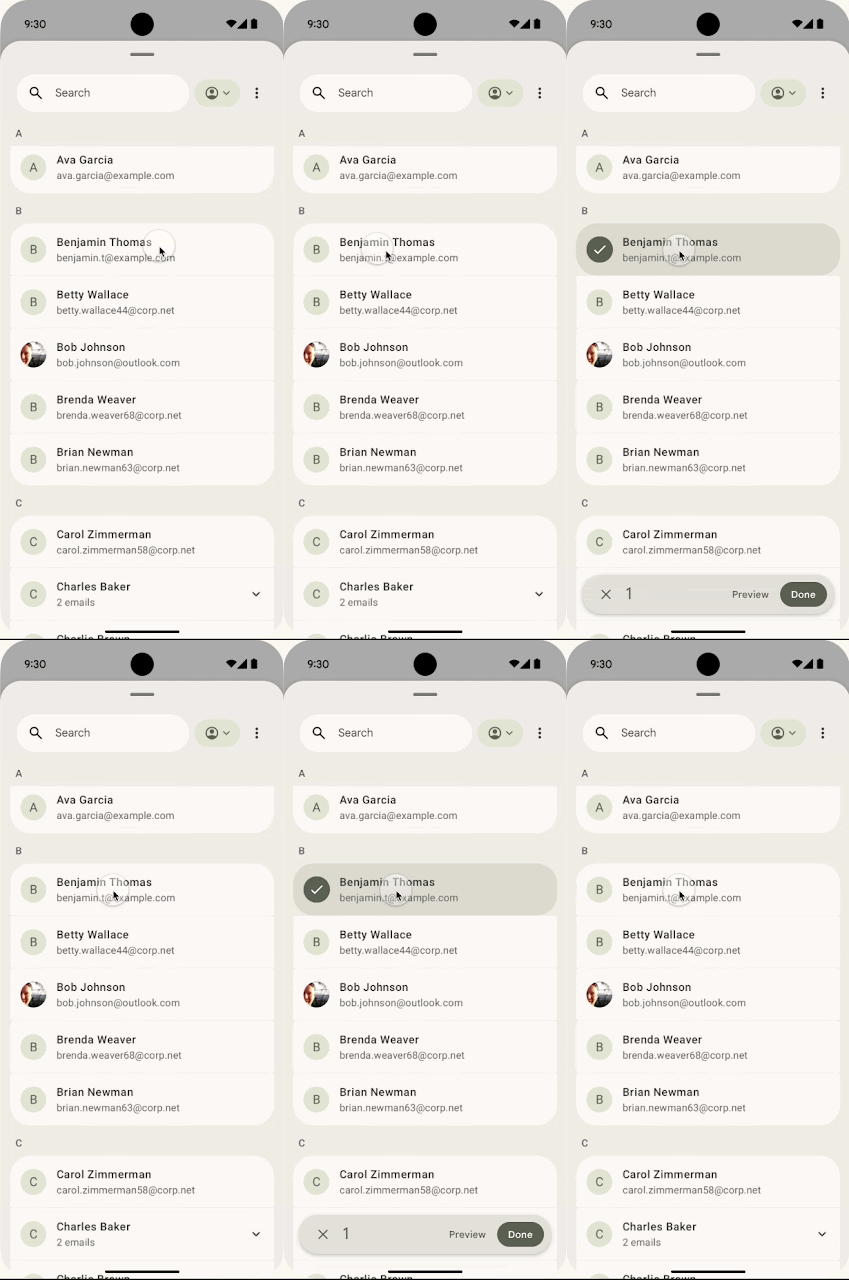
In a nutshell, users will be able to select one or more contacts to share with an app at a time, rather than granting blanket access to the hundreds of contacts in their phone’s contact book. This access is also a one-time snapshot — apps will not receive subsequent updates to those contacts, further protecting your privacy by preventing them from tracking changes over time.
At the Android Show: I/O Edition 2026, Google announced that it is enhancing Find Hub’s Mark as lost feature in Android 17 to allow locking a phone with biometric authentication, in addition to the regular device passcode or PIN, as we previously spotted. This means that thieves who may have obtained your passcode or PIN won’t be able to turn off device tracking or re-access your phone if you mark it as lost.

Triggering Mark as lost also enables additional protections, such as hiding Quick Settings and disabling new Wi-Fi and Bluetooth connections.
With Android 17, Google is also making it harder for thieves to access your data. Google has significantly reduced the number of attempts required to guess a PIN or password. The wait times between failed attempts have also been extended. This shuts down attackers who try to rapidly guess their way into your phone. Google has also refined how the lock screen displays information after failed attempts.
With Android 17, Google is introducing app memory limits based on the device’s total RAM, aiming to create a more stable, deterministic environment for applications and user expectations.
In Android 17, limits are set conservatively to establish system baselines, targeting extreme memory leaks and other outliers before they trigger system-wide instability that leads to UI stuttering, increased battery drain, and app kills.
Google anticipates only a minimal impact on the vast majority of app sessions, but it still recommends that Android app developers check for and fix memory leaks in their apps. A lighter memory footprint for apps translates directly to smoother performance, longer battery life, and a premium experience across all form factors.
With Android 16 QPR2 Beta 1, Google added a new “expanded option under dark theme” that allows the system to “intelligently invert the UI of apps that appear light despite users having selected the dark theme.”

Mishaal Rahman / Android Authority
The expanded dark theme aims to create a “more consistent user experience for users who have low vision, photosensitivity, or simply those who prefer a dark system-wide appearance.” When enabled, the system uses the app’s isLightTheme attribute to determine whether to apply inversion. This is intended only as an accessibility feature; hence, Google recommends developers implement a native dark theme if they haven’t already. You can toggle this setting by navigating to Settings > Display & touch > Dark theme on your Pixel.
With the Android 16 QPR2 stable release, this feature went live for Pixel devices. The feature will expand to the wider platform with Android 17.
Further, with Android 17 Beta 3, Google added the ability to exclude apps individually from the expanded dark theme.

This ability to exclude apps from the Expanded Dark Theme is also part of the Android 17 stable release.
Previously, changes to the media volume would typically automatically affect the Assistant volume and vice versa. Now, with Android 17, the Assistant volume level can be managed independently, thanks to the separate Assistant volume slider.

Android 16 QPR2 introduces a built-in Parental Controls menu on Pixel devices, providing a centralized location to manage device-specific restrictions. Parents can use this menu to set daily screen time limits, schedule downtime to automatically lock the device at night, and restrict specific apps via timers or total blocks. They can also easily add bonus time once a limit or scheduled break has been reached. To ensure these rules stick, parents can secure these settings with a PIN.
Android’s parental controls also work alongside Google Family Link, allowing quick access to broader controls like School Time, purchase approvals, and location alerts.

Foldable devices on Android 17 will feature an optimized 50/50 layout with a game view on the top half and a dynamic virtual gamepad on the bottom half. This division above and below the folding crease/hinge gives users a large screen for gameplay and plenty of space for button-mashing.
Before you get too excited, this is not present in the Android 17 stable release today, as Google says that “Foldable gaming mode is enabled in Android 17 and will be available in the coming months.”
Google doesn’t mention this, but given that inner foldable displays tend to be softer and less durable than cover displays, I’d also suggest going easy on the button mashing.
Android 17 also brings native controller remapping for external controllers. Google says it has also reduced frame drops and stutters by making memory cleanup more efficient for high-definition gaming.
Android 17 brings an option to show or hide app names on the home screen in the Pixel Launcher. This does not affect the app labels seen in the app drawer or within folders.
Have you received Android 17 stable on your Pixel? Let us know your experience in the comments below!
Thank you for being part of our community. Read our Comment Policy before posting.
此内容由惯性聚合(RSS阅读器)自动聚合整理,仅供阅读参考。 原文来自 — 版权归原作者所有。