惯性聚合 高效追踪和阅读你感兴趣的博客、新闻、科技资讯
阅读原文 在惯性聚合中打开

推荐订阅源

N
Netflix TechBlog - Medium
罗磊的独立博客
云风的 BLOG
云风的 BLOG
Last Week in AI
Last Week in AI
Y
Y Combinator Blog
小众软件
小众软件
Blog — PlanetScale
Blog — PlanetScale
T
The Blog of Author Tim Ferriss
freeCodeCamp Programming Tutorials: Python, JavaScript, Git & More
月光博客
月光博客
博客园 - Franky
F
Fortinet All Blogs
D
Docker
博客园 - 司徒正美
腾讯CDC
Recent Announcements
The Cloudflare Blog
B
Blog RSS Feed
GbyAI
GbyAI
T
Tailwind CSS Blog
雷峰网
雷峰网
Cyber Security Advisories - MS-ISAC
博客园 - 三生石上(FineUI控件)
阮一峰的网络日志
阮一峰的网络日志

少数派

派早报:Google 发布 Fitbit Air 等 - 少数派 「新人报到」確認需求,再開始 - 少数派 从 SOLO 独立开发者社区,我看到了越来越多开发者开始做自己的产品 - 少数派 我怎么管理那些"不常做,但总会忘"的生活事项 - 少数派 人形机器人量产元年,数据才是具身智能的“生死线” - 少数派 BuhoLaunchpad 高度还原 Mac 启动台:开发历程与思考 - 少数派 五年陪伴依然不舍,DIY 换壳后让罗技 MX Master 3 继续服役 - 少数派 新玩意 240|少数派的编辑们最近买了啥? - 少数派 一日一技|为什么你应该关闭 iOS 的键盘声音 - 少数派 我做了个插件和 Skills,一键提取任何网站的设计规范 Design.md - 少数派 住在三四线城市的你,该开始录播客了 - 少数派 甘南秘境,大白高国 - 少数派 AI的审美:谁让把我变成川内倫子 - 少数派 返工怎能不烦恼,打工人片单总有一部是你的「嘴替」 - 少数派 为了让「上厕所」更健康,我做了一个小工具 - 少数派 AI + Skill,能够让生成的文章去除 AI 味吗? - 少数派 新玩意|韶音OpenDots ONE 耳夹式耳机 - 少数派 《美满》| 在每一个春天的晚上相爱(362) - 少数派 新玩意|优篮子 PS01 MagSnap 磁吸支架 - 少数派 自我整合手记 | 我开始早睡了:用稳定规则,为自由托底 - 少数派 用龙虾(OpenClaw)两个多月,我最深的12个体会 - 少数派 听歌时间到,12 张你可能错过的 2025 华语乐坛好专辑 - 少数派 承诺能追吗 - 少数派 macOS 26启动台没了? 我做了个不一样的App启动器 - Keboard - 少数派 《四海为家的人》| INTJ对话INTJ(361) - 少数派 你发过的那些黑历史,是时候一次清干净了 - 少数派 新玩意:安安静静玩,越玩越专注:计客密码机 - 少数派 iPad 用户首次体验 Android 平板:vivo Pad6 Pro - 少数派 数据逻辑强 - 少数派 极北行+ | 一路向北,探访日本至北之地 | 001 - 少数派
Obs#68] 利用QuickAdd巨集由IMDB建立影片檔案,用Minimal主...
2022-03-06 · via 少数派

Minimal樣式主題是很多人使用的主題,它在4.4.0版時推出了卡片格式,將Dataview的table查詢轉換成卡片的顯示格式,再與Sortable外掛合用時則可做排序卡片的顯示。

卡片格式很適合用於蒐集資訊類型的多欄位形式,例如影片庫、書庫等。

在建立影片庫時,我們可以使用QuickAdd的movies.js搜尋IMDB,直接由IMDB讀取資料,將影片欄位與海報圖片建立成筆記,透過QuickAdd巨集可省去大量的資料輸入時間。

cards筆記需要下列外掛:

  • Minimal樣式主題
  • Dataview外掛
  • Sortable外掛

1.1. 建立影片資訊模板

  1. 啟用核心外掛內的模板,再於【外掛選項】→【模板】→指定【模板資料夾位置】為templates
  2. 在templates資料夾建立template-movie.md,內容如下:
---
cover: {{VALUE:Poster}}
---

category:: {{VALUE:typeLink}}
director:: {{VALUE:directorLink}}
genre:: {{VALUE:genreLinks}}
imdbId:: {{VALUE:imdbID}}
ratingImdb:: {{VALUE:imdbRating}}
rating::
year:: {{VALUE:Year}}
cast:: {{VALUE:actorLinks}}
plot:: {{VALUE:Plot}}

![poster]({{VALUE:Poster}})

1.2. 申請Open Movie Database的API Key

API Key網頁申請存取Open Movie Database的API Key。輸入EMail等資訊後,網站會寄出Key與啟用鏈接給你,複製API Key並點擊啟用鏈接。
1.3. 新增QuickAdd Movie巨集

  1. 下載movies.js並存入儲存庫任意位置(建議建立專門存放JavaScript的資料夾)
  2. QuickAdd外掛選項→【Manage Macros】→輸入巨集名稱(如macro_movie)後按【Add macro】
  3. 在User Scripts輸入欄位裡選用movies.js,再按【Add】
  4. 點擊上方movies右側齒輪,在彈出的對話窗輸入申請到的OMDb API Key
upgit-20220205_1644050124.png
  1. 點擊【Template】以增加要使用的模板
    1. 【Template Path】選用「templates/template-movie.md」
    2. 勾選【File Name Format】
    3. 【File Name】欄位輸入:{{VALUE:fileName}}
    4. 勾選【Open】,開啟依模板建立的新檔案
    5. 勾選【Focus new pane】,將焦點移入新檔案

1.4. 新增QuickAdd Choice選單

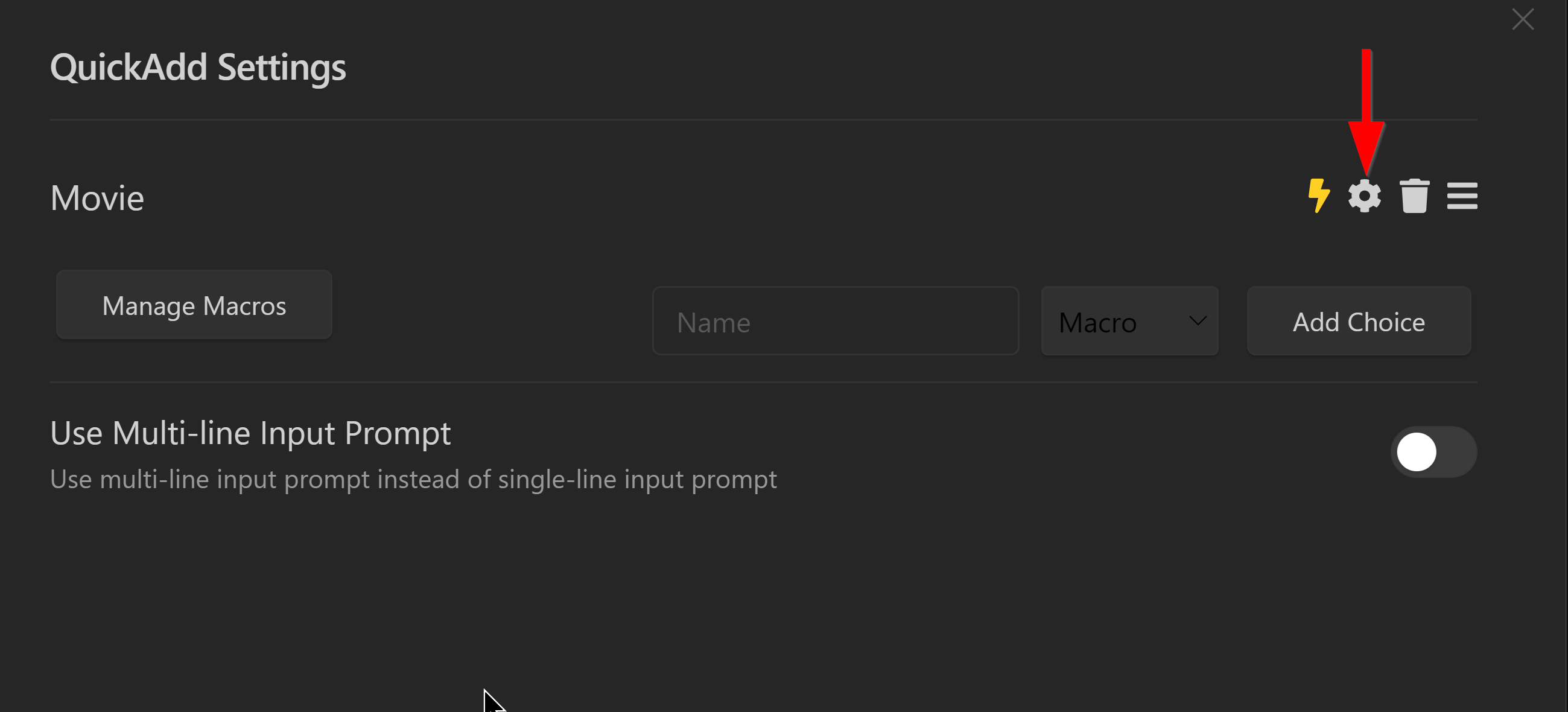
  1. 輸入Choice名稱,如:Movie
  2. 選用【Macro】後點擊【Add Choice】
  3. 新增Choice後點擊其右側的齒輪,再選用前面新增的巨集
  4. 點擊閃電符號將此Choice加入命令面板

![01|500](https://raw.githubusercontent.com/emisjerry/upgit/master/2022/02/upgit-20220205_1644050901.png)

1.5. 測試QuickAdd Movie Choice

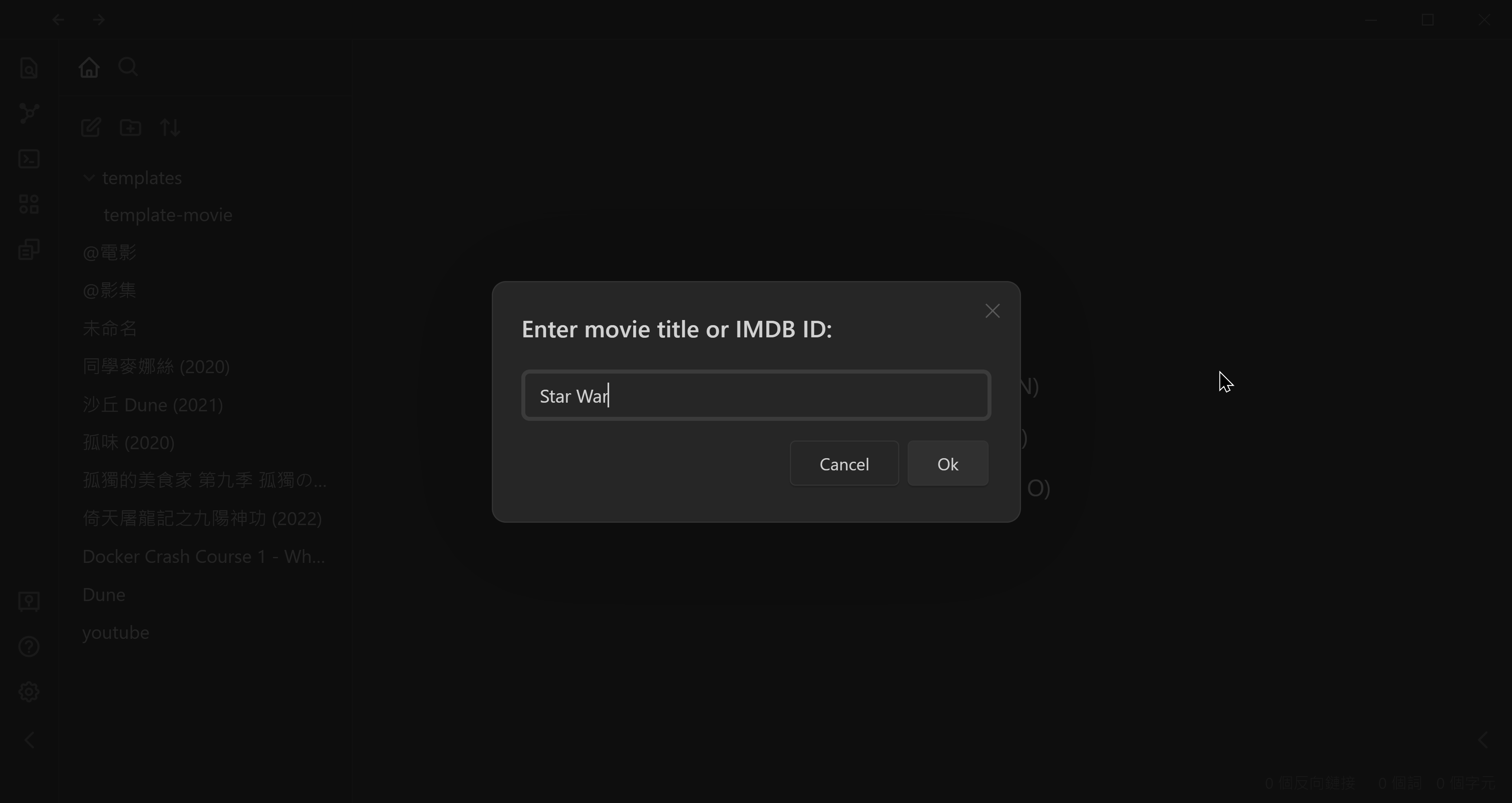
  1. 點擊〔Ctrl/Cmd+P〕→輸入quickadd→點擊【QuickAdd: Movie】
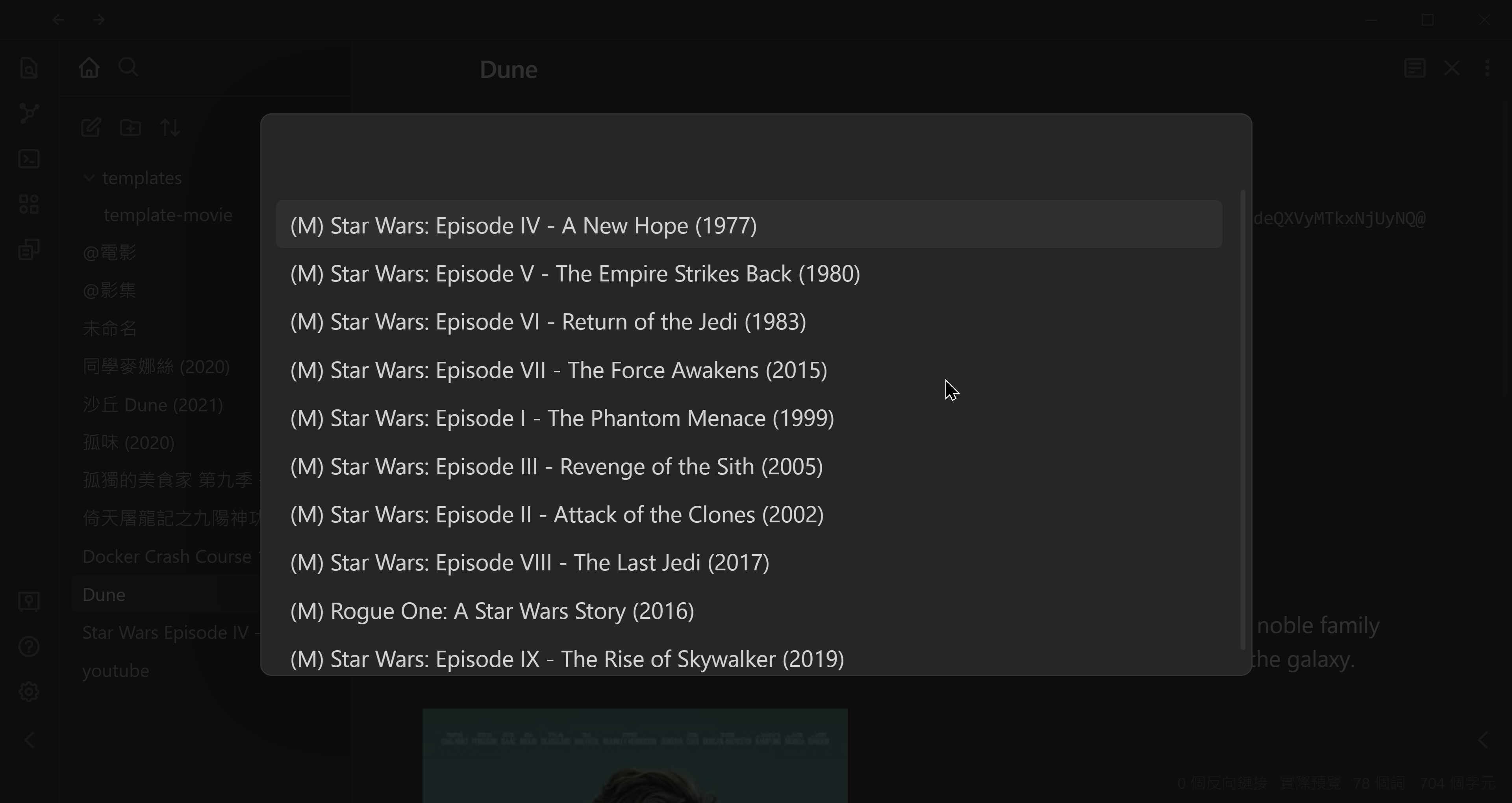
  2. 輸入要搜尋的電影名稱或IMDb代碼,如:Star Wars或tt0086190

![01|700](https://raw.githubusercontent.com/emisjerry/upgit/master/2022/02/upgit-20220205_1644051321.png)

▼ 在選單裡找到要建立的影片後按〔Enter〕或〔Click〕

![01|700](https://raw.githubusercontent.com/emisjerry/upgit/master/2022/02/upgit-20220205_1644051604.png)

2. Minimal樣式主題

在筆記YAML區裡使用cssClasses: cards讓筆記套用卡片格式,額外能使用的CSS樣式如下:

  • cards-align-bottom: 最後一項對齊卡片底部
  • cards-cover: 圖片尺寸填滿空間
  • cards-16-9 / cards-1-1 / cards-2-1 / cards-2-3 : 圖片比例
  • cards-cols-4~cards-cols-8: 指定卡片每列個數

3. 影片庫筆記範例

---
cssClasses: cards, cards-align-bottom, cards-cover, cards-cols-3
---
# 電影 from IMDb
```dataview
table without id ("![](" + cover + ")") as Cover, 
  file.link as Name, 
  year as Year, 
  "by " + director as Director,
  "Rating " + ratingImdb as Rating
from #movies-imdb 
sort year, imdbId 
```

## 動作片 (Action)
```dataview
table without id ("![](" + cover + ")") as Cover, 
  file.link as Name, 
  year as Year, 
  "by " + director as Director
from #movies-imdb 
where contains(string(genre), "Action")
sort year, imdbId 
```

## 喜劇片 (Comedy)
```dataview
table without id ("![](" + cover + ")") as Cover, 
  file.link as Name, 
  year as Year, 
  "by " + director as Director
from #movies-imdb 
where contains(string(genre), "Comedy")
sort year, imdbId 
```

## 喬治,盧卡斯作品

```dataview
table without id ("![](" + cover + ")") as Cover, 
  file.link as Name, 
  year as Year, 
  "by " + director as Director
from #movies-imdb 
where contains(string(director), "George Lucas")
sort year, imdbId 
```

4. 相關鏈接

5. 教學影片

4. 相關鏈接

5. 教學影片

##