惯性聚合 高效追踪和阅读你感兴趣的博客、新闻、科技资讯
阅读原文 在惯性聚合中打开

推荐订阅源

Security Archives - TechRepublic
I
InfoQ
阮一峰的网络日志
阮一峰的网络日志
云风的 BLOG
云风的 BLOG
Threat Intelligence Blog | Flashpoint
AWS News Blog
AWS News Blog
S
SegmentFault 最新的问题
T
Tailwind CSS Blog
The Hacker News
The Hacker News
GbyAI
GbyAI
P
Palo Alto Networks Blog
博客园 - 三生石上(FineUI控件)
Y
Y Combinator Blog
Stack Overflow Blog
Stack Overflow Blog
博客园 - Franky
Cyber Security Advisories - MS-ISAC
Cyberwarzone
Cyberwarzone
H
Help Net Security
S
Securelist
月光博客
月光博客
博客园 - 【当耐特】
T
Threatpost
T
Tenable Blog
G
GRAHAM CLULEY
博客园 - 司徒正美
I
Intezer
MyScale Blog
MyScale Blog
T
Threat Research - Cisco Blogs
P
Privacy & Cybersecurity Law Blog
The GitHub Blog
The GitHub Blog
C
CERT Recently Published Vulnerability Notes
T
Tor Project blog
Google DeepMind News
C
Cybersecurity and Infrastructure Security Agency CISA
罗磊的独立博客
腾讯CDC
P
Privacy International News Feed
博客园_首页
The Cloudflare Blog
Cisco Talos Blog
Cisco Talos Blog
A
About on SuperTechFans
V
Vulnerabilities – Threatpost
A
Arctic Wolf
B
Blog RSS Feed
Recorded Future
Recorded Future
奇客Solidot–传递最新科技情报
奇客Solidot–传递最新科技情报
Google DeepMind News
S
Security Affairs
Microsoft Security Blog
L
LangChain Blog

HCLonely Blog

HCLonely Blog - 让OpenWrt控制台进入赛博空间:luci-theme-cyberpunk HCLonely Blog - Artitalk V4: 从Leancloud迁移至Vercel HCLonely Blog - 记一次hexo-bilibili-bangumi分时函数渲染优化 HCLonely Blog - IP签名图片生成服务 HCLonely Blog - 树莓派搭建私有在线PS网站 HCLonely Blog - 将 Node.js 项目打包为一个可执行文件 HCLonely Blog - 哔哩哔哩硬核会员搜题脚本 HCLonely Blog - 在静态网站上实现浏览记录功能 HCLonely Blog - 统一推送服务Nodejs API HCLonely Blog - 在线答题搜答案脚本 HCLonely Blog - 青年大学习安卓跳过方法 HCLonely Blog - 公主连结 Re:Dive 中文输入法词库 HCLonely Blog - 基于 NodeJs 的 live2d 后端 Api 服务器 HCLonely Blog - 百度分析和谷歌分析适配 pjax HCLonely Blog - hexo-calendar 活动日历插件 HCLonely Blog - 一款基于 webstack 的 hexo 主题 HCLonely Blog - 使用 cron-job 解决 LeanCloud 因流控原因自动唤醒失败的问题 HCLonely Blog - Valine 添加验证码、博主标签及评论微信、QQ 通知 HCLonely Blog - 使用 Cloud Studio 在线搭建、编辑、部署 Hexo HCLonely Blog - 给你的网页添加一个 moc3 格式的 Live2d 模型 HCLonely Blog - Hexo-tag-steamgame 插件 HCLonely Blog - Hexo-online-server 在线编辑发布文章插件 HCLonely Blog - Hexo 博客美化
HCLonely Blog - Git 免密、免 SSH 进行 push & pull
博主:HCLonely · 2020-07-03 · via HCLonely Blog

本文最后更新于天前,内容可能已不再适用!

本文介绍了如何不使用帐号密码,不配置 SSH 对 git 远程仓库进行拉取(pull)和推送(push), 如果你需要经常换电脑或使用公共电脑的话使用此方法比较安全。这里主要介绍 Github, Coding, 码云这三个比较主流的托管平台的配置方法。

Github

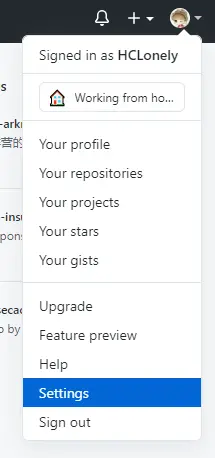
  1. 登录 Github, 点击右上角的头像->Settings

Github-1

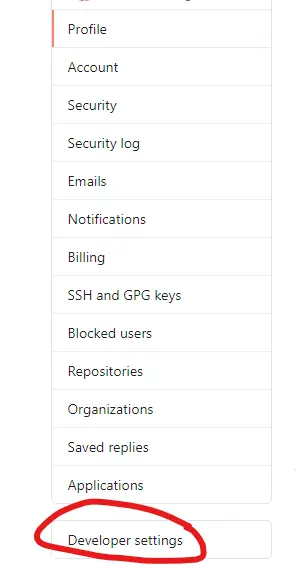
  1. 点击Developer settings

Github-2

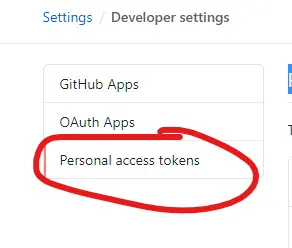
  1. 点击Personal access tokens

Github-3

  1. 点击Generate new token创建一个token

Github-4

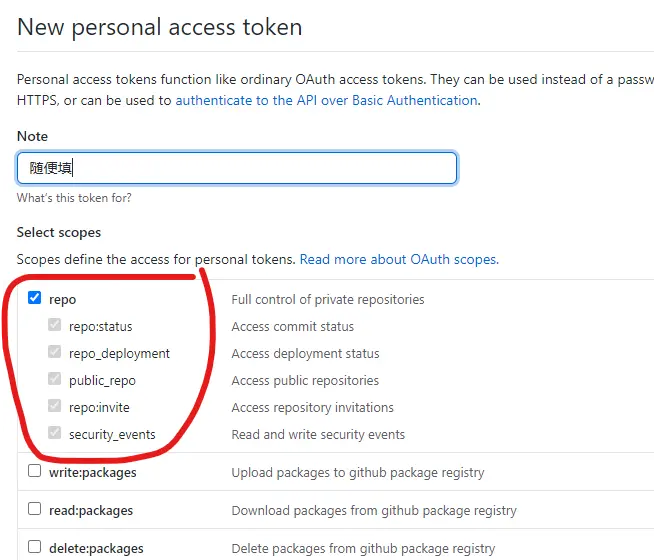
  1. Note随便填就行,Select scopes勾选repo给与 repo 操作权限,然后拉到最下面点击Generate token即可
Github-5

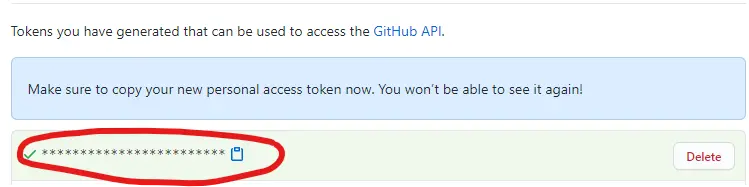
  1. 记住这个 token(我这里加密了,实际上是一串字母数字)

Github-6

  1. https://github.com/user/repo.git仓库为例,只需要在仓库前面添加x-access-token:**************@即可,************替换成上一步的 token

    https://x-access-token:**************@github.com/user/repo.git
    

Coding

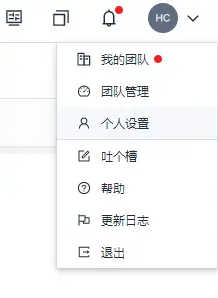
  1. 登录 Coding, 点击右上角的头像->个人设置

Coding-1

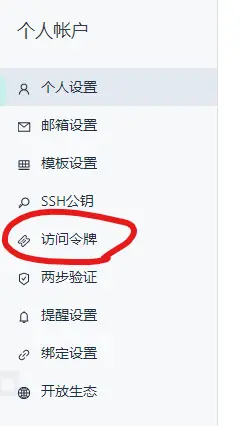
  1. 点击访问令牌

Coding-2

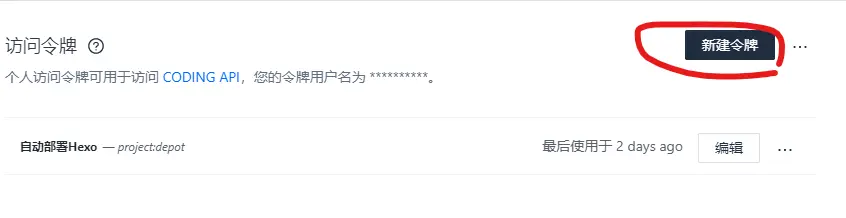
  1. 点击新建令牌创建一个令牌

Coding-3

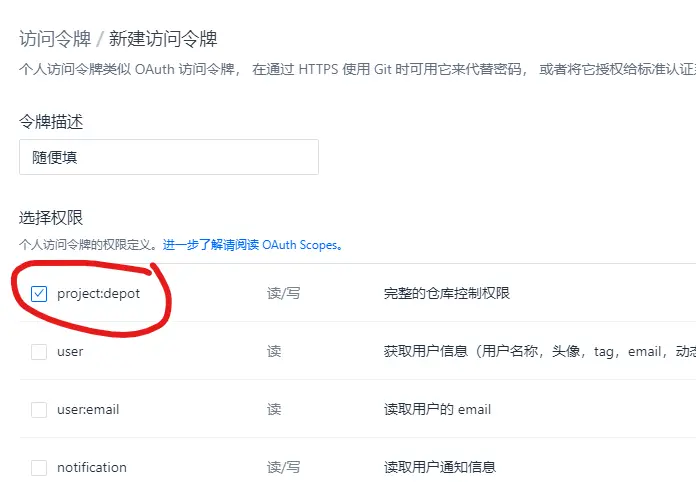
  1. 令牌描述随便填就行,选择权限勾选project:depot给与仓库操作权限,然后拉到最下面点击创建令牌即可
Coding-4

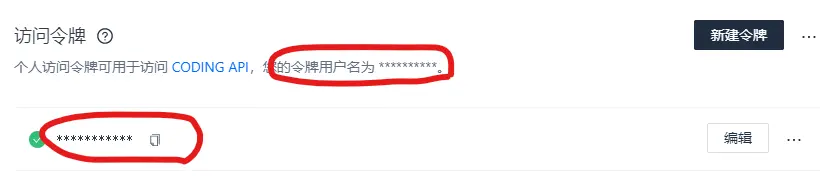
  1. 记住这个用户名和令牌(我这里加密了,实际上是一串字母数字)

Coding-5

  1. https://e.coding.net/user/project/repo.git仓库为例,只需要在仓库前面添加用户名:令牌@即可,用户名令牌替换成上一步的用户名和令牌

    https://*****:***********@e.coding.net/user/project/repo.git
    

码云

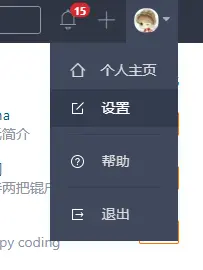
  1. 登录码云, 点击右上角的头像->设置

Gitee-1

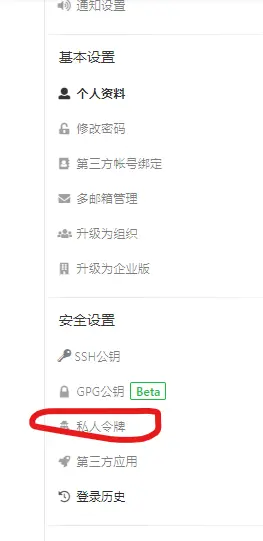
  1. 点击私人令牌

Gitee-2

  1. 点击生成新令牌创建一个令牌

Gitee-3

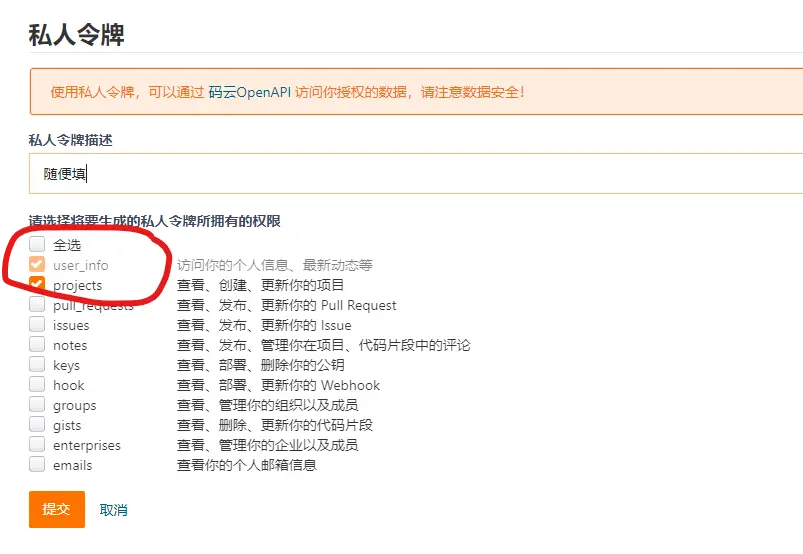
  1. 私人令牌描述随便填就行,请选择将要生成的私人令牌所拥有的权限勾选projects给与仓库操作权限,如果弄需要Pull Requests那就把下面的pull_requests也勾选上,然后拉到最下面点击提交即可
Gitee-4

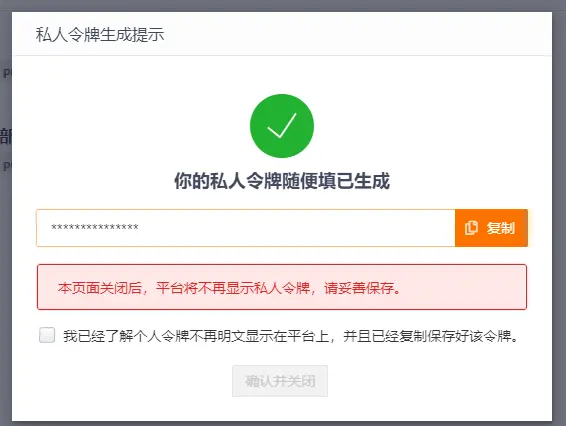
  1. 记住这个令牌(我这里加密了,实际上是一串字母数字)

Gitee-5

  1. https://gitee.com/user/repo.git仓库为例,只需要在仓库前面添加oauth2:**********即可,**********替换成上一步的令牌

    https://oauth2:**********@gitee.com/user/repo.git
    

安全起见,如果你使用公共电脑进行仓库的 push&pull 操作,请在离开时删除你的代码仓库,如果你之后还要用不想删除代码仓库,请使用git remote rm命令把仓库链接删掉!

赞赏作者

扫一扫支付