





一种常见的服务部署架构是 Nginx 反向代理后端 Java 应用服务器,Nginx 监听 443 端口处理 https 请求,然后转发给后端服务器。
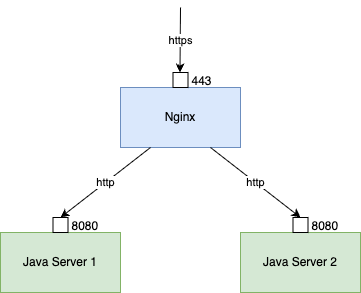
对应的 Nginx 配置大致如下:
upstream www {
    server 192.168.1.101:8080  weight=100 max_fails=3 fail_timeout=10s;
    server 192.168.1.102:8080  weight=100 max_fails=3 fail_timeout=10s;
}

server {
    listen 443 ssl;
    server_name example.com;

    ssl_certificate /path/to/cert.pem;
    ssl_certificate_key /path/to/key.pem;

    location / {
        proxy_pass http://www;
    }
}
即:客户端与 Nginx 之间是 https,Nginx 与后端 Java 应用服务器之间是 http。
这样可能会遇到一些问题,如:
HttpServletRequest.getRequestURL()获取到的 URL 是 Nginx 与后端服务器之间的 http URL,比如http://192.168.1.101:8080/xxx;HttpServletResponse.sendRedirect()生成的重定向 URL 也是 http URL。
要解决这些问题,可以通过 Nginx 配置 + 少量后端代码修改来实现。
解决应用中获取到的 URL 的问题
用户实际访问的是 https://example.com/xxx,但是后端应用获取到的 URL 是 http://192.168.1.101:8080/xxx,如何让后端应用获取到正确的 URL 呢?
第一步,Nginx 可以通过 proxy_set_header Host 指令将客户端请求的 Host 头传递给后端服务器:
location / {
    # ...
    proxy_set_header Host $host;
}
这样,后端应用通过 HttpServletRequest.getRequestURL() 获取到的 URL 就是 http://example.com/xxx 了。
但此时,协议仍然不对,还是 http。
要给后端应用传递正确的协议,通常的做法是使用 X-Forwarded-Proto 头:
location / {
    # ...
    proxy_set_header X-Forwarded-Proto $scheme;
}
添加这个头之后并不会让 HttpServletRequest.getRequestURL() 直接返回 https URL,需要在后端应用中做一些处理。以 Java 应用为例,可以通过一个过滤器(Filter)来修改 request 的 scheme:
import javax.servlet.*;
import javax.servlet.http.HttpServletRequest;
import javax.servlet.http.HttpServletRequestWrapper;

import org.apache.commons.lang3.StringUtils;
import org.springframework.stereotype.Component;

import java.io.IOException;

@Component
public class XForwardedProtoFilter implements Filter {

    @Override
    public void doFilter(ServletRequest request, ServletResponse response, FilterChain chain)
            throws IOException, ServletException {
        if (request instanceof HttpServletRequest) {
            HttpServletRequest httpRequest = (HttpServletRequest) request;
            String xForwardedProto = httpRequest.getHeader("X-Forwarded-Proto");
            if (StringUtils.isNotBlank(xForwardedProto) && !xForwardedProto.equalsIgnoreCase(httpRequest.getScheme()) && xForwardedProto.equalsIgnoreCase("https")) {
                httpRequest = new HttpServletRequestWrapper(httpRequest) {
                    @Override
                    public String getScheme() {
                        return xForwardedProto;
                    }

                    @Override
                    public StringBuffer getRequestURL() {
                        StringBuffer requestURL = super.getRequestURL();
                        if (requestURL != null && requestURL.length() > 0) {
                            int index = requestURL.indexOf("://");
                            if (index > 0) {
                                requestURL.replace(0, index, xForwardedProto);
                            }
                        }
                        return requestURL;
                    }

                };
            }
            chain.doFilter(httpRequest, response);
        } else {
            chain.doFilter(request, response);
        }
    }

    @Override
    public void init(FilterConfig filterConfig) throws ServletException {
    }

    @Override
    public void destroy() {
    }
}
至此,后端应用通过 HttpServletRequest.getRequestURL() 获取到的 URL 就是 https://example.com/xxx 了。
解决重定向 URL 的问题
后端应用通过 HttpServletResponse.sendRedirect() 生成的重定向 URL 也是 http URL,如何让它变成 https 呢?
这个问题可以通过 Nginx 的另一指令 proxy_redirect 来解决,该指令用于修改从后端服务器返回的 Location 和 Refresh 响应头。
location / {
    # ...
    proxy_redirect http:// $scheme://;
}
这样,当后端应用返回一个重定向响应时,Nginx 会将 Location 头中的 http:// 替换为 $scheme://,即 https://。
进一步思考:当 Nginx 前面还有负载均衡器时
在很多情况下,Nginx 前面可能还有商用负载均衡器(如 AWS ELB、阿里云 SLB 等),这时需要考虑负载均衡器与 Nginx 之间的协议问题。
如果负载均衡器与 Nginx 之间是 http,而 Nginx 与后端应用之间是 http,那么就需要在负载均衡器和 Nginx 之间添加 X-Forwarded-Proto 头,以便 Nginx 能够正确地识别原始请求的协议。
主流的负载均衡器配置项里应该都有添加 X-Forwarded-Proto 头的选项开关,比如阿里云:
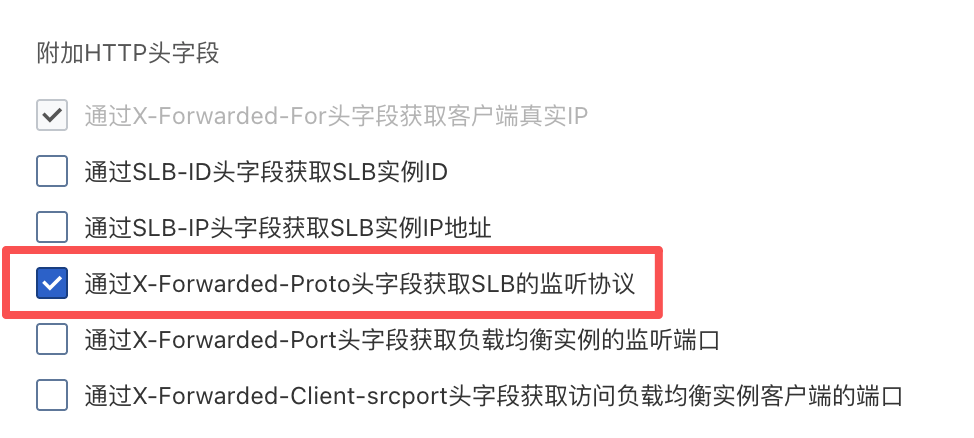
需要注意的是这样配置后,Nginx 配置也需要做相应的调整,将 $scheme 替换为 $http_x_forwarded_proto: (此种场景 $scheme 为负载均衡器与 Nginx 之间的协议 http,$http_x_forwarded_proto 为负载均衡器通过 Header 透传过来的前端访问协议 https。)
location / {
    # ...
    proxy_set_header X-Forwarded-Proto $http_x_forwarded_proto;
    proxy_redirect http:// $http_x_forwarded_proto://;
}
参考链接
文档信息
- 本文作者:Zhuang Ma
- 本文链接:https://mazhuang.org/2025/11/14/https-redirect-http-problem-in-nginx/
- 版权声明:自由转载-非商用-非衍生-保持署名(创意共享3.0许可证)