





iOS - 审核问题记录,所有的问题都可以在 issues 上交流
Github: https://github.com/lishangjing-spec/IOSAuditRecords
Tag:功能重复,产品在市场过于多 Your app primarily features dating features. As such, it duplicates the content and functionality of many other similar apps currently available on the App Store. While these app features may be useful, informative or entertaining, we simply have enough of these types of apps on the App Store, and they are considered a form of spam. 苹果反馈: 您的应用程序主要具有约会功能。因此,它复制了 App Store 上目前可用的许多其他类似应用程序的内容和功能。 虽然这些应用程序功能可能有用、信息丰富或有趣,但我们在应用商店上有足够多的此类应用程序,它们被视为一种垃圾邮件。
处理方式: 完善产品,体现产品价值后在进行发布
Tag:应用截图
2.3.3 Screenshots should show the app in use, and not merely the title art, login page, or splash screen. They may also include text and image overlays (e.g. to demonstrate input mechanisms, such as an animated touch point or Apple Pencil) and show extended functionality on device, such as Touch Bar.

Issue Description

Some or all of the provided screenshots do not sufficiently show the app in use. Screenshots should highlight the app's core concept to help users understand the app’s functionality and value.

Follow these requirements when adding or updating screenshots:

- Marketing or promotional materials that do not reflect the UI of the app are not appropriate for screenshots.
- The majority of the screenshots should highlight the app's main features and functionality.
- Confirm that the app looks and behaves identically in all languages and on all supported devices.
- Make sure that the screenshots show the app in use on the correct device. For example, iPhone screenshots should be taken on iPhone, not on iPad.

Next Steps

The iPad Pro (2nd Gen) and iPad Pro (6th Gen) screenshots show an iPhone image that has been modified or stretched to appear to be an iPad image. Upload new screenshots that accurately reflect the app in use on each of the supported devices.
苹果反馈:
存在的问题:
处理方式:
处理结果:通过审核
Tag:内购、无法从苹果服务器获取商品信息、response.products.count == 0
We found that your in-app purchase products exhibited one or more bugs which create a poor user experience. Specifically, there was no further action produced when we attempted to make a purchase. Please review the details and resources below and complete the next steps.

Review device details:

- Device type: iPhone 12
- OS version: iOS 17.4.1

Next Steps

When validating receipts on your server, your server needs to be able to handle a production-signed app getting its receipts from Apple’s test environment. The recommended approach is for your production server to always validate receipts against the production App Store first. If validation fails with the error code "Sandbox receipt used in production," you should validate against the test environment instead.

Resources

- Learn how to set up and test in-app purchase products in the sandbox environment.
- For more information on receipt validation, see the In-App Purchase FAQ.
- If your app makes a SKReceiptRefreshRequest call and fails, do not retry the call. Assume the user does not have access. Continue by making the addPayment call.
- If your app makes a SKReceiptRefreshRequest call to restore previously purchased in-app purchases, make sure the app calls restoreCompletedTransactions when the user selects the "Restore" button.

Support

- Reply to this message in your preferred language if you need assistance. If you need additional support, use the Contact Us module.
- Consult with fellow developers and Apple engineers on the Apple Developer Forums.
- Help improve the review process or identify a need for clarity in our policies by suggesting guideline changes.
苹果反馈: 在点击内购商品的时候,没有错误提示,没有下一步的操作,无法完成内购行为
自行检查:
- (void)productsRequest:(SKProductsRequest *)request didReceiveResponse:(SKProductsResponse *)response经过排查后,我认为程序上没有存在问题,可以把问题抛回给苹果,审核人员也是人,也并非不会犯错
回复中所有的涉及的截图不方便展示,根据自身项目进行截图替换文件名
回复内容: 您好,在您提供的截图中,我看到了错误信息的返回,并非没有任何下一步的处理,截图文件 “Screenshot-0331-171650.png” 中显示“无法获取产品信息, 请重试”,这个错误信息是因为在苹果 API 回调方法
- (void)productsRequest:(SKProductsRequest *)request didReceiveResponse:(SKProductsResponse *)response
回调中 response.products.count 的数量为 0 ,也就是说,我并没有从苹果 API 的回调中获取内购列表信息
这个项目是我首次提交的项目,与内购一同在审核中,内购项目也处于“正在等待审核”的状态,请确认您的审核环境,或是缓存等问题,同时请帮我确认我的内购项目的审核状态。
同时,在您反馈的截图中,我发现一个点,我并未在您触发内购的截图中观察到网络环境,无论是 wifi 还是蜂窝。
在这之前,我也检查了所有的配置:
我也提供了我在 TestFlight 中的测试视频,请查看附件("test1.mp4") 以及相同系统环境下的测试视频:请查看附件("test2.mp4")
请您检查并确认后,再次进行测试,感谢
处理结果:通过审核
Tag:内购、Storage
We noticed that your app requires users to register with personal information to purchase in-app purchase products that are not account based.

Apps cannot require user registration prior to allowing access to app content and features that are not associated specifically to the user. User registration that requires the sharing of personal information must be optional or tied to account-specific functionality.

Next Steps

To resolve this issue, please revise your app to not require users to register before purchasing in-app purchase products that are not account based. You may explain to the user that registering will enable them to access the purchased content from any of their supported devices and provide them a way to register at any time, if they wish to later extend access to additional devices.

Please note that although App Review Guideline 3.1.2 requires an app to make subscription content available to all the supported devices owned by a single user, it is not appropriate to force user registration to meet this requirement; such user registration must be optional.

Resources

- Watch a video from App Review with tips for doing more for users with less data.
- See guideline 5.1.1(v) - Account Sign-In to learn more about our requirements for apps with account-based content and features.
大致意思,App 需要支持不登录就能支付内购 解决方案:与后端配合做一个游客模式,同时这个游客也有自己的 token 进行内购
如果审核之后,会关闭游客模式,可以不考虑后续游客内购内容如何与后续登录的实际账号进行关联 如果你们不关闭,可以多考虑这些优化
结果:通过审核
Tag:UIBackgroundModes 、画中画
Guideline 2.5.4 - Performance - Software Requirements

The app declares support for audio in the UIBackgroundModes key in your Info.plist, but we are unable to play any audible content when the app is running in the background.

Background audio is intended for use by apps that provide audible content to the user while in the background, such as music player, music creation, or streaming audio apps.

Next Steps

If the app has a feature that requires persistent audio, reply to this message and let us know how to locate this feature. If the app does not have a feature that requires persistent audio, it would be appropriate to remove the "audio" setting from the UIBackgroundModes key.

Resources

- Learn more about software requirements in guideline 2.5.4.
- Review documentation for the UIBackgroundModes key.
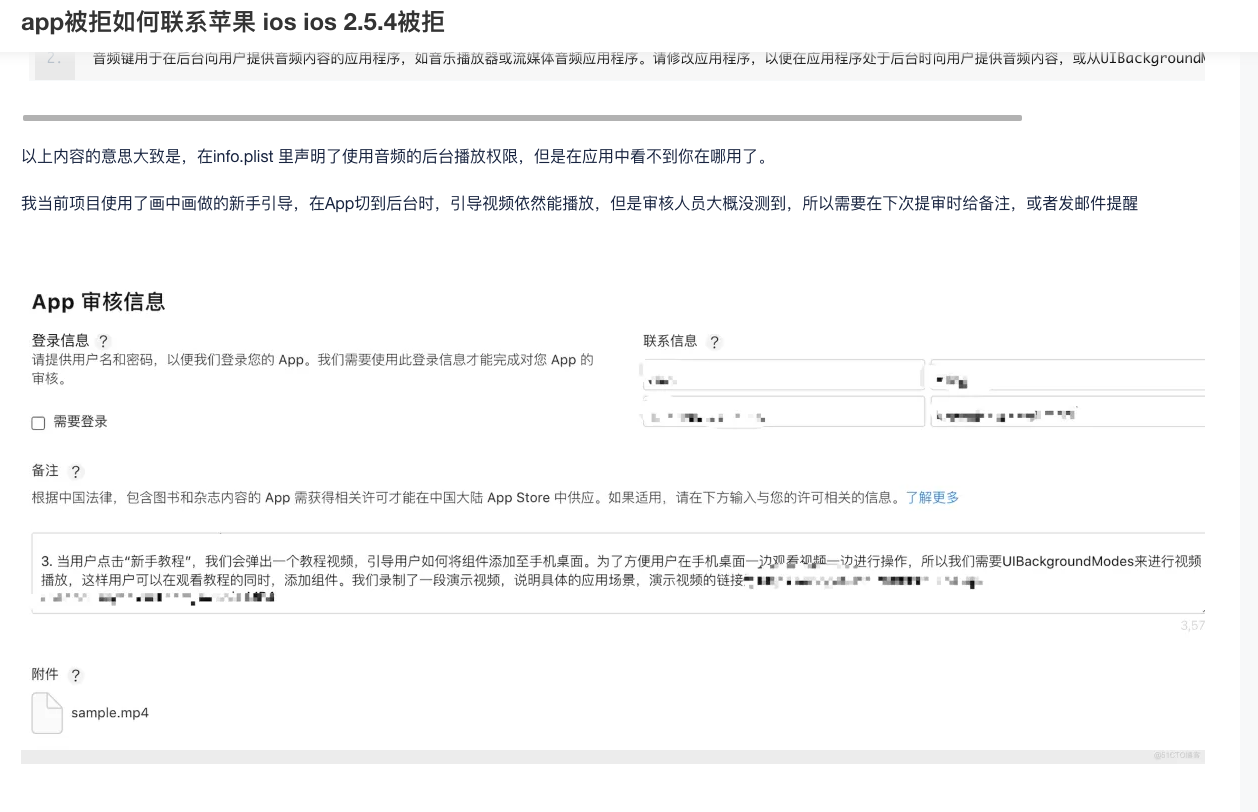
项目中开启了 UIBackgroundModes 但是审核人员并么有发现对应功能,无论是后台播放音乐还是画中画
在我的项目中,我用到了画中画功能,所以我将其开启了
从苹果的反馈 If the app has a feature that requires persistent audio, reply to this message and let us know how to locate this feature ,苹果审核人员并没有找到项目中画中画的功能,所以这种情况我们录制 app 中,触发画中画功能的视频给苹果就可以通过。
解决方式:录制功能视频提交至苹果,并反馈(备注、回复)中进行详细描述
当用户点击 “xxx” 时,我们会弹出一个教程视频,引导用户如何开启 xxx 功能、xxxx 等行为。为了方便用户在手机桌面一边观看视频一边进行操作,所以我们需要 UIBackgroundModes 来进行视频播放,这样用户可以在观看教程的同时,进行 xxx 行为。我们录制了一段演示视频,说明具体的应用场景,演示视频的链接: https://xxx.mp4
| 来源: https://blog.51cto.com/u_16099186/9399269 |
|---|
 |
结果:通过审核
Hello,

We noticed one or more issues with a recent submission for App Store review for the following app:

Although submission for App Store review was successful, you may want to correct the following issues in your next submission for App Store review. Once you've corrected the issues, upload a new binary to App Store Connect.

ITMS-91053: Missing API declaration - Your app’s code in the “PlugIns/XXXIntent.appex/XXXIntent” file references one or more APIs that require reasons, including the following API categories: NSPrivacyAccessedAPICategoryUserDefaults. While no action is required at this time, starting May 1, 2024, when you upload a new app or app update, you must include a NSPrivacyAccessedAPITypes array in your app’s privacy manifest to provide approved reasons for these APIs used by your app’s code. For more details about this policy, including a list of required reason APIs and approved reasons for usage, visit: https://developer.apple.com/documentation/bundleresources/privacy_manifest_files/describing_use_of_required_reason_api.

ITMS-91053: Missing API declaration - Your app’s code in the “PlugIns/XXXIntent.appex/XXXIntent” file references one or more APIs that require reasons, including the following API categories: NSPrivacyAccessedAPICategoryDiskSpace. While no action is required at this time, starting May 1, 2024, when you upload a new app or app update, you must include a NSPrivacyAccessedAPITypes array in your app’s privacy manifest to provide approved reasons for these APIs used by your app’s code. For more details about this policy, including a list of required reason APIs and approved reasons for usage, visit: https://developer.apple.com/documentation/bundleresources/privacy_manifest_files/describing_use_of_required_reason_api.

ITMS-91053: Missing API declaration - Your app’s code in the “XXX” file references one or more APIs that require reasons, including the following API categories: NSPrivacyAccessedAPICategoryFileTimestamp. While no action is required at this time, starting May 1, 2024, when you upload a new app or app update, you must include a NSPrivacyAccessedAPITypes array in your app’s privacy manifest to provide approved reasons for these APIs used by your app’s code. For more details about this policy, including a list of required reason APIs and approved reasons for usage, visit: https://developer.apple.com/documentation/bundleresources/privacy_manifest_files/describing_use_of_required_reason_api.

ITMS-91053: Missing API declaration - Your app’s code in the “XXX” file references one or more APIs that require reasons, including the following API categories: NSPrivacyAccessedAPICategorySystemBootTime. While no action is required at this time, starting May 1, 2024, when you upload a new app or app update, you must include a NSPrivacyAccessedAPITypes array in your app’s privacy manifest to provide approved reasons for these APIs used by your app’s code. For more details about this policy, including a list of required reason APIs and approved reasons for usage, visit: https://developer.apple.com/documentation/bundleresources/privacy_manifest_files/describing_use_of_required_reason_api.

ITMS-91053: Missing API declaration - Your app’s code in the “XXX” file references one or more APIs that require reasons, including the following API categories: NSPrivacyAccessedAPICategoryDiskSpace. While no action is required at this time, starting May 1, 2024, when you upload a new app or app update, you must include a NSPrivacyAccessedAPITypes array in your app’s privacy manifest to provide approved reasons for these APIs used by your app’s code. For more details about this policy, including a list of required reason APIs and approved reasons for usage, visit: https://developer.apple.com/documentation/bundleresources/privacy_manifest_files/describing_use_of_required_reason_api.

ITMS-91053: Missing API declaration - Your app’s code in the “XXX” file references one or more APIs that require reasons, including the following API categories: NSPrivacyAccessedAPICategoryUserDefaults. While no action is required at this time, starting May 1, 2024, when you upload a new app or app update, you must include a NSPrivacyAccessedAPITypes array in your app’s privacy manifest to provide approved reasons for these APIs used by your app’s code. For more details about this policy, including a list of required reason APIs and approved reasons for usage, visit: https://developer.apple.com/documentation/bundleresources/privacy_manifest_files/describing_use_of_required_reason_api.

Apple Developer Relations
规则更新时间:2023 年 12 月 7 日
主要内容:开发者在 5 月 1 号后上传的 app 都需要增加隐私描述
官方文档 1
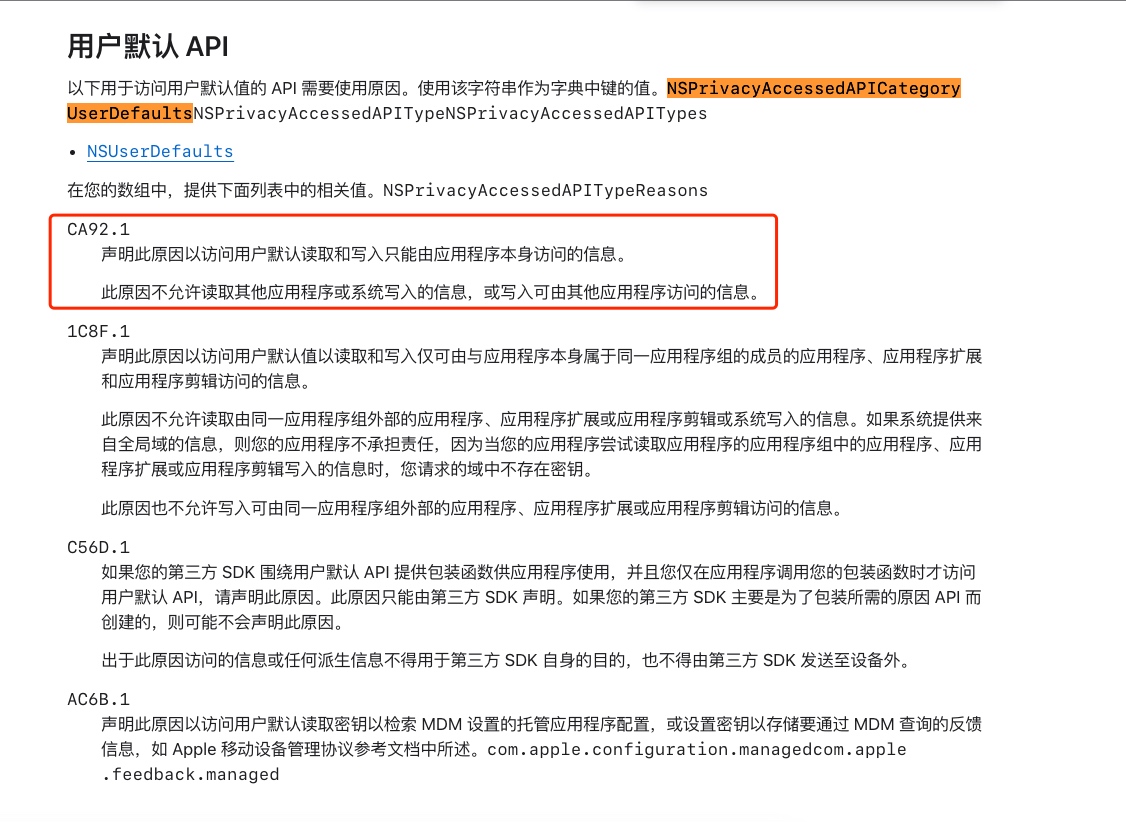
NSPrivacyAccessedAPITypeReasons 配置 - 官方文档 2
三方 SDK 的应对参考: https://cloud.tencent.com/document/product/269/104138
开发者的处理: https://www.jianshu.com/p/633f9778efd7
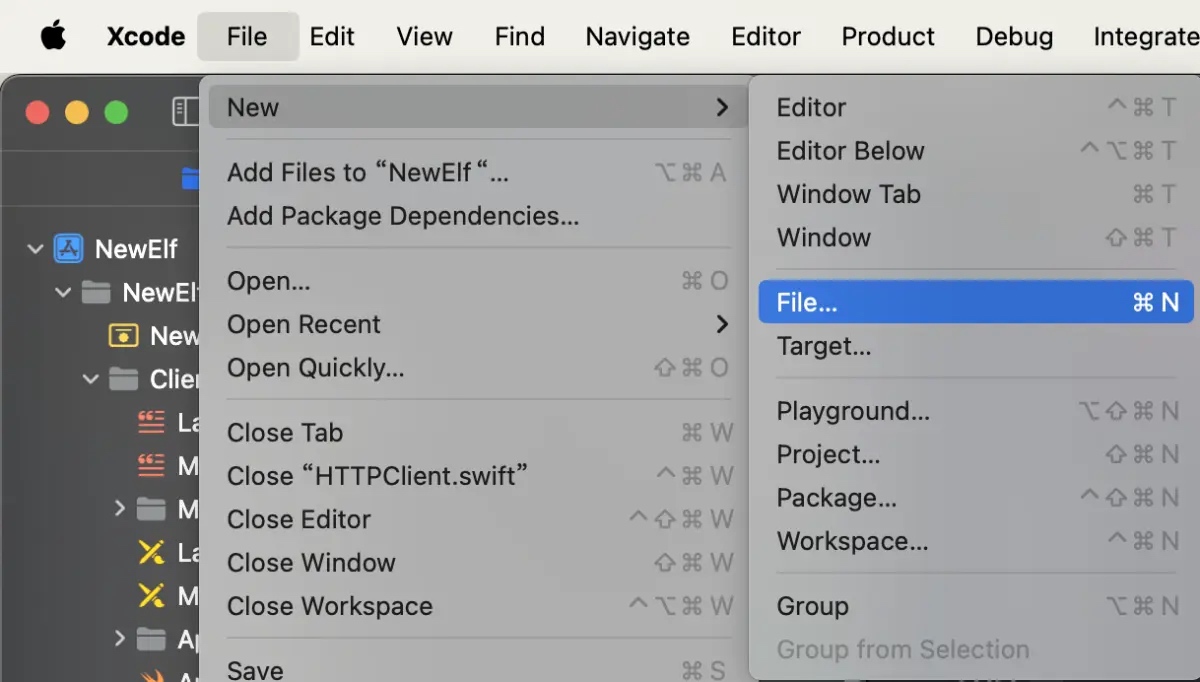 |
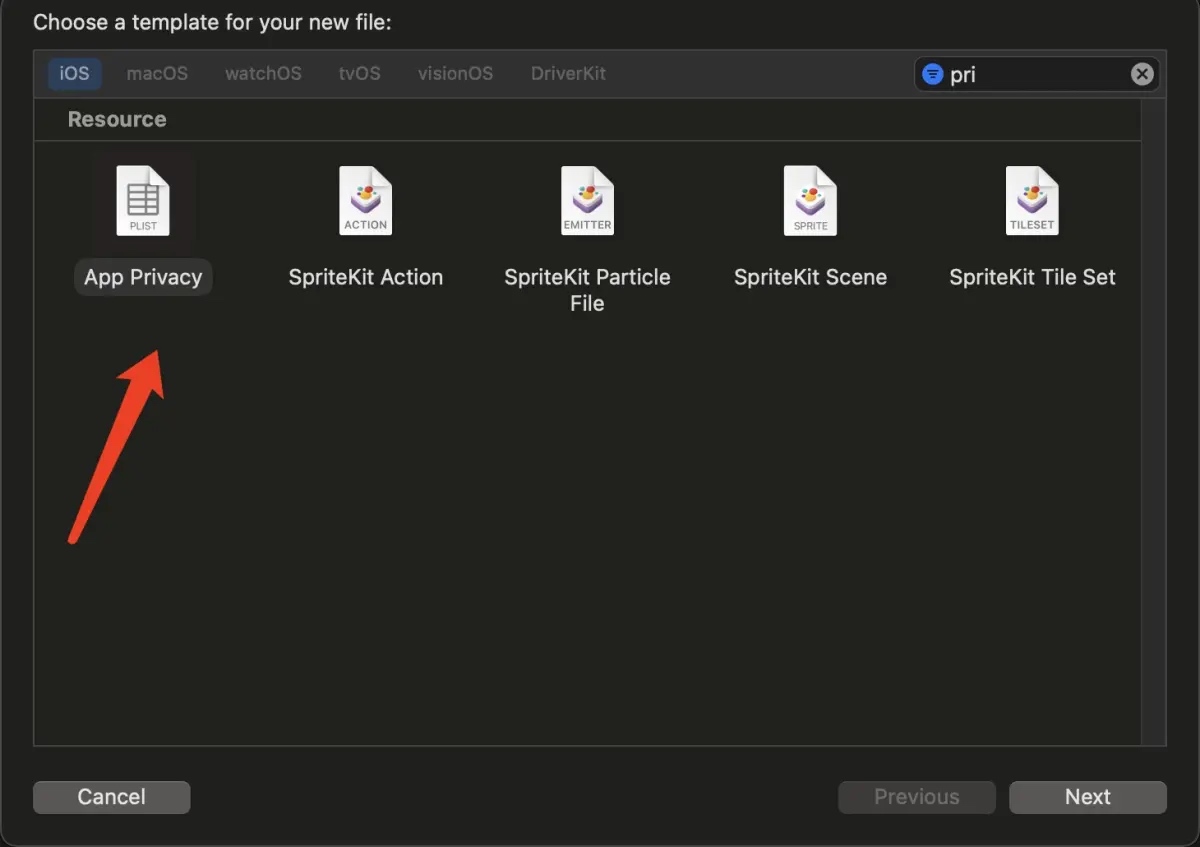 |
<?xml version="1.0" encoding="UTF-8"?>
<!DOCTYPE plist PUBLIC "-//Apple//DTD PLIST 1.0//EN" "http://www.apple.com/DTDs/PropertyList-1.0.dtd">
<plist version="1.0">
<dict>
    <key>NSPrivacyAccessedAPITypes</key>
    <array>
        <dict>
            <key>NSPrivacyAccessedAPITypeReasons</key>
            <array>
                <string>E174.1</string>
            </array>
            <key>NSPrivacyAccessedAPIType</key>
            <string>NSPrivacyAccessedAPICategoryDiskSpace</string>
        </dict>
        <dict>
            <key>NSPrivacyAccessedAPITypeReasons</key>
            <array>
                <string>35F9.1</string>
            </array>
            <key>NSPrivacyAccessedAPIType</key>
            <string>NSPrivacyAccessedAPICategorySystemBootTime</string>
        </dict>
        <dict>
            <key>NSPrivacyAccessedAPITypeReasons</key>
            <array>
                <string>CA92.1</string>
            </array>
            <key>NSPrivacyAccessedAPIType</key>
            <string>NSPrivacyAccessedAPICategoryUserDefaults</string>
        </dict>
        <dict>
            <key>NSPrivacyAccessedAPITypeReasons</key>
            <array>
                <string>C617.1</string>
            </array>
            <key>NSPrivacyAccessedAPIType</key>
            <string>NSPrivacyAccessedAPICategoryFileTimestamp</string>
        </dict>
    </array>
</dict>
</plist>
关于 NSPrivacyAccessedAPITypeReasons 配置,可查看 官方文档
此内容由惯性聚合(RSS阅读器)自动聚合整理,仅供阅读参考。 原文来自 — 版权归原作者所有。