惯性聚合 高效追踪和阅读你感兴趣的博客、新闻、科技资讯
阅读原文 在惯性聚合中打开

推荐订阅源

P
Privacy International News Feed
Martin Fowler
Martin Fowler
D
Docker
Y
Y Combinator Blog
云风的 BLOG
云风的 BLOG
U
Unit 42
T
Tailwind CSS Blog
J
Java Code Geeks
G
Google Developers Blog
MongoDB | Blog
MongoDB | Blog
阮一峰的网络日志
阮一峰的网络日志
WordPress大学
WordPress大学
月光博客
月光博客
大猫的无限游戏
大猫的无限游戏
美团技术团队
F
Fortinet All Blogs
N
News and Events Feed by Topic
Exploit-DB.com RSS Feed
Hacker News - Newest:
Hacker News - Newest: "LLM"
The GitHub Blog
The GitHub Blog
cs.AI updates on arXiv.org
Recorded Future
Recorded Future
N
Netflix TechBlog - Medium
Google DeepMind News
Hacker News: Ask HN
Hacker News: Ask HN
L
LINUX DO - 最新话题
Microsoft Security Blog
N
News and Events Feed by Topic
I
Intezer
TaoSecurity Blog
TaoSecurity Blog
NISL@THU
NISL@THU
小众软件
小众软件
博客园 - 聂微东
博客园 - Franky
有赞技术团队
有赞技术团队
P
Palo Alto Networks Blog
爱范儿
爱范儿
H
Hacker News: Front Page
C
Cyber Attacks, Cyber Crime and Cyber Security
C
Cisco Blogs
P
Proofpoint News Feed
I
InfoQ
Google DeepMind News
OSCHINA 社区最新新闻
OSCHINA 社区最新新闻
Vercel News
Vercel News
H
Heimdal Security Blog
C
Cybersecurity and Infrastructure Security Agency CISA
Application and Cybersecurity Blog
Threat Intelligence Blog | Flashpoint
量子位

轶哥博客

blog blog blog blog blog blog blog blog blog blog blog blog blog blog blog blog blog blog blog blog blog blog blog blog blog blog blog blog blog blog blog blog blog blog blog blog blog blog blog blog blog blog blog blog blog blog blog blog blog blog blog blog blog blog blog blog blog blog blog blog blog blog blog blog blog blog blog blog blog blog blog blog blog blog blog blog blog blog blog blog blog blog blog blog blog blog blog blog blog blog blog blog blog blog blog blog blog blog blog blog
blog
2022-04-06 · via 轶哥博客

Windows server系列系统是支持多用户同时连接远程桌面独立使用互不影响的,但是常规版本并未直接支持。如果您使用Windows Vista、Windows 7/8/8.1/10的配置参考:https://github.com/stascorp/rdpwrapwin11中无需安装此软件。

在Win11中配置多用户同时登陆远程桌面(并发远程桌面RDP)之前,请先确保已开启远程桌面并单用户访问运行正常。

需要注意的是,除非手动修改,否则在Win11的设置-账户-家庭和其他用户中添加其他用户默认添加的是Microsoft用户而不是本地用户,添加用户后还需要在设置-系统-远程桌面-远程桌面用户中添加新配置的用户,操作完成后,还必须使用真实显示器本地登录一次Microsoft用户才能将此用户用于远程桌面访问(首次登录需要配置用户信息),否则将提示无法使用此凭据,类似于密码错误的提示。需要通过管理登录并关闭为了提高安全性,仅允许对此设备上的Microsoft账户使用Windows Hello登录,否则可能导致部分场景下无法使用Microsoft用户进行远程登录。

配置远程桌面服务

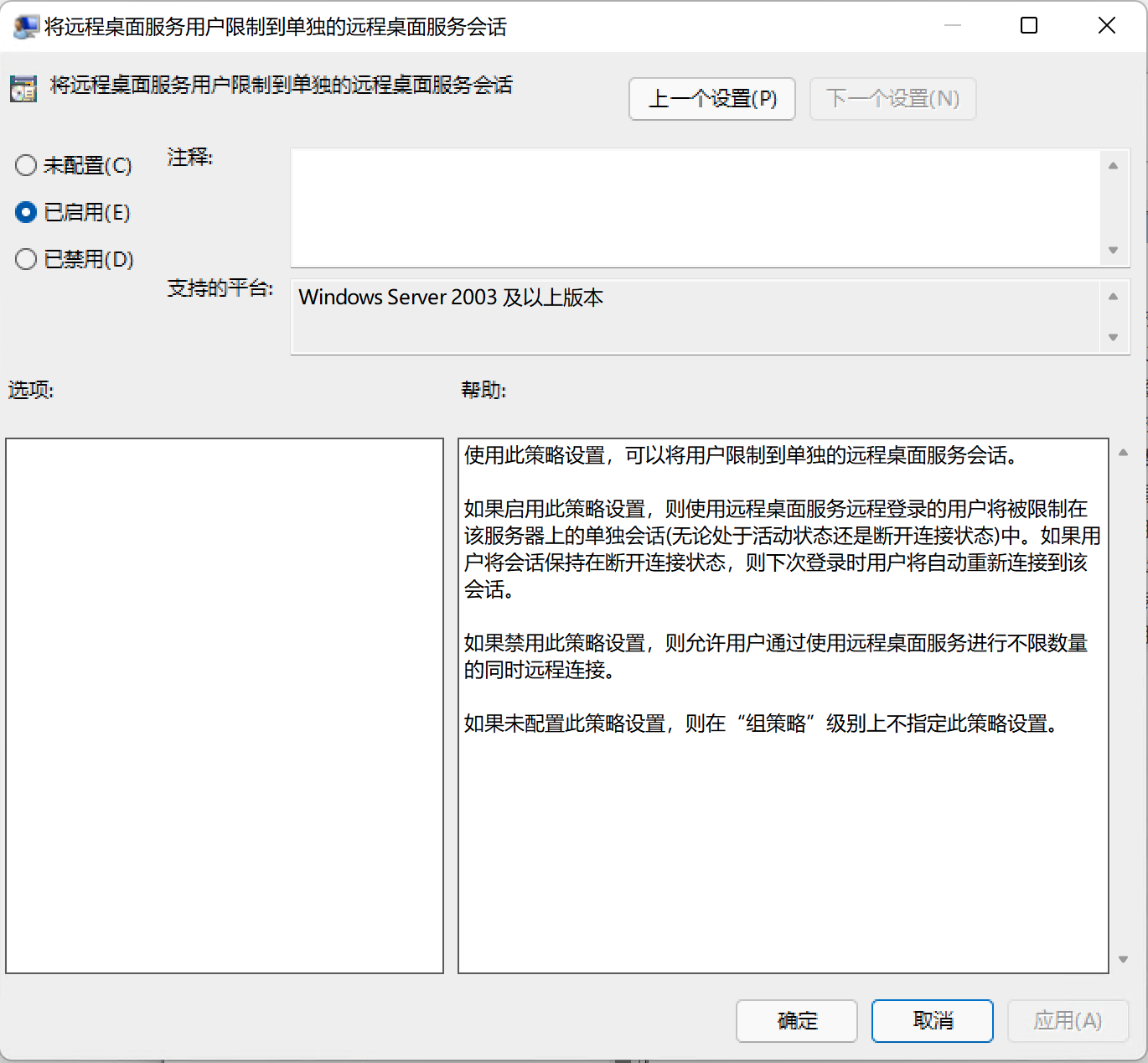
打开编辑组策略应用,进入本地计算机策略-计算机配置-管理模板-Windows组件-远程桌面服务-远程桌面会话主机-连接

image.png

启用允许用户通过使用远程桌面服务进行远程连接,启用限制连接的数量并修改为999,启用将远程桌面服务用户限制到单独的远程桌面服务会话,这样设置的目的是使得多用户链接的时候重新链接能恢复之前的工作而不是新开启一个会话(丢失桌面)。另外,推荐客户端为MacOS的用户启用选择 RDP 传输协议并选择同时使用UDP和TCP,同时使用Microsoft Remote Desktop Beta优化使用体验。

修改/替换系统文件

多用户同时使用远程桌面,会提示必须下线对端用户,为了实现多用户同时使用且互不干扰,需要修改win11操作系统的C:\Windows\System32\termsrv.dll文件。

先将该文件复制出来,此DLL文件可以使用任何HEX编辑器(例如 Tiny Hexer )进行修改。您可以通过替换下面显示的字符串来自己完成此操作,或者只需点此下载补丁(基于2022-04-06日Windows 11 专业版 21H2 22000.469进行修改)替换该文件。

手工修改方法

HEX编辑器查找(注意,查找的最后四组XX可以是任何数字):

39 81 3C 06 00 00 0F 84 XX XX XX XX

替换为:

B8 00 01 00 00 89 81 38 06 00 00 90

替换方法

如果您是直接下载的补丁,实现方法是:使用解压后的termsrv.dll替换C:\Windows\System32\termsrv.dll文件。但是无法直接替换。

无论是直接下载的补丁还是修改完成后文件,都需要先接管termsrv.dll文件,为自己分配管理员权限,然后停止远程桌面相关服务TermService才能替换该文件。具体操作如下:

使用可以获取管理员权限(处于管理员组的账户)的账户本地登录,先备份原有的C:\Windows\System32\termsrv.dll文件,然后右键属性-安全-高级,点击所有者右边的更改

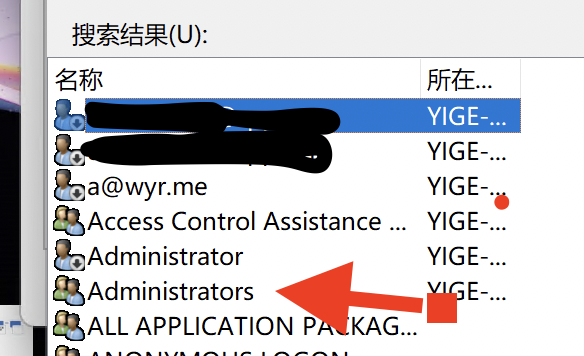
在弹出来的窗口中选择高级-立即查找。搜索结果会显示所有用户,选择Administrators,注意有两个相似Administrator名称,选择最后面有s的这个Administrators

Administrator.png

然后一直点确定,最后关闭属性窗口,重新右键打开属性-安全,修改Administrators的权限,增加修改权限。

image.png

打开服务,找到Remote Desktop Services,关闭服务。

至此,即可使用termsrv.dll替换C:\Windows\System32\termsrv.dll文件。(如果替换失败,打开任务管理器-服务,确认TermService处于已停止的状态。)

替换完成后,重新开启Remote Desktop Services服务。

启动服务后,您的Win11即可多用户同时登录远程桌面了。