惯性聚合 高效追踪和阅读你感兴趣的博客、新闻、科技资讯
阅读原文 在惯性聚合中打开

推荐订阅源

cs.CV updates on arXiv.org
博客园 - 【当耐特】
博客园 - 聂微东
MyScale Blog
MyScale Blog
T
The Blog of Author Tim Ferriss
F
Full Disclosure
aimingoo的专栏
aimingoo的专栏
H
Help Net Security
Engineering at Meta
Engineering at Meta
Last Week in AI
Last Week in AI
D
DataBreaches.Net
让小产品的独立变现更简单 - ezindie.com
宝玉的分享
宝玉的分享
Cyberwarzone
Cyberwarzone
S
Schneier on Security
Know Your Adversary
Know Your Adversary
cs.CL updates on arXiv.org
云风的 BLOG
云风的 BLOG
T
Threatpost
D
Darknet – Hacking Tools, Hacker News & Cyber Security
博客园 - 司徒正美
酷 壳 – CoolShell
酷 壳 – CoolShell
Recent Announcements
罗磊的独立博客
L
LangChain Blog
L
Lohrmann on Cybersecurity
The GitHub Blog
The GitHub Blog
P
Palo Alto Networks Blog
The Cloudflare Blog
Hacker News - Newest:
Hacker News - Newest: "LLM"
M
MIT News - Artificial intelligence
WordPress大学
WordPress大学
博客园 - Franky
C
Cyber Attacks, Cyber Crime and Cyber Security
S
Securelist
NISL@THU
NISL@THU
L
LINUX DO - 最新话题
PCI Perspectives
PCI Perspectives
V2EX - 技术
V2EX - 技术
IT之家
IT之家
钛媒体:引领未来商业与生活新知
钛媒体:引领未来商业与生活新知
N
News | PayPal Newsroom
人人都是产品经理
人人都是产品经理
Google DeepMind News
T
The Exploit Database - CXSecurity.com
cs.AI updates on arXiv.org
Cisco Talos Blog
Cisco Talos Blog
H
Heimdal Security Blog
Help Net Security
Help Net Security
V
V2EX

Claude's Blog

浅谈 npm 依赖治理 记录 Got(Node.js) 代理 HTTP 请求的坑 如何管理桌面窗口 SSR 页面 CDN 缓存实践 从 is-promise 事件我们可以学到什么 分享一个 npm dist-tag 的冷知识 从 Vimium 到 qutebrowser Verdaccio 性能优化:单机 Cluster 让 npm install 不使用缓存的方法 Verdaccio 性能优化:代理分流 Verdaccio 性能优化:上游路径转发 CSAPP DataLab 题解 不靠谱的 Egg.js 框架开发指南 Hexo NexT 主题升级 7.4 From Journeyman to Master Mac 上移除 EasyConnect 常驻后台进程 Nginx SWRR 算法解读 记一次 Node.js 进程挂起的 BUG 追踪 警惕 Travis CI 的 npm 缓存
如何解决 Debian 系 Elastic apm-server 7.x 启动失败
Post author: Claude Ray · 2019-09-13 · via Claude's Blog

本来是几个月前在 Ubuntu 部署 Elastic apm-server 遇到的问题,当时处理起来没遇到特别的卡点,就只是把解决过程丢到 Evernote 了。最近发现还有人在重复踩这个坑,因此我把笔记整理之后搬到这里作一个极简的分享。

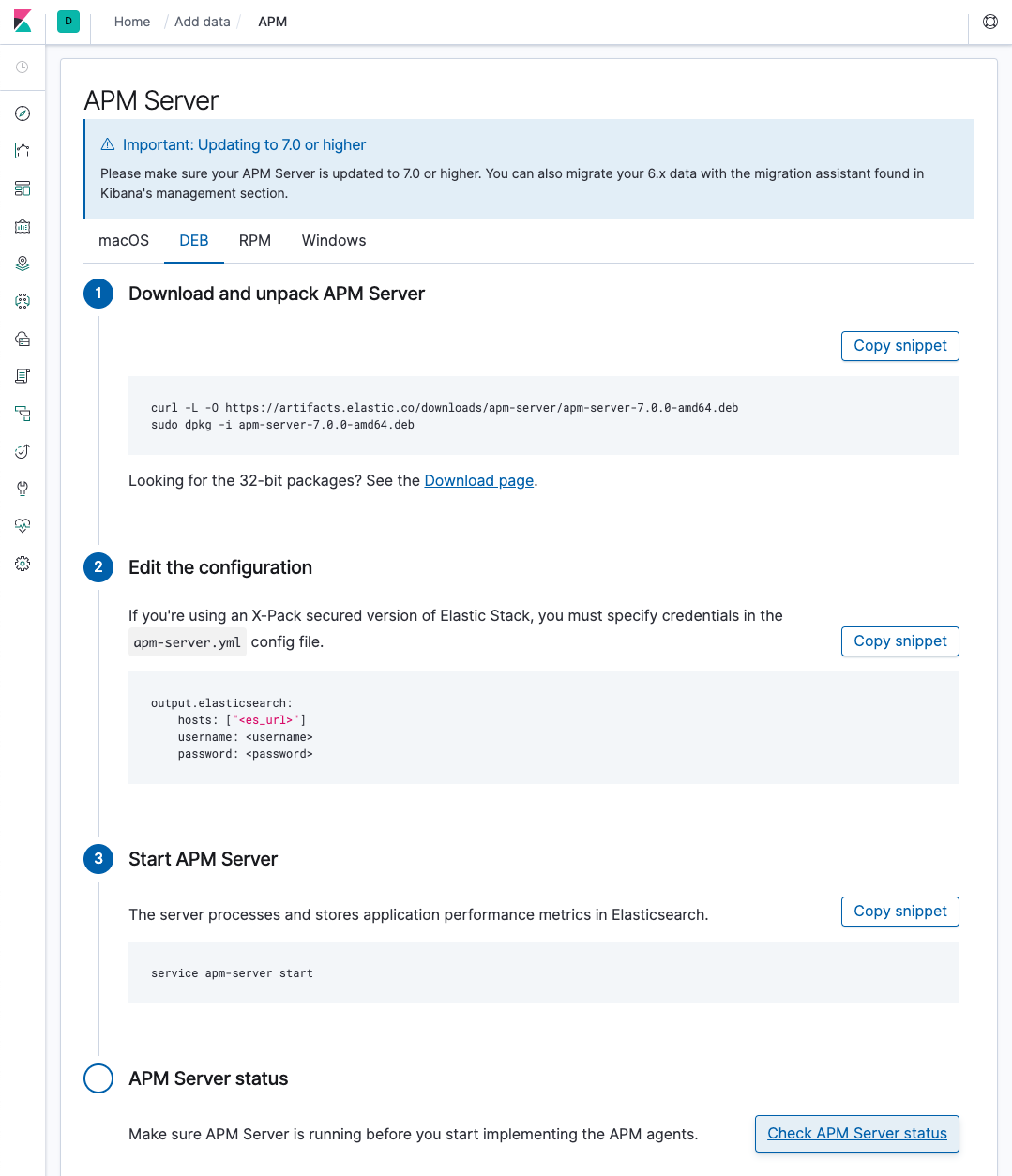
实际步骤就不需要我复述了,官方提供现成的 deb 安装包。除了查看官方文档,更推荐使用 Kibana APM 看板自带的指南。

指南的 url 路径大概是 http://localhost:5601/app/kibana#/home/tutorial/apm?_g=()

不仅有安装引导,还提供按钮协助检查 apm-server 的服务状态。

Kibana apm-server tutorial

启动异常

在 debian 系发行版安装 apm-server 后,执行 service apm-server start 报告失败,且切换到 systemctl 也无效。

service apm-server status报错如下:

1
2
3
4
5
6
7
8
9
10
11
12
13
14
$ service apm-server status                                                                                          
● apm-server.service - Elastic APM Server
Loaded: loaded (/lib/systemd/system/apm-server.service; enabled; vendor preset: enabled)
Active: failed (Result: exit-code) since Tue 2019-04-16 14:44:42 CST; 3s ago
Docs: https://www.elastic.co/solutions/apm
Process: 4783 ExecStart=/usr/share/apm-server/bin/apm-server $BEAT_LOG_OPTS $BEAT_CONFIG_OPTS $BEAT_PATH_OPTS (code=ex
Main PID: 4783 (code=exited, status=1/FAILURE)

4 月 16 14:44:42 ray systemd[1]: apm-server.service: Service hold-off time over, scheduling restart.
4 月 16 14:44:42 ray systemd[1]: apm-server.service: Scheduled restart job, restart counter is at 5.
4 月 16 14:44:42 ray systemd[1]: Stopped Elastic APM Server.
4 月 16 14:44:42 ray systemd[1]: apm-server.service: Start request repeated too quickly.
4 月 16 14:44:42 ray systemd[1]: apm-server.service: Failed with result 'exit-code'.
4 月 16 14:44:42 ray systemd[1]: Failed to start Elastic APM Server.

检查日志

首先使用 journalctl 查看 systemd 的日志,如下

1
$ journalctl -u apm-server.service

打印日志

1
2
3
4
5
6
7
8
9
10
11
12
13
14
15
16
17
18
19
-- Logs begin at Wed 2019-04-10 09:30:25 CST, end at Tue 2019-04-16 14:44:42 CST. --                                    
4 月 16 13:43:23 ray systemd[1]: Started Elastic APM Server.
4 月 16 13:43:23 ray apm-server[2487]: Exiting: error loading config file: config file ("/etc/apm-server/apm-server.yml")
4 月 16 13:43:23 ray systemd[1]: apm-server.service: Main process exited, code=exited, status=1/FAILURE
4 月 16 13:43:23 ray systemd[1]: apm-server.service: Failed with result 'exit-code'.
4 月 16 13:43:23 ray systemd[1]: apm-server.service: Service hold-off time over, scheduling restart.
4 月 16 13:43:23 ray systemd[1]: apm-server.service: Scheduled restart job, restart counter is at 1.
4 月 16 13:43:23 ray systemd[1]: Stopped Elastic APM Server.
4 月 16 13:43:23 ray systemd[1]: Started Elastic APM Server.

4 月 16 14:44:42 ray apm-server[4783]: Exiting: error loading config file: config file ("/etc/apm-server/apm-server.yml")
4 月 16 14:44:42 ray systemd[1]: apm-server.service: Main process exited, code=exited, status=1/FAILURE
4 月 16 14:44:42 ray systemd[1]: apm-server.service: Failed with result 'exit-code'.
4 月 16 14:44:42 ray systemd[1]: apm-server.service: Service hold-off time over, scheduling restart.
4 月 16 14:44:42 ray systemd[1]: apm-server.service: Scheduled restart job, restart counter is at 5.
4 月 16 14:44:42 ray systemd[1]: Stopped Elastic APM Server.
4 月 16 14:44:42 ray systemd[1]: apm-server.service: Start request repeated too quickly.
4 月 16 14:44:42 ray systemd[1]: apm-server.service: Failed with result 'exit-code'.
4 月 16 14:44:42 ray systemd[1]: Failed to start Elastic APM Server.

这样找出真正的启动错误是 Exiting: error loading config file: config file ("/etc/apm-server/apm-server.yml")

解决方法

配置文件异常,采用 apm-server export config 进一步观察。提示如下:

1
error initializing beat: error loading config file: config file ("/etc/apm-server/apm-server.yml") must be owned by the beat user (uid=1000) or root

github issues 上找到了类似的问题,但没有给出推荐的处理方案,所以决定自己动手解决。

ls -l 观察 /etc/apm-server/ 的信息,发现除了 apm-server.yml 之外,owner 都是 root

1
2
3
4
5
6
$ ls -l /etc/apm-server
total 148K
drwxr-xr-x 2 root root 4.0K 4 月 16 14:11 .
drwxr-xr-x 142 root root 12K 4 月 16 14:11 ..
-rw------- 1 apm-server apm-server 33K 4 月 6 05:48 apm-server.yml
-rw-r--r-- 1 root root 94K 4 月 6 05:48 fields.yml

那么统一将权限变更到 root 吧!

1
$ sudo chown root:root /etc/apm-server/apm-server.yml

改之后测试

1
2
$ sudo apm-server test config
Config OK

再尝试启动则提示成功。