







- LaunchRocket. 系统偏好设置中的用户与群组可以添加登录项脚本, 但对于需要root权限启动的应用无解, 脚本会卡在输入密码. LaunchRocket能优雅解决.(当然, 还有一种魔法方法: 用docker加
--restart always的container或docker swarm service 跑, docker启动时会自动启动这些container/service) GitHub地址https://github.com/jimbojsb/launchrocket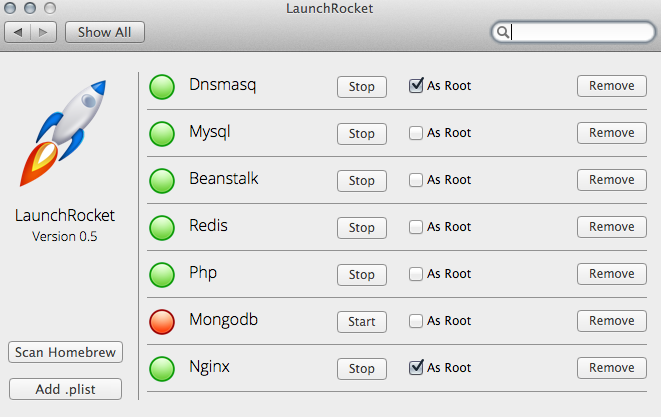
- Snip. Windows下有Winsnap、FastStone、Snipaste等此等优秀的截图软件, 相比之下, Mac上的截图软件要逊色不少. Winsnap有个很方便的特性是截图可以默认复制到剪切板, 很容易粘贴到其他软件去, Mac上snip也有这个特性, snip是一款腾讯开发的截图软件, 官网http://snip.qq.com/
- jietu. 还是腾讯开发的截图软件, 比snip更好用, 也是默认复制到剪切板, 而且提供编辑功能. 官网http://jietu.qq.com
- Macdown. 好用优雅免费的Markdown书写工具. GitHub地址https://github.com/MacDownApp/macdown 2018.12.15发现了更棒的Markdown软件Typora, 胜在颜值和文件夹模式.
- Homebrew. yum/dnf之于centOS, apt之于Ubuntu, pacman之于ArchLinux, brew之于macOS,
brew install简直不能太爽. 官网https://brew.sh/ - Homebrew-Cask.
brew install不能安装chrome Macdown这样的GUI app, Homebrew-Cask扩展了brew, GitHub地址https://github.com/caskroom/homebrew-cask privoxy.
brew pip npm install、docker pull总是慢如蜗牛? privoxy能将shadowsocks的socks代理(127.0.0.1:1080)转换为http/https代理, 有个奇特的地方是把它把文档写在配置文件的注释里, config文件有2271行, 初让人以为配置起来会巨复杂, 实际上基本的功能两行配置即可.listen-address配置为0.0.0.0:8118, 局域网内其他设备也可以走此代理:8118. 官网https://www.privoxy.org/listen-address 0.0.0.0:8118
forward-socks5 / localhost:1080 .然后在.zshrc或.bashrc中加入一下命令就可以通过
proxydproxy来切换是否在本终端下使用代理了.function proxy(){
export http_proxy=http://127.0.0.1:8118
export https_proxy=https://127.0.0.1:8118
export HTTP_PROXY=http://127.0.0.1:8118
export HTTPS_PROXY=https://127.0.0.1:8118
}
function dproxy(){
unset http_proxy
unset https_proxy
unset HTTP_PROXY
unset HTTPS_PROXY
}proxier 可以按进程名指定哪些进程走ss代理, 比如ssh
- kcptun. bandwagon上的shadowsocks越来越慢, 不用kcptun加速没法正常使用, 只能不太厚道地超量发包了. GitHub地址https://github.com/xtaci/kcptun
- oh-my-zsh的z命令. 手动输入一个很长的路径名不停地tab很麻烦, 配置了oh-my-zsh的话可以启用z命令(
edit: ~/.zshrc line: plugins=(git python z tmux)),z 文件夹名就可以跳转到常用目录中最符合输入文件夹名的文件夹中, 非常方便, GitHub地址https://github.com/robbyrussell/oh-my-zsh - aria2. 非常厉害的下载器,
brew install aria2即可. GitHub地址:https://github.com/aria2/aria2 GUI Client:https://github.com/yangshun1029/aria2gui - BaiduExporter. 百度网盘文件导出到aria2下载, GitHub地址https://github.com/acgotaku/BaiduExporter
- Chrome插件加白描述文件. 有时需要安装一些在商店下架了的扩展, 比如BaiduExporter, 在扩展页面安装后重启chrome会提示此扩展程序并非来自chrome商店,启用开关灰色无法启用, 可以下载此描述文件将特定扩展id加入白名单. https://hencolle.com/2016/10/16/baidu_exporter/
- 坚果云.同步配置文件,pdf书非常方便.
- Monaco字体. 非常舒服的等宽代码字体 https://github.com/hanjm/codeFont
- Scroll Reverser. 外接鼠标神器, 让触摸板是自然方向, 鼠标是习惯的Windows滚动方向.
- Karabiner-Elements. 外接键盘神器, 我就想禁用capsLock键, 让右边的option键变成control键, 能把外接键盘的Windows键映射为command键.
- ssh tunnel. ssh隧道管理器, 本地连接远程服务器的kibana nsqAdmin mysql简直不要太爽
