






 在学习的过程中,总是会有一些细节的问题,它很小,也很容易解决,但有时候它还真的挺有用,于是,便产生了写此随笔的念头。这将是一篇不断更新的随笔,记录一些平常碰到的ASP.NET的“小”问题。
1. 问题:一个页面,它有一个TextBox,还有一个RequiredFieldValidator验证控件(Text="...不能为空"),页面中还有一个退出按钮(服务器控件,OnClick="Logout")。在点击“退出”按钮时,RequiredFieldValidator验证控件会起作用,显示“...不能为空”,请求无法回传,也就导致了不能退出。[2008.6.10]
解决办法:设置“退出”按钮的属性:CausesValidation="false"
2. 为什么一旦浏览器不启用Cookie,Session也不能用,不是说Session是保存在服务器么?[2008.8.6]
答:When you use Session state, a session cookie named ASP.NET_SessionId is added to your browser automatically. This cookie contains a unique identifier. It is used to track you as you move from page to page.When you add items to the Session object, the items are stored on the web server and not the web browser. The ASP.NET_SessionId cookie is used to associate the correct data with the correct user. (A session cookie exists only in memory. If a user closes the web browser, the session cookie disappears forever).
-- Stephen Walther 《ASP.NET 2.0 Unleashed》
3. Session事件注意点[2008.8.6]:
The Session End event is not raised by all session store providers. The event is raised by the InProc session store provider (the default provider), but it is not raised by the StateServer or SQLServer state providers.
-- Stephen Walther 《ASP.NET 2.0 Unleashed》
4. Cookieless Session的注意点[2008.8.6]:
When you enable cookieless session state, you should also enable this attribute because it can help prevent users from inadvertently sharing session state.
<sessionState cookieless="AutoDetect" regenerateExpiredSessionId="true" />
-- Stephen Walther 《ASP.NET 2.0 Unleashed》
5. 关于HttpServerUtility.Execute(string path, TextWriter writer, bool preserveForm)方法中的preserveForm参数[2008.8.6]:
如果将此参数设为true,则会把传给本页面的querystring和request.form中的信息传给被Excute的那个页面,比如本页地址为Default.aspx?p=5,页中有代码:Server.Execute("Default2.aspx", sw, true),sw是StringWriter的实例,那么,页面Default2.aspx中就可以通过Request.QueryString["p"]得到5,反之,如果把preserveForm设为false,则Default2.aspx中就取不到url参数p的值。
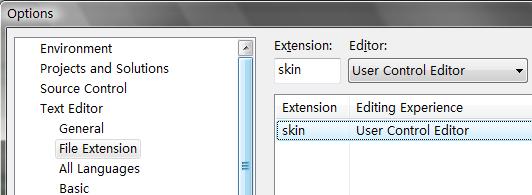
6. 在Visual Studio中编写皮肤文件(*.skin)时没有智能感知?[2008.8.10]
答:是可以设置的,在VS中Tools --> Options --> Text Editor --> File Extension, 在右侧的Extension中添加skin,然后选择User Control Editor,确定,然后关掉*.skin文件再打开就行了,图如下:
7. 自定义异常不要从ApplicationException继承,而要从Exception继承:[2008.8.12]
这点放在这篇文章里或许不是太合适,但现在没地儿可放,就先搁这儿了。这点用Krzysztof Cwalina和Jeffery Richter的话来解释:
Jeffery Richter: System.ApplicationException is a class that should not be part of the .NET Framework. The original idea was that classes derived from SystemException would indicate exceptions thrown from the CLR (or system) itself, whereas non-CLR exceptions would be derived from ApplicationException. However, a lot of exception classes didn’t follow this pattern. For example, TargetInvocationException (which is thrown by the CLR) is derived from ApplicationException. So, the ApplicationException class lost all meaning. The reason to derive from this base class is to allow some code higher up the call stack to catch the base class. It was no longer possible to catch all application exceptions.
Krzysztof Cwalina: Today, somebody asked me whether they should go through their code-base and remove all references to the exception. I answered that it’s not worth the effort. “ApplicationException is not considered harmful, just useless.”
此内容由惯性聚合(RSS阅读器)自动聚合整理,仅供阅读参考。 原文来自 — 版权归原作者所有。