







Problem
One of the junior SQL Server Database Administrators in my company approached me yesterday with a dilemma. He want to know how to enabled the Dedicated Administrator Connection in SQL Server 2008. At first I started to tell him, but figured it would be smarter to document the options and share the information. This tips shows you how you can enable this feature in SQL 2008.
Solution
In SQL Server 2005, Microsoft introduced a new feature called Dedicated Administrator Connection (DAC). Using this feature a SQL Server Database Administrator can connect to a SQL Server Instance when the database engine is not responding to regular connections. During such a scenario a DBA can connect to the SQL Server Instance to troubleshoot and to kill any of the SQL Server Processes which are causing the issues.
The DAC allows database administrators to connect to a SQL Server Instance and to execute T-SQL commands to troubleshoot and fix issues rather than rebooting the SQL Server which could lead to database corruption or other problems. By default, the remote Dedicated Administrator Connection feature is disabled in SQL Server 2005 and later versions. It’s a good practice to enable the DAC feature once the SQL Server 2005 or SQL Server 2008 is installed on every instance as this will help you troubleshoot issues when regular connections are not responding. However, only one dedicated administrator connection is allowed at a time on SQL Server 2005 and later versions.
Enable Dedicated Administrator Connection in SQL Server 2008 Using TSQL
Execute the below T-SQL to enable remote clients to utilize the Dedicated Administrator Connection.
Use master
GO
sp_configure 'show advanced options' , 1
GO
/* 0 = Allow Local Connection, 1 = Allow Remote Connections*/
sp_configure 'remote admin connections', 1
GO
RECONFIGURE
GO
Enable Dedicated Administrator Connection in SQL Server 2008 Using SQL Server 2008 Management Studio
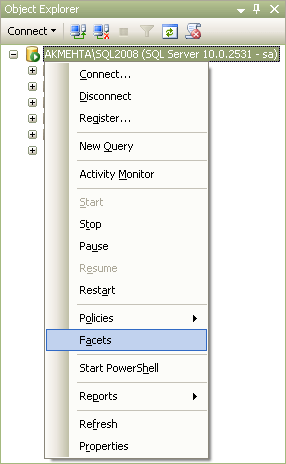
Database Administrators can also enable Dedicated Administrator Connection Feature using SQL Server 2008 Management Studio. This can be done by right clicking the SQL Server Instance and selecting the Facets option from the drop down list as shown in the snippet below.
This will open up View Facets window as shown in the snippet below. Here you need to select Surface Area Configuration facet as highlighted and then select the option as “True” for RemoteDacEnabled.
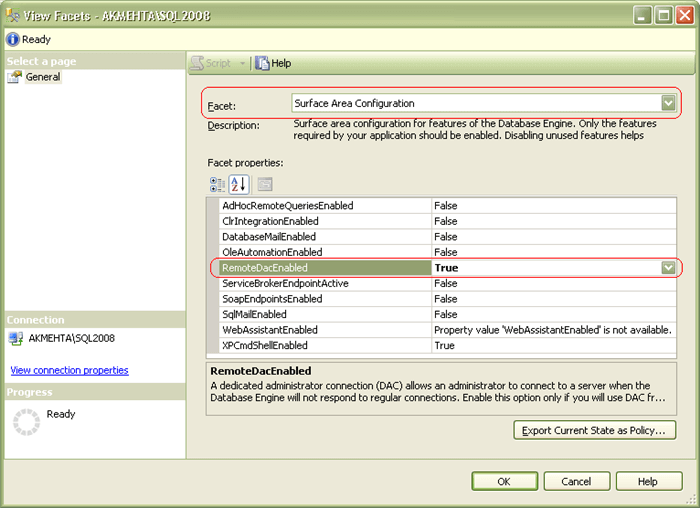
Finally, click OK to save the configuration changes in the View Facets window.
You can also enable other database engine features like AsHocRemoteQueriesEnabled, ClrIntegrationEnabled, DatabaseMailEnabled, OleAutomationEnabled, ServiceBrokerEndpointActive, SoapEndpointsEnabled, SQLMailEnabled, WebAssistanceEnabled, XPCmdShellEnabled etc when required using the Surface Server Configuration Facet which is available in SQL Server 2008 Management Studio.
Once the Dedicated Administrator Connection is enabled you can connect to SQL Server 2008 using either SQL Server Management Studio or using SQLCMD.
Using DAC with SQLCMD
You need to be a member of the sysadmin fixed server role in order to use this feature. The “-A” switch is used to specify that the user is trying to connect to SQL Server using the Dedicated Administrator Connection.
The syntax to use DAC is mentioned below.
SQLCMD –S [SQL Server Name] –U [User Name] –P [Password] –A
Using DAC with SQL Server Management Studio
You need to specify “ADMIN:” before the SQL Server Instance name when trying to connect to an SQL Server Instance to using DAC feature as shown in the snippet below.
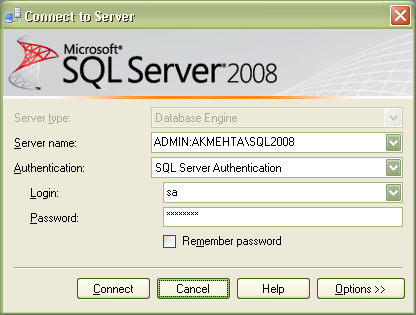
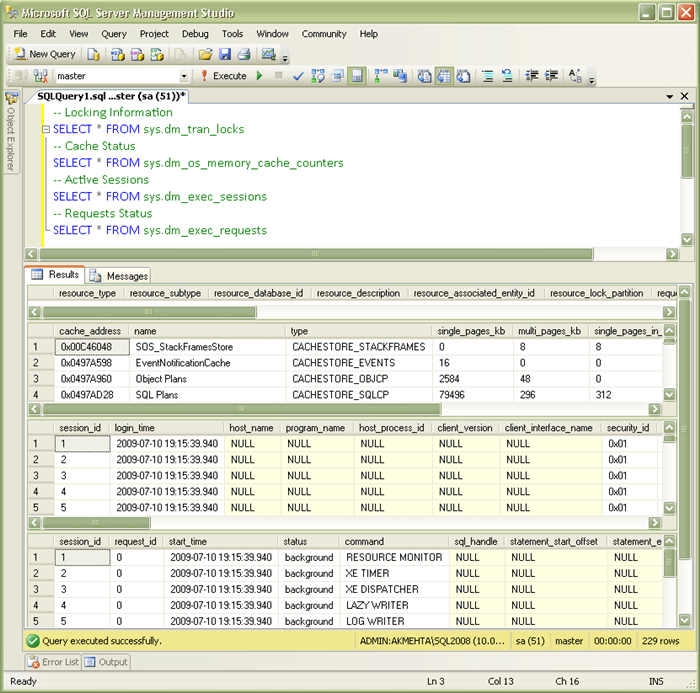
Once you are connected to SQL Server Instance using DAC, then you can execute code such as the code below to check the SQL Server health.
-- Locking Information
SELECT * FROM sys.dm_tran_locks
GO
-- Cache Status
SELECT * FROM sys.dm_os_memory_cache_counters
GO
-- Active Sessions
SELECT * FROM sys.dm_exec_sessions
GO
-- Requests Status
SELECT * FROM sys.dm_exec_requests
GO
Next Steps
Original link: http://www.mssqltips.com/tip.asp?tip=1801&home
此内容由惯性聚合(RSS阅读器)自动聚合整理,仅供阅读参考。 原文来自 — 版权归原作者所有。