惯性聚合 高效追踪和阅读你感兴趣的博客、新闻、科技资讯
阅读原文 在惯性聚合中打开

推荐订阅源

V
Vulnerabilities – Threatpost
U
Unit 42
F
Fortinet All Blogs
aimingoo的专栏
aimingoo的专栏
P
Proofpoint News Feed
F
Full Disclosure
月光博客
月光博客
Engineering at Meta
Engineering at Meta
博客园_首页
The Register - Security
G
Google Developers Blog
The Cloudflare Blog
博客园 - Franky
K
Kaspersky official blog
A
Arctic Wolf
Scott Helme
Scott Helme
C
Cisco Blogs
Hugging Face - Blog
Hugging Face - Blog
C
Check Point Blog
NISL@THU
NISL@THU
AI
AI
D
DataBreaches.Net
Cyber Security Advisories - MS-ISAC
Stack Overflow Blog
Stack Overflow Blog
Project Zero
Project Zero
The GitHub Blog
The GitHub Blog
H
Hackread – Cybersecurity News, Data Breaches, AI and More
量子位
Vercel News
Vercel News
T
Tor Project blog
P
Privacy International News Feed
D
Docker
I
Intezer
L
LangChain Blog
P
Proofpoint News Feed
Security Latest
Security Latest
C
CXSECURITY Database RSS Feed - CXSecurity.com
T
Threatpost
博客园 - 聂微东
AWS News Blog
AWS News Blog
Martin Fowler
Martin Fowler
P
Privacy & Cybersecurity Law Blog
V
V2EX
Last Week in AI
Last Week in AI
C
Cybersecurity and Infrastructure Security Agency CISA
The Hacker News
The Hacker News
T
Tenable Blog
Blog — PlanetScale
Blog — PlanetScale
钛媒体:引领未来商业与生活新知
钛媒体:引领未来商业与生活新知
T
Tailwind CSS Blog

Lucifr

Cerebro App:一个开源的 Alfred 最佳 Inoreader App 从 Hexo 迁移到 Hugo OS X 10.11 El Capitan 下免费 NTFS 解决方案 无需越狱切换 OmniFocus for iPhone 语言为英语 A Dark Room 我不知道的 1password 快捷键 Sublime Text 2 主题推荐:Flatland 豆瓣 Workflow for Alfred v2 Caps Lock to Hyper key PopClip 插件收集 从 Octopress 到 Hexo Sublime Text 2 插件:PlainTasks Safari 6 搜索插件两枚
Alfred 2 Workflow 推荐:OmniFocus Task Actions
Lucifr · 2013-04-22 · via Lucifr
Alfred 2 Workflow 推荐:OmniFocus Task Actions

OmniFocus Task Actions 是一个可以在 Alfred 2 中对 Omnifocus 中的任务进行操作的 workflow。

功能
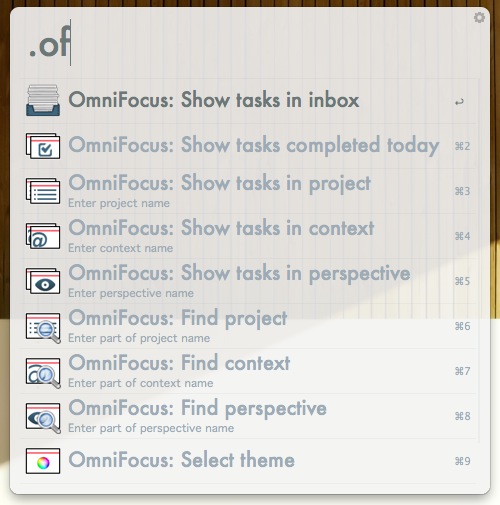
OF-TaskActions

  • 搜索 project、context、perspective
  • 查看相应 project、context、perspective 下的任务
  • 查看 Inbox 中的任务
  • 查看今天完成的任务
  • 可对任务进行的操作:
    • Check/Uncheck
    • Flag/Un-flag
    • 改变 Project
    • 改变 context
    • 改变 start/due date
    • 添加 note
    • 在 OmniFocus 中打开

安装

下载 OmniFocus Task Actions 并导入 Alfred 2

关键词

  • .of - 显示可用操作列表

管理 Project

  • .offp [project 名称的一部分] - 搜索 project

    • ENTER - 显示所选 project 下的有效任务
  • .oftp [project 名称] - 显示该 project 下的有效任务

    • ENTER - 显示所选任务的细节

管理 Context

  • .offc [context 名称的一部分] - 搜索 context

    • ENTER - 显示所选 context 下的有效任务
  • .oftc [context 名称] - 显示该 context 下的有效任务

    • ENTER - 显示所选任务的细节

管理 Perspective

  • .offv [perspective 名称的一部分] - 搜索 perspective

    • ENTER - 显示所选 perspective 下的有效任务
  • .oftv [perpective 名称] - 显示该 perspective 下的有效任务

    • ENTER - 显示所选任务的细节

管理任务

  • .ofti - 显示 Inbox 中的任务

    • ENTER - 显示所选任务的细节
  • .ofdt - 显示今日完成的任务

    • ENTER - 显示所选任务的细节

可对任务进行的操作

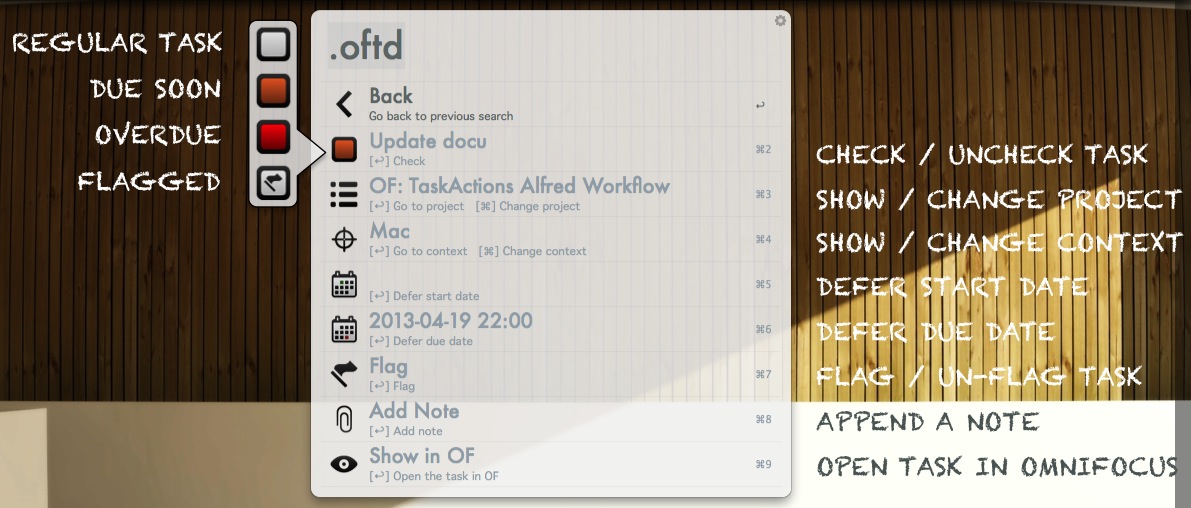
OF-TaskActions_oftd

值得注意的是任务的状态是直接可以通过 Check/Uncheck 这一项前的图标来看出来的,赞啊

设置

  • .oftheme - 切换主题,可选 light 和 dark,如果 Alfred 本身的主题是偏暗就选 light,反之则反之

快捷键

  • Shift+Ctrl+I - 显示 Inbox 中的任务
  • Shift+Ctrl+D - 显示今日完成的任务
  • Shift+Ctrl+P - 搜索 project
  • Shift+Ctrl+C - 搜索 context
  • Shift+Ctrl+V - 搜索 perspective

目前存在的问题

  • 对任务进行修改操作后有时似乎不能立刻反映出来
  • 图标无法显示的情况,先使用 .oftheme 选择主题就可以了