惯性聚合 高效追踪和阅读你感兴趣的博客、新闻、科技资讯
阅读原文 在惯性聚合中打开

推荐订阅源

Google DeepMind News
F
Fortinet All Blogs
量子位
G
Google Developers Blog
J
Java Code Geeks
N
Netflix TechBlog - Medium
博客园 - 聂微东
宝玉的分享
宝玉的分享
Cyber Security Advisories - MS-ISAC
月光博客
月光博客
The Cloudflare Blog
Apple Machine Learning Research
爱范儿
爱范儿
雷峰网
雷峰网
M
MIT News - Artificial intelligence
T
Tailwind CSS Blog
V
Visual Studio Blog
阮一峰的网络日志
阮一峰的网络日志
博客园 - 三生石上(FineUI控件)
Microsoft Azure Blog
aimingoo的专栏
aimingoo的专栏
Martin Fowler
Martin Fowler
有赞技术团队
有赞技术团队
T
The Blog of Author Tim Ferriss

博客园 - SamDragon

如何通过LangChain实现记忆功能的总结 基于LangChain的Ai应用开发平台 .net CPU和内存爆高的分析与处理01 前端导出Excel和打印介绍 ApiTemplate:.net后端项目模板完善与总结 Jenkins之Nunit的应用 Jenkins基础系统之完整的.net项目编译 Jenkins基础系统之更换镜像源 记一次业余项目的敏捷开发实践 奉上简单的.Net后端开发模板 C#之委托如此简单 cordova环境搭建 Linux实现免密码登录 ElasticSearch安装及运行的坑 Autofac 应用于IIS托管的WEB程序,注册程序集被回收的问题 通过Thrift实现C#与Hbase交流 OpenLayer实现路径运动 对SVN的落地与实践总结 Jenkins配置从节点
jenkins发布application且并运行
SamDragon · 2020-05-10 · via 博客园 - SamDragon

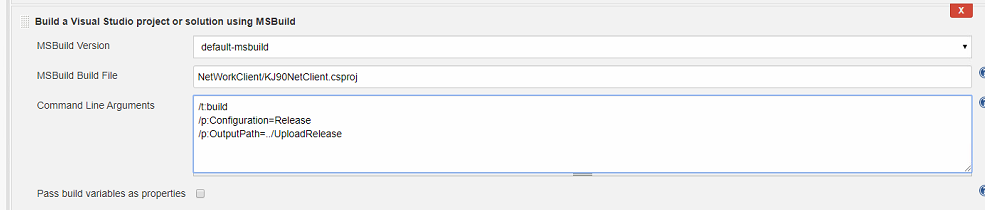
一、发布配置

  • 差异配置:编译内容
    • 编译目标NetWorkClient/KJ90NetClient.csproj
    • 编译命令
    /t:build
    /p:Configuration=Release  /p:OutputPath=../UploadRelease
    

image

  • 运行外部程序
    image

二、配置jenkins启动外部程序不报错

  • 通过参数配置
key: BUILD_ID
value: dontKillMe
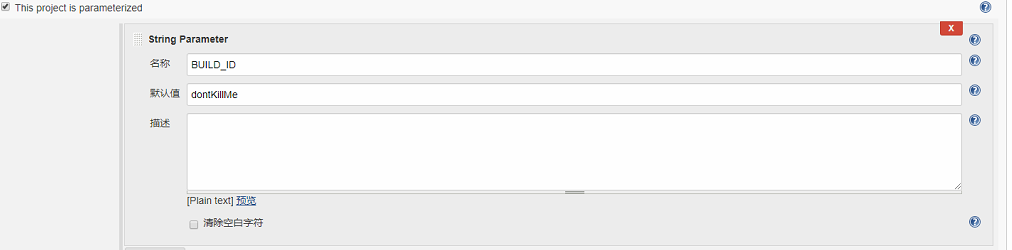
image

  • 设置全局变量配置
    Go to Jenkins-->Manage Jenkins-->Configure System Now under 'Global properties' section, under Environment variables, click on ADD button to add new Environment variable. Give Name= BUILD_ID and value='allow_to_run_as_daemon start_my_service' (without quote). Click on save button. And you are done.
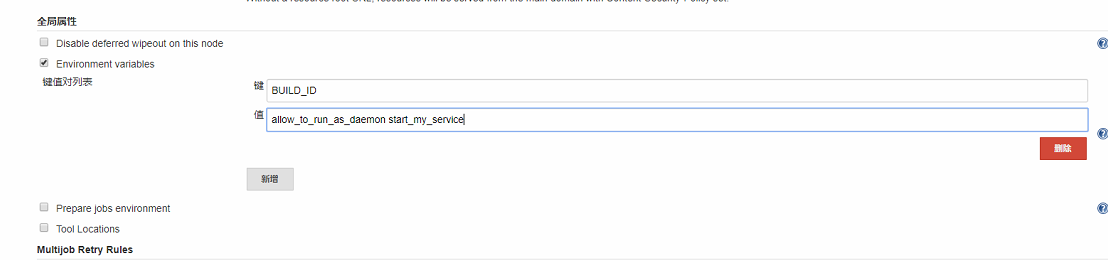
    image

1. 随笔为作者自己经验以及学习的总结;
2. 如本文对您有帮助请移步右下角,推荐本文,先谢谢各位看官,因为您的支持是我最大动力
3. 欢迎大家转载本文;

posted @ 2020-05-10 20:39  SamDragon  阅读(384)  评论(0)    收藏  举报