
惯性聚合 高效追踪和阅读你感兴趣的博客、新闻、科技资讯
阅读原文 在惯性聚合中打开

推荐订阅源

腾讯CDC
Schneier on Security
B
Blog RSS Feed
aimingoo的专栏
aimingoo的专栏
P
Proofpoint News Feed
A
About on SuperTechFans
Recorded Future
Recorded Future
Recent Announcements
Microsoft Security Blog
L
LangChain Blog
Hugging Face - Blog
Hugging Face - Blog
The GitHub Blog
The GitHub Blog
Google DeepMind News
T
Tailwind CSS Blog
Vercel News
Vercel News
H
Hackread – Cybersecurity News, Data Breaches, AI and More
MyScale Blog
MyScale Blog
V2EX - 技术
V2EX - 技术
N
Netflix TechBlog - Medium
F
Fortinet All Blogs
V
Visual Studio Blog
Martin Fowler
Martin Fowler
K
KPMG report finds enterprise disconnect between AI and its ROI | CIO
博客园 - Franky
freeCodeCamp Programming Tutorials: Python, JavaScript, Git & More
T
The Exploit Database - CXSecurity.com
F
Full Disclosure
Scott Helme
Scott Helme
H
Heimdal Security Blog
博客园 - 叶小钗
Google DeepMind News
Cyberwarzone
Cyberwarzone
Application and Cybersecurity Blog
V
Vulnerabilities – Threatpost
Blog — PlanetScale
Blog — PlanetScale
Security Latest
Security Latest
WordPress大学
WordPress大学
Cyber Security Advisories - MS-ISAC
T
Troy Hunt's Blog
S
SegmentFault 最新的问题
Forbes - Security
Forbes - Security
Jina AI
Jina AI
S
Securelist
小众软件
小众软件
Simon Willison's Weblog
J
Java Code Geeks
AWS News Blog
AWS News Blog
N
News and Events Feed by Topic
博客园 - 三生石上(FineUI控件)
量子位

博客园 - tatung zhang

全屏显示问题 sun发布lwuit1.4 深入理解 LWUIT 框架的 MVC lwuit控件关系模式图,Padding和Margin关系图 eclipse rcp 获取工程项目路径 eclipse content assist 代码提示功能失效解决办法 LWUIT 1.3 发布了 lwuit---调整滚动条灵敏度值 lwuit---更改字体大小 j2me获取手机IMEI保证软件信息安全解决方案 show一下最新项目的界面图 谈谈移动开发 lwuit ---一些细节疑难杂症整理笔记 lwuit-list 困扰我的列颜色改变 lwuit-tab与list配合使用 lwuit-List控件使用 lwuit控件布局定位 VS2005创建智能设备项目失败 wince嵌入式应用程序开发环境搭建
Eclipse RCP中添加第三方jar包的办法
tatung zhang · 2009-12-15 · via 博客园 - tatung zhang

今天做一个XML解析的DEMO,要用到 jdom.jar,添加后工程就编译出错了删除掉也还是一样的错误,郁闷了还一会。

现在把方法共享出来。

1、在工程中新建一个lib目录,将jdom.jar拷贝到那个目录底下。

2、打开plugin.xml选项卡中的build,你会看到最底下的Extra ClassPath Entries,如图:

 

3、仍然在plugin的Build页面上,左边的Binary Build下面把你程序的输出目录(bin)和你的jar所在的目录(lib)打勾,这样输出时候会包含你编译后的文件以及第三方库,如图:
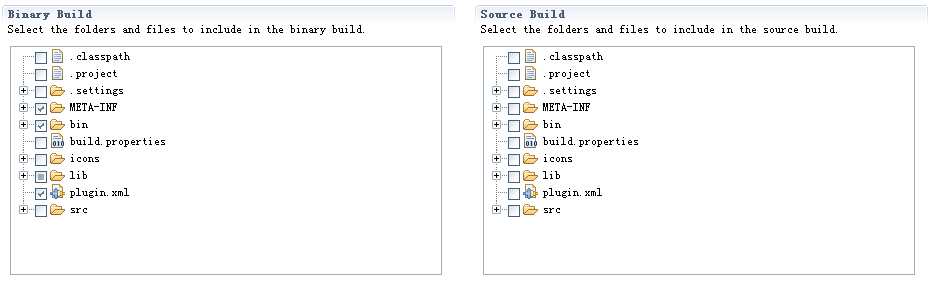
4、然后切换到plugin的Runtime页面,在右下角的Classpath里面把你程序的输出目录(bin)和你所有要包含的jar文件(lib/hello.jar)都加进去,这样就基本上完成了,如图: