惯性聚合 高效追踪和阅读你感兴趣的博客、新闻、科技资讯
阅读原文 在惯性聚合中打开

推荐订阅源

V
V2EX
博客园 - 叶小钗
Last Week in AI
Last Week in AI
Google DeepMind News
钛媒体:引领未来商业与生活新知
钛媒体:引领未来商业与生活新知
Microsoft Security Blog
腾讯CDC
P
Proofpoint News Feed
大猫的无限游戏
大猫的无限游戏
The Cloudflare Blog
aimingoo的专栏
aimingoo的专栏
月光博客
月光博客
量子位
A
About on SuperTechFans
Engineering at Meta
Engineering at Meta
Apple Machine Learning Research
Jina AI
Jina AI
博客园 - Franky
OSCHINA 社区最新新闻
OSCHINA 社区最新新闻
人人都是产品经理
人人都是产品经理
D
DataBreaches.Net
博客园_首页
Cyber Security Advisories - MS-ISAC
Stack Overflow Blog
Stack Overflow Blog

HelloDog

字节跳动和TikTok内推 nftables代替iptables的新一代防火墙配置指南 新加坡女佣申请中国签证 新加坡信用卡cashback和miles的使用心得 关于AI的基础知识和第三方AI应用 新加坡政府小学报名和学区房义工的选择分析 新加坡幼儿园和托儿所的报名准备经验分享 新加坡政府学校和国际学校的上学路径分析 新加坡聘请女佣的流程和注意事项 AdGuard过滤规则分享 新加坡宽带套餐选择推荐和路由器配置经验分享 MacBook从mac intel升级到apple silicon 使用GitHub和Hexo搭建免费静态Blog Git常用命令和Git团队使用规范指南 新加坡保险和理财规划 新加坡生娃和养娃的重要时间线记录 新加坡申请LTVP的流程介绍 MySQL使用mysqldump导出和导入数据常用命令 新加坡生小孩的医院和流程费用介绍
macOS使用iterm2启用rz与sz功能
wsgzao · 2024-10-03 · via HelloDog

前言

本文主要介绍macOS环境下使用iterm2的rz(上传)和sz(下载)功能的安装流程,某些时候这些小命令可以方便的代替scp绕过安全限制执行简单的上传和下载任务,同理SecureCRT和Xshell也可以启用rz和sz功能。

更新历史

2024年10月03日 - 更新M芯片配置变化
2021年11月18日 - 完善macOS lrzsz安装配置
2020年11月02日 - 初稿

阅读原文 - https://wsgzao.github.io/post/lrzsz/


lrzsz简介

lrzsz: free x/y/zmodem implementation

lrzsz is a unix communication package providing the XMODEM, YMODEM ZMODEM file transfer protocols. lrzsz is a heavily rehacked version of the last public domain release of Omen Technologies rzsz package, and is now free software and released under the GNU General Public Licence.

Features of lrzsz

  • very portable, automagically configured with GNU autoconf.
  • crash recovery.
  • up to 8KB block sizes (ZMODEM8K).
  • internationalized (using GNU gettext). German translation of the programs output exists.
  • far more secure than the original sources.
  • high performance. say `make vcheck-z’ and have a look at the BPS rate - i recently saw 1.4 MB per second transfering a large file through pipes (on a I586/133 system. Beat that!).
  • good blocksize calculation (tries to compute an optimal blocksize based on the number of errors occured).
  • It’s free software.

https://www.ohse.de/uwe/software/lrzsz.html

lrzsz原理

下载文件
在服务器上执行sz(Send by ZMODEM),先在终端上输出**B00000000000000,然后客户端在终端发送指令,表示拒绝,还是接收(接收的话,就在客户端运行rz指令与服务端交互)

上传文件
在服务器上执行rz(Receive by ZMODEM),先在终端上输出rz waiting to receive.**B0100000023be50,然后客户端发送指令,表示取消,还是上传(上传的话,在客户端运行sz命令与服务端交互)。

可以看到在上述流程中,对Terminal的要求就是,遇到特殊指令,触发对应的操作(执行本地命令)

由于macOS自带的Terminal.app不支持这个,所以网上大部分教程都是使用iTerm2

如果你已经升级到最新的apple silicon比如M1/M2/M3/…
brew安装lrzsz的位置是在 /opt/homebrew/

1
2
3
4
5
6
7
8
9
10
11
12
13
14
15
16
17
18
19
20
➜  ~ brew install lrzsz
==> Downloading https://formulae.brew.sh/api/formula.jws.json

==> Downloading https://formulae.brew.sh/api/cask.jws.json

==> Downloading https://ghcr.io/v2/homebrew/core/lrzsz/manifests/0.12.20_1

==> Fetching lrzsz
==> Downloading https://ghcr.io/v2/homebrew/core/lrzsz/blobs/sha256:427b498d1c8853fdcd90bc96572f5f622c7c17b229101382fa235aad

==> Pouring lrzsz--0.12.20_1.arm64_sonoma.bottle.tar.gz
🍺 /opt/homebrew/Cellar/lrzsz/0.12.20_1: 19 files, 660.0KB
==> Running `brew cleanup lrzsz`...
Disable this behaviour by setting HOMEBREW_NO_INSTALL_CLEANUP.
Hide these hints with HOMEBREW_NO_ENV_HINTS (see `man brew`).


ln -s /opt/homebrew/Cellar/lrzsz/0.12.20_1/bin/rz /usr/local/bin/rz
ln -s /opt/homebrew/Cellar/lrzsz/0.12.20_1/bin/sz /usr/local/bin/sz

安装lrzsz

1
2
3
4
5
6
brew install lrzsz

==> Downloading https://homebrew.bintray.com/bottles/lrzsz-0.12.20_1.catalina.bottle.tar.gz
######################################################################## 100.0%
==> Pouring lrzsz-0.12.20_1.catalina.bottle.tar.gz
🍺 /usr/local/Cellar/lrzsz/0.12.20_1: 18 files, 473.9KB
  1. Install lrzsz on OSX: brew install lrzsz
  2. Save the iterm2-send-zmodem.sh and iterm2-recv-zmodem.sh scripts in /usr/local/bin/
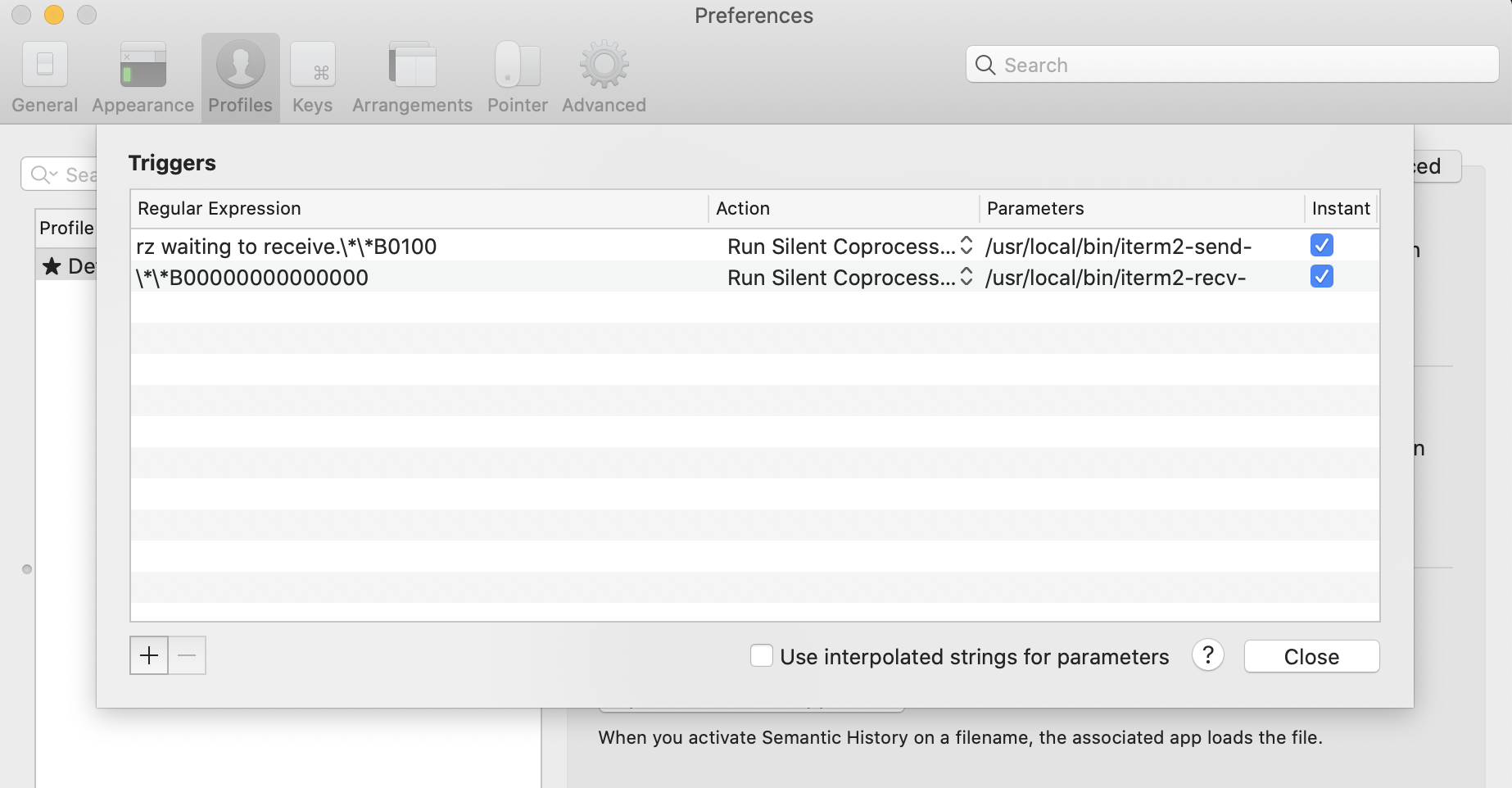
  3. Set up Triggers in iTerm 2 like so:
    How to Create a Trigger
1
2
3
4
5
6
7
8
9
Regular expression: rz waiting to receive.\*\*B0100
Action: Run Silent Coprocess
Parameters: /usr/local/bin/iterm2-send-zmodem.sh
Instant: checked

Regular expression: \*\*B00000000000000
Action: Run Silent Coprocess
Parameters: /usr/local/bin/iterm2-recv-zmodem.sh
Instant: checked

To send a file to a remote machine:

  1. Type rz on the remote machine
  2. Select the file(s) on the local machine to send
  3. Wait for the coprocess indicator to disappear

The receive a file from a remote machine

  1. Type sz filename1 filename2 … filenameN on the remote machine
  2. Select the folder to receive to on the local machine
  3. Wait for the coprocess indicator to disappear

安装执行脚本

iterm2-send-zmodem.shiterm2-recv-zmodem.sh保存到/usr/local/bin目录下。

iterm2-send-zmodem.sh

1
2
3
4
5
6
7
8
9
10
11
12
13
14
15
16
17
18
19
20
21
22
23
24
25
#!/bin/bash


osascript -e 'tell application "iTerm2" to version' > /dev/null 2>&1 && NAME=iTerm2 || NAME=iTerm
if [[ $NAME = "iTerm" ]]; then
FILE=$(osascript -e 'tell application "iTerm" to activate' -e 'tell application "iTerm" to set thefile to choose file with prompt "Choose a file to send"' -e "do shell script (\"echo \"&(quoted form of POSIX path of thefile as Unicode text)&\"\")")
else
FILE=$(osascript -e 'tell application "iTerm2" to activate' -e 'tell application "iTerm2" to set thefile to choose file with prompt "Choose a file to send"' -e "do shell script (\"echo \"&(quoted form of POSIX path of thefile as Unicode text)&\"\")")
fi

if [[ $FILE = "" ]]; then
echo Cancelled.

echo -e \\x18\\x18\\x18\\x18\\x18
sleep 1
echo
echo \
else
/usr/local/bin/sz "$FILE" --escape --binary --bufsize 4096
sleep 1
echo
echo \
fi

iterm2-recv-zmodem.sh

1
2
3
4
5
6
7
8
9
10
11
12
13
14
15
16
17
18
19
20
21
22
23
24
25
26
27
28
#!/bin/bash


osascript -e 'tell application "iTerm2" to version' > /dev/null 2>&1 && NAME=iTerm2 || NAME=iTerm
if [[ $NAME = "iTerm" ]]; then
FILE=$(osascript -e 'tell application "iTerm" to activate' -e 'tell application "iTerm" to set thefile to choose folder with prompt "Choose a folder to place received files in"' -e "do shell script (\"echo \"&(quoted form of POSIX path of thefile as Unicode text)&\"\")")
else
FILE=$(osascript -e 'tell application "iTerm2" to activate' -e 'tell application "iTerm2" to set thefile to choose folder with prompt "Choose a folder to place received files in"' -e "do shell script (\"echo \"&(quoted form of POSIX path of thefile as Unicode text)&\"\")")
fi

if [[ $FILE = "" ]]; then
echo Cancelled.

echo -e \\x18\\x18\\x18\\x18\\x18
sleep 1
echo
echo \
else
cd "$FILE"
/usr/local/bin/rz --rename --escape --binary --bufsize 4096
sleep 1
echo
echo
echo \
fi
1
2
3
4
5
6
7
8

cd /usr/local/bin
wget https://raw.githubusercontent.com/RobberPhex/iterm2-zmodem/master/iterm2-recv-zmodem.sh
wget https://raw.githubusercontent.com/RobberPhex/iterm2-zmodem/master/iterm2-send-zmodem.sh


chmod 777 /usr/local/bin/iterm2-*

设置Iterm2的Tirgger特性

配置好配置文件之后,开始对iTerm2进行配置

点击 iTerm2 的设置界面 Perference-> Profiles -> Default -> Advanced -> Triggers 的 Edit 按钮,加入以下配置

添加两条trigger,分别设置 Regular expression,Action,Parameters,Instant如下:

1
2
3
4
5
6
7
8
9
Regular expression: rz waiting to receive.\*\*B0100
Action: Run Silent Coprocess
Parameters: /usr/local/bin/iterm2-send-zmodem.sh
Instant: checked

Regular expression: \*\*B00000000000000
Action: Run Silent Coprocess
Parameters: /usr/local/bin/iterm2-recv-zmodem.sh
Instant: checked

使用rz和sz

前提是客户端也要安装lrzsz

  • rz 上传功能
    • 在bash中,也就是iTerm2终端输入rz 就会弹出文件选择框,选择文件 choose 就开始上传,会上传到当前目录
    • rz中的r意为received(接收),告诉客户端,我(服务器)要接收文件 received by cilent,就等同于客户端在上传。
  • sz 下载功能
    • sz fileName(你要下载的文件的名字) 回车,会弹出窗体 我们选择要保存的地方即可。
    • sz中的s意为send(发送),告诉客户端,我(服务器)要发送文件 send to cilent,就等同于客户端在下载。
1
2
3
4
5
6
7
8
9
10
11
12
13
14
15
16
17
18
19
20
21
22
23
24
sz用法:

下载一个文件
sz filename

下载多个文件
sz filename1 filename2

下载dir目录下的所有文件,不包含dir下的文件夹
sz dir/*

rz用法:

输入rz回车后,会出现文件选择对话框,选择需要上传文件,一次可以指定多个文件,上传到服务器的路径为当前执行rz命令的目录。


-b 以二进制方式,默认为文本方式。(Binary (tell it like it is) file transfer override.)

-e 对所有控制字符转义。(Force sender to escape all control characters; normally XON, XOFF, DLE, CR-@-CR, and Ctrl-X are escaped.)

果要保证上传的文件内容在服务器端保存之后与原始文件一致,最好同时设置这两个标志,如下所示方式使用:

rz -be

备注说明

  1. rz与sz只适合小的文件传输,大文件还是使用Filezilla与xftp等工具进行传输;
  2. 只能传输文件,而不能传输文件夹;
  3. 不是所有工具都支持rz与sz,必须支持ZModem协议才行,例如putty不能使用rz与sz。

参考文章

macOS下使用ZMODEM协议上传/下载文件

ZModem integration for iTerm 2

通过SecureCRT的rz、sz和sftp实现文件的上传和下载