




惯性聚合 高效追踪和阅读你感兴趣的博客、新闻、科技资讯
阅读原文 在惯性聚合中打开

推荐订阅源

GbyAI
GbyAI
Blog — PlanetScale
Blog — PlanetScale
The GitHub Blog
The GitHub Blog
Microsoft Security Blog
I
InfoQ
A
About on SuperTechFans
T
The Blog of Author Tim Ferriss
D
DataBreaches.Net
L
LangChain Blog
F
Fortinet All Blogs
C
Check Point Blog
Google DeepMind News
云风的 BLOG
云风的 BLOG
Engineering at Meta
Engineering at Meta
Cyber Security Advisories - MS-ISAC
H
Help Net Security
J
Java Code Geeks
月光博客
月光博客
H
Hackread – Cybersecurity News, Data Breaches, AI and More
IT之家
IT之家
aimingoo的专栏
aimingoo的专栏
小众软件
小众软件
宝玉的分享
宝玉的分享
Jina AI
Jina AI

博客园 - 马伟

通过xrdp实现远程桌面连接Windows Azure linux虚拟机 使用VNC远程连接Windows Azure Linux虚拟机 设置Windows Azure Linux虚拟机中的root账户 将SQL Azure数据库备份到本地SQL Server 2012 asp.net MVC3 “System.Web.Mvc.ModelClientValidationRule”问题 Session的生命周期 在ASP.NET中以编程方式设置母版页 ASP.NET自定义输出缓存提供程序 ASP.NET缓存依赖--自定义缓存依赖 ASP.NET缓存依赖--SQL Server 2005与SQL Server 2008缓存依赖 QueryExtender控件之CustomExpression QueryExtender控件之OrderByExpression QueryExtender控件之PropertyExpression QueryExtender控件之RangeExpression QueryExtender控件之SearchExpession <<易学C#>>全书目录 用C#编程合并多个WORD文档 fckeditor编辑器上传文件出现invalid Request问题解决 荣获2009年“微软最有影响力开发者”
使用Windows Azure PowerShell远程管理Windows Azure虚拟机
马伟 · 2014-07-10 · via 博客园 - 马伟

2014-07-10 11:23  马伟  阅读(845)  评论()    收藏  举报

对于Windows Azure,如果你还在使用windowsazure.com门户来管理虚拟机,那就显得不怎么高上大了。Windows Azure PowerShell 是一个功能强大的脚本环境,可用于在 Windows Azure 中控制和自动执行工作负荷的部署和管理。

  安  装  

通过Microsoft Web Platform Installer一键搞定安装。

  登录Azure账户  

启动安装好的Windows Azure PowerShell,使用“Add-AzureAccount” 命令来登录你的Windows Azure账户,如下图:
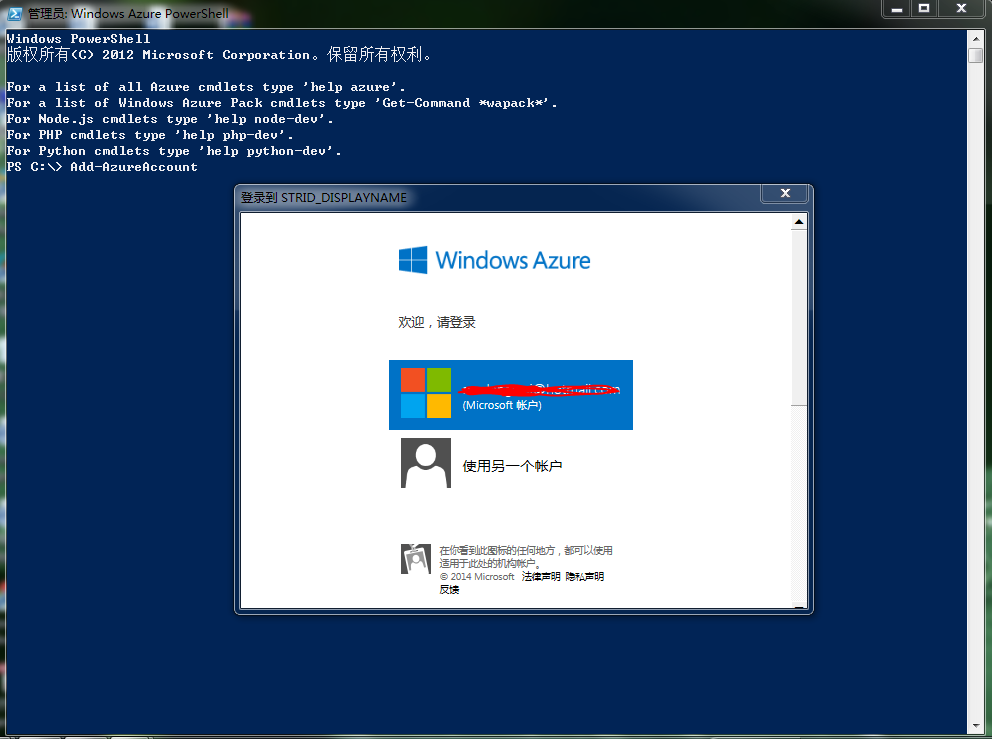
 如果你有多个订阅,可以通过“Select-AzureSubscription”命令进行设置,如下图:

启动、停止以及重新启动Windows Azure虚拟机

Windows Azure PowerShell Cmdlet 支持使用 Restart-AzureVM、Stop-AzureVM 和 Start-AzureVM 命令执行重新启动、停止和启动虚拟机操作,其格式如下:

Restart-AzureVM -ServiceName $cloudSvcName -Name $vmname 

Stop-AzureVM -ServiceName $cloudSvcName -Name $vmname 

Start-AzureVM -ServiceName $cloudSvcName -Name $vmname

其中,“-ServiceName $cloudSvcName”表示云服务的名称,“-Name $vmname” 虚拟机的名称。例如,使用“Stop-AzureVM ”命令来关闭一台虚拟机,如下图:

使用“Start-AzureVM” 命令来启动一台虚拟机,如下图:

其他命令,请查看相关帮助。