惯性聚合 高效追踪和阅读你感兴趣的博客、新闻、科技资讯
阅读原文 在惯性聚合中打开

推荐订阅源

www.infosecurity-magazine.com
Vercel News
Vercel News
G
Google Developers Blog
MyScale Blog
MyScale Blog
The Register - Security
I
InfoQ
Blog — PlanetScale
Blog — PlanetScale
D
DataBreaches.Net
Microsoft Security Blog
V
Visual Studio Blog
V2EX - 技术
V2EX - 技术
F
Fortinet All Blogs
博客园_首页
S
Secure Thoughts
GbyAI
GbyAI
S
Security Affairs
N
News | PayPal Newsroom
Forbes - Security
Forbes - Security
Recent Announcements
H
Hackread – Cybersecurity News, Data Breaches, AI and More
Security Archives - TechRepublic
宝玉的分享
宝玉的分享
Hugging Face - Blog
Hugging Face - Blog
Hacker News - Newest:
Hacker News - Newest: "LLM"
H
Heimdal Security Blog
A
About on SuperTechFans
P
Proofpoint News Feed
H
Help Net Security
Application and Cybersecurity Blog
Exploit-DB.com RSS Feed
Y
Y Combinator Blog
L
LINUX DO - 最新话题
Apple Machine Learning Research
L
LangChain Blog
博客园 - 叶小钗
A
Arctic Wolf
Cisco Talos Blog
Cisco Talos Blog
T
The Exploit Database - CXSecurity.com
人人都是产品经理
人人都是产品经理
T
Threat Research - Cisco Blogs
N
News and Events Feed by Topic
Security Latest
Security Latest
The Hacker News
The Hacker News
T
Tor Project blog
O
OpenAI News
博客园 - 三生石上(FineUI控件)
PCI Perspectives
PCI Perspectives
量子位
大猫的无限游戏
大猫的无限游戏
Stack Overflow Blog
Stack Overflow Blog

夜行人

回家路上 第一期的直播演示项目 震动检测器 正能量 在线参观CodeLab Neverland 发布 CodeLab Adapter 3.3.1 DynamicTable 之 纸糊方向盘 CodeLab DynamicTable: 一个可实施的技术方案 CodeLab Insight 发布 Alpha 版 情人节 Home Assistant 周报 && IoT 周报 (02) Joplin: 关注隐私的 Evernote 开源替代软件 浏览器的未来与 Web 传感器 Home Assistant 周报 && IoT 周报 (01) 百宝箱(01) 论自由 介绍 WebThings Home Assistant 周报 && iot 周报 (00) 百宝箱(00) 毛姆读书心得 传世之作 周末徒步 CodeLab Adapter ❤️ Jupyter/Python 航班 躲雨 夏令营途中 [译]思想--作为一种技术 The future of coding 美国之行 三门问题的程序模拟 从Python转向Pharo https://blog.just4fun.site/post/iot/iot-open-source-projects/ Python异步编程笔记 https://blog.just4fun.site/post/iot/iot-open-source-hardware-community/ 万物积木化开发者社区 CodeLab ❤️ Blender Scratch3技术分析之云变量 API(第7篇) [译]对管道(Pipes)的偏爱 [译]提出正确的问题比得到正确答案更重要 蓝牙设备与Scratch3.0 创建你的第一个Scratch3.0 Extension Scratch3技术分析之项目内部数据(第6篇) Scratch3技术分析之社区 API(第5篇) Scratch3技术分析之User API(第4篇) Scratch3技术分析之项目主页API(第3篇) Scratch3技术分析之静态资源API(第2篇) Scratch3.0、micro:bit与Windows7 https://blog.just4fun.site/post/iot/zerynth-vs-micropython/ 核聚变、方所与半宅空间 可视化编程为何是个糟糕的主意 codelab.club周末聚会 关于codelab.club '下一件大事'是一个房间 Hungry Robot - Eat everything 编程作为一种思考方式 今日简史 史蒂夫·乔布斯传 罗素自选文集 https://blog.just4fun.site/post/edx/tianjin-scratch-ai/ https://blog.just4fun.site/post/edx/richie-cms-openedx/ 徒步武功山 WebUSB与micro:bit 积木化编程与3D场景 夜宿武功山顶 scratch3-adapter接入优必选Alpha系列机器人 https://blog.just4fun.site/post/edx/video-migration-note/ scratch3-adapter重构笔记 https://blog.just4fun.site/post/edx/edx-community-members/ 两种硬件编程风格的比较 使用micro:bit自制PPT翻页笔 柏拉图对话集 scratch3.0 + micro:bit 七月电影放映计划 非营利组织的管理 Screenly--用树莓派让任何屏幕变为可编程的数字标牌 以最佳实践开始你的Django项目 micro:bit与事件驱动 为Scratch3.0设计的插件系统(上篇) OCR应用一例 近两年读过的一些好书 blockly开发之使用python驱动浏览器中的turtle(2) 牛顿新传 文学理论入门 逻辑的引擎 人生的意义 blockly开发之生成并运行js代码(1) blockly开发之hello world(0) micro:bit使用笔记 神器之Termux https://blog.just4fun.site/post/iot/micropython-notes/ Cozmo what is this Scratch的前世今生 下段旅程 我行在远方 爆裂 途中杂记 https://blog.just4fun.site/post/edx/open-edx-startup/ cozmo系列之入门 - 有性格且可编程的机器人 PaperWeekly开发笔记 创业二三事
为mpv写一个简单的图形界面
2016-07-31 · via 夜行人

文章目录

缘起

几个月前给朋友推荐过mpv,朋友非技术人员,而mpv只提供命令行工具,没有图形界面,周末下午逛github看到Gooey,觉得简单有趣,决定用它给mpv写一个简单的图形界面

需求

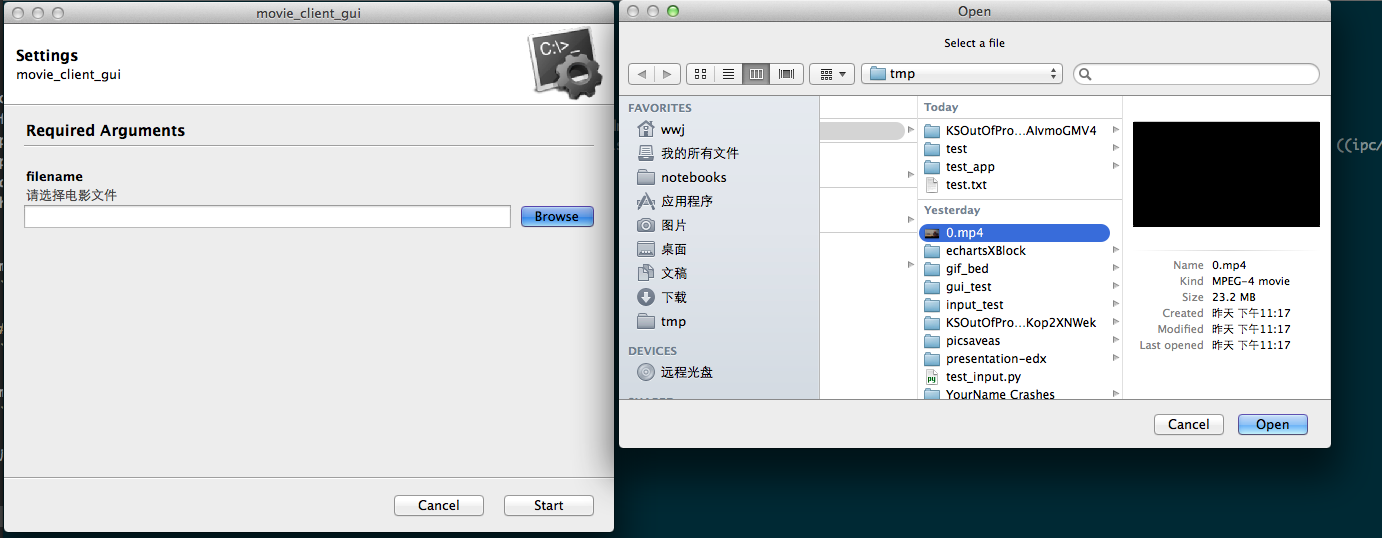
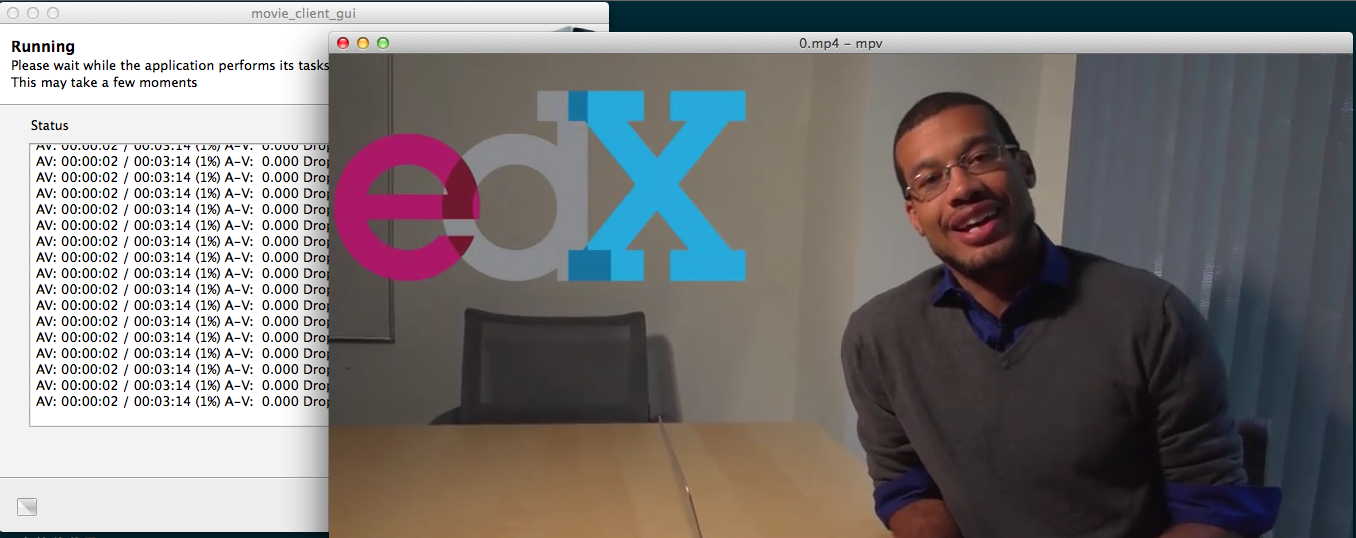
需求很简单,通过点击桌面图标,之后选择电影文件,就能播放,而不需要使用图形界面,这应该是大多非技术用户习惯的操作。

一些介绍

mpv

mac下常见播放器有QuickTime,MplayerX,VLC。我之前用MplayerX居多,mpv 是 Mplayer 和 Mplayer2 项目的分支,目前活跃的开发者都转向开发 mpv。mpv基本可以满足一般用户的需要

mac下不同播放器的比较参考这里

Gooey

Turn (almost) any Python command line program into a full GUI application with one line

Gooey能轻易地把python命令行工具变为GUI应用,通过极少的代码

安装

mpv

1
2
3
brew tap mpv-player/mpv
brew install mpv
which mpv # /usr/local/bin/mpv

使用:mpv /your/folder/yourfile.mp4

mpv在mac目前没有图形界面

Gooey

pip install Gooey //需要在sudo pip下安装,wxpython要求比较多,virtuanenv下比较麻烦,具体可以参考wxPythonVirtualenvOnMac

依赖wxpython,安装wxpython

1
2
3
brew install wxpython
cd /Library/Python/2.7/site-packages    
ln -s /usr/local/Cellar/wxpython/3.0.2.0/lib/python2.7/site-packages/wx-3.0-osx_cocoa/wx/ wx

上源码

cat mpv_gui.py

 1
 2
 3
 4
 5
 6
 7
 8
 9
10
11
12
13
14
15
16
17
18
19
20
21
22
23
#!/usr/bin/env python
# encoding: utf-8
#import argparse
from gooey import Gooey, GooeyParser
import subprocess
import sys

def handle(args):
    filename = args.filename
    # 播放,调用系统服务(mpv)
    mpv = "/usr/local/bin/mpv"
    # todo:变为独立进程
    subprocess.Popen([mpv,filename])

@Gooey(language="chinese")
def main():
  parser = GooeyParser(description=u'mpv_gui')
  parser.add_argument('filename', help=u"请选择电影文件", widget='FileChooser')
  args = parser.parse_args()
  handle(args)

if __name__ == '__main__':
  main()

点击执行

1
2
mv mpv_gui.py mpv_gui
chmod +x mpv_gui

之后点击mpv_gui文件即可选择播放电影

如果你想把这个工具打包成无依赖的系统软件,可以试试pyinstaller

todo

Gooey安装不方便,文件选择用tkinter的tkFileDialog就好了

1
2
3
4
5
6
from Tkinter import Tk
from tkFileDialog import askopenfilename

Tk().withdraw() # we don't want a full GUI, so keep the root window from appearing
filename = askopenfilename() # show an "Open" dialog box and return the path to the selected file , 在命令行下层?
print(filename)

后记

后来发现可以直接安装mpv.app,之后绑定格式和播放工具 (参考 全能高效的播放器 mpv

1
2
brew install mpv --with-bundle
brew linkapps mpv

文章作者 种瓜

上次更新 2016-07-31