





WCF 支持两种消息处理模式:
缓冲模式:WCF处理消息的默认方式,在缓冲模式下,整个消息都会保存在内存中,知道发送或者接收完成。此模式作为默认方式,在某些情况下是必需的,如可靠消息传送和数字签名,但存在的缺陷是如果消息数据过大,缓冲占用大量系统内存,同时消耗其他系统资源。
流模式:使用System.IO.Stream 来发传送消息,流模式通常在绑定或传输信道上打开,在绑定的配置上设置transferMode属性来控制流模式的粒度。
transferMode的属性值包括:Buffer、Streamed、StreamedResponse、StreamedRequest;
Demo
Contract:
    [ServiceContract]
    public interface IFileDownload
    {
        [OperationContract]
        Stream GetFileStream(string fileName);
    }
Service:
    public class FileDownloadService : IFileDownload, IDisposable
    {
        private FileStream fStream = null;

        public Stream GetFileStream(string fileName)
        {
            string filePath = AppDomain.CurrentDomain.BaseDirectory + fileName;
            if (!File.Exists(filePath))
            {
                throw new ArgumentException(string.Format("无法找到文件名为{0}的文件", fileName));
            }

            fStream = new FileStream(filePath, FileMode.Open, FileAccess.Read, FileShare.Read);
            return fStream;
        }

        public void Dispose()
        {
            Dispose(true);
        }

        protected virtual void Dispose(bool disposing)
        {
            //被客户直接调用的,那么托管的,和非托管的资源都可以释放  if (disposing)
            {
                // 释放 托管资源  fStream.Dispose();
                //垃圾回收器从Finalization队列中清除自己,从而阻止垃圾回收器调用Finalize方法.          GC.SuppressFinalize(this);
            }
        }
    }
Config
<service name="JerryShi.EssentialWCF.FileDownloadService"  behaviorConfiguration="StockServiceBehavior">
        <host>
          <baseAddresses>
            <add baseAddress="net.tcp://localhost:809/FileDownloadService"/>
          </baseAddresses>
        </host>
        <endpoint address="" binding="netTcpBinding"  contract="JerryShi.EssentialWCF.IFileDownload" bindingConfiguration="EnableStreamingOnNetTcp" />
        <endpoint address="mex" binding="mexTcpBinding" contract="IMetadataExchange" />
      </service>
    </services>
    <bindings>
      <netTcpBinding>
        <binding name="EnableStreamingOnNetTcp" transferMode="Streamed" />
      </netTcpBinding>
    </bindings>
说明
运行过程中出现一次异常,异常如下:
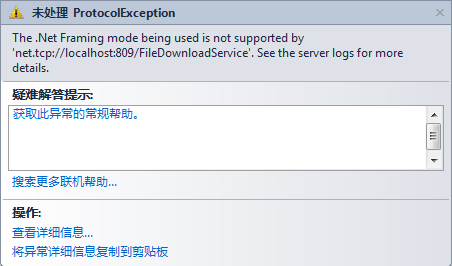
此异常由于Client端配置与Server端配置不匹配导致的
<binding name="NetTcpBinding_IFileDownload" closeTimeout="00:01:00"
                   openTimeout="00:01:00" receiveTimeout="00:10:00" sendTimeout="00:01:00"
                   transactionFlow="false" transferMode="Streamed" transactionProtocol="OleTransactions"
                   hostNameComparisonMode="StrongWildcard" listenBacklog="10"
                   maxBufferPoolSize="524288" maxBufferSize="65536" maxConnections="10"
                   maxReceivedMessageSize="65536">
          <readerQuotas maxDepth="32" maxStringContentLength="8192" maxArrayLength="16384"
              maxBytesPerRead="4096" maxNameTableCharCount="16384" />
          <reliableSession ordered="true" inactivityTimeout="00:10:00"
              enabled="false" />
          <security mode="Transport">
            <transport clientCredentialType="Windows" protectionLevel="EncryptAndSign" />
            <message clientCredentialType="Windows" />
          </security>
        </binding>
此内容由惯性聚合(RSS阅读器)自动聚合整理,仅供阅读参考。 原文来自 — 版权归原作者所有。