惯性聚合 高效追踪和阅读你感兴趣的博客、新闻、科技资讯
阅读原文 在惯性聚合中打开

推荐订阅源

freeCodeCamp Programming Tutorials: Python, JavaScript, Git & More
腾讯CDC
cs.AI updates on arXiv.org
L
LINUX DO - 热门话题
D
Darknet – Hacking Tools, Hacker News & Cyber Security
Project Zero
Project Zero
V
Vulnerabilities – Threatpost
Cisco Talos Blog
Cisco Talos Blog
P
Palo Alto Networks Blog
C
Cisco Blogs
A
Arctic Wolf
月光博客
月光博客
The GitHub Blog
The GitHub Blog
T
The Blog of Author Tim Ferriss
量子位
小众软件
小众软件
Latest news
Latest news
OSCHINA 社区最新新闻
OSCHINA 社区最新新闻
Microsoft Security Blog
T
The Exploit Database - CXSecurity.com
Security Latest
Security Latest
N
Netflix TechBlog - Medium
K
Kaspersky official blog
人人都是产品经理
人人都是产品经理
Cyber Security Advisories - MS-ISAC
博客园_首页
Y
Y Combinator Blog
P
Proofpoint News Feed
H
Hackread – Cybersecurity News, Data Breaches, AI and More
M
MIT News - Artificial intelligence
T
Threat Research - Cisco Blogs
S
Schneier on Security
D
Docker
Scott Helme
Scott Helme
MyScale Blog
MyScale Blog
Spread Privacy
Spread Privacy
cs.CL updates on arXiv.org
Threat Intelligence Blog | Flashpoint
GbyAI
GbyAI
有赞技术团队
有赞技术团队
Google DeepMind News
The Hacker News
The Hacker News
H
Help Net Security
Simon Willison's Weblog
J
Java Code Geeks
C
Cyber Attacks, Cyber Crime and Cyber Security
T
Tenable Blog
B
Blog
Know Your Adversary
Know Your Adversary
IT之家
IT之家

博客园 - 笑傲江湖

用户中心 - 博客园 .NET 定时执行写日志任务解决方案(Timer & Quartz.Net) 用户中心 - 博客园 任意类型转换成json ASP.net中动态加载控件时一些问题的总结 图片等比例显示 用select做下拉式友情链接及jquery改写 - 笑傲江湖 - 博客园 一个商城的购车相关代码 M| SQL 导入导出的时候数据库表的主键和自动编号丢失 怎么办 .Net通用分页类 存储过程分页 鼠标经过时改变背景颜色 - 笑傲江湖 - 博客园 GridView、Repeater等数据控件列数字、货币和日期的显示格式 - 笑傲江湖 - 博客园 【JQuery】鼠标经过表格行变色 - 笑傲江湖 - 博客园 ASP实现长文章自动分页的函数代码 - 笑傲江湖 - 博客园 JQuery图片大小自适应 - 笑傲江湖 - 博客园 Visual Studio小技巧:复制代码时,保留原ID eWebEditor编辑器 IE8.0兼容 一个简单的XML的操纵类 asp.net日期格式
客户端使用自定义代理类访问WCF服务
笑傲江湖 · 2013-06-20 · via 博客园 - 笑傲江湖

      通常在客户端访问WCF服务时,都需要添加服务引用,然后在客户端app.config或web.config文件中产生WCF服务的客户端配置信息。若是每添加一个服务都是这样做,这样势必会将比较麻烦,能否简单在app.config或web.config文件增加WCF服务地址,然后直接通过此地址访问WCF服务呢?可以,那就是通过自定义客户端代理类来实现。本文是通过继承ClientBase<T>类实现的自定义客户端代理类,来实现同过简单在app.config或web.config文件增加wcf服务地,然后直接通过此地址访问WCF服务。

      以下以一个简单的计算器WCF服务为例:

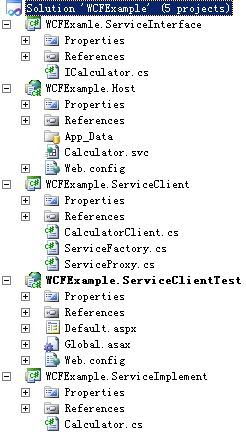
     解决方案项目目录结构:


   其中WCFExample.ServiceInterface项目是WCF服务接口、WCFExample.ServiceImplement项目是WCF服务实现、WCFExample.Host项目是服务宿主、WCFExample.ServiceClient项目自定义WCF服务客户端代理、WCFExample.ServiceClientTest项目是客户端测试

  WCF服务接口定义

    [ServiceContract]
    public interface ICalculator
    {
        [OperationContract]
        decimal Add(decimal a, decimal b);
    }

  WCF服务接口实现

   public class Calculator : ICalculator
    {
        public decimal Add(decimal a, decimal b)
        {
            return a + b;
        }
    }

  WCF服务客户端自定义代理类

    internal class CalculatorClient : ClientBase<ICalculator>,ICalculator
    {
        public CalculatorClient(Binding binding, EndpointAddress remoteAddress):base(binding,remoteAddress)
        {
        }

        public  decimal Add(decimal a,decimal b)
        {
           return base.Channel.Add(a, b);
        }
    }

   服务创建工厂

internal class ServiceFactory
    {
        public ICalculator GetCalculatorClient(string remotingAddress)
        {
            if(string.IsNullOrEmpty(remotingAddress))
            {
                return null;
            }
            try
            {
                return new CalculatorClient(this.GetInitBinding(), new EndpointAddress(remotingAddress));
            }
            catch
            {
                return null;
            }
        }

        public ICalculator GetCalculatorClient(string remotingAddress, Binding binding)
        {
            if (string.IsNullOrEmpty(remotingAddress))
            {
                return null;
            }
            try
            {
                return new CalculatorClient(binding, new EndpointAddress(remotingAddress));
            }
            catch
            {
                return null;
            }
        }

        private BasicHttpBinding GetInitBinding()
        {
            BasicHttpBinding binding = new BasicHttpBinding();
            binding.MaxBufferSize = 0x27100000;
            binding.MaxReceivedMessageSize = 0x27100000L;
            binding.MaxBufferPoolSize = 0x138800000L;
            XmlDictionaryReaderQuotas quotas = new XmlDictionaryReaderQuotas();
            quotas.MaxStringContentLength = 0x4e20000;
            binding.ReaderQuotas = quotas;
            return binding;
        }
    }

    对外服务代理类

public class ServiceProxy
    {
        private ICalculator m_ICalculator;
        public ServiceProxy(string remotingAddress)
        {
            m_ICalculator = new ServiceFactory().GetCalculatorClient(remotingAddress);
        }

        public ServiceProxy(string remotingAddress,Binding binding)
        {
            m_ICalculator = new ServiceFactory().GetCalculatorClient(remotingAddress, binding);
        }

        public decimal Add(decimal a,decimal b)
        {
            return m_ICalculator.Add(a, b);
        }
    }

   客户端web.config增加服务地址

<appSettings>
  <add key="WCFAddress" value="http://wcf.test.com/Calculator.svc%22/>
 </appSettings>

  客户端调用

   decimal a = 10;
   decimal b = 20;
   string url = System.Configuration.ConfigurationManager.AppSettings["WCFAddress"];
   ServiceProxy serviceProxy = new ServiceProxy(url);
   Response.Write(serviceProxy.Add(a,b));

  项目下载:https://files.cnblogs.com/binny1983/WCFExample.rar