惯性聚合 高效追踪和阅读你感兴趣的博客、新闻、科技资讯
阅读原文 在惯性聚合中打开

推荐订阅源

D
Docker
U
Unit 42
Google DeepMind News
B
Blog RSS Feed
S
SegmentFault 最新的问题
阮一峰的网络日志
阮一峰的网络日志
雷峰网
雷峰网
Microsoft Security Blog
爱范儿
爱范儿
Cyber Security Advisories - MS-ISAC
博客园_首页
Apple Machine Learning Research
罗磊的独立博客
GbyAI
GbyAI
Stack Overflow Blog
Stack Overflow Blog
Martin Fowler
Martin Fowler
宝玉的分享
宝玉的分享
L
LangChain Blog
Engineering at Meta
Engineering at Meta
量子位
有赞技术团队
有赞技术团队
博客园 - 【当耐特】
A
About on SuperTechFans
Y
Y Combinator Blog

博客园 - 生鱼片

Gitlab安装过程 SharePoint 2013即SharePoint 15的一些新特性 关于虚机克隆模板导致无法添加域用户的问题 http header Content-type SharePoint 2010 文档库中直接打开文档 使用SymbolResolver在Activity内访问宿主环境信息 增加一个Export to Spreadsheet的链接 WF4:自定义跟踪参考者 WF4:ETW跟踪参与者 WF4集合Collection相关活动用法 SharePoint 2010 BI(2):使用Visio Service 微软WebMatrix介绍 使用Sharepoint 2007中的webservice操作列表 - 生鱼片 - 博客园 SharePoint中CAML使用的一些总结 使用SharePoint Designer 2010 创建 外部内容类型 WF4:同步执行工作流 - 生鱼片 - 博客园 SharePoint 2010中托管元数据 SharePoint 2010中的客户端模型 SharePoint 2010中的Content Query WebPart
SharePoint 2010 BI (1):Chart WebPart
生鱼片 · 2011-01-17 · via 博客园 - 生鱼片

Sharepoint 2010增加很多BI的特性,Chart WebPart功能和asp.net的中chart控件基本一样,可以通过使用基于 Web 的配置向 SharePoint 网站添加丰富的图表,将图表连接到各种来源的数据,例如 SharePoint 列表、外部列表、业务数据服务、Excel Services 和其他 Web 部件。我们简单看下

1. 准备数据

Chart Web Part的数据源可以有四种形式:Web PartListBusiness Data CatalogExcel Services 我们以List为例,创建一个列表并录入一些数据,如下:
clip_image002

2. 绑定数据

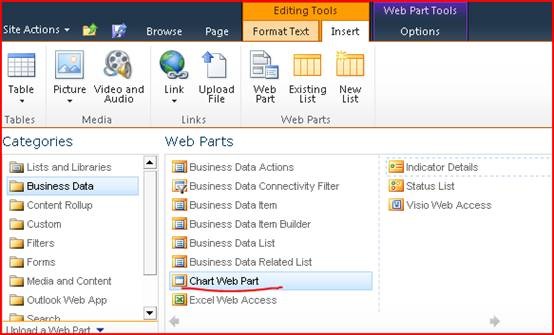
在页面中插入Chart Web Part

clip_image004

点击Data & Appearance

clip_image006

Customize Your Chart可以用step的方式来设计chart web part的各种外观和属性,Connect Chart To Data来设置chart的数据源:

clip_image008

可以从下面四种中提供一种数据源,我们使用的List,选择Connect to a List
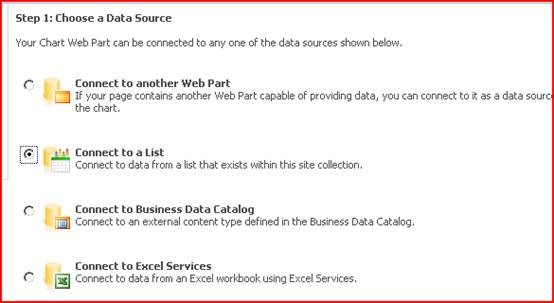
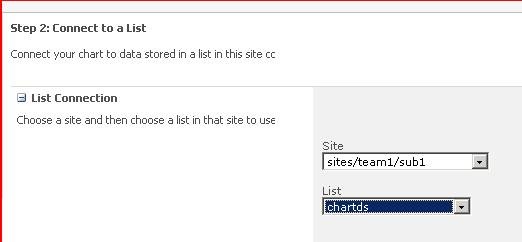
clip_image010

设置要选择的List

clip_image012

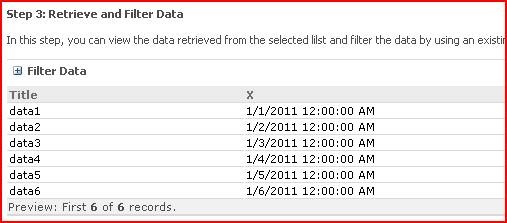
可以用过滤一些数据

clip_image014

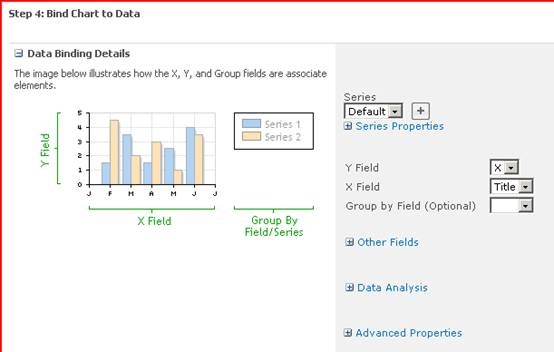
设置图表的X,Y周分别对应哪些栏

clip_image016

3.下面是Customize Your Chart对应的Step

clip_image018

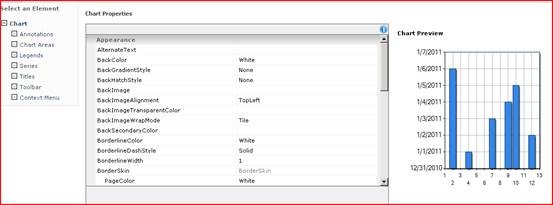
4.下图是这个Chart的详细属性设置包括颜色、字体、大小等等

clip_image020