










安装步骤:
1、下载程序源码(大家可以进入官网下载)
2、编译源码并安装
yum install gcc gcc-c++ glibc glibc-devel glib2
tar -zxvf nginx-1.2.4.tar.gz
cd nginx-1.2.4/
./configure
make && make install
tar -jxvf mono-2.11.4.tar.bz2
cd mono-2.11.4/
./configure --prefix=/opt/mono-2.11
make
make install
echo export PKG_CONFIG_PATH=/opt/mono/lib/pkgconfig:$PKG_CONFIG_PATH>>~/.bash_profile
echo export LD_LIBRARY_PATH=/opt/mono/lib:$LD_LIBRARY_PATH>>~/.bash_profile
echo export PATH=/opt/mono/bin:$PATH>>~/.bash_profile
source ~/.bash_profile
tar -jxvf xsp-2.10.2.tar.bz2
cd xsp-2.10.2/
./configure --prefix=/opt/mono-2.11
make && make install
4、配置Nginx
vi /usr/local/nginx/conf/fastcgi_params
--添加2行
fastcgi_param PATH_INFO "";
fastcgi_param SCRIPT_FILENAME $document_root$fastcgi_script_name;
vi /usr/local/nginx/conf/nginx.conf
--添加一个服务器
server{
listen 9999;
server_name netserver;
location /{
root html/end;
index index.html;
fastcgi_index /Home;
fastcgi_pass 127.0.0.1:9900;
include /usr/local/nginx/conf/fastcgi_params;
}
}
5、上传MVC3 Web程序(名称:MvcTest)
System.Data.dll
System.Web.ApplicationServices.dll
System.Web.DynamicData.dll
System.Web.Helpers.dll
System.Web.Mvc.dll
System.Web.Routing.dll
System.Web.WebPages.Deployment.dll
System.Web.WebPages.dll
System.Web.WebPages.Razor.dll
dll所在目录 C:\Program Files\Microsoft ASP.NET\ASP.NET Web Pages\v1.0\Assemblies
/usr/local/nginx/html/end/
6、测试MVC程序是否正常执行
cd /usr/local/nginx/html/end/MvcTest
xsp4
Listening on address: 0.0.0.0
Root directory: /usr/local/nginx/html/end/MvcTest
Listening on port: 8080 (non-secure)
Hit Return to stop the server.
7、启动Nginx、fastcgi_server
/usr/local/nginx/sbin/nginx
fastcgi-mono-server4 /applications=/:/usr/local/nginx/html/end/MvcTest/ /socket=tcp:127.0.0.1:9900 /printlog=True
nohup fastcgi-mono-server4 /applications=/:/usr/local/nginx/html/end/MvcTest/ /socket=tcp:127.0.0.1:9900 /printlog=True &
8、所有问题解决以后就可以正常运行基本的MVC3程序了,欢呼吧~~
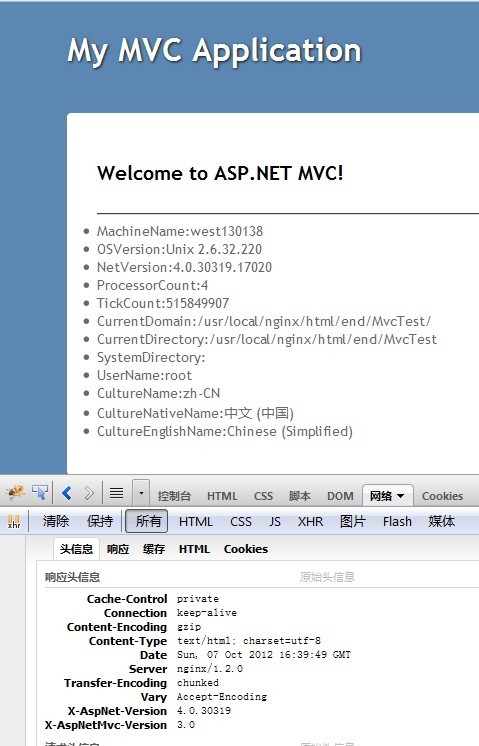
常见错误及解决:
解决方法:移除程序bin目录下System.Web.dll
--解决方法:在/opt/mono-2.11/bin 下新建prefix.sh,并运行
#!/bin/bash
# Your mono directory
cd $PREFIX/lib/mono/4.0
for file in "$FILES"
do
cp "$file.exe" ../4.5
done
cd $PREFIX/bin
for file in "$FILES"
do
sed -ie 's|mono/4.0|mono/4.5|g' $file
done
System.Resources.MissingManifestResourceException: Could not find any
resources appropriate for the specified culture or the neutral
culture. Make sure "System.Web.Mvc.Resources.MvcResources.resources"
was correctly embedded or linked into assembly "System.Web.Mvc" at
compile time, or that all the satellite assemblies required are
loadable and fully signed.
--解决方法:修改Web.config,在system.web节点下添加
<globalization uiCulture="en" culture="en-US" />
使用数据库报错:
System.InvalidProgramException: Invalid IL code in System.Data.Common.DbPr
oviderFactories:GetFactory (string): method body is empty.
--解决方法:将bin下的System.Data.dll 删掉

此内容由惯性聚合(RSS阅读器)自动聚合整理,仅供阅读参考。 原文来自 — 版权归原作者所有。