


惯性聚合 高效追踪和阅读你感兴趣的博客、新闻、科技资讯
阅读原文 在惯性聚合中打开

推荐订阅源

K
Kaspersky official blog
Martin Fowler
Martin Fowler
CTFtime.org: upcoming CTF events
V
Visual Studio Blog
博客园_首页
Engineering at Meta
Engineering at Meta
The Cloudflare Blog
MongoDB | Blog
MongoDB | Blog
Blog — PlanetScale
Blog — PlanetScale
T
The Blog of Author Tim Ferriss
雷峰网
雷峰网
D
Docker
博客园 - 司徒正美
S
SegmentFault 最新的问题
M
MIT News - Artificial intelligence
博客园 - 叶小钗
博客园 - 三生石上(FineUI控件)
U
Unit 42
J
Java Code Geeks
A
About on SuperTechFans
N
Netflix TechBlog - Medium
freeCodeCamp Programming Tutorials: Python, JavaScript, Git & More
S
Security Affairs
I
Intezer
Cisco Talos Blog
Cisco Talos Blog
C
Cyber Attacks, Cyber Crime and Cyber Security
Threat Intelligence Blog | Flashpoint
B
Blog RSS Feed
P
Privacy & Cybersecurity Law Blog
T
Tenable Blog
T
Threatpost
H
Hacker News: Front Page
G
Google Developers Blog
博客园 - 【当耐特】
Hugging Face - Blog
Hugging Face - Blog
Apple Machine Learning Research
L
Lohrmann on Cybersecurity
大猫的无限游戏
大猫的无限游戏
Google DeepMind News
A
Arctic Wolf
S
Secure Thoughts
GbyAI
GbyAI
NISL@THU
NISL@THU
S
Security @ Cisco Blogs
Exploit-DB.com RSS Feed
Webroot Blog
Webroot Blog
C
CXSECURITY Database RSS Feed - CXSecurity.com
O
OpenAI News
Spread Privacy
Spread Privacy
Application and Cybersecurity Blog

博客园 - 王伟晔

docker 主从mysql配置 利用asp.net Core开发webapi对接云之家智能审批数据互联控件 Windows 2012安装odoo12 Windows有点腻了?不如试试Ubuntu. 处理范例代码Webapi中的Mongodb的Bson中ObjectId反序列化异常 用app.net Core搞掂多国语言网站 重建程序员能力(3)-asp.net MVC框架增加Controller 重建程序员能力(2)-如何使asp.net mvc应用增加js和其他功能 asp.net mvc 5发布部署遇到403.14 我需要在Web上完成一个图片上传的功能(+2) 我需要在Web上完成一个图片上传的功能后续(+1) 我需要在Web上完成一个图片上传的功能 android-studio-bundle-141.1980579-windows download Site Razor提高WebPage代码的易读性 C# Hello World - 王伟晔 用params关键字增强代码的可读性 陌生的yield关键字 发现Visual Studio隐含的大礼包--漂亮的Visual Studio图像库 职业程序员必须要有的工作态度(之一)
重建程序员能力(1)
王伟晔 · 2017-02-26 · via 博客园 - 王伟晔

1. Visual Studio是要安装的工具,对于效率而言,必须安装

2. 现在的目标是要学做asp.net MVC

3. 打开Visual Studio
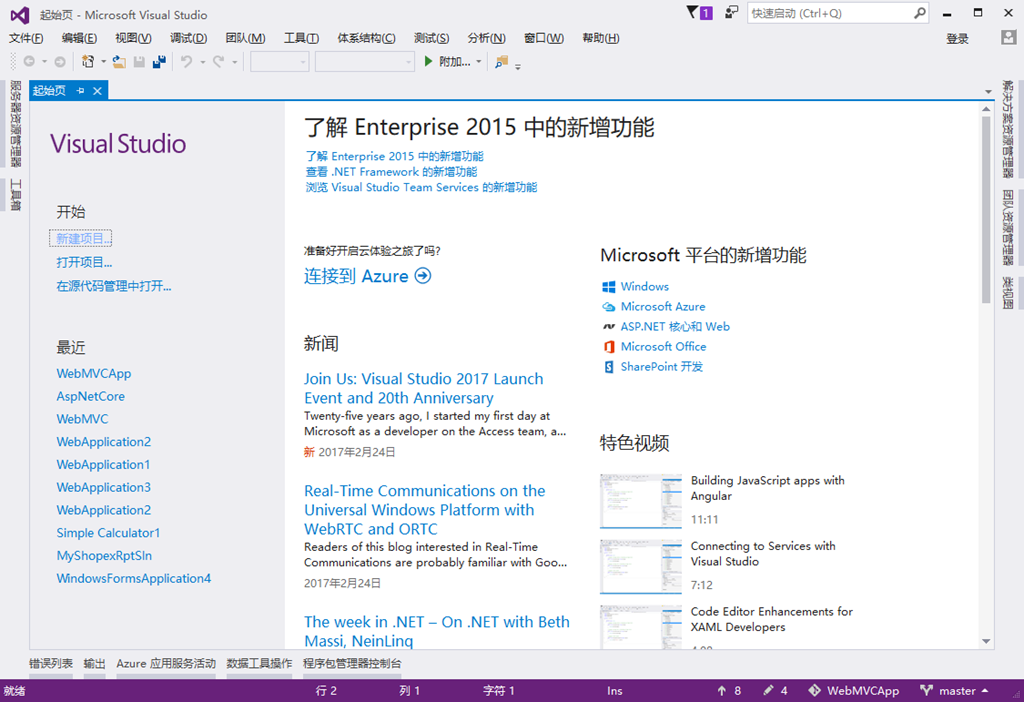
01

b.文件->新建->项目 

* 注意这里选择的是项目而不会网站。

02

c. 选择Visual C#,选择Web项目,选择ASP.net Web Application(.net Framework)

*为什么选择C#日后在解析。

*也没有选择Core,日后再给你们介绍Core吧。

一定选择GIT,以为这会给你无限次重生的机会。:-)

d.[确定]还有下一步

03

选择MVC,如果您需要有注册,登录等功能,在庞斌有个[更改身份验证]的按钮,这里选择身份验证  个人用户账户。

e.[确定],基础就搭好了。甚至可以运行。