





OpenXLive beta版发布已经有一个半月的时间了,得到了开发者和玩家的好评,目前已经有五款OpenXLive游戏进入Windows Phone Marketplace,其中的7bomb和Super Hoops都取得了非常骄人的成绩。
当OpenXLive在XNA游戏中大展身手的同时,我们也听到了一些来自Silverlight程序员的抱怨。在Windows Phone 7中虽然提供了XNA的游戏开发平台,但相当一部分的游戏是采用Silverlight开发的。毕竟对于显示性能不高的游戏来说,Silverlight是一个颇具魅力的快速开发工具。
幸好,我们在最初的架构设计上考虑了未来支持Silverlight的可能性,所以将业务逻辑部分封装到了OpenXLive.dll中,而将XNA上的XLiveForm窗体和控件库封装到了OpenXLive.Forms.dll中。我们只需要在Silverlight中调用OpenXLive中的功能即可。
在提供了一个OpenXLive on Silverlight的简单示例代码后,我们发现对Silverlight游戏的支持仍旧不够。首先,我们只提供了Leaderboard部分的示例代码,在缺乏文档的情况下,开发其他功能的UI是很困难的;其次,开发者并不希望自己动手写一个Silverlight UI,而只是想简单地在游戏中加入OpenXLive的支持,就像在XNA游戏中那样。
所以,我们重新定义了OpenXLive Silverlight的功能,实现了OpenXLive中的所有功能,并将其封装到了OpenXLive.Silverlight.dll中。在开发过程中,我们尽力保持XNA和Silverlight框架的一致性,如果您使用过OpenXLive XNA版本,在Silverlight版本中,您会有一种似曾相识的感觉,这正是我们所希望的。
需要提示的一点是,OpenXLive的Silverlight和XNA版本共同使用了一个逻辑程序集——OpenXLive.dll,所以他们在功能上是一致的。
未来,我们会将OpenXLive Silverlight加入到OpenXLive SDK中,并提供Visual Studio模板。在某一个时间点上,我们会考虑对OpenXLive Silverlight进行开源,让开发者能够方便的将OpenXLive Silverlight修改成自己想要的样子。
微软为Windows Phone 7上的XNA和Silverlight游戏开发提供了非常好的开发工具和应用程序框架,使得开发者可以更加容易地开发出生动有趣的游戏来。但是随着开发的深入,我们发现,虽然我们开发的游戏品质可以和大公司的产品相媲美,但比起大公司游戏的用户体验还是相差很多。因为,我们必须将很多时间用于周边功能的开发,比如:启动界面(Splash Screen), 积分榜(Leaderboard)和游戏成就(Achievement)等,更不要奢谈为游戏加入SNS功能,比如:查看在线用户(Online Player)、云存储(Cloud Storage)等在线功能了。这些周边功能的开发时间,可能要超过游戏本身的开发时间,那我们该怎么办呢?
OpenXLive正在想办法帮助个人开发者和小团队开发者,使他们在最短的时间内拥有以上这些只有大公司才可能拥有的游戏功能。

OpenXLive是一种为Windows Phone 7智能手机游戏开发者提供的云端在线服务。支持开发者为单机游戏增加云端和SNS功能,帮助开发者以最小的工作量将云端服务集成到自己的游戏中。这些云端服务包括:积分榜、游戏成就、在线对战、Social Network和云端存储等功能。与Open XLive类似的服务,还有iOS上的OpenFeint。
OpenXLive目前支持Windows Phone的XNA与Silverlight开发框架,不需要开发者编写UI代码,即可在游戏中方便地调用OpenXLive的界面及功能。由于XNA和Silverlight是两个不同的应用程序框架,所以,OpenXLive提供了不同的引用方式来支持XNA和Silverlight游戏。
本文讨论的是如何将OpenXLive加入到Silverlight游戏中,如果您的游戏采用XNA编写,请查看《OpenXLive开发入门》,链接如下:
http://wiki.openxlive.net/Getting-Started-with-Open-XLive.ashx
您可以在下面的链接中下载单独的OpenXLive Silverlight SDK:
http://resource.openxlive.com/resource/Download/ad686043-d477-4d5a-bc83-f27520a3d600
首先,我们假设您已经有了基于Silverlight开发的Windows Phone游戏。如果您想从头创建一个OpenXLive Silverlight游戏,您可以参考下一节《OpenXLive Silverlight向导使用》。
我们采用的示例工程OpenXLiveGameSilverlight,您可以在OpenXLive的资源网站中找到。
首先,我们在OpenXLive SDK的bin文件夹下找到OpenXLive.dll和OpenXLive.Silverlight.dll,将其拷贝到工程所在的目录中。
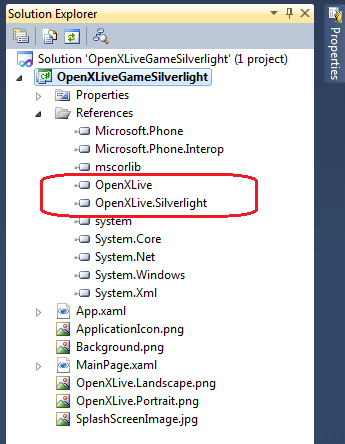
然后,在Visual Studio 2010中,打开OpenXLiveGameSilverlight工程,在Solution Explorer中找到References节点,右键单击啊,选择Add References,在对话框中选择Browse页面,找到工程目录下的OpenXLive.dll和OpenXLive.Silverlight.dll,将两个程序集的引用加入到工程中。
添加成功后,如下图所示:
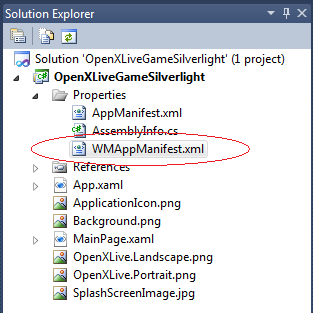
在引用添加完成之后,我们还要修改WMAppMainifest.xml文件,使Silverlight游戏启动时,启动OpenXLive.Silverlight中所包含的Startup页面。
在工程的Propertes节点下找到WMAppMainifest.xml文件,双击打开,如下图所示:
WMAppMainifest.xml文件的结构如下:
<?xml version="1.0" encoding="utf-8"?>

<Deployment xmlns="http://schemas.microsoft.com/windowsphone/2009/deployment" AppPlatformVersion="7.0">
  <App xmlns="" ProductID="{3cf35939-f7f6-4808-969c-22d520f6a526}" Title="OpenXLiveGameSilverlight" RuntimeType="Silverlight" Version="1.0.0.0" Genre="apps.normal"  Author="OpenXLiveGameSilverlight author" Description="Sample description" Publisher="OpenXLiveGameSilverlight">
    <IconPath IsRelative="true" IsResource="false">ApplicationIcon.png</IconPath>
    <Capabilities>
      <Capability Name="ID_CAP_GAMERSERVICES"/>
    </Capabilities>
    <Tasks>
      <DefaultTask  Name ="_default" NavigationPage="OpenXLive.Silverlight;component/Forms/StartupPage.xaml"/>
    </Tasks>
    <Tokens>
      <PrimaryToken TokenID="OpenXLiveGameSilverlightToken" TaskName="_default">
        <TemplateType5>
          <BackgroundImageURI IsRelative="true" IsResource="false">Background.png</BackgroundImageURI>
          <Count>0</Count>
          <Title>OpenXLiveGameSilverlight</Title>
        </TemplateType5>
      </PrimaryToken>
    </Tokens>
  </App>
</Deployment>
在WMAppMainifest.xml文件中找到DefaultTask节点,并将其中的NavigationPage改为”OpenXLive.Silverlight;component/Forms/StartupPage.xaml”。这样能保证Silverlight游戏启动之后,会首先启动OpenXLive的Startup页面。
接下来,我们还要完成对XLiveSLFormManager对象的初始化工作。打开工程中的App.xaml.cs文件,首先在文件顶部加入对OpenXLive.Silverlight的引用:
using OpenXLive.Silverlight;
然后,在App类中找到Application_Launching方法,加入XLiveSLFormManager对象的创建操作:
        // Code to execute when the application is launching (eg, from Start)
        // This code will not execute when the application is reactivated
        private void Application_Launching(object sender, LaunchingEventArgs e)
        {
            XLiveSLFormManager manager = new XLiveSLFormManager(this, "xxxxxxxxxxxxxxxx");
        }
其中,第一个参数为App实例的引用,第二个参数为SecretKey,该Key是在OpenXLive网站上创建游戏时,由系统生成的,作为OpenXLive系统识别游戏的唯一标识符,请保证这个SecretKey的安全,以防止其他游戏进行仿冒。
更多详细情况,请查看《在开发者网站上创建OpenXLive游戏》,链接如下:
http://wiki.openxlive.net/Tutorial-4-Create-OpenXLive-Game-in-website.ashx
当然,我们也可以在App类中创建一个static的FormManager属性,用于在程序的其他地方调用XLiveSLFormManager对象,但这一步不是必须的,代码如下:
        public static XLiveSLFormManager FromManager { get; internal set; }

        // Code to execute when the application is launching (eg, from Start)
        // This code will not execute when the application is reactivated
        private void Application_Launching(object sender, LaunchingEventArgs e)
        {
            FromManager = new XLiveSLFormManager(this, "xxxxxxxxxxxxxxxxxx");
        }
我们运行程序,能够看到下面的界面,是不是有一种似曾相识的感觉?点击Game Center和Leaderboards,我们可以进入相关的界面:
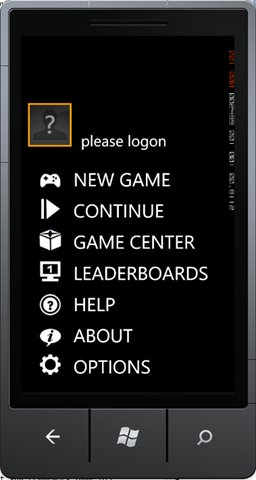
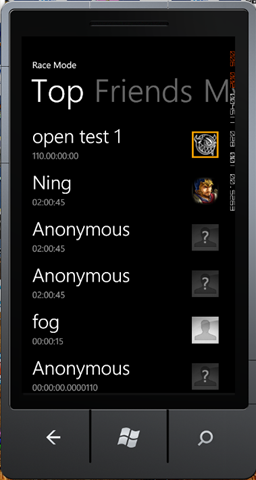
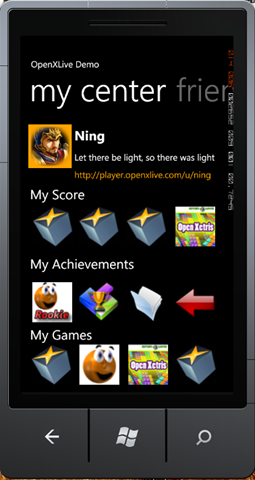
目前OpenXLive Silverlight只支持竖屏(Portrait)显示,未来我们会加入对于横屏(Landscape)的支持。另外,除了Startup界面之外,其他OpenXLive界面都是黑色背景,这样做主要是为了节省系统资源。
接下来,为了美化启动界面,我们要加入背景图片。添加背景图片的操作非常简单:在Solution Explorer中,选择Project节点,右键单击,选择Add – Existing Item,在选择一副PNG或JPG的图片,尺寸最好是800x480,这样能够有效保证图片不变形。
另外请确认一下,我们加入的图片Build Action为Resource,且Copy to Output Directory选择“Do not copy”。
然后,回到App.xaml.cs文件的Application_Launching方法中:
        // Code to execute when the application is launching (eg, from Start)
        // This code will not execute when the application is reactivated
        private void Application_Launching(object sender, LaunchingEventArgs e)
        {
            FromManager = new XLiveSLFormManager(this, "xxxxxxxxxxxxxxxxxxx");
            StartupPage.BackgroundPath = "/OpenXLiveGameSilverlight;component/OpenXLive.Portrait.png";
        }
我们要为StartupPage添加BackgroundPath,示例代码的写法是针对游戏本身的资源,也可以指定一个来自Web的链接,不过出于显示效果的考虑,建议您不要这么做。OpenXLiveGameSilverlight,是资源所在程序集的名称;component/OpenXLive.Portrait.png,是资源的引用路径,如果资源包含在一个文件夹中,写法应该是component/MyFolder/OpenXLive.Portrait.png。
最后提醒,请大家千万不要忘记字符串前面的“/”,没有这个符号,程序将抛出异常。
接下来,我们要加入Startup页面的事件处理函数,当用户点击某一个按钮时,会触发一个事件操作。我们在下面增加了其中两个按钮的事件处理方法:
        public static XLiveSLFormManager FromManager { get; internal set; }

        // Code to execute when the application is launching (eg, from Start)
        // This code will not execute when the application is reactivated
        private void Application_Launching(object sender, LaunchingEventArgs e)
        {
            FromManager = new XLiveSLFormManager(this, "xxxxxxxxxxxxxxxxxx");
            StartupPage.BackgroundPath = "/OpenXLiveGameSilverlight;component/OpenXLive.Portrait.png";
            StartupPage.NewGameButtonClick += new EventHandler(StartupPage_NewGameButtonClick);
            StartupPage.AboutButtonClick += new EventHandler(StartupPage_AboutButtonClick);
        }

        void StartupPage_AboutButtonClick(object sender, EventArgs e)
        {
            MessageBox.Show("OpenXLive Silverlight Demo 1.0");
        }

        void StartupPage_NewGameButtonClick(object sender, EventArgs e)
        {
            this.RootFrame.Navigate(new Uri("/MainPage.xaml", UriKind.Relative));
        }
AboutButtonClick的处理函数非常简单,只是调用了Message来显示游戏的版本信息。而NewGameButtonClick则是为了调用开发人员自己编写的Silverlight游戏界面,这个界面应该存在于Silverlight游戏的程序集中。
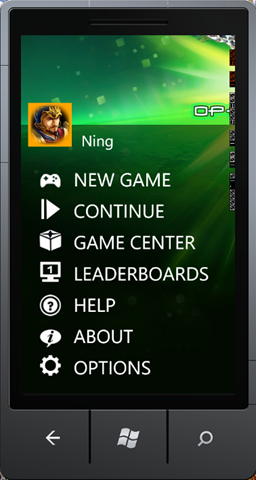
最后,我们得到的Silverlight启动界面就是上图这样。我们在Silverlight的界面中,没有增加Exit选项,因为Silverlight界面默认不支持退出操作,只能通过按Back键来退出程序。
接下来,我们要介绍如何使用Visual Studio 2010的Template来创建一个OpenXLive Silverlight游戏。OpenXLive Silverlight的模板会包括在OpenXLive SDK中,如果您安装了OpenXLive SDK,就可以在Visual Studio 2010中创建基于Silverlight的游戏了。
首先,打开Visual Studio 2010,在File菜单中选择New-Project,在New Project对话框中,选择Visual C#下的Silverlight for Windows Phone中的OpenXLive Silverlight节点,然后选择创建OpenXLiveSilverlightGame。
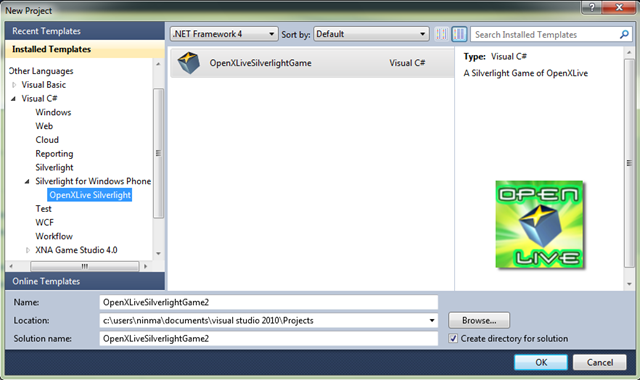
OpenXLiveSilverlightGame工程创建完毕后,如果直接编译,会得到下列的错误提示:
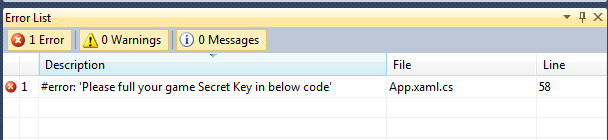
这个错误是为了提醒开发者,要在OpenXLive开发者网站上创建自己的游戏,获取游戏对应的Secret Key,才能够正常使用OpenXLive的在线功能。
获取Secret Key的方法,请参考《在开发者网站上创建OpenXLive游戏》,链接如下:
http://wiki.openxlive.net/Tutorial-4-Create-OpenXLive-Game-in-website.ashx
打开App.xaml.cs文件,找到下面的代码:
public static XLiveSLFormManager FromManager { get; internal set; }

#error Please full your game Secret Key in below code
private string APISecretKey = "xxxxxxxxxxxxxxxxxxxxxxxxxxxx";

// Code to execute when the application is launching (eg, from Start)
// This code will not execute when the application is reactivated
private void Application_Launching(object sender, LaunchingEventArgs e)
{
    FromManager = new XLiveSLFormManager(this, APISecretKey);
    StartupPage.BackgroundPath = "/OpenXLiveSilverlightGame2;component/OpenXLive.Portrait.png";
    StartupPage.NewGameButtonClick += new EventHandler(StartupPage_NewGameButtonClick);
    StartupPage.AboutButtonClick += new EventHandler(StartupPage_AboutButtonClick);
}
开发者将Secret Key加入到高亮显示部分,并且注释掉#error代码,我们的工程就可以正常编译了。
我们也可以修改New Game Button的事件处理函数,来决定调用哪个Silverlight窗体。
void StartupPage_NewGameButtonClick(object sender, EventArgs e)
{
    this.RootFrame.Navigate(new Uri("/MainPage.xaml", UriKind.Relative));
}
到这里,我们就介绍完了如何通过Visual Studio 2010向导来创建OpenXLive Silverlight游戏的方法。
我们用几乎与XNA版本相同的顺序,叙述了如何将OpenXLive Silverlight加入到Windows Phone Silverlight的游戏中去。接下来,我们会介绍,如何提交成绩、提交成就,考虑到Silverlight的界面编程更加容易,我们并不会提供一个标准的成绩提交界面,该界面只会以示例代码的形式出现。
http://wiki.openxlive.net/OpenXLive-Silverlight.ashx
OpenXLive官方网站
OpenXLive开发者网站
http://developer.openxlive.net/
OpenXLive开发入门
http://wiki.openxlive.net/Getting-Started-with-Open-XLive.ashx
此内容由惯性聚合(RSS阅读器)自动聚合整理,仅供阅读参考。 原文来自 — 版权归原作者所有。