惯性聚合 高效追踪和阅读你感兴趣的博客、新闻、科技资讯
阅读原文 在惯性聚合中打开

推荐订阅源

博客园 - 叶小钗
云风的 BLOG
云风的 BLOG
G
Google Developers Blog
S
SegmentFault 最新的问题
罗磊的独立博客
Hugging Face - Blog
Hugging Face - Blog
美团技术团队
爱范儿
爱范儿
博客园 - 三生石上(FineUI控件)
H
Hackread – Cybersecurity News, Data Breaches, AI and More
D
DataBreaches.Net
F
Fortinet All Blogs
TaoSecurity Blog
TaoSecurity Blog
D
Docker
C
Cybersecurity and Infrastructure Security Agency CISA
K
Kaspersky official blog
宝玉的分享
宝玉的分享
腾讯CDC
Google Online Security Blog
Recorded Future
Recorded Future
T
The Exploit Database - CXSecurity.com
T
The Blog of Author Tim Ferriss
V
V2EX
S
Securelist
K
KPMG report finds enterprise disconnect between AI and its ROI | CIO
C
CERT Recently Published Vulnerability Notes
A
Arctic Wolf
Scott Helme
Scott Helme
L
LINUX DO - 热门话题
Y
Y Combinator Blog
P
Proofpoint News Feed
T
Tor Project blog
AWS News Blog
AWS News Blog
cs.CV updates on arXiv.org
The Last Watchdog
The Last Watchdog
博客园 - 聂微东
T
Threat Research - Cisco Blogs
B
Blog
Attack and Defense Labs
L
Lohrmann on Cybersecurity
C
CXSECURITY Database RSS Feed - CXSecurity.com
阮一峰的网络日志
阮一峰的网络日志
cs.AI updates on arXiv.org
IT之家
IT之家
N
News and Events Feed by Topic
博客园 - 司徒正美
H
Help Net Security
C
Cisco Blogs
C
Check Point Blog
S
Secure Thoughts

博客园 - 踏歌长行

前端知识质量内容网址 NuGet 质量博客链接 Entity Framework 质量博客链接 LINK1123:failure during conversion to COFF:file invalid or corrupt 未授权用户在此计算机上的请求登录类型 System.ServiceModel.AddressAccessDeniedException DataGrid 导出 Excel 中文乱码 80070005 Access is denied in Windows 2008 How to install ASP.NET 1.1 with IIS7 on Vista and Windows 2008 Unable to find script library '/aspnet_client/system-web/1-1-4322/webvalidation.js' JQuery file upload Access is denied in IE 7, 8, 9 ReportViewer 自适应高度 单元测试之模拟Mock 单元测试之 Xunit ASP.NET MVC ajax 提交列表到 Action VS 2010 制作 Windows Service 安装包之用户界面 Postback 之后保持浏览器滚动条的位置 VS 2010 开发 ActiveX 自动升级外篇 VS 2010 开发 ActiveX 制作 cab 包
VS 2010 制作 Windows Service 安装包
踏歌长行 · 2013-08-23 · via 博客园 - 踏歌长行

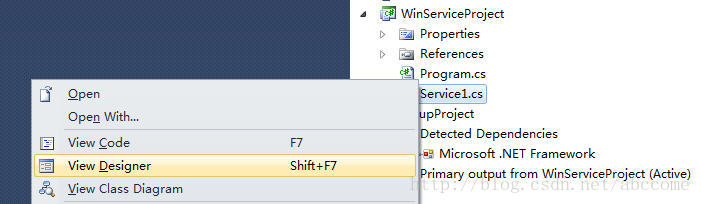
创建一个Windows Service Project [WinServiceProject],由于在安装的过程中需要安装服务,所以需要以下步骤
1. 以[Design]的方式打开[Service1.cs]

   
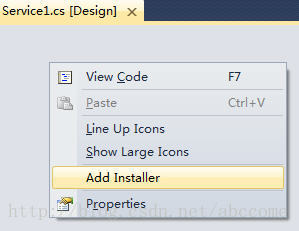
2. 右键 --> [Add Installer]
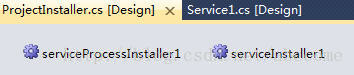
    将会有文件[ProjectInstaller.cs]添加进项目


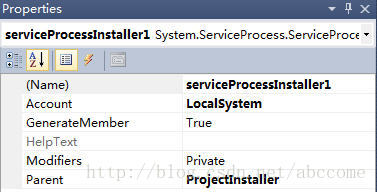
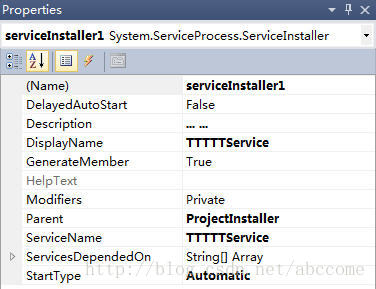
3. 分别设置两组件的属性如下


创建一个Setup Project [SetupProject]
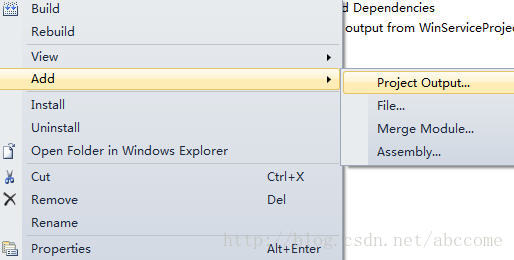
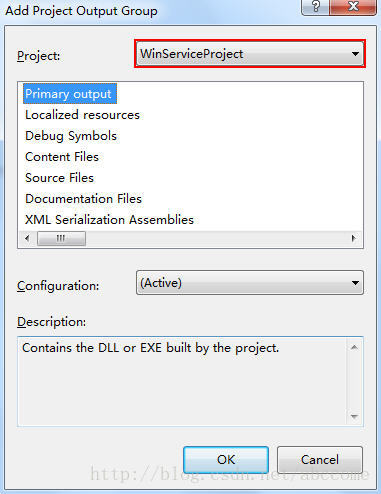
1. 添加[Project Output]


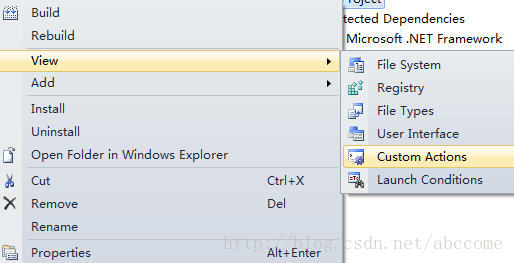
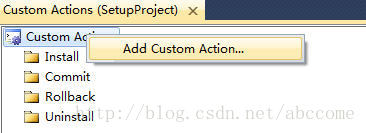
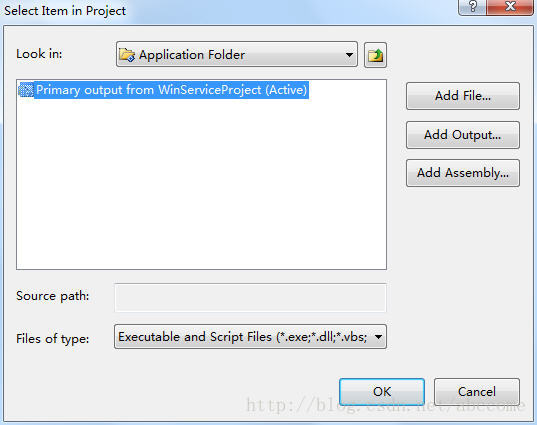
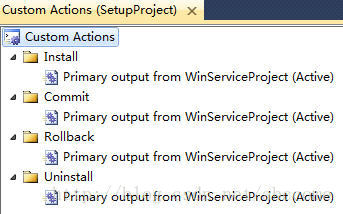
2. 添加[Custom Actions]
    只有设置了[Custom Actions],在安装过程中,程序才能执行[ProjectInstaller.cs]中的方法安装服务


3. [Build]项目即可