






利用了Silverlight toolkit中的TreeView控件实现了区服选择。
TreeView控件在Silverlight toolkit中,需要去http://silverlight.codeplex.com/ 下载,然后安装,最新版本是5.0的,4.0的也可以下载。
1.引用程序集:System.Windows.Controls.Toolkit.dll
2.新建silverlight子控件页面 childRegionWorld1.xaml
3.在 childRegionWorld1.xaml中的usercontrol 中添加xmlns:toolkit="clrnamespace:System.Windows.Controls;assembly=System.Windows.Controls.Toolkit"
4.放入TreeView控件(完整XAML代码):
<controls:ChildWindow x:Class="SilverlightApplication1.ChildRegionWorld1"
xmlns="http://schemas.microsoft.com/winfx/2006/xaml/presentation"
xmlns:x="http://schemas.microsoft.com/winfx/2006/xaml"
xmlns:controls="clr-namespace:System.Windows.Controls;assembly=System.Windows.Controls"
xmlns:toolkit="clr-namespace:System.Windows.Controls;assembly=System.Windows.Controls.Toolkit"
Width="400" Height="300"
Title="区服选择">
<Grid x:Name="LayoutRoot" Margin="2">
<Grid.RowDefinitions>
<RowDefinition />
<RowDefinition Height="Auto" />
</Grid.RowDefinitions>
<controls:TreeView x:Name="tvRegionWorld">
</controls:TreeView>
<Button x:Name="CancelButton" Content="取消" Click="CancelButton_Click" Width="75" Height="23" HorizontalAlignment="Right" Margin="0,12,0,0" Grid.Row="1" />
<Button x:Name="OKButton" Content="确定" Click="OKButton_Click" Width="75" Height="23" HorizontalAlignment="Right" Margin="0,12,79,0" Grid.Row="1" />
</Grid>
</controls:ChildWindow>
5.childRegionWorld1.xaml.cs中的代码:
using System;
using System.Collections.Generic;
using System.Linq;
using System.Net;
using System.Windows;
using System.Windows.Controls;
using System.Windows.Documents;
using System.Windows.Input;
using System.Windows.Media;
using System.Windows.Media.Animation;
using System.Windows.Shapes;
namespace SilverlightApplication1
{
public class Region
{
public string RegionID { get; set; }
public string RegionName { get; set; }
}
public class World
{
public string WorldID { get; set; }
public string WorldName { get; set; }
public string RegionID { get; set; }
}
public partial class ChildRegionWorld1 : ChildWindow
{
public ChildRegionWorld1()
{
InitializeComponent();
FillRegionWorldIntoTreeView();
}
private void FillRegionWorldIntoTreeView()
{
IList<Region> regions = new List<Region> {
new Region(){RegionName="一区",RegionID="1"},
new Region(){RegionName="二区",RegionID="2"}
};
IList<World> worlds = new List<World> {
new World(){WorldName="一服",WorldID="1",RegionID="1"},
new World(){WorldName="二服",WorldID="2",RegionID="1"},
new World(){WorldName="一服",WorldID="1",RegionID="2"},
new World(){WorldName="二服",WorldID="2",RegionID="2"},
new World(){WorldName="三服",WorldID="3",RegionID="2"}
};
tvRegionWorld.Items.Clear();
foreach (Region r in regions)
{
TreeViewItem item = new TreeViewItem();
item.IsExpanded = true;
StackPanel hPanel = new StackPanel();
hPanel.Orientation = Orientation.Horizontal;
hPanel.Name = "sp_" + r.RegionID;
CheckBox hCk = new CheckBox();
hCk.Click+=new RoutedEventHandler(Region_CheckBox_Click);
hCk.Name = "ck_" + r.RegionID;
TextBlock hTb = new TextBlock();
hTb.Text = r.RegionName;
hPanel.Children.Add(hCk);
hPanel.Children.Add(hTb);
item.Header = hPanel;
foreach (World w in worlds.Where(w=>w.RegionID==r.RegionID))
{
StackPanel iPanel = new StackPanel();
iPanel.Orientation = Orientation.Horizontal;
iPanel.Name = "sp_" + r.RegionID+"_"+w.WorldID;
CheckBox iCk = new CheckBox();
iCk.Click += new RoutedEventHandler(World_CheckBox_Click);
iCk.Name = "ck_" + r.RegionID+"_"+w.WorldID;
TextBlock iTb = new TextBlock();
iTb.Text =w.WorldName;
iPanel.Children.Add(iCk);
iPanel.Children.Add(iTb);
item.Items.Add(iPanel);
}
tvRegionWorld.Items.Add(item);
}
}
private void OKButton_Click(object sender, RoutedEventArgs e)
{
this.DialogResult = true;
}
private void CancelButton_Click(object sender, RoutedEventArgs e)
{
this.DialogResult = false;
}
/// <summary>
/// 单服选中时,区必须要选中
/// </summary>
/// <param name="sender"></param>
/// <param name="e"></param>
private void World_CheckBox_Checked(CheckBox ck)
{
StackPanel stackPanel = ck.Parent as StackPanel;
TreeViewItem item = GetTreeViewItemFromItems(stackPanel.Name);
StackPanel panel = item.Header as StackPanel;
UIElement uIE = panel.Children.FirstOrDefault();
if (uIE != null)
{
CheckBox cb = uIE as CheckBox;
cb.IsChecked = true;
}
}
/// <summary>
/// 单服不选中时,如果同区其他服也不选中,那么区就不要选中
/// </summary>
/// <param name="sender"></param>
/// <param name="e"></param>
private void World_CheckBox_Unchecked(CheckBox ck)
{
StackPanel stackPanel = ck.Parent as StackPanel;
TreeViewItem item = GetTreeViewItemFromItems(stackPanel.Name);
bool result = false;
foreach (var c in item.Items)
{
StackPanel p = c as StackPanel;
if (p != null && p.Name != stackPanel.Name)
{
CheckBox cb = (p.Children.First()) as CheckBox;
result = cb.IsChecked.Value;
if (result == true) break;
}
}
StackPanel panel = item.Header as StackPanel;
UIElement uIE = panel.Children.FirstOrDefault();
if (uIE != null)
{
CheckBox cb = uIE as CheckBox;
cb.IsChecked = result;
}
}
/// <summary>
/// 区选中时,底下所有的服都选中
/// </summary>
/// <param name="sender"></param>
/// <param name="e"></param>
private void Region_CheckBox_Checked(CheckBox ck)
{
CheckOrUnCheckWorlds(ck, true);
}
/// <summary>
/// 区选不中时,底下所有的服都不选中
/// </summary>
/// <param name="sender"></param>
/// <param name="e"></param>
private void Region_CheckBox_Unchecked(CheckBox ck)
{
CheckOrUnCheckWorlds(ck, false);
}
private void CheckOrUnCheckWorlds(CheckBox ck,bool IsCheck)
{
StackPanel stackPanel = (ck.Parent) as StackPanel;
string spName = stackPanel.Name;
TreeViewItem treeViewItem = GetTreeViewItemFromHeader(spName);
if (treeViewItem != null)
{
if (treeViewItem.Items.Count > 0)
{
foreach (var item in treeViewItem.Items)
{
StackPanel panel = item as StackPanel;
foreach (var c in panel.Children)
{
CheckBox cb = c as CheckBox;
if (cb != null)
{
cb.IsChecked = IsCheck;
}
}
}
}
}
}
private TreeViewItem GetTreeViewItemFromHeader(string spName)
{
foreach (TreeViewItem item in tvRegionWorld.Items)
{
StackPanel stackPanel=(item.Header) as StackPanel;
if (stackPanel.Name==spName)
{
return item;
}
}
return null;
}
private TreeViewItem GetTreeViewItemFromItems(string spName)
{
foreach (TreeViewItem item in tvRegionWorld.Items)
{
foreach (var c in item.Items)
{
StackPanel stackPanel = c as StackPanel;
if (stackPanel.Name == spName)
{
return item;
}
}
}
return null;
}
private void World_CheckBox_Click(object sender, RoutedEventArgs e)
{
CheckBox ck = sender as CheckBox;
if (ck.IsChecked.Value)
{
World_CheckBox_Checked(ck);
}
else
{
World_CheckBox_Unchecked(ck);
}
}
private void Region_CheckBox_Click(object sender, RoutedEventArgs e)
{
CheckBox ck = sender as CheckBox;
if (ck.IsChecked.Value)
{
Region_CheckBox_Checked(ck);
}
else
{
Region_CheckBox_Unchecked(ck);
}
}
}
}
7.在MainPage.xaml.cs中写入如下的调用方法:
private void Button_Click(object sender, RoutedEventArgs e)
{
ChildRegionWorld1 child = new ChildRegionWorld1();
child.Closed += new EventHandler(child_Closed);
child.Show();
}
void child_Closed(object sender, EventArgs e)
{
String str = "";
ChildRegionWorld1 child = sender as ChildRegionWorld1;
foreach (TreeViewItem item in child.tvRegionWorld.Items)
{
foreach (var c in item.Items)
{
StackPanel panel = c as StackPanel;
CheckBox cb = panel.Children.First() as CheckBox;
if (cb.IsChecked.HasValue && cb.IsChecked.Value)
{
str += string.Format("{0},",cb.Name);
}
}
}
MessageBox.Show(str);
}
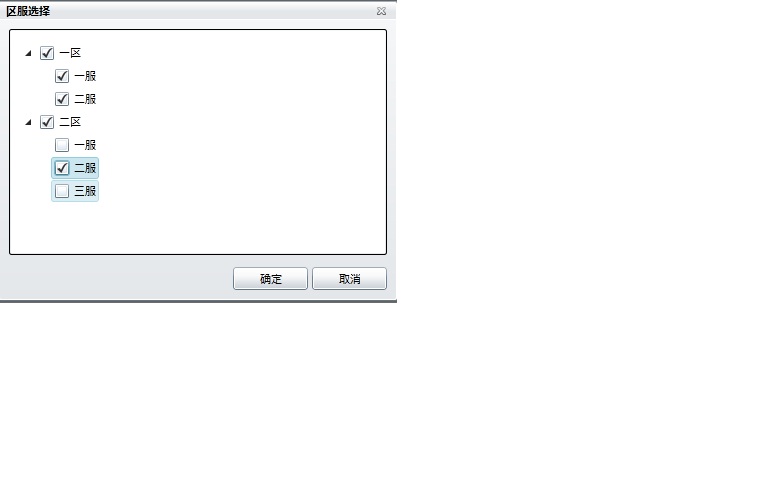
具体运行效果解释如下图所示:(点击区时,区下所有的服都会选中,区下所有的服都不选中时,区也不选中,只要有一个服是选中的,区也会选中)
此内容由惯性聚合(RSS阅读器)自动聚合整理,仅供阅读参考。 原文来自 — 版权归原作者所有。