惯性聚合 高效追踪和阅读你感兴趣的博客、新闻、科技资讯
阅读原文 在惯性聚合中打开

推荐订阅源

S
Schneier on Security
雷峰网
雷峰网
S
Securelist
V
Vulnerabilities – Threatpost
S
SegmentFault 最新的问题
T
The Exploit Database - CXSecurity.com
A
About on SuperTechFans
T
Threat Research - Cisco Blogs
Attack and Defense Labs
L
LangChain Blog
Cyberwarzone
Cyberwarzone
Engineering at Meta
Engineering at Meta
Google DeepMind News
H
Hackread – Cybersecurity News, Data Breaches, AI and More
V
V2EX
Y
Y Combinator Blog
云风的 BLOG
云风的 BLOG
L
Lohrmann on Cybersecurity
S
Security Affairs
S
Secure Thoughts
P
Privacy & Cybersecurity Law Blog
T
Tailwind CSS Blog
Cyber Security Advisories - MS-ISAC
C
CXSECURITY Database RSS Feed - CXSecurity.com
Threat Intelligence Blog | Flashpoint
Application and Cybersecurity Blog
Cisco Talos Blog
Cisco Talos Blog
Spread Privacy
Spread Privacy
让小产品的独立变现更简单 - ezindie.com
Microsoft Security Blog
博客园 - 叶小钗
H
Heimdal Security Blog
L
LINUX DO - 热门话题
月光博客
月光博客
Apple Machine Learning Research
D
Darknet – Hacking Tools, Hacker News & Cyber Security
C
CERT Recently Published Vulnerability Notes
钛媒体:引领未来商业与生活新知
钛媒体:引领未来商业与生活新知
J
Java Code Geeks
Google Online Security Blog
WordPress大学
WordPress大学
D
DataBreaches.Net
N
Netflix TechBlog - Medium
The Hacker News
The Hacker News
N
News and Events Feed by Topic
C
Check Point Blog
博客园_首页
Scott Helme
Scott Helme
T
Troy Hunt's Blog
U
Unit 42

博客园 - 新房客

iOS中判断Apple Pencil力度与手触摸 Electron,VUEJS3,Vite,TypesSript 开发环境配置 安卓2022.3.11环境配置 网上设置的跨域基本都失效了,新的设置方式 群晖中使用Docker安装备份升级Gitlab vscode Typescript自动修复引入类时,引号设置 基于nodejs的阿里云DDNS服务,支持多网卡绑定 WebGL与Canvas的显存与内存使用分析 基于nodejs的游戏服务器 typescript 中 d.ts module 与 namespace 区别 使用vs code与microsoft edge调试webpack项目 解决Jenkins无法编译Egret5.0项目的问题 筛选git最后一次文件列表 推荐一个不错的plist拆解工具,untp - 新房客 - 博客园 vs code(egret wing) php配置与调试 关于 typings install 的使用 angular 引入 component 报错 angular2 环境配置 html5 js跨域
从模型坐标到屏幕坐标
新房客 · 2023-04-03 · via 博客园 - 新房客

在 3D 引擎中,场景通常被描述为三维空间中的模型或对象,每个模型对象由许多三维顶点组成。最终,这些模型对象将在平面屏幕上呈现和显示。

渲染场景始终相对于摄像机,因此,还必须相对于摄像机的视图定义场景的顶点。了解一下这个转换过程是相当有必要的。

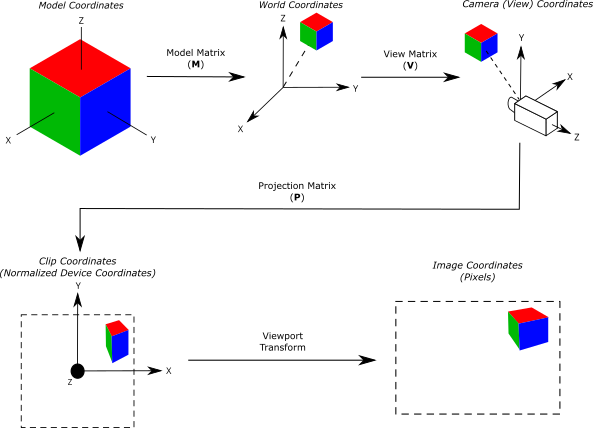
一般从模型坐标到我们可看到在屏幕中的坐标要经过4步变化。

  • 模型坐标 -> 世界坐标
  • 世界坐标-> 相机坐标
  • 相机坐标 -> NDC
  • NDC > 屏幕坐标

NDC是Normalized Device Coordinates 的缩写,所谓Normalized Device就是指xyz三个轴向都是-1到1的空间

在 Webgl绘制图形时,顶点着色器将处理每个顶点,期望在剪辑空间中定义顶点的位置。模型视图投影是一系列常见的矩阵转换,可应用于模型空间中定义的顶点,将其转换为剪辑空间,然后可以对其进行栅格化。

定义矩阵

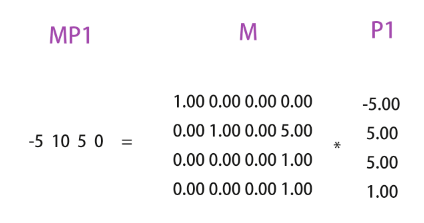
P1 = 模型中的点 point matrix

{
 -5.00
  5.00
  5.00
  1.00
}

M = 模型世界坐标 world matrix

{
  1.00 0.00 0.00 0.00
  0.00 1.00 0.00 5.00
  0.00 0.00 0.00 1.00
  0.00 0.00 0.00 1.00
}

世界向偏移5个单位,使结果看起来有意义。一般世界坐标是0,0,0。

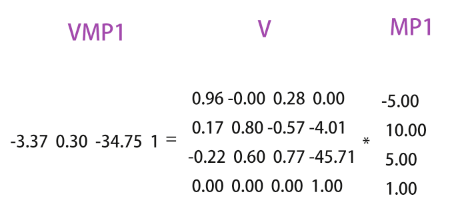
V = 相机 camera matrix invert

{
  0.96 -0.00  0.28  0.00
  0.17  0.80 -0.57 -4.01
 -0.22  0.60  0.77 -45.71
  0.00  0.00  0.00  1.00
}

P = 投影坐标 camera projection matrix

{
  1.50  0.00  0.28  0.00
  0.00  2.75  0.00  0.00 
  0.00  0.00 -1.20 -22.00
  0.00  0.00 -1.00  0.00
}

W = 视口坐标 camera projection matrix

{
701.50      0.00    0.00  701.50
  0.00   -384.00    0.00  384.00 
  0.00      0.00    0.00    0.00
  0.00      0.00    0.00    1.00
}

在上述矩阵准备好后,后续可进行计算。

转换

第一步 模型坐标 -> 世界坐标

计算出P1在模型世界位置MP1

MP1 = M * P1

第二步 世界坐标-> 相机坐标

计算出P1在相机中的位置VMP1

VMP1 = V*MP1

第三步 相机投影坐标-> NDC

  1. 计算出P1在相机中的位置PVMP1
  2. 将4Dvector转为3Dvector,获得 NDC
PVMP1= P*VMP1 
NDC = PVMP1 / PVMP1.W // -0.15 0.02 0.57 1.00

第四步 NDC > 屏幕坐标

通过上述四步获取最终视口中的坐标599px,393px。

示例

通过代码角度更容易理解上述过程

/*
    立方体:
  - 大小 10x10x10
  - 世界坐标 (0, 5, 0) 

  桔色小球的坐标,在立方体的左上角,(-5, 5, 5)
*/

// cube.position.y = 5
// cube.add(sphere)
// sphere.position.set(-5, 5, 5)

const point = sphere.position.clone(); // (-5, 5, 5) 
console.log("point=", point);

//
// A: Model -> World
//

const M = cube.matrixWorld;
console.log("Model (World) Matrix", M);
point.applyMatrix4(M);
console.log("world-space point=", point);

//
// B: World -> Camera (aka View)
//

const V = camera.matrixWorldInverse;
console.log("View Matrix", V);
point.applyMatrix4(V);
console.log("view-space point=", point);

//
// C: Camera -> NDC
//

const P = camera.projectionMatrix;
console.log("Projection Matrix", P);
point.applyMatrix4(P);
console.log("clip coordinates", point);

//
// D: NDC -> Screen
//

const W = new THREE.Matrix4();
const { x: WW, y: WH } = renderer.getSize(new THREE.Vector2());
W.set(
  WW / 2, 0, 0, WW / 2,
  0, -WH / 2, 0, WH / 2,
  0, 0, 0.5, 0.5,
  0, 0, 0, 1
);
console.log("Window Matrix", W);
point.applyMatrix4(W);
console.log("window coordinates", point);

用一张图更容易看懂这个过程:
相关的文章

https://webgl2fundamentals.org/webgl/lessons/zh_cn/webgl-matrix-naming.html
https://jsantell.com/model-view-projection/