


惯性聚合 高效追踪和阅读你感兴趣的博客、新闻、科技资讯
阅读原文 在惯性聚合中打开

推荐订阅源

The GitHub Blog
The GitHub Blog
云风的 BLOG
云风的 BLOG
T
Threatpost
WordPress大学
WordPress大学
CTFtime.org: upcoming CTF events
PCI Perspectives
PCI Perspectives
T
The Exploit Database - CXSecurity.com
Y
Y Combinator Blog
雷峰网
雷峰网
爱范儿
爱范儿
The Hacker News
The Hacker News
Last Week in AI
Last Week in AI
Simon Willison's Weblog
T
Tor Project blog
S
Securelist
宝玉的分享
宝玉的分享
L
LangChain Blog
O
OpenAI News
AI
AI
P
Privacy International News Feed
L
LINUX DO - 最新话题
D
DataBreaches.Net
Exploit-DB.com RSS Feed
Attack and Defense Labs
罗磊的独立博客
M
MIT News - Artificial intelligence
Security Archives - TechRepublic
月光博客
月光博客
博客园 - 【当耐特】
T
Tailwind CSS Blog
C
Cybersecurity and Infrastructure Security Agency CISA
H
Help Net Security
freeCodeCamp Programming Tutorials: Python, JavaScript, Git & More
博客园_首页
K
KPMG report finds enterprise disconnect between AI and its ROI | CIO
Hacker News - Newest:
Hacker News - Newest: "LLM"
腾讯CDC
Jina AI
Jina AI
The Last Watchdog
The Last Watchdog
K
Kaspersky official blog
Webroot Blog
Webroot Blog
奇客Solidot–传递最新科技情报
奇客Solidot–传递最新科技情报
Blog — PlanetScale
Blog — PlanetScale
MyScale Blog
MyScale Blog
MongoDB | Blog
MongoDB | Blog
P
Proofpoint News Feed
Recorded Future
Recorded Future
Threat Intelligence Blog | Flashpoint
博客园 - 三生石上(FineUI控件)
The Cloudflare Blog

BGR - Industry-Leading Insights In Tech And Entertainment

Here's How Much Your Original Macintosh From The '80s Is Worth Today This $10 Gadget On Amazon Adds 4 More USB Ports To Your Laptop 5 Things To Know Before Buying A Laptop Docking Station 11 Ways To Get The Most Out Of Your New PC 7 Of The Best Laptops For Seniors In 2026 Plastic Or Metal Laptop Body: Which Handles Heat Better? Windows Vs macOS: Which Is Better For You? Samsung's Next Laptop Lineup Might Be Abandoning Windows 11 The First Thing To Replace When Your PC Feels Outdated Stop Spending So Much On Second Monitors For Gaming - Do This Instead Amazon Is Selling 2026's Powerful MacBook Air For $150 Off Right Now 5 Ways You Can Speed Up A Slow SSD Laptops Vs. Notebooks: What's The Difference? Intel Is Reportedly Selling CPUs It Would Normally 'Scrap' Due To Overwhelming Demand 3 Common Mistakes People Make When Buying A Monitor Everything Microsoft Is Offering To Stop Students From Buying The MacBook Neo 5 Essential Tips For Cleaning And Maintaining Your PC Can You Use A Laptop Without A Battery? The Keyboard Accessory Most MacBook Owners Should Skip Here's How Much A Replacement Battery For The MacBook Neo Will Cost You How Often Should You Restart Your PC? Here's What Users Say What It Means If Your MacBook Charger Is Blinking Orange Don't Wait To Install Software Updates On Your Laptop - Here's Why Why Did Apple Get Rid Of The Touch Bar On The MacBook Pro? What Happened To IBM PCs? Why The Company Stopped Making Them RAM Prices Are Getting Too High In 2026, So This YouTuber Is Making His Own You Can Finally Get A Raspberry Pi Laptop - But Is It Worth It? Microsoft Says You Don't Need A Third-Party Antivirus App Anymore This Highly Rated 18-In-1 USB-C Hub Is $30 Off On Amazon Right Now 5 Clever Uses For Your PC's Secondary Monitor The 5 Cheapest Upgrades To Turn Your PC Into A Gaming Setup Every New Product Apple Is Launching In 2026 (There Are Over 15) Not Even The Raspberry Pi Is Safe From The RAM Crisis Changing This One Windows Setting Can Make File Explorer Run Much Better This Is One Of The Worst Things You Can Do To Your Laptop Your PC's Task Manager Is Lying To You - Here's Why The MacBook Neo Might Not Have Many Competitors Soon - Here's Why 5 Ways To Speed Up Your MacBook Neo 12 Old-School Computer Accessories That Used To Be Essential Some NZXT PC Renters Could See Their Debt Cleared Up To $5,000 - Here's Why What's The Difference Between IPS And VA Monitors? Blue Or Black: Which USB Port Is Faster? 5 Devices Your Nintendo Switch Pro Controller Can Connect To 1440p Vs. 1080p: What Resolution Is Best For Your Monitor? This $3 USB Gadget Can Make Your Old Laptop Run Like New Here's How Much The MacBook Neo's Display Costs To Replace New Breakthrough In Quantum Computers Could Completely Change How Much They Cost 5 Weird Raspberry Pi Projects That Will Freak Out Your Friends What's The Point Of A Mini PC If You Already Have A Laptop? Don't Wait To Upgrade Your MacBook In 2026 - Here's Why Should You Accept Or Reject Cookies From A Website? These 15 Laptops Have The Longest Lasting Batteries In 2026 5 Reasons Why I Chose PC Gaming Over Consoles In 2026 Is It Safe To Use A 100W Charger On A 65W Laptop? Is Mobile Hotspot Or USB Tethering Faster? Here's What You Need To Know What's The Difference Between Firmware And Software Updates? This Is The Best MacBook For Every Budget 5 Tiny Raspberry Pi Projects That Can Fit In The Palm Of Your Hand 4 Things You Might Not Realize Supercomputers Are Used For This Lenovo Android Tablet Takes Audio To The Next Level Touchscreen Computer Monitors Might Not Be Worth It For You - Here's Why 3 Uses For Your PC's M.2 Slot (Other Than Storage) Framework's CEO Called Out The MacBook Neo For One Potential Problem Why Did Apple Get Rid Of The Glowing Logo On MacBooks? Why The M4 Mac Mini's Power Button Is On The Bottom Should You Buy A Used Hard Drive? Here's What You Need To Know Micro Center's 5 Best Deals In April 2026 Watch Out, Gaming PCs: All Eyes Are On This MacBook Neo Mod You Should Clean Your Keyboard More Often Than Your Bathroom - Here's Why 5 Clever Uses For Your PC's Ethernet Port (Other Than Plugging In Your Router) This Hidden MacBook Feature Tells You Exactly When The Battery Needs Replacing Why Desktop PCs Usually Last Longer Than Laptops 5 PC Upgrades You Can Actually Afford What That Purple Dot On Your MacBook Screen Is Trying To Tell You Are Hard Drives Still Worth Buying In 2026? 5 Of The Most Reliable Budget PCs You Can Buy In 2026 The Laptop Charging Mistake That Could Be Killing Your Battery 4 Underrated SSD Brands That Can Compete With Samsung 5 Of The Best Laptops You Can Buy At Sam's Club Is DDR4 RAM Still Worth Buying In 2026? A 3 Monitor Setup Just Isn't Worth It To Most People - Here's Why You Should Be Clearing Your PC's Cache More Often - Here's Why 4 Signs It's Time To Replace Your External Hard Drive It's Becoming Almost Impossible To Get A Mac Studio Or Mac Mini In 2026 Here's What A MacBook Neo Can Do That Your iPad Couldn't Here's What The Ethernet Port On Your Monitor Is Actually For The PC Brand With The Highest Customer Satisfaction Rating Isn't Apple Your MacBook Screen's Corners Have Hidden Powers You're Probably Not Using How Often Should You Back Up Your PC? The Pros & Cons Of Curved Monitors Shutdown Vs. Sleep: What's Better For Your PC? This $9 Amazon Adapter Lets You Add More Storage To Your PC Modern Computer Monitors Ignore This Myth About The Human Eye, And So Should You Can An Android Tablet Replace Your Laptop? 5 Laptops With Better Battery Life Than The MacBook Air 8 Of The Best Laptops For Minimalists In 2026 Police Are Using Cookies To Catch Criminals - Here's How 4 Clever Uses For The Thunderbolt Port On Your PC Apple Says This Popular MacBook Privacy Accessory Might Destroy Your Screen 3 Hard Drive Myths You Need To Stop Believing
Blue Or Red: Which USB Port Is Faster?
Gaurav Shukla · 2026-05-11 · via BGR - Industry-Leading Insights In Tech And Entertainment
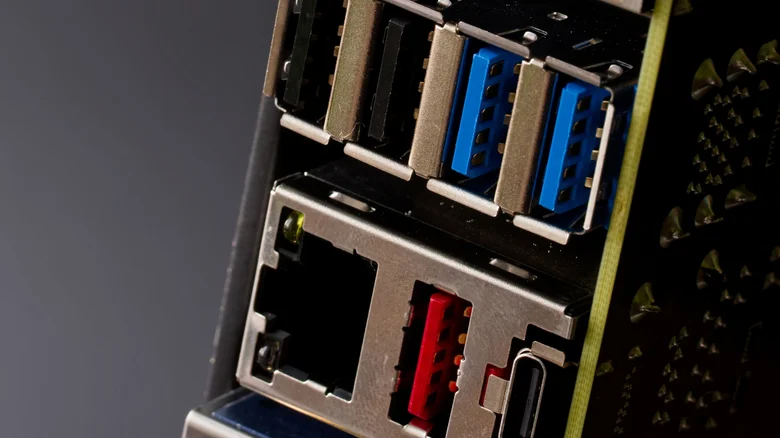
Close up of a motherboard back panel connectors on a dark background

slexp880/Shutterstock

Universal Serial Bus or USB ports, particularly USB Type-A and Type-B, can have different colors, which are denoted by the color of the plastic insert present in the connectors. Blue USB ports, which are pretty common in modern computing devices, are often considered to be faster than other common ports, such as a black USB ports or white USB ports. However, if you have a red USB port on your computer, which is relatively less common, there is a high chance that you have access to a faster port than the blue USB.

The USB port color is typically associated with the USB generation supported by the connector, which determines how fast it can transfer data or its power capabilities. In some cases, the port color can also tell if the port has always-on functionality, which allows it to provide power or charge the connected device even when the computer is sleeping. For example, if a USB port is orange, it's typically an always-on port, and can also support USB 3.2 Gen 1 (or USB 3.0) data transfer speeds. So, what are the capabilities of the blue and red USB ports, and how much faster is the red USB port? Let's find out.

Red USB ports can reach up to 20Gbps data transfer rates

The presence of a blue plastic insert in a USB port indicates that it supports the USB 3.0 generation or SuperSpeed USB, which was launched in November 2008. Also known as USB 3.2 Gen 1, the USB 3.0 specification is capable of reaching up to 5Gbps data transfer rates and a power delivery of 900 mA at 5 volts (or 4.5W). In some cases, when a USB 3.0 port is dedicated to charging, it can deliver up to 1500mA at 5V for a total of 7.5W.

The red USB ports, on the other hand, are typically associated with USB 3.1, USB 3.2 Gen 2, or USB 3.2 (aka USB 3.2 Gen 2x2) generations, all of which are newer than USB 3.0, and can handle up to 10Gbps data transfer rates in the case of USB 3.1 and up to 20Gbps in the case of USB 3.2. The red USB ports are, however, similar in terms of power delivery, but you do get support for always-on functionality. So if your computer has both blue and red USB ports, there is a very good chance that you will get faster data transfer rates and support for always-on power on the red port. However, there is one big caveat.

Port colors don't always tell the full story

While USB port colors are typically a pretty good indicator of what you can expect from a USB port in terms of data transfer and power delivery capabilities, it's not always guaranteed. This is because the USB Implementers Forum (or USB-IF) has not made it mandatory to use specific colors with specific USB ports. It's just a recommendation, which means device and motherboard manufacturers are free to use whichever color they want when including a USB port. While most do follow the common USB port colors, it's not always a given. 

One example of a popular computer manufacturer not following this practice is HP, which includes black colored plastic inserts in the front USB Type-A port on its Omen 25L gaming desktop, despite those USB ports supporting USB 3.2 Gen 1 or 5Gbps data transfer rates. So it's always a good idea to cross-check a USB port's capabilities in the supplied literature by the manufacturer or by asking the manufacturer directly.