
惯性聚合 高效追踪和阅读你感兴趣的博客、新闻、科技资讯
阅读原文 在惯性聚合中打开

推荐订阅源

S
Secure Thoughts
Security Latest
Security Latest
Simon Willison's Weblog
O
OpenAI News
GbyAI
GbyAI
L
LINUX DO - 最新话题
A
Arctic Wolf
T
Tor Project blog
G
GRAHAM CLULEY
I
InfoQ
博客园_首页
IT之家
IT之家
The Register - Security
Exploit-DB.com RSS Feed
P
Proofpoint News Feed
The GitHub Blog
The GitHub Blog
Blog — PlanetScale
Blog — PlanetScale
N
Netflix TechBlog - Medium
K
Kaspersky official blog
博客园 - 三生石上(FineUI控件)
S
SegmentFault 最新的问题
U
Unit 42
PCI Perspectives
PCI Perspectives
量子位
P
Palo Alto Networks Blog
S
Securelist
T
Troy Hunt's Blog
博客园 - 【当耐特】
Recorded Future
Recorded Future
K
KPMG report finds enterprise disconnect between AI and its ROI | CIO
S
Security Affairs
Engineering at Meta
Engineering at Meta
T
The Blog of Author Tim Ferriss
博客园 - 聂微东
罗磊的独立博客
N
News and Events Feed by Topic
人人都是产品经理
人人都是产品经理
B
Blog RSS Feed
NISL@THU
NISL@THU
C
Cisco Blogs
T
Threatpost
有赞技术团队
有赞技术团队
Forbes - Security
Forbes - Security
Hugging Face - Blog
Hugging Face - Blog
Last Week in AI
Last Week in AI
T
The Exploit Database - CXSecurity.com
Cloudbric
Cloudbric
Cyberwarzone
Cyberwarzone
Google DeepMind News
C
Cyber Attacks, Cyber Crime and Cyber Security

博客园 - wingfay

【转载】解决 安装或卸载软件时报错Error 1001 的问题 Win7下做一个Kubernetes的NetCore项目Demo .net Cache 需要注意的地方 SQL 字段修改 Powser Design 16.5 导入Mysql数据库的bug Druid中配置双数据库 ActiveMq Windows 配置优化 Eclipse使用Maven创建Web时错误:Could not resolve archetype 更新VS2017会出现“请更新 Visual Studio 安装程序 再继续” 提示 ipv6过审函数 转.iPhone开发网站、论坛、博客 NSLog的使用 Could not load type System.Security.Authentication..... [原创]Prism Command 和 IsEnabled 的冲突解决方法 [ZT]JScript下Array对象的性能问题 获取地区的Resolve Weather Location ID Using .NET C# LDAP Library(Novell.Directory.Ldap) WINDOWS下搭建LDAP服务器 [转帖]LDAP Schema的概念和基本要素
win7 升级Power Shell到4.0
wingfay · 2018-11-26 · via 博客园 - wingfay

因为用到EntityFrameworkCore ,想使用scaffold 来生成models。

提示我power Shell 2.0不支持命令,然后需要升级PS。

PS  win7 升级文件下载地址是 https://www.microsoft.com/zh-CN/download/details.aspx?id=40855

在这里下载 Windows6.1-KB2819745-x64-MultiPkg.msu,安装即可

在下载后安装有时候会出现 0x80240037 错误。

如果出现这个,将下载文件 .msu 改成.cab .

然后加压这个文件

然后使用 dism /online /add-package /packagepath:"X:\加压后的文件夹\Windows6.1-KB2872047-x64.cab" 依次执行解压后的各个cab文件

=============================================

如果需要右键支持打开power shell的话

首先打开regedit
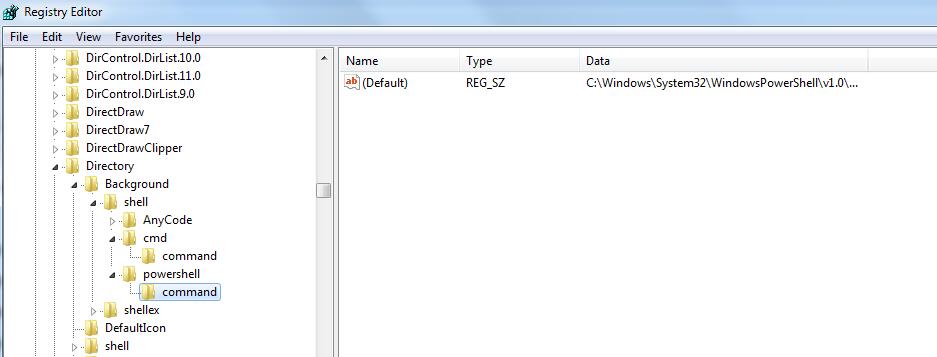
在{HKEY_CLASSES_ROOT\Directory\Background\shell\cmd\command}

下新建powershell以及command两个文件夹,如上图,

然后在command的REG_SZ的值输入

C:\Windows\System32\WindowsPowerShell\v1.0\powershell.exe -NoExit Set-Location "%V"

如果不小心误操作删除了cmd的键值,那么可以用下面的键值回复,cmd的REG_Sz键值为:

cmd.exe /s /k pushd "%V"

然后关闭注册表,shift+右键 ,出现的菜单中可以看到powershell,效果如下: