惯性聚合 高效追踪和阅读你感兴趣的博客、新闻、科技资讯
阅读原文 在惯性聚合中打开

推荐订阅源

S
Secure Thoughts
Security Latest
Security Latest
Simon Willison's Weblog
O
OpenAI News
GbyAI
GbyAI
L
LINUX DO - 最新话题
A
Arctic Wolf
T
Tor Project blog
G
GRAHAM CLULEY
I
InfoQ
博客园_首页
IT之家
IT之家
The Register - Security
Exploit-DB.com RSS Feed
P
Proofpoint News Feed
The GitHub Blog
The GitHub Blog
Blog — PlanetScale
Blog — PlanetScale
N
Netflix TechBlog - Medium
K
Kaspersky official blog
博客园 - 三生石上(FineUI控件)
S
SegmentFault 最新的问题
U
Unit 42
PCI Perspectives
PCI Perspectives
量子位
P
Palo Alto Networks Blog
S
Securelist
T
Troy Hunt's Blog
博客园 - 【当耐特】
Recorded Future
Recorded Future
K
KPMG report finds enterprise disconnect between AI and its ROI | CIO
S
Security Affairs
Engineering at Meta
Engineering at Meta
T
The Blog of Author Tim Ferriss
博客园 - 聂微东
罗磊的独立博客
N
News and Events Feed by Topic
人人都是产品经理
人人都是产品经理
B
Blog RSS Feed
NISL@THU
NISL@THU
C
Cisco Blogs
T
Threatpost
有赞技术团队
有赞技术团队
Forbes - Security
Forbes - Security
Hugging Face - Blog
Hugging Face - Blog
Last Week in AI
Last Week in AI
T
The Exploit Database - CXSecurity.com
Cloudbric
Cloudbric
Cyberwarzone
Cyberwarzone
Google DeepMind News
C
Cyber Attacks, Cyber Crime and Cyber Security

博客园 - 是谁啊?

jenkins 权限控制(用户只能看指定的项目) NoSQLBooster for MongoDB延长-试用期 使用openVPN组建企业局域网,连接之后无法访问互联网的问题解决 - 是谁啊? mac os socks5转http proxy M1 Mac Xcode模拟器无法运行 解决git“Unable to negotiate with 218.244.143.137 port 22: no matching host key type found. Their offer: ssh-rsa,ssh-dss”的问题 macos 升级后提示 python 命令需要使用命令行开发者工具,你要现在安装该工具吗 解决 Android studio 代理 Connect to 127.0.0.1:[/127.0.0.1] failed: Connection refused nginx 代理https后,应用redirect https变成http centos6无法安装nginx Postfix maillog邮件发送各阶段延时的日志记录 高德坐标系转wgs(苹果坐标系) java代码 How Do I test James Distributed Version with JMeter? springBoot项目不重新上传jar包,增量升级步骤 mac安装homebrew(国内) 企业微信会话存档消息解密(Java RSA PKCS1解密) 启动apache,将debug日志输出在console窗口 git 忽略提交某个指定的文件(不从版本库中删除) git pull 和本地文件冲突问题解决
转:solr6.0配置中文分词器IK Analyzer
是谁啊? · 2016-10-14 · via 博客园 - 是谁啊?

  solr6.0中进行中文分词器IK Analyzer的配置和solr低版本中最大不同点在于IK Analyzer中jar包的引用。一般的IK分词jar包都是不能用的,因为IK分词中传统的jar不支持solr6.0这个高版本的,所以就会发送运行错误的界面。下面就来介绍一下solr6.0中中文分词器IK Analyzer的配置。

步骤1:

  下载solr6.0专用的IK Analyzer的jar包和相应的配置文件。因为IK Analyzer可以很方便的对词库近些年扩展,所以我在IK Analyzer中加入了搜狗词库的配置,可以最大限度的收录现在一些潮流的词语。  IK Analyzer的jar包和相应的配置文件下载地址:点击打开链接

步骤2:

  解压上一个步骤所得到的压缩包,将ik-analyzer-solr5-5.x.jar这个jar包放入solr项目下的WEB-INF\lib目录中去,将IKAnalyzer.cfg.xml,mydict.dic(搜狗的扩展词库),stopword.dic放在solr项目下的WEB-INF\classes目录中去。

步骤3:

  将项目下solrhome\mynode\conf下的managed-schema配置文件中</schema>上面加入如下配置信息:(如果这里不懂的话可以去看我前几篇的博客关于solr6.0项目的环境的配置 连接地址:点击打开链接

  1. <span style="font-size:14px;">    <fieldType name="text_ik" class="solr.TextField">  
  2.         <analyzer class="org.wltea.analyzer.lucene.IKAnalyzer"/>  
  3.     </fieldType>  
  4.     <field name="text_ik"  type="text_ik" indexed="true"  stored="true"  multiValued="false" /></span>  

步骤4:

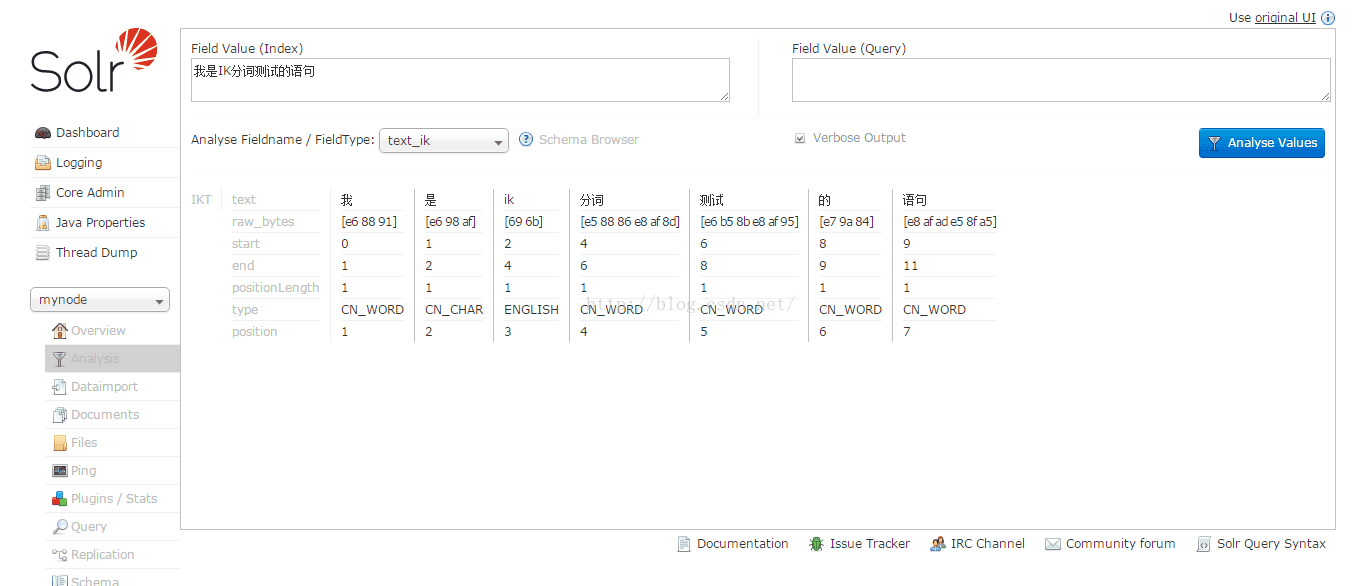
  启动Tomcat,打开solr项目主页进行测试。测试结果如下:

结合上一讲的MySQL数据库配置,这里我集成了solr6.0+mysql5.0+IK Analyzer分词。如果有兴趣的可以下载下来看看,下载地址:点击打开链接

如果有什么不清楚或者有啥疑问意见可以加我QQ  208017534  ,欢迎一起交流一起进步。

http://blog.csdn.net/linzhiqiang0316/article/details/51554217