






近来,用MVC5开发自己的一个小网站.网上租用了一个小空间(虚拟主机),可选.net版本为2.0 3.0 3.5 4.0 ,上传网站 后发现是403错误.不能访问.
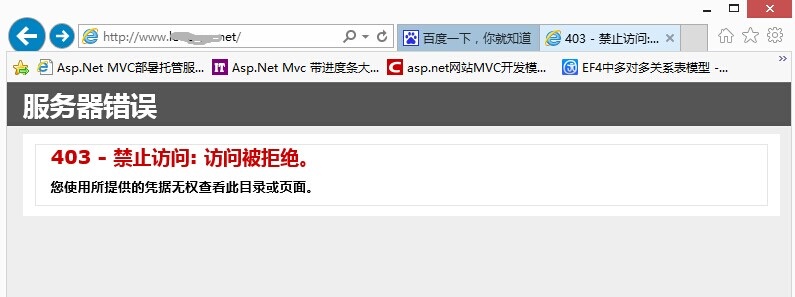

经与技术人员联系,把虚拟机更换到高版本.net4.5.1上面,还是不行.在本地IIS环境下可以访问.远程服务器下不能访问.
多方查资料未能解决.服务器提供方也无能为力了.只能自己再想办法解决.原来在刚刚购买空间时上传了一个.net2.0的程序,能正常运行.而且服务器上以经安装了相应.net框架,理论上是应该能使用的.本着解决问题不怕麻烦的精神,用VS2013建立了多个版本的网站基本程序,(如: .net4.0 MVC4, .net4.5 MVC4, .net4.5 Mvc5,.net4.5.1 MVC5)发现在.net4.0 MVC4,能够访问,其它的三个都不能访问.遂对比Web.config文件.

<?xml version="1.0" encoding="utf-8"?>
<!--
  有关如何配置 ASP.NET 应用程序的详细信息,请访问
  http://go.microsoft.com/fwlink/?LinkId=169433
  -->

<configuration>
  <appSettings>
    <add key="webpages:Version" value="2.0.0.0" />
    <add key="webpages:Enabled" value="false" />
    <add key="PreserveLoginUrl" value="true" />
    <add key="ClientValidationEnabled" value="true" />
    <add key="UnobtrusiveJavaScriptEnabled" value="true" />
  </appSettings>

  <system.web>

    <compilation targetFramework="4.0" />

    <pages>
      <namespaces>
        <add namespace="System.Web.Helpers" />
        <add namespace="System.Web.Mvc" />
        <add namespace="System.Web.Mvc.Ajax" />
        <add namespace="System.Web.Mvc.Html" />
        <add namespace="System.Web.Routing" />
        <add namespace="System.Web.WebPages" />
      </namespaces>
    </pages>
  </system.web>

  <system.webServer>
    <validation validateIntegratedModeConfiguration="false" />

    <modules runAllManagedModulesForAllRequests="true" />

  <handlers>
      <remove name="ExtensionlessUrlHandler-ISAPI-4.0_32bit" />
      <remove name="ExtensionlessUrlHandler-ISAPI-4.0_64bit" />
      <remove name="ExtensionlessUrlHandler-Integrated-4.0" />
      <add name="ExtensionlessUrlHandler-ISAPI-4.0_32bit" path="*." verb="GET,HEAD,POST,DEBUG,PUT,DELETE,PATCH,OPTIONS" modules="IsapiModule" scriptProcessor="%windir%\Microsoft.NET\Framework\v4.0.30319\aspnet_isapi.dll" preCondition="classicMode,runtimeVersionv4.0,bitness32" responseBufferLimit="0" />
      <add name="ExtensionlessUrlHandler-ISAPI-4.0_64bit" path="*." verb="GET,HEAD,POST,DEBUG,PUT,DELETE,PATCH,OPTIONS" modules="IsapiModule" scriptProcessor="%windir%\Microsoft.NET\Framework64\v4.0.30319\aspnet_isapi.dll" preCondition="classicMode,runtimeVersionv4.0,bitness64" responseBufferLimit="0" />
      <add name="ExtensionlessUrlHandler-Integrated-4.0" path="*." verb="GET,HEAD,POST,DEBUG,PUT,DELETE,PATCH,OPTIONS" type="System.Web.Handlers.TransferRequestHandler" preCondition="integratedMode,runtimeVersionv4.0" />
    </handlers></system.webServer>
</configuration>
这是.net4.0 MVC4 的Web.config代码
<?xml version="1.0" encoding="utf-8"?> <!-- 有关如何配置 ASP.NET 应用程序的详细信息,请访问 http://go.microsoft.com/fwlink/?LinkId=301880 --> <configuration> <configSections> <!-- For more information on Entity Framework configuration, visit http://go.microsoft.com/fwlink/?LinkID=237468 --> <section name="entityFramework" type="System.Data.Entity.Internal.ConfigFile.EntityFrameworkSection, EntityFramework, Version=6.0.0.0, Culture=neutral, PublicKeyToken=b77a5c561934e089" requirePermission="false" /> <section name="UploadConfig" type="DataModel.Config.UploadConfig,DataModel"/> <section name="WebSiteInfo" type="DataModel.Config.WebSiteInfo,DataModel"/> <section name="UserConfig" type="DataModel.Config.UserConfig,DataModel"/> </configSections> <connectionStrings> <!--<add name="DefaultConnection" connectionString="Data Source=(LocalDb)\v11.0;AttachDbFilename=|DataDirectory|\aspnet-WEB-20140601091318.mdf;Initial Catalog=aspnet-WEB-20140601091318;Integrated Security=True" providerName="System.Data.SqlClient" />--> <add name="LonggerDataEntities" connectionString="metadata=res://*/LonggerDataModel.csdl|res://*/LonggerDataModel.ssdl|res://*/LonggerDataModel.msl;provider=System.Data.SqlClient;provider connection string="data source=.;initial catalog=***;persist security info=True;user id=***;password=***;MultipleActiveResultSets=True;App=EntityFramework"" providerName="System.Data.EntityClient" /> </connectionStrings> <appSettings> <add key="webpages:Version" value="3.0.0.0" /> <add key="webpages:Enabled" value="false" /> <add key="ClientValidationEnabled" value="true" /> <add key="UnobtrusiveJavaScriptEnabled" value="true" /> </appSettings> <system.web> <authentication mode="None" /> <compilation debug="true" targetFramework="4.5.1" /> <httpRuntime targetFramework="4.5.1" /> </system.web> <system.webServer> <modules> <remove name="FormsAuthenticationModule" /> </modules> </system.webServer> <runtime> <assemblyBinding xmlns="urn:schemas-microsoft-com:asm.v1"> <dependentAssembly> <assemblyIdentity name="System.Web.Helpers" publicKeyToken="31bf3856ad364e35" /> <bindingRedirect oldVersion="1.0.0.0-3.0.0.0" newVersion="3.0.0.0" /> </dependentAssembly> <dependentAssembly> <assemblyIdentity name="System.Web.Mvc" publicKeyToken="31bf3856ad364e35" /> <bindingRedirect oldVersion="1.0.0.0-5.1.0.0" newVersion="5.1.0.0" /> </dependentAssembly> <dependentAssembly> <assemblyIdentity name="System.Web.Optimization" publicKeyToken="31bf3856ad364e35" /> <bindingRedirect oldVersion="1.0.0.0-1.1.0.0" newVersion="1.1.0.0" /> </dependentAssembly> <dependentAssembly> <assemblyIdentity name="System.Web.WebPages" publicKeyToken="31bf3856ad364e35" /> <bindingRedirect oldVersion="1.0.0.0-3.0.0.0" newVersion="3.0.0.0" /> </dependentAssembly> <dependentAssembly> <assemblyIdentity name="WebGrease" publicKeyToken="31bf3856ad364e35" /> <bindingRedirect oldVersion="0.0.0.0-1.6.5135.21930" newVersion="1.6.5135.21930" /> </dependentAssembly> <dependentAssembly> <assemblyIdentity name="Antlr3.Runtime" publicKeyToken="eb42632606e9261f" culture="neutral" /> <bindingRedirect oldVersion="0.0.0.0-3.5.0.2" newVersion="3.5.0.2" /> </dependentAssembly> <dependentAssembly> <assemblyIdentity name="Newtonsoft.Json" publicKeyToken="30ad4fe6b2a6aeed" culture="neutral" /> <bindingRedirect oldVersion="0.0.0.0-6.0.0.0" newVersion="6.0.0.0" /> </dependentAssembly> </assemblyBinding> </runtime> <entityFramework> <defaultConnectionFactory type="System.Data.Entity.Infrastructure.LocalDbConnectionFactory, EntityFramework"> <parameters> <parameter value="v12.0" /> </parameters> </defaultConnectionFactory> <providers> <provider invariantName="System.Data.SqlClient" type="System.Data.Entity.SqlServer.SqlProviderServices, EntityFramework.SqlServer" /> </providers> </entityFramework> <UploadConfig configSource="Config\Upload.config" /> <WebSiteInfo configSource="Config\WebSiteInfo.config" /> <UserConfig configSource="Config\UserConfig.config" /> </configuration>
这是.net4.5.1 MVC5 的Web.config代码
仔细观察发现,在
<appSettings>
<add key="webpages:Version" value="3.0.0.0" />
<add key="webpages:Enabled" value="false" />
<add key="ClientValidationEnabled" value="true" />
<add key="UnobtrusiveJavaScriptEnabled" value="true" />
</appSettings>
中间少一条 <add key="PreserveLoginUrl" value="true" /> 这个应该是登录引导用的.应该用处不大.
最主要的是在 <system.webServer> </system.webServer> 看了网上好多方法,都是在这里面加上<modules runAllManagedModulesForAllRequests="true" /> ,这个我试了,不管用,反而会引发500错误.经过对比,发现需要加入以下代码
  <system.webServer>

    <validation validateIntegratedModeConfiguration="false" />

    <modules runAllManagedModulesForAllRequests="true" />

  <handlers>
      <remove name="ExtensionlessUrlHandler-ISAPI-4.0_32bit" />
      <remove name="ExtensionlessUrlHandler-ISAPI-4.0_64bit" />
      <remove name="ExtensionlessUrlHandler-Integrated-4.0" />
      <add name="ExtensionlessUrlHandler-ISAPI-4.0_32bit" path="*." verb="GET,HEAD,POST,DEBUG,PUT,DELETE,PATCH,OPTIONS" modules="IsapiModule" scriptProcessor="%windir%\Microsoft.NET\Framework\v4.0.30319\aspnet_isapi.dll" preCondition="classicMode,runtimeVersionv4.0,bitness32" responseBufferLimit="0" />
      <add name="ExtensionlessUrlHandler-ISAPI-4.0_64bit" path="*." verb="GET,HEAD,POST,DEBUG,PUT,DELETE,PATCH,OPTIONS" modules="IsapiModule" scriptProcessor="%windir%\Microsoft.NET\Framework64\v4.0.30319\aspnet_isapi.dll" preCondition="classicMode,runtimeVersionv4.0,bitness64" responseBufferLimit="0" />
      <add name="ExtensionlessUrlHandler-Integrated-4.0" path="*." verb="GET,HEAD,POST,DEBUG,PUT,DELETE,PATCH,OPTIONS" type="System.Web.Handlers.TransferRequestHandler" preCondition="integratedMode,runtimeVersionv4.0" />
    </handlers>

  </system.webServer>
用这段代码替换你的Config文件相应的配置节
当然了,你的配置节里有其它配置,就要自己有选择的添加了.
经测试,成功!!!!现记录下来,一来备忘,二来可以帮助有需要的人.
此内容由惯性聚合(RSS阅读器)自动聚合整理,仅供阅读参考。 原文来自 — 版权归原作者所有。