





在ElementUI的Dialog中,需要实现其宽度随浏览器宽度变化而变化,并设定默认值,当浏览器宽度大于该值时,Dialog保持该宽度,小于该值时,使用100%宽度。
代码使用 window.onresize 事件触发变化,具体Demo代码如下
<template>
  <div class="app-container">
    <div class="filter-container">
      <el-button type="primary" icon="el-icon-edit" @click="dialogFormVisible=true">
        打开
      </el-button>
    </div>
    <el-dialog title="Test" :visible.sync="dialogFormVisible" :width="dialogWidth">
      <el-form ref="dataForm" :model="temp" label-position="left" label-width="110px">
        <el-row :gutter="10">
          <el-col>
            <el-form-item label="标题" prop="title">
              <el-input
                v-model="temp.title"
                placeholder="请输入培训标题"
              />
            </el-form-item>
          </el-col>
        </el-row>
      </el-form>
      <div slot="footer" class="dialog-footer">
        <el-button @click="dialogFormVisible=false">
          取消
        </el-button>
      </div>
    </el-dialog>
  </div>
</template>

<script>
export default {
  name: 'DialogWidthDemo',
  components: {
  },
  data() {
    return {
      temp: {
        title: ''
      },
      dialogWidth: 0,
      dialogFormVisible: false
    }
  },
  created() {
    this.setDialogWidth()
  },
  mounted() {
    window.onresize = () => {
      return (() => {
        this.setDialogWidth()
      })()
    }
  },
  methods: {
    setDialogWidth() {
      console.log(document.body.clientWidth)
      var val = document.body.clientWidth
      const def = 800 // 默认宽度
      if (val < def) {
        this.dialogWidth = '100%'
      } else {
        this.dialogWidth = def + 'px'
      }
    }
  }
}
</script>

<style scoped>

</style>
效果如下
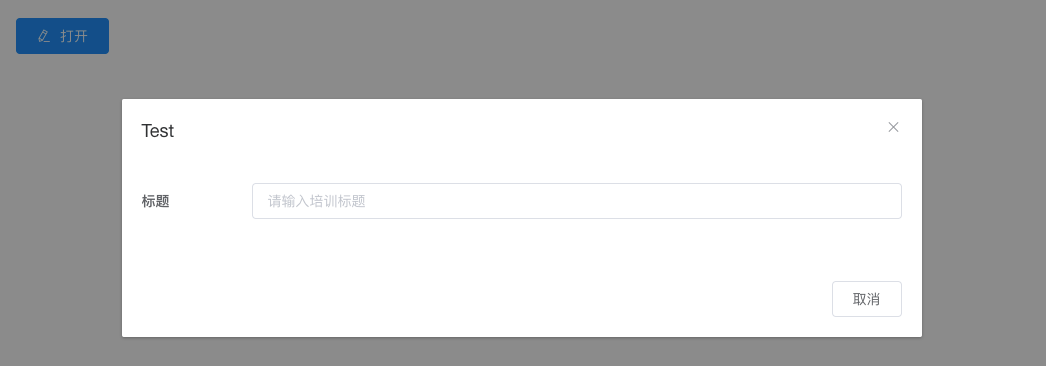
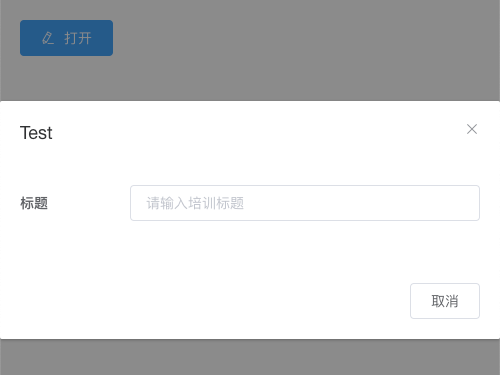
此内容由惯性聚合(RSS阅读器)自动聚合整理,仅供阅读参考。 原文来自 — 版权归原作者所有。