





项目里需要用到扫描二维码,自己实现,不会。
找到了两种解决方案:
具体实现:前端代码(vue)(前端用到 vux)
<template>
<div class="main">
  <group title="打印机参数" label-width="5.5em">
      <x-input title="名称" placeholder="输入打印机名称" v-model="model.name" :required="true" @on-change="check" ref="name"></x-input>
      <x-input title="MAC地址" placeholder="输入MAC地址" v-model="model.mac"  @on-change="check" ref="mac">
        <a slot="right-full-height" class="scan" @click="scan()" title="扫码"><x-icon type="android-expand" size="32"></x-icon></a>
      </x-input>
      <cell title="城市" :value="city"></cell>
      <cell title="经纬度" :value="location"></cell>
  </group>
  <iframe id="geoPage" width=0 height=0 frameborder=0  style="display:none;" scrolling="no"  src="https://apis.map.qq.com/tools/geolocation?key=212121U3F2Q&referer=3Dprint"></iframe>
  <x-button type="primary" @click.native="add()" :disabled.sync="disabled"> 添加打印机</x-button>
  <input type="file" accept="image/*" capture="camera" @change="show($event)" v-show="false" ref="file">
</div>
</template>
<script>
import {Group, XInput, XButton, Alert, Range, XSwitch, Cell, InlineXSwitch, ChinaAddressV4Data} from 'vux'
export default {
  components: {Group, XInput, XButton, Alert, Range, XSwitch, Cell, InlineXSwitch, ChinaAddressV4Data},
  data () {
    return {
      addressData: ChinaAddressV4Data,
      disabled: true,
      city: '',
      location: '',
      sys: false, // 扫一扫调用
      model: {
        name: '',
        mac: '',
        status: false,
        citys: [],
        city: '',
        address: '',
        memory: '',
        temperature: 0,
        modelName: '',
        location: '',
        ver: '',
        step: 0,
        plantTemperature: '',
        userId: 0
      }
    }
  },
  mounted () {
    // this.getLocation()
    let that = this
    window.addEventListener('message', function (event) {
      var loc = event.data
      if (loc) {
        that.city = loc.nation + ' ' + loc.province + ' ' + loc.city
        that.location = loc.lat + ' , ' + loc.lng
        that.model.address = that.city
        that.model.location = that.location
      }
      console.log('location', loc)
    }, false)
    this.initConifig()
  },
  methods: {
    add () {
      let that = this
      this.model.userId = sessionStorage["userId"]
      this.model.status = this.model.status ? 1 : 0
      this.model.city = this.model.citys.join()
     // console.log(this.model.city)
      console.log(this.$store.state.user)
      this.Ajax.post('/api/services/app/Print/Create', this.model).then(function (result) {
        // console.log(that.model)
        if (result.success) {
          that.go('/user/prints')
        } else {
          that.$vux.toast.show({text: result.error.message, type: 'cancel'})
        }
      })
    },
    check () {
      this.disabled = !(this.model.name !== '' && this.model.mac !== '')
    },
    initConifig () {
      let that = this
      /* global wx */
      this.Ajax.get('/WX/GetConfig?url=' + location.href).then((r) => {
        let data = r.result
        console.log(data)
        wx.config({
          debug: false, // 开启调试模式,调用的所有api的返回值会在客户端alert出看传入的参数,可以在pc端打开,参数信息会通过log打出,仅在pc端时才会打印。
          appId: data.appId, // 必填,公众号的唯一标识
          timestamp: data.timestamp, // 必填,生成签名的时间戳
          nonceStr: data.noncestr, // 必填,生成签名的随机串
          signature: data.signature, // 必填,签名,见附录1
          jsApiList: ['scanQRCode'] // 必填,需要使用的JS接口列表,所有JS接口2
        })
        that.sys = true
        wx.error((r) => {
          console.log(r)
          that.sys = false
          alert('微信调用异常:' + r.errMsg)
        })
      })
    },
    wxScan () {
      let that = this
       /* global wx */
      wx.scanQRCode({
        needResult: 1,
        desc: 'scanQRCode desc',
        success: (r) => {
          console.log(r)
          let msg = r.resultStr
          if (msg.length === 29) {
            let mac = msg.substring(17, 29)
            let arrs = []
            console.log(mac)
            for (let i = 0; i < 6; i++) {
              arrs.push(mac.substring(i * 2, i * 2 + 2))
            }
            that.model.mac = arrs.join(':')
            console.log(msg, that.model.mac)
          } else {
            that.$vux.toast.show({text: 'mac解析失败:' + msg, type: 'cancel'})
          }
        }
      })
    },
    scan () {
      if (this.sys) {
        this.wxScan()
      } else {
        this.$refs.file.click()
      }
    },
    go (link) {
      this.$router.push({path: link})
    },
    show (send) {
      // var file = console.log(send)
      /* global qrcode */
      let file = send.target.files[0]
      qrcode.decode(this.getUrl(file))
      var that = this
      qrcode.callback = function (msg) {
        if (msg.length === 29) {
          let mac = msg.substring(17, 29)
          let arrs = []
          console.log(mac)
          for (let i = 0; i < 6; i++) {
            arrs.push(mac.substring(i * 2, i * 2 + 2))
          }
          that.model.mac = arrs.join(':')
          console.log(msg, that.model.mac)
        } else {
          that.$vux.toast.show({text: 'mac解析失败:' + msg, type: 'cancel'})
        }
      }
    },
    getUrl (file) {
      let url = null
      if (window.createObjectURL !== undefined) {
        url = window.createObjectURL(file)
      } else if (window.URL !== undefined) {
        url = window.URL.createObjectURL(file)
      } else if (window.webkitURL !== undefined) {
        url = window.webkitURL.createObjectURL(file)
      }
      return url
    },
    getLocation () {
      if (navigator.geolocation) {
        navigator.geolocation.getCurrentPosition(function (p) {
          console.log(p)
        })
      } else {
        alert('不支持定位')
      }
    }
  }
}
</script>
<style  scoped>
.ptitle{ background: #efeff4;padding: 10px 20px; font-size: 16px; font-weight: bold; border-bottom: #d8d8dd;}
a.add:hover{ color: #4086ff;fill: #4086ff;cursor: pointer;}
.main{padding: 0 10px;}
a.scan{ fill: #4086ff; cursor: pointer;}
</style>
通用.net core 微信授权获取方法。
using System;
using System.Net.Http;
using System.Security.Cryptography;
using System.Text;
using Newtonsoft.Json;

namespace PrintServe.Web.Host.Core
{
    public static class WXApi
    {
        /// <summary>
        /// 过期时间
        /// </summary>
        public static DateTime OutDateTime { get; set; }
        /// <summary>
        /// 凭据
        /// </summary>
        public static string Token { get; set; }
        /// <summary>
        /// 船票
        /// </summary>
        public static string Ticket { get; set; }
        /// <summary>
        /// 获取微信api接口船票
        /// </summary>
        /// <param name="url">请求页面地址</param>
        /// <param name="appId">开发者Id</param>
        /// <param name="secret">开发者密码</param>
        /// <returns></returns>
        public static dynamic  GetConfig(string url,string appId,string secret)
        {
            var timestamp = CreatenTimestamp();
            var noncestr = CreatenNonce_str();
            var ticket = Ticket;
            if (DateTime.Now > OutDateTime)
            {
                var token = GetToken(appId, secret);
                if (!string.IsNullOrEmpty(token))
                {
                    OutDateTime = DateTime.Now.AddMinutes(90);
                    Token = token;
                    Ticket = GetTickect(Token);
                    ticket = Ticket;
                }
            }
            var signature = GetSignature(ticket, noncestr, timestamp, url, out var str);
            return new
            {
                ticket,
                appId,
                url,
                timestamp,
                noncestr,
                signature,
                str
            };
        }
        /// <summary>
        /// 获取凭据
        /// </summary>
        /// <param name="appid"></param>
        /// <param name="secret"></param>
        /// <returns></returns>
        public static string GetToken(string appid,string secret)
        {
            var url = string.Format("https://api.weixin.qq.com/cgi-bin/token?grant_type=client_credential&appid={0}&secret={1}",appid,secret);
            var client = new HttpClient();
            var result = client.GetAsync(url).Result;
            if (!result.IsSuccessStatusCode) return string.Empty;
            var jsTicket = result.Content.ReadAsStringAsync().Result;
            var v = JsonConvert.DeserializeObject<dynamic>(jsTicket);
            return v.access_token.ToString();
        }
        /// <summary>
        /// 获取船票
        /// </summary>
        /// <param name="token"></param>
        /// <returns></returns>
        public static string GetTickect(string token)
        {
            var url = string.Format("https://api.weixin.qq.com/cgi-bin/ticket/getticket?access_token={0}&type=jsapi", token);
            var client = new HttpClient();
            var result = client.GetAsync(url).Result;
            if (!result.IsSuccessStatusCode) return string.Empty;
            var jsTicket = result.Content.ReadAsStringAsync().Result;
            var v = JsonConvert.DeserializeObject<dynamic>(jsTicket);
            return v.ticket.ToString();
        }
        /// <summary>
        /// 获取时间戳
        /// </summary>
        /// <returns></returns>
        public static long CreatenTimestamp()
        {
            return (DateTime.Now.ToUniversalTime().Ticks - 621355968000000000) / 10000000;
        }

        ///  <summary>
        ///  签名算法
        /// 本代码来自开源微信SDK项目:https://github.com/night-king/weixinSDK
        ///  </summary>
        ///  <param name="jsapi_ticket">jsapi_ticket</param>
        ///  <param name="noncestr">随机字符串(必须与wx.config中的nonceStr相同)</param>
        ///  <param name="timestamp">时间戳(必须与wx.config中的timestamp相同)</param>
        ///  <param name="url">当前网页的URL,不包含#及其后面部分(必须是调用JS接口页面的完整URL)</param>
        /// <param name="string1"></param>
        /// <returns></returns>
        public static string GetSignature(string jsapi_ticket, string noncestr, long timestamp, string url, out string string1)
        {
            url = url.Split('#')[0];
            var string1Builder = new StringBuilder();
            string1Builder.Append("jsapi_ticket=").Append(jsapi_ticket).Append("&")
                .Append("noncestr=").Append(noncestr).Append("&")
                .Append("timestamp=").Append(timestamp).Append("&")
                .Append("url=").Append(url);
            string1 = string1Builder.ToString();
            return Sha1(string1);
        }
        /// <summary>
        /// 创建随机字符串
        ///本代码来自开源微信SDK项目:https://github.com/night-king/weixinSDK
        /// </summary>
        /// <returns></returns>
        public static string CreatenNonce_str()
        {
            var strs = "0123456789abcdefghijklmnopqrstuvwxyzABCDEFGHIJKLMNOPQRSTUVWXYZ".ToCharArray();
            Random r = new Random();
            var sb = new StringBuilder();
            var length = strs.Length;
            for (int i = 0; i < 15; i++)
            {
                sb.Append(strs[r.Next(length - 1)]);
            }
            return sb.ToString();
        }
        /// <summary>
        /// HMAC-SHA1加密算法
        /// </summary>
        /// <param name="str">加密字符串</param>
        /// <returns></returns>
        public static string Sha1(string str)
        {
            var sha1 = SHA1.Create();
            var hash = sha1.ComputeHash(Encoding.UTF8.GetBytes(str));
            string byte2String = string.Empty;
            foreach (var t in hash)
            {
                byte2String += t.ToString("x2");
            }
            return byte2String;
        }
    }
}
controller调用
using System;
using Abp.AspNetCore.Mvc.Controllers;
using Microsoft.AspNetCore.Hosting;
using Microsoft.AspNetCore.Mvc;
using Microsoft.Extensions.Configuration;
using PrintServe.Configuration;
using PrintServe.Web.Host.Core;

namespace PrintServe.Web.Host.Controllers
{
    public class WXController : AbpController
    {
        private readonly IConfigurationRoot _configuration;
        public WXController(IHostingEnvironment env)
        {
            _configuration = env.GetAppConfiguration();
        }
        public dynamic GetConfig(string url)
        {
            var appId = _configuration["wx:appid"];
            var secret = _configuration["wx:secret"];
//            Logger.Error("出现异常");
            return WXApi.GetConfig(url,appId,secret);
        }
        [HttpGet]
        public string Test(string input)
        {
            return WXApi.Sha1(input);
        }

    }
}
在主页面要添加微信接口js调用
<!DOCTYPE html>
<html>
  <head>
    <meta charset="utf-8">
    <meta name="viewport" content="width=device-width,initial-scale=1,user-scalable=0">
    <title>3D打印</title>
    <script src="./static/js/reqrcode.js"></script>
    <!-- <script src="./static/js/vconsole.min.js"></script> -->
    <!-- <script src="http://res.wx.qq.com/open/js/jweixin-1.4.0.js"></script> -->
    <script src="http://res.wx.qq.com/open/js/jweixin-1.1.0.js"></script>
  </head>
  <body>
    <div id="app-box"></div>
    <!-- built files will be auto injected -->
  </body>
</html>
调用微信api接口:
1:Ip,和域名都要加到微信公众平台里,缺一不可,在这里被坑了很久。
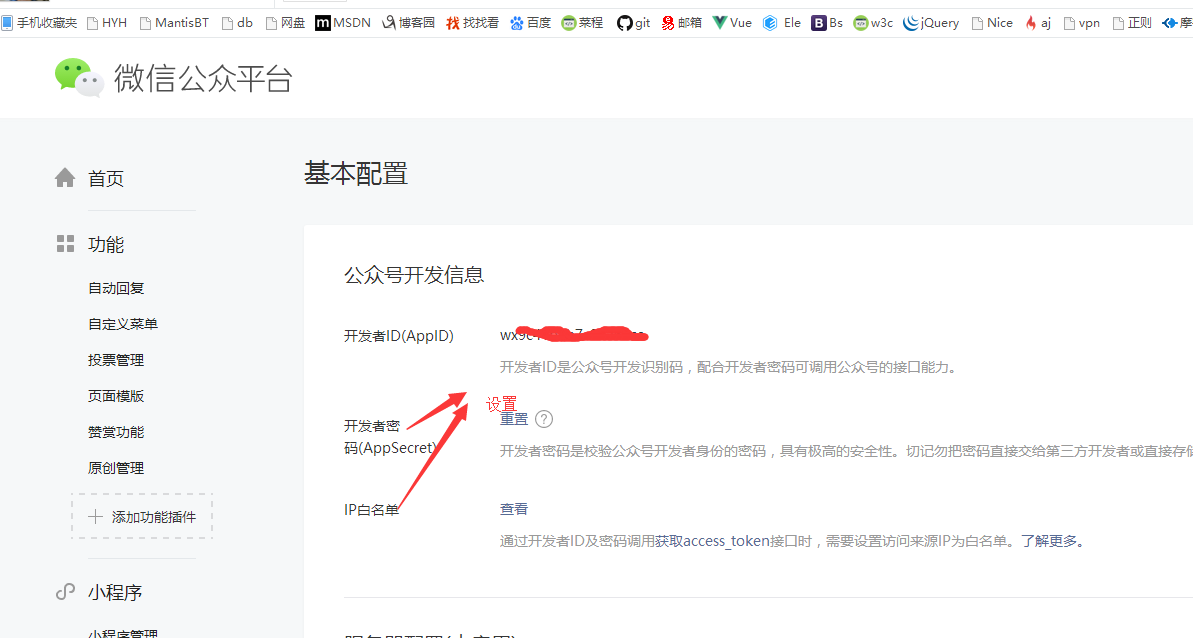
设置域名,一个月只能设置3次,要慎重。
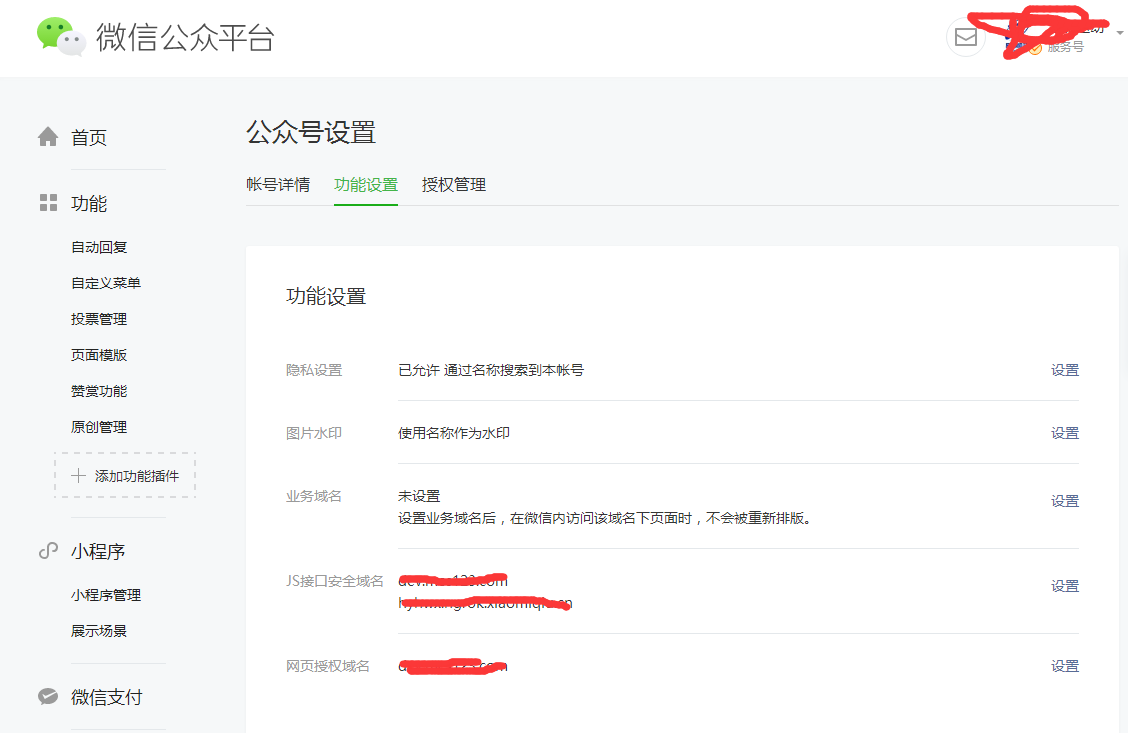
2:调试时候,最好在开发机器上用花生壳绑定个域名,以便开发。本地没有域名,不能调试。可以下载微信开发者工具,进行调试,错误提示比较清晰。
微信开发者工具地址:地址
参考文章:
此内容由惯性聚合(RSS阅读器)自动聚合整理,仅供阅读参考。 原文来自 — 版权归原作者所有。