

惯性聚合 高效追踪和阅读你感兴趣的博客、新闻、科技资讯
阅读原文 在惯性聚合中打开

推荐订阅源

S
Secure Thoughts
freeCodeCamp Programming Tutorials: Python, JavaScript, Git & More
S
Securelist
云风的 BLOG
云风的 BLOG
M
MIT News - Artificial intelligence
Engineering at Meta
Engineering at Meta
雷峰网
雷峰网
C
CERT Recently Published Vulnerability Notes
H
Hackread – Cybersecurity News, Data Breaches, AI and More
S
SegmentFault 最新的问题
cs.CL updates on arXiv.org
K
Kaspersky official blog
WordPress大学
WordPress大学
I
Intezer
L
Lohrmann on Cybersecurity
V
Vulnerabilities – Threatpost
C
Check Point Blog
A
About on SuperTechFans
AWS News Blog
AWS News Blog
Latest news
Latest news
宝玉的分享
宝玉的分享
Cyber Security Advisories - MS-ISAC
小众软件
小众软件
奇客Solidot–传递最新科技情报
奇客Solidot–传递最新科技情报
C
Cyber Attacks, Cyber Crime and Cyber Security
SecWiki News
SecWiki News
Recorded Future
Recorded Future
Last Week in AI
Last Week in AI
D
Darknet – Hacking Tools, Hacker News & Cyber Security
The Register - Security
A
Arctic Wolf
V2EX - 技术
V2EX - 技术
Hacker News: Ask HN
Hacker News: Ask HN
V
V2EX
Scott Helme
Scott Helme
I
InfoQ
Project Zero
Project Zero
Security Archives - TechRepublic
Recent Announcements
Spread Privacy
Spread Privacy
Attack and Defense Labs
大猫的无限游戏
大猫的无限游戏
Webroot Blog
Webroot Blog
N
News and Events Feed by Topic
博客园 - 司徒正美
Microsoft Security Blog
The GitHub Blog
The GitHub Blog
NISL@THU
NISL@THU
L
LangChain Blog
让小产品的独立变现更简单 - ezindie.com

博客园 - 缤纷夏日

文件分割合并DOS版 安装vs2017后,RDLC 报表定义具有无法升级的无效目标命名空间 TortoiseGit版本库中某个文件显示问号或叹号的问题解决办法 vs2012调试时,抛出异常的等待时间很慢,原来是QQ电脑管家搞的鬼。 wordpress4.4+版本自动生成一个768w像素缩略图的解决办法 vs2012 与 win7 不兼容的问题 c#+Winform实现自定义的“复制、粘贴”右键快捷菜单,多个控件共享使用一个右键菜单。 自制《要塞:十字军东征》无限金钱修改器 ms Sql 数据库出现 “提供的统计信息流已损坏”的解决办法。 C#+Midi 模拟各种乐器演奏 如何让DataGridView根据数据“0”或“1”等值显示为“是”或“否”(复选框的使用) DataGridView 显示和隐藏DataGridViewButtonCell按钮的办法 文件隐藏助手,将一个压缩文件隐藏到图片中 如何让DataGridview控件自动滚动到指定的行或列 为Winform程序中DataGridView控件增加自动显示行号功能 在Excel Vba程序中自制进度条,显示实时进度信息 Winform中的DataGridView控件内容自动保存 地下城守护者2 无限魔法修改器 缤纷影视系统3.0源码开放
frp+TeamViewer 完美解决TeamViewer5分钟商业提醒
缤纷夏日 · 2019-02-21 · via 博客园 - 缤纷夏日

必要条件:必须有一个公网服务器

frp是一个开源的端口转发工具,中文使用说明及下载地址在这里  https://github.com/fatedier/frp/blob/master/README_zh.md

TeamViewer有一个功能,就是允许Lan直连,就是说允许在局域网内部使用,而不经过TeamViewer的服务器,这就为我们提供了思路。

方案图:
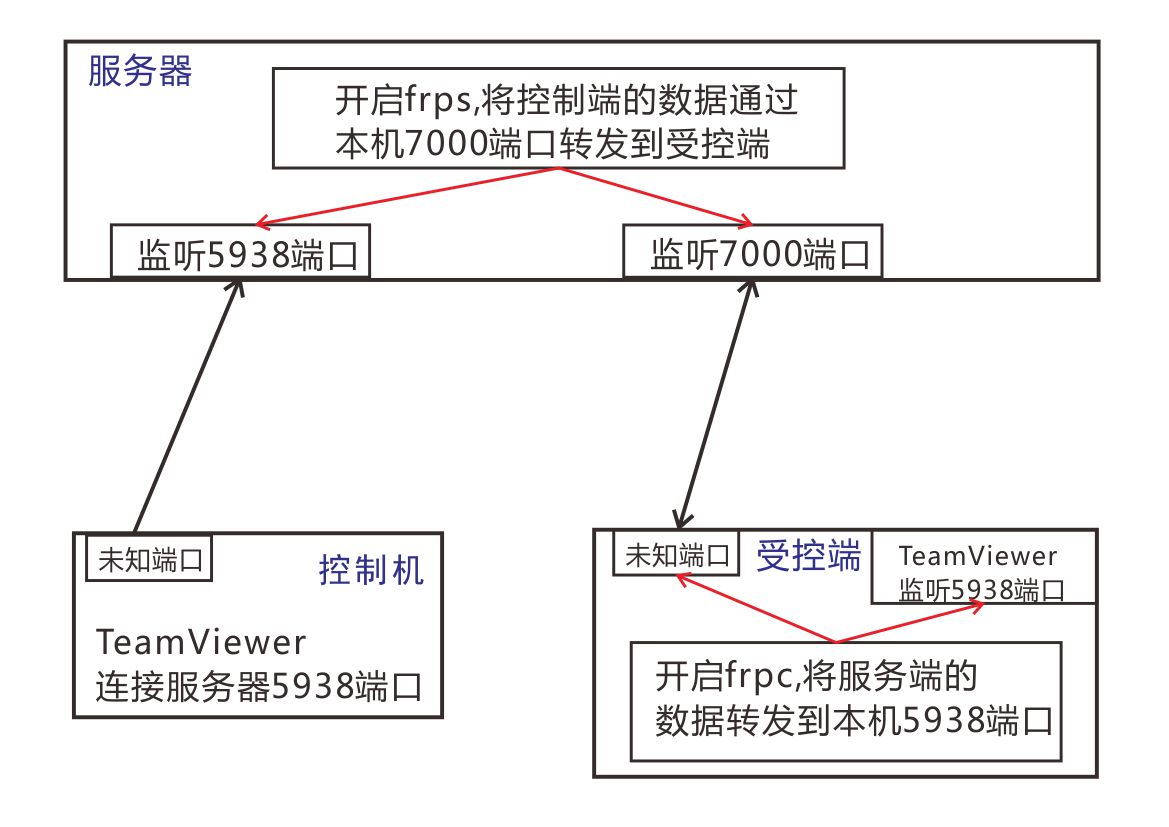
服务端(frps.ini)的配置:

[common]
bind_port = 7000

端口可以随便改,防火墙记得要开放此端口和5938端口

被控端(frpc.ini)配置:

[common]
server_addr = xx.xx.xx.xx  这是你的服务器外网IP
server_port = 7000

[rdp]
type = tcp
local_ip = 127.0.0.1
local_port = 5938
remote_port = 5938

被控端开启frpc方式:

新建一个快捷方式,内容为 %comspec% /c  "frpc.exe -c frpc.ini"

这是使用配置文件的方式运行,当然frpc.exe也是支持命令行参数的,具体可以输入frpc --help查看

服务端的开启方式也是类似

最后,记得开启TeamViewer的允许Lan连接,控制端TeamViewer的ID位置输入服务器的IP,密码是被控端的密码。

尽情使用吧