




惯性聚合 高效追踪和阅读你感兴趣的博客、新闻、科技资讯
阅读原文 在惯性聚合中打开

推荐订阅源

Engineering at Meta
Engineering at Meta
博客园_首页
H
Help Net Security
WordPress大学
WordPress大学
让小产品的独立变现更简单 - ezindie.com
罗磊的独立博客
博客园 - 三生石上(FineUI控件)
B
Blog
I
InfoQ
SecWiki News
SecWiki News
T
Tailwind CSS Blog
Spread Privacy
Spread Privacy
freeCodeCamp Programming Tutorials: Python, JavaScript, Git & More
V
Vulnerabilities – Threatpost
N
Netflix TechBlog - Medium
P
Palo Alto Networks Blog
CTFtime.org: upcoming CTF events
Vercel News
Vercel News
Threat Intelligence Blog | Flashpoint
K
Kaspersky official blog
M
MIT News - Artificial intelligence
S
Schneier on Security
T
Threat Research - Cisco Blogs
F
Fortinet All Blogs
Cyberwarzone
Cyberwarzone
Scott Helme
Scott Helme
aimingoo的专栏
aimingoo的专栏
Martin Fowler
Martin Fowler
MyScale Blog
MyScale Blog
The Cloudflare Blog
Recent Announcements
Security Latest
Security Latest
G
GRAHAM CLULEY
IT之家
IT之家
Y
Y Combinator Blog
The Last Watchdog
The Last Watchdog
腾讯CDC
Google DeepMind News
V
V2EX
S
Securelist
TaoSecurity Blog
TaoSecurity Blog
B
Blog RSS Feed
S
SegmentFault 最新的问题
博客园 - 叶小钗
P
Proofpoint News Feed
云风的 BLOG
云风的 BLOG
Project Zero
Project Zero
G
Google Developers Blog
Google DeepMind News
F
Full Disclosure

博客园 - 黄彬子

【转】Go语言:编译后文件体积过大解决方案 【转】使用 UPX 压缩可执行文件 Go语言获取路径的文件名、后缀 go - 如何将gin模式设置为release模式? 【Golang标准库】flag 【Golang踩过的坑】exported function Script should have comment or be unexported wget配置文件的使用:代理设置与不检查证书 Rust Crates 源使用帮助 2020大风口!什么是图神经网络?有什么用?终于有人讲明白了 2020必火的图神经网络(GNN)是什么?有什么用? 【每天学习一点点】Tensorflow 版本与CUDA版本 【每天学习一点点】使用plot_model绘制网络模式失败 【每天学习一点点】keras cifar10.load_data()自己下载数据 【每天学习一点点】Tensorflow2.X 运行问题:Could not create cudnn handle: CUDNN_STATUS_ALLOC_FAILED 【每天学习一点点】mxnet 版本运行失败问题 【每天学习一点点】Tensorflow GPU与CPU版本 【每天学习一点点】不再显示I信息(Tensorflow GPU) 【每天学习一点点】numpy中的reshape中参数为-1 Putty与Xming组合应用
【Golang学习】SVG图片的生成
黄彬子 · 2022-11-03 · via 博客园 - 黄彬子

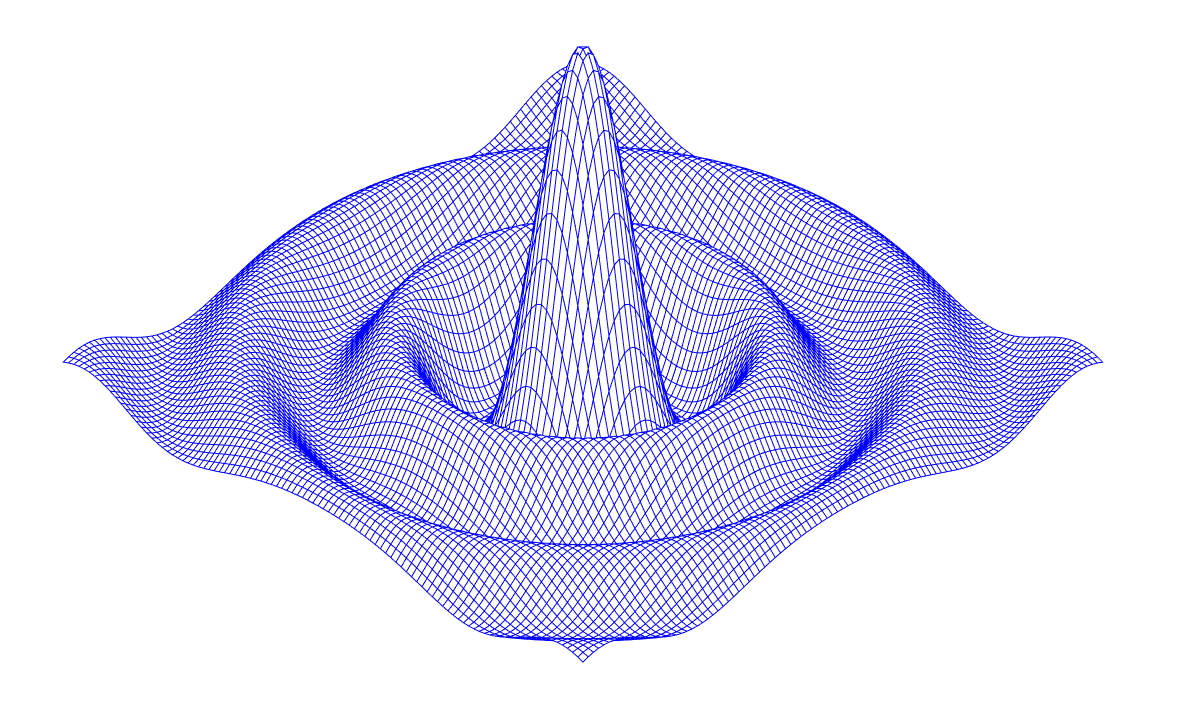
生成的图片:

package main

import (
    "fmt"
    "math"
)

const (
    width, height = 1200, 820
    cells         = 100
    xyrange       = 30.0
    xyscale       = width / 2 / xyrange
    zscale        = height * 0.4
    angle         = math.Pi / 6
)

var sin30, cos30 = math.Sin(angle), math.Cos(angle)

func main() {

    fmt.Printf("<svg xmlns='http://www.w3.org/2000/svg' "+
        "style='stroke: blue; fill: white; stroke-width: 1.0' "+
        "width='%d' height='%d'>", width, height)
    for i := 0; i < cells; i++ {
        for j := 0; j < cells; j++ {
            ax, ay := corner(i+1, j)
            bx, by := corner(i, j)
            cx, cy := corner(i, j+1)
            dx, dy := corner(i+1, j+1)
            fmt.Printf("<polygon points='%g,%g,%g,%g,%g,%g,%g,%g'/>\n", ax, ay, bx, by, cx, cy, dx, dy)

        }
    }
    fmt.Println("</svg>")
}

func corner(i, j int) (float64, float64) {
    x := xyrange * (float64(i)/cells - 0.5)
    y := xyrange * (float64(j)/cells - 0.5)
    z := f(x, y)

    sx := width/2 + (x-y)*cos30*xyscale
    sy := height/2 + (x+y)*sin30*xyscale - z*zscale
    return sx, sy
}

func f(x, y float64) float64 {
    r := math.Hypot(x, y)
    return math.Sin(r) / r
}