

惯性聚合 高效追踪和阅读你感兴趣的博客、新闻、科技资讯
阅读原文 在惯性聚合中打开

推荐订阅源

Martin Fowler
Martin Fowler
Microsoft Security Blog
freeCodeCamp Programming Tutorials: Python, JavaScript, Git & More
Vercel News
Vercel News
Y
Y Combinator Blog
D
DataBreaches.Net
IT之家
IT之家
Cyber Security Advisories - MS-ISAC
博客园_首页
钛媒体:引领未来商业与生活新知
钛媒体:引领未来商业与生活新知
H
Hackread – Cybersecurity News, Data Breaches, AI and More
WordPress大学
WordPress大学
H
Help Net Security
GbyAI
GbyAI
C
Check Point Blog
L
LangChain Blog
小众软件
小众软件
T
The Blog of Author Tim Ferriss
MyScale Blog
MyScale Blog
G
Google Developers Blog
月光博客
月光博客
V
V2EX
M
MIT News - Artificial intelligence
博客园 - 叶小钗

博客园 - 宽田

SQLite在.NET中自适应32位/64位系统 OWIN是什么? 好的用户界面-界面设计的一些技巧 Android模拟器连接本李服务器localhost Js 验证中文字符长度 Javascript技巧 解释器模式(interpreter): 访问者模式(Visitor) 职责链模式(Chain of Responsibility) Web Service 中返回DataSet结果大小改进 通用数据链接(UDL)的用法 ORACLE WITH AS 用法 Oracle REGEXP_INSTR 用法 C# 实现自定义事件 错误:200, Stream not found, NetStream.Play.StreamNotFound, clip: '[Clip] GetCallbackEventReference(客户端调用服务器端)的用法 wcf Svcutil用法 IIS 增加net.tcp绑定 客户端字符集NLS_LANG
win7 64位 VS2010调试提示“ORA-12154: TNS: 无法解析指...
宽田 · 2013-09-12 · via 博客园 - 宽田

如果使用工具可以连接Oralce说明与Oralce安装无法。

解决方法:

解决步骤:

1、去网上下载“instantclient-basic-win32-11.2.0.1.0.zip”。

2、下载下来解压并拷贝到安装Oracle 11g目录的Client中(oracle目录),我的电脑上为:“D:\oracle\product\10\client1”

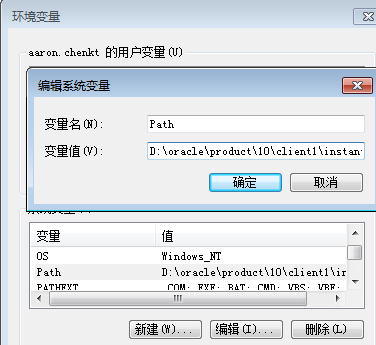
3、配置Path环境变量

    选择计算机右击属性-》选择左边的高级系统设置-》选择高级选项卡,选择环境变量-》找到Path变量,选择编辑

    再把刚才 instantclient 的路径“D:\oracle\product\10\client1\instantclient11;”拷贝到最前面。结果为:“D:\oracle\product\10\client1\instantclient11;D:\oracle\product\10\client1\BIN;”如图:
image

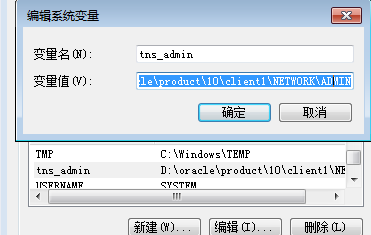
4、配置tns_admin环境变量

   在环境变量中增加“tns_admin”变量。值为安装时的Clent\network\admin目录。我电脑上的值为:“D:\oracle\product\10\client1\NETWORK\ADMIN”,如下图:
image

关闭VS,重新调试成功。