








首先,mvc的客户端验证用的是jquery.validate.js, jquery.validate本身已经提供了很好的扩展功能,通过简单点配置就可以做得更好看些.
而Microsoft通过jquery.validate.unobtrusive.js然后做了封装,让它高度的集成到了MVC中.
这次,我们通过对jquery.validate.unobtrusive.js做一点小小的修改,让这个验证效果看起来更漂亮一点.
同时也让大家对jquery.validate.unobtrusive.js了解的更多一点,希望能够给大家起到举一反三的效果.
我们先来看看修改后的效果:
1.初始状态
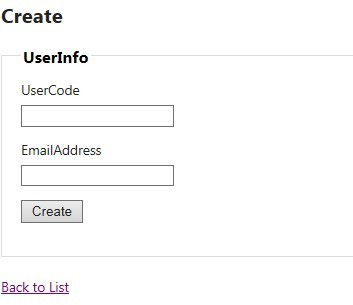
2.验证失败

3.验证成功
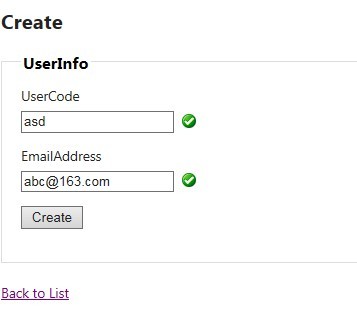
1.首先对CSS做一点点小修改(注意红色字部分),
代码如下:
.field-validation-error {
color: #f00;
background: url(onError.gif) left center no-repeat;
padding-left: 20px;
}
.field-validation-success {
display: inline;
padding-left: 20px;
background: url(onCorrect.gif) left center no-repeat;
}
2.修改jquery.validate.unobtrusive.js
在onError方法中:
把
container.removeClass("field-validation-valid").addClass("field-validation-error");
改成
container.removeClass("field-validation-success field-validation-valid").addClass("field-validation-error");
    function onError(error, inputElement) {  // 'this' is the form element
        var container = $(this).find("[data-valmsg-for='" + escapeAttributeValue(inputElement[0].name) + "']"),
            replaceAttrValue = container.attr("data-valmsg-replace"),
            replace = replaceAttrValue ? $.parseJSON(replaceAttrValue) !== false : null;

        container.removeClass("field-validation-success field-validation-valid").addClass("field-validation-error");
        error.data("unobtrusiveContainer", container);

        if (replace) {
            container.empty();
            error.removeClass("input-validation-error").appendTo(container);
        }
        else {
            error.hide();
        }
    }
在onSuccess方法中:
把
container.addClass("field-validation-valid").removeClass("field-validation-error");
改成
container.addClass("field-validation-success").removeClass("field-validation-error field-validation-valid");
    function onSuccess(error) {  // 'this' is the form element
        var container = error.data("unobtrusiveContainer"),
            replaceAttrValue = container.attr("data-valmsg-replace"),
            replace = replaceAttrValue ? $.parseJSON(replaceAttrValue) : null;

        if (container) {
            container.addClass("field-validation-success").removeClass("field-validation-error field-validation-valid");
            error.removeData("unobtrusiveContainer");

            if (replace) {
                container.empty();
            }
        }
    }
3.OK,搞定.
此内容由惯性聚合(RSS阅读器)自动聚合整理,仅供阅读参考。 原文来自 — 版权归原作者所有。