惯性聚合 高效追踪和阅读你感兴趣的博客、新闻、科技资讯
阅读原文 在惯性聚合中打开

推荐订阅源

The GitHub Blog
The GitHub Blog
Hugging Face - Blog
Hugging Face - Blog
让小产品的独立变现更简单 - ezindie.com
WordPress大学
WordPress大学
Y
Y Combinator Blog
Google DeepMind News
大猫的无限游戏
大猫的无限游戏
Vercel News
Vercel News
V
Visual Studio Blog
Microsoft Azure Blog
MyScale Blog
MyScale Blog
Cyber Security Advisories - MS-ISAC
罗磊的独立博客
N
Netflix TechBlog - Medium
M
MIT News - Artificial intelligence
G
Google Developers Blog
阮一峰的网络日志
阮一峰的网络日志
P
Proofpoint News Feed
小众软件
小众软件
Engineering at Meta
Engineering at Meta
D
DataBreaches.Net
S
SegmentFault 最新的问题
H
Help Net Security
量子位

博客园 - 吴有鋆

XMLHttpRequest DOM树操作 第十六篇: Ajax Control Toolkit 控件包--5.AnimationExtender - 吴有鋆 第十五篇: Ajax Control Toolkit 控件包--4.AlwaysVisibleControlExtender - 吴有鋆 第十四篇: Ajax Control Toolkit 控件包--3. DragPanel (拖动效果) - 吴有鋆 第十三篇: Ajax Control Toolkit 控件包--2. CollapsiblePanel (展开和折叠效果) 第十一篇: Ajax Control Toolkit 控件包--1. Accordion (多层折叠效果) 第十篇: Timer 控件 第九篇: UpdateProgress 控件--用户中断 第八篇: UpdateProgress 控件--显示正在处理中的信息 第七篇: UpdatePanel 控件--总结 第六篇: UpdatePanel 控件--UpdateMode属性 第五篇: UpdatePanel 控件--RegisterAsyncPostBackControl方法 第四篇: UpdatePanel 控件--触发机制Triggers - 吴有鋆 第二篇: 在虚拟主机上使用ASP.NET Ajax 第一篇: 第一个简单的vs 2008 ASP.NET Ajax 范例 asp.net 字符串格式化 C# 中的常用正则表达式总结 - 吴有鋆 - 博客园 鼠标经过时背景变色的效果(小技巧)
第三篇: UpdatePanel 控件示例
吴有鋆 · 2010-01-26 · via 博客园 - 吴有鋆

1. 新建一个web窗体Default3.aspx

2. 加入ScriptManager控件和UpdatePanel控件.
    在UpdatePanel控件中加入 一个2 * 3 的表格
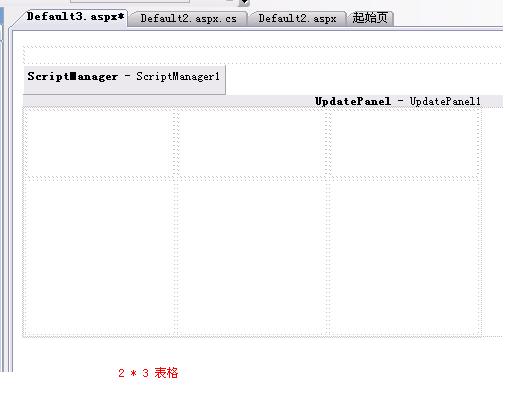
  
                              图5

3. 加入TextBox控件,Button控件,Calendar控件
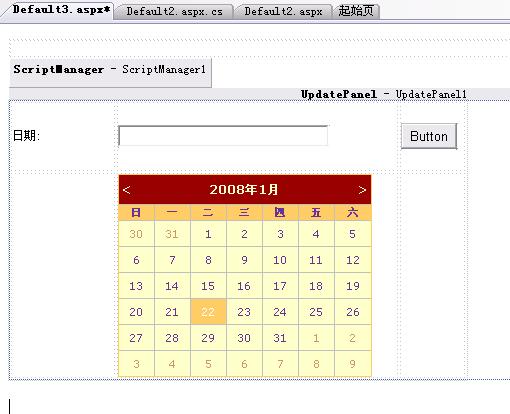
  
                                           图6

4. 双击Button控件,键入下列代码


    protected void Button1_Click(object sender, EventArgs e)
    
{
        Calendar2.Visible 
= true;
    }


    双击Calendar控件,键入下列代码


    protected void Calendar2_SelectionChanged(object sender, EventArgs e)
    
{
        TextBox1.Text 
= Calendar2.SelectedDate.ToString();
        Calendar2.Visible 
= false;
    }

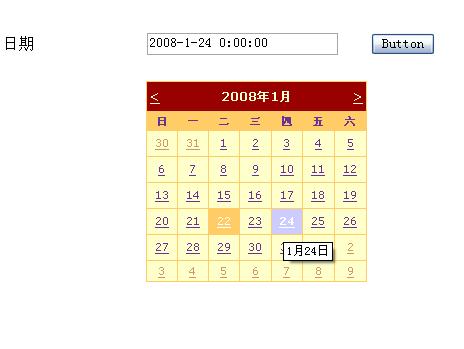
5.运行!!!