








1.建立工程,比如Document,配置webconfig
 <appSettings> <add key="DefaultCulture" value="zh-cn" /> <add key="CNCulture" value="zh-cn" /> <add key="ENCulture" value="en-us" /> </appSettings>
2.添加资源文件
右键添加新项目,选中Assembly Resource File,命名为strings.en-us.resx和strings.zh-cn.resx,然后配置如下
2.1 strings.en-us.resx
<?xml version="1.0" encoding="utf-8" ?><root> <xsd:schema id="root" xmlns="" xmlns:xsd="http://www.w3.org/2001/XMLSchema" xmlns:msdata="urn:schemas-microsoft-com:xml-msdata"> <xsd:element name="root" msdata:IsDataSet="true"> <xsd:complexType> <xsd:choice maxOccurs="unbounded"> <xsd:element name="data"> <xsd:complexType> <xsd:sequence> <xsd:element name="value" type="xsd:string" minOccurs="0" msdata:Ordinal="1" /> <xsd:element name="comment" type="xsd:string" minOccurs="0" msdata:Ordinal="2" /> </xsd:sequence> <xsd:attribute name="name" type="xsd:string" /> <xsd:attribute name="type" type="xsd:string" /> <xsd:attribute name="mimetype" type="xsd:string" /> </xsd:complexType> </xsd:element> <xsd:element name="resheader"> <xsd:complexType> <xsd:sequence> <xsd:element name="value" type="xsd:string" minOccurs="0" msdata:Ordinal="1" /> </xsd:sequence> <xsd:attribute name="name" type="xsd:string" use="required" /> </xsd:complexType> </xsd:element> </xsd:choice> </xsd:complexType> </xsd:element> </xsd:schema> <resheader name="ResMimeType"> <value>text/microsoft-resx</value> </resheader> <resheader name="Version"> <value>1.0.0.0</value> </resheader> <resheader name="Reader"> <value>System.Resources.ResXResourceReader, System.Windows.Forms, Version=1.0.5000.0, Culture=neutral, PublicKeyToken=b77a5c561934e089</value> </resheader> <resheader name="Writer"> <value>System.Resources.ResXResourceWriter, System.Windows.Forms, Version=1.0.5000.0, Culture=neutral, PublicKeyToken=b77a5c561934e089</value> </resheader> <data name="LoginName"> <value>Username</value> </data> <data name="Password"> <value>Password</value> </data> </root>
2.2 strings.zh-cn.resx
<?xml version="1.0" encoding="utf-8" ?><root> <xsd:schema id="root" xmlns="" xmlns:xsd="http://www.w3.org/2001/XMLSchema" xmlns:msdata="urn:schemas-microsoft-com:xml-msdata"> <xsd:element name="root" msdata:IsDataSet="true"> <xsd:complexType> <xsd:choice maxOccurs="unbounded"> <xsd:element name="data"> <xsd:complexType> <xsd:sequence> <xsd:element name="value" type="xsd:string" minOccurs="0" msdata:Ordinal="1" /> <xsd:element name="comment" type="xsd:string" minOccurs="0" msdata:Ordinal="2" /> </xsd:sequence> <xsd:attribute name="name" type="xsd:string" /> <xsd:attribute name="type" type="xsd:string" /> <xsd:attribute name="mimetype" type="xsd:string" /> </xsd:complexType> </xsd:element> <xsd:element name="resheader"> <xsd:complexType> <xsd:sequence> <xsd:element name="value" type="xsd:string" minOccurs="0" msdata:Ordinal="1" /> </xsd:sequence> <xsd:attribute name="name" type="xsd:string" use="required" /> </xsd:complexType> </xsd:element> </xsd:choice> </xsd:complexType> </xsd:element> </xsd:schema> <resheader name="ResMimeType"> <value>text/microsoft-resx</value> </resheader> <resheader name="Version"> <value>1.0.0.0</value> </resheader> <resheader name="Reader"> <value>System.Resources.ResXResourceReader, System.Windows.Forms, Version=1.0.5000.0, Culture=neutral, PublicKeyToken=b77a5c561934e089</value> </resheader> <resheader name="Writer"> <value>System.Resources.ResXResourceWriter, System.Windows.Forms, Version=1.0.5000.0, Culture=neutral, PublicKeyToken=b77a5c561934e089</value> </resheader> <data name="LoginName"> <value>用户名</value> </data> <data name="Password"> <value>密码</value> </data> </root>
3.在Global.asax写如下代码
protected void Application_BeginRequest(Object sender, EventArgs e) {
{ try
try { if(Request.Cookies["CultureResource"]!=null) Thread.CurrentThread.CurrentCulture=new CultureInfo(Request.Cookies["CultureResource"].Value); else Thread.CurrentThread.CurrentCulture=new CultureInfo(ConfigurationSettings.AppSettings["DefaultCulture"].ToString()); Thread.CurrentThread.CurrentUICulture=Thread.CurrentThread.CurrentCulture;
 } catch(Exception) { Thread.CurrentThread.CurrentCulture=new CultureInfo(ConfigurationSettings.AppSettings["DefaultCulture"].ToString()); }
 }
}
4.添加测试页面
4.1 html
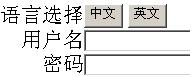
<HTML> <HEAD> <title>Login</title> <meta name="GENERATOR" Content="Microsoft Visual Studio .NET 7.1"> <meta name="CODE_LANGUAGE" Content="C#"> <meta name="vs_defaultClientScript" content="JavaScript"> <meta name="vs_targetSchema" content="http://schemas.microsoft.com/intellisense/ie5"> </HEAD> <body> <form id="Form1" method="post" runat="server"> <table align="center" cellSpacing="0" cellPadding="0" width="100%" border="0" height="100%"> <colgroup> <col width="20%"> </col> <col width="60%"> </col> <col width="20%"> </col> </colgroup> <tr> <td></td> <td valign="middle"> <TABLE id="Table1" align="center" cellSpacing="0" cellPadding="0" width="100%" border="0"> <colgroup> <col width="50%"> </col> <col width="50%"> </col> </colgroup> <TR> <TD align="right">语言选择</TD> <TD> <asp:Button id="Button1" runat="server" Text="中文"></asp:Button> <asp:Button id="Button2" runat="server" Text="英文"></asp:Button></TD> </TR> <TR> <TD align="right"> <asp:Label id="Label1" runat="server">Label</asp:Label></TD> <TD> <asp:TextBox id="txtLoginName" runat="server" Width="100%"></asp:TextBox></TD> </TR> <TR> <TD align="right"> <asp:Label id="Label2" runat="server">Label</asp:Label></TD> <TD> <asp:TextBox id="txtPassword" runat="server" Width="100%"></asp:TextBox></TD> </TR> </TABLE> </td> <TD></TD> </tr> </table> </form> </body></HTML>
4.2 cs代码
using System;using System.Collections;using System.ComponentModel;using System.Data;using System.Drawing;using System.Web;using System.Web.SessionState;using System.Web.UI;using System.Web.UI.WebControls;using System.Web.UI.HtmlControls;using System.Configuration;using System.Threading;using System.Resources;using System.Globalization;using System.Diagnostics;using System.Reflection;namespace Document{ /// <summary> /// Summary description for Login. /// </summary> public class Login : System.Web.UI.Page { protected System.Web.UI.WebControls.TextBox txtLoginName; protected System.Web.UI.WebControls.TextBox txtPassword; protected System.Web.UI.WebControls.Button Button1; protected System.Web.UI.WebControls.Button Button2; protected System.Web.UI.WebControls.Label Label1; protected System.Web.UI.WebControls.Label Label2; private void Page_Load(object sender, System.EventArgs e) { Label1.Text = Resource("LoginName"); Label2.Text = Resource("Password"); } Web Form Designer generated code Resource private void Button2_Click(object sender, System.EventArgs e) { this.UpdateCultureCookie(ConfigurationSettings.AppSettings["ENCulture"].ToString()); System.Web.UI.Page currentPage= (System.Web.UI.Page)this; Response.Redirect(currentPage.Request.Url.ToString()); } private void Button1_Click(object sender, System.EventArgs e) { this.UpdateCultureCookie(ConfigurationSettings.AppSettings["CNCulture"].ToString()); System.Web.UI.Page currentPage= (System.Web.UI.Page)this; Response.Redirect(currentPage.Request.Url.ToString()); } private void UpdateCultureCookie(string culture) { if(Request.Cookies["CultureResource"] != null) { Response.Cookies["CultureResource"].Value = culture; Response.Cookies["CultureResource"].Expires = System.DateTime.Now.AddDays(30); } else { HttpCookie cultureCookie = new HttpCookie("CultureResource"); cultureCookie.Value = culture; cultureCookie.Expires = System.DateTime.Now.AddDays(30); Response.Cookies.Add(cultureCookie); } } }}
5.源代码下载/Files/singlepine/Resource.rar
6.资源文件配置小工具使用XML读写删除功能来实现资源文件配置
此内容由惯性聚合(RSS阅读器)自动聚合整理,仅供阅读参考。 原文来自 — 版权归原作者所有。