


LogErrorAttribute继承HandleErrorAttribute并重写OnException实现处理逻辑LogErrorAttribute加入启动时的Filter注册使之在管道中生效using System;
using System.Collections.Generic;
using System.Linq;
using System.Web;
using System.Web.Mvc;
using NLog;
using EmpowerApiService.Entity;
using Newtonsoft.Json;
namespace EmpowerApiService.Filter
{
public class LogErrorAttribute : HandleErrorAttribute
{
private static NLog.Logger logger = NLog.LogManager.GetCurrentClassLogger();
public override void OnException(ExceptionContext filterContext)
{
// 如果发现被处理过,则不进行处理
if (filterContext.ExceptionHandled) { return; }
// 可获取一些关键参数待用
var controllerName = (string)filterContext.RouteData.Values["controller"];
var actionName = (string)filterContext.RouteData.Values["action"];
// 将http上下文关键信息写入日志
if (filterContext.HttpContext != null && filterContext.HttpContext.Request != null)
{
var requestUrl = filterContext.HttpContext.Request.Url.ToString();
var requestParams = filterContext.HttpContext.Request.Params;
var requestParamsStr = HttpUtility.UrlDecode(requestParams.ToString());
// 写日志
logger.Error(
filterContext.Exception,
"url: {0}, params: {1}",
new Object[] { requestUrl, requestParamsStr });
}
// build http response result
filterContext.Result = new JsonResult
{
ContentType = "applicaltion/json",
ContentEncoding = System.Text.Encoding.UTF8,
Data = BuildErrorData(filterContext.Exception),
JsonRequestBehavior = JsonRequestBehavior.AllowGet
};
filterContext.ExceptionHandled = true;
}
private object BuildErrorData(Exception error)
{
if(error == null) { return null; }
var ar = new AjaxResult();
if (error is ArgumentException)
{
ar.Code = AjaxResult.Err_Code_BadRequest;
ar.Message = error.Message;
}
else if (error is System.Runtime.InteropServices.COMException)
{
ar.Code = AjaxResult.Err_Code_InternalServer;
try
{
ar.Message = EmpowerUtils.EmpowerProject.TkErrorDescription(error.HResult);
}
catch
{
ar.Message = "Toolkit error";
}
}
else
{
ar.Code = AjaxResult.Err_Code_InternalServer;
ar.Message = error.Message ?? AjaxResult.Err_Msg_InternalServer;
}
ar.Data = error.HResult.ToString("X");
return ar;
}
}
}
关于自定义响应结果,需要注意的两点:
修改HttpContext.Response.StatusCode,asp.net mvc 将根据响应码自动匹配并返回对应的错误信息页面,如下图

设置ExceptionContext.Result,可返回自定义的ActionResult类型的结果,比如一个Json结构的错误消息,如下图
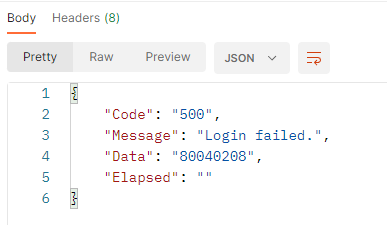
HttpContext.Response.StatusCode与 ExceptionContext.Result会冲突,不能同时设置这两个属性,或者说修改了StatusCode后,Result将不再起作用。
注册自定义的处理类,使之生效,替换默认的错误处理,修改APP_Start中的FilterConfig.cs
namespace EmpowerApiService
{
    public class FilterConfig
    {
        public static void RegisterGlobalFilters(GlobalFilterCollection filters)
        {
            //filters.Add(new HandleErrorAttribute());
            filters.Add(new EmpowerApiService.Filter.LogErrorAttribute());
        }
    }
}
在需要使用错误处理的Controller或Action上使用特性,就可以捕捉并处理异常
using EmpowerApiService.Filter;

namespace EmpowerApiService.Controllers{

   [LogError]
   public class xxxController : Controller
   { ... }
}
先从Nuget安装NLog,网文说要同时安装NLog.Config,经实测不安装也可以,测试版本是5.2.3
右键点击目标项目,新增项,选择新增配置文件,起名NLog.config
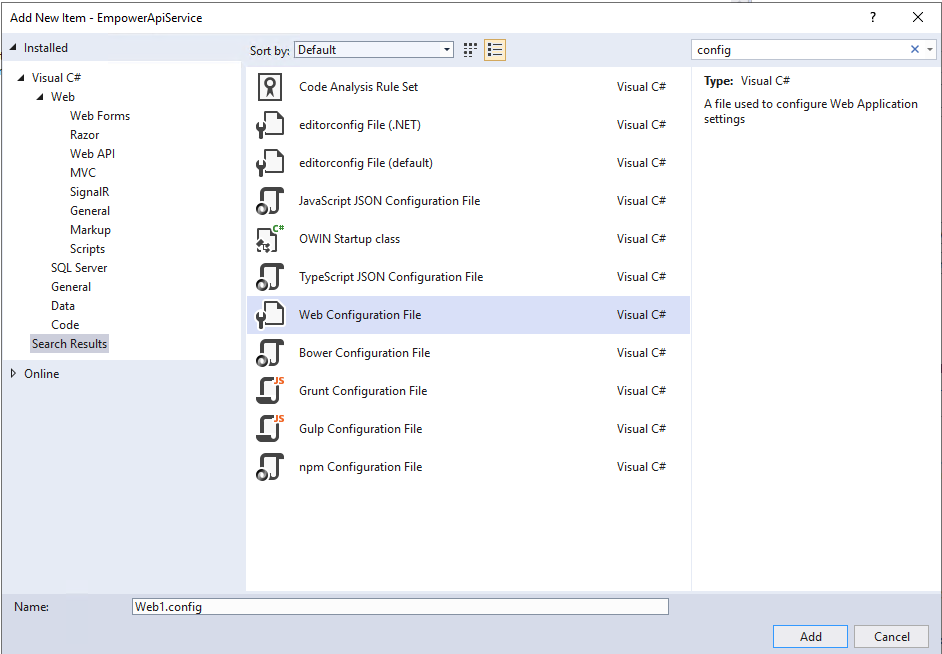
编辑文件如下
<?xml version="1.0"?>
<nlog xmlns="http://www.nlog-project.org/schemas/NLog.xsd"
	  xmlns:xsi="http://www.w3.org/2001/XMLSchema-instance"
	  xsi:schemaLocation="http://www.nlog-project.org/schemas/NLog.xsd"
	  autoReload="true"
	  throwException="false"
	  internalLogLevel="Off" internalLogFile="c:\temp\nlog-internal.log">

	<variable name="appName" value="EmpowerApiService" />

	<targets>
		<target name="logfile"
				xsi:type="File"
				fileName="${basedir}/logs/${appName}-${shortdate}.log"
				layout="${longdate}|${uppercase:${level}}|${message}${newline}${callsite}(${callsite-filename:includeSourcePath=False}:${callsite-linenumber})|${exception:format=ToString}"
				maxArchiveFiles="999"
				archiveFileName="${basedir}/logs/${appName}-${shortdate}-${###}.log"
				createDirs="true"
				archiveAboveSize="5242880"
				archiveEvery="Day"
				archiveNumbering="Sequence"
				encoding="UTF-8"
				>
		</target>
	</targets>

	<rules>
		<logger name="*" minlevel="Debug" writeTo="logfile"/>
	</rules>
</nlog>
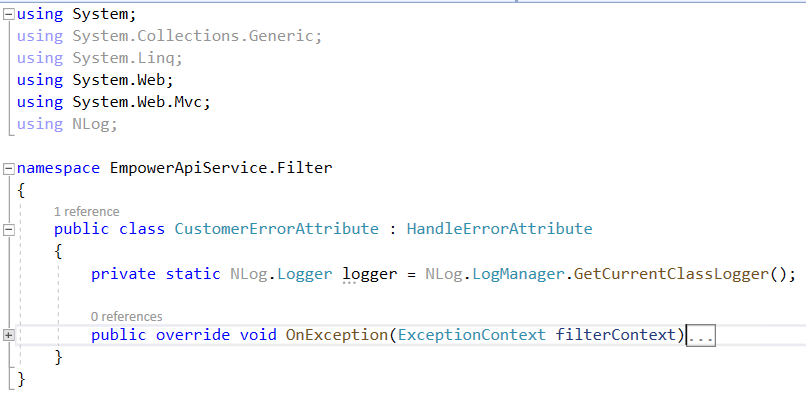
在需要使用日志的类中实例化日志组件即可使用
项目引入Com组件,VS调试运行正常,发布并部署到IIS运行报Com组件错误,解决方法:
允许32位应用程序此内容由惯性聚合(RSS阅读器)自动聚合整理,仅供阅读参考。 原文来自 — 版权归原作者所有。