



惯性聚合 高效追踪和阅读你感兴趣的博客、新闻、科技资讯
阅读原文 在惯性聚合中打开

推荐订阅源

Forbes - Security
Forbes - Security
GbyAI
GbyAI
OSCHINA 社区最新新闻
OSCHINA 社区最新新闻
S
SegmentFault 最新的问题
Y
Y Combinator Blog
Recorded Future
Recorded Future
博客园 - Franky
I
InfoQ
T
The Blog of Author Tim Ferriss
Recent Announcements
Cyber Security Advisories - MS-ISAC
博客园_首页
阮一峰的网络日志
阮一峰的网络日志
T
Tailwind CSS Blog
Cyberwarzone
Cyberwarzone
The Register - Security
H
Hackread – Cybersecurity News, Data Breaches, AI and More
Threat Intelligence Blog | Flashpoint
雷峰网
雷峰网
P
Palo Alto Networks Blog
G
GRAHAM CLULEY
Cloudbric
Cloudbric
CTFtime.org: upcoming CTF events
MongoDB | Blog
MongoDB | Blog
F
Full Disclosure
Google DeepMind News
Recent Commits to openclaw:main
C
Check Point Blog
爱范儿
爱范儿
The GitHub Blog
The GitHub Blog
cs.AI updates on arXiv.org
W
WeLiveSecurity
T
Threat Research - Cisco Blogs
U
Unit 42
N
Netflix TechBlog - Medium
The Cloudflare Blog
Spread Privacy
Spread Privacy
Microsoft Azure Blog
美团技术团队
T
Troy Hunt's Blog
Engineering at Meta
Engineering at Meta
H
Heimdal Security Blog
TaoSecurity Blog
TaoSecurity Blog
C
Cybersecurity and Infrastructure Security Agency CISA
T
Tenable Blog
B
Blog
S
Securelist
H
Hacker News: Front Page
Google Online Security Blog
G
Google Developers Blog

博客园 - 在天空飞翔

asp net core 跨平台初体验 获取图片的主色调 U盘启动安装 window server 2003 简单的中文姓名生成器 扩展 DataGridView 的功能(五) WebBrowser - 想说爱你不容易 表白 天涯宝盒-天涯看贴脚本-只看楼主-自动翻页 使用 asp.net 编写的一些大中型的网站 PrecompiledApp.config 的惨剧 [音乐] the dream catcher csv 文件的读取 三八节快乐 将MP3文件嵌入到exe中并播放 [音乐] 下个路口见 雷人的面试 发现不明飞行物 扩展 DataGridView 的功能(三) 扩展 DataGridView 的功能(二)
扩展DataGridView 的功能(四)
在天空飞翔 · 2010-07-07 · via 博客园 - 在天空飞翔

在用友金蝶等财务软件中,经常需要输入货币类型的数据, 那么这种输入框要如何制作呢?

 借助于强大的 DataGridView 控件, 我们可以轻易的制作出这种效果,见下图.
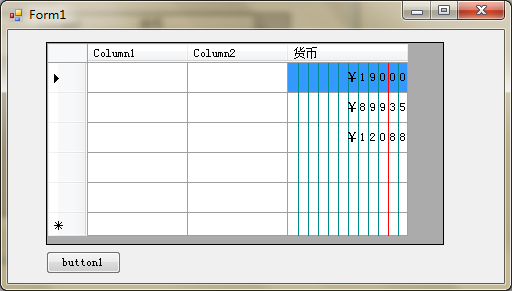
要扩展 DataGridView 的列类型,我们只需要从 DataGridViewColumn 类中派生出一个新的类,并且为这个列添加对应的单元格模板即可(从 DataGridViewCell 类中派生)。

代码其实超级简单, 新增一个 Column 类型

代码

    public class DataGridViewCurrencyColumn : DataGridViewColumn
    {
        
public DataGridViewCurrencyColumn()
            : 
base(new DataGridViewCurrencyCell())
        {
            Resizable 
= DataGridViewTriState.False;
            
//固定宽度
            Width = 120;
        }
public override sealed DataGridViewTriState Resizable
        {
            
get { return base.Resizable; }
            
set { base.Resizable = value; }
        }
    }

新增一个 Cell 类型

主要是重载 OnPaint ,对单元格重新绘制,给数据的每一位都画上一条分隔线就行了

代码

    public class DataGridViewCurrencyCell : DataGridViewTextBoxCell
    {
        
//每一位数字的宽度
        private const int P_WIDTH = 10;
        
        
public override Type ValueType
        {
            
get { return typeof (decimal); }
        }protected override void Paint(Graphics graphics, Rectangle clipBounds, Rectangle cellBounds, int rowIndex,
                                      DataGridViewElementStates cellState, object value, object formattedValue,
                                      
string errorText, DataGridViewCellStyle cellStyle,
                                      DataGridViewAdvancedBorderStyle advancedBorderStyle,
                                      DataGridViewPaintParts paintParts)
        {
            
//背景色
            Color clr_background = (cellState & DataGridViewElementStates.Selected) !=
                                   DataGridViewElementStates.Selected
                                       
? cellStyle.BackColor
                                       : cellStyle.SelectionBackColor;
            
using (Brush bru = new SolidBrush(clr_background))
            {
                graphics.FillRectangle(bru, cellBounds);
            }
            
//边框
            if ((paintParts & DataGridViewPaintParts.Border) != 0)
            {
                PaintBorder(graphics, clipBounds, cellBounds, cellStyle, advancedBorderStyle);
            }//画出10个整数位,2个小数位
            for (int i = 1; i < 10; i++)
            {
                graphics.DrawLine(Pens.DarkCyan, cellBounds.Left + i*P_WIDTH, cellBounds.Top,
                                  cellBounds.Left + i*P_WIDTH, cellBounds.Bottom - 1);
            }
            graphics.DrawLine(Pens.Red, cellBounds.Left + 10*P_WIDTH, cellBounds.Top, cellBounds.Left + 10*P_WIDTH,
                              cellBounds.Bottom - 1);
            graphics.DrawLine(Pens.DarkCyan, cellBounds.Left + 11*P_WIDTH, cellBounds.Top, cellBounds.Left + 11*P_WIDTH,
                              cellBounds.Bottom - 1);//文字
            if (value == null)
                
return;
            var sf = new StringFormat
                         {
                             Alignment = StringAlignment.Center,
                             LineAlignment = StringAlignment.Center
                         };decimal v = Convert.ToDecimal(value);
            
string s_int = ((int) v).ToString();
            
//两位小数
            string s_dec = (v*100%100).ToString("00");
            
string s_value = "" + s_int + s_dec;
            
for (int i = 0; i < s_value.Length; i++)
            {
                
string ch = s_value[s_value.Length - i - 1].ToString();
                
int x = cellBounds.Left + (12 - i - 1)*P_WIDTH;
                
int y = cellBounds.Top;
                var rect = new RectangleF(x, y, P_WIDTH, cellBounds.Height);
                graphics.DrawString(ch, cellStyle.Font, Brushes.Black, rect, sf);
            }            sf.Dispose();
        }
    }