






2012-01-16 16:44 一一九九 阅读(256) 评论() 收藏 举报
http://living-in-concordion.blogspot.com/2009/05/your-first-concordionnet-project-part-4.html、
在之前完成的Specification Document(Calculator.html)中,我们放置了一个到Operations.html的链接。现在我们来完成它。添加.html和对应的Class文件,然后设置.html文件的属性以及Class的Fixture。
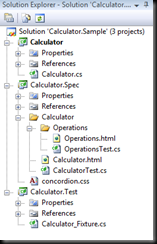
完成之后额Operatons.html应该如下所示:

现在我们有一个描述了不同操作的文档了。让我们来添加更多的Sepcifications: 一个进行四则运算,另外一个进行三角函数运算。完成后内容大体如下所示:
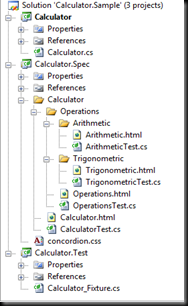 、
、
记得设置.html和.cs文件的属性。
让我们为我们的Spec添加一些基本的算术运算操作: 加减乘除。现在我们在Spec中添加一些特殊的脚本。
下面是一些片段:
<h3>Example - Multiplication</h3>
<p>
    The result of <b concordion:set="#firstOperand">2</b> * <b concordion:set="#secondOperand">2</b>
    the result will be:
    <b concordion:assertEquals="Multiplication(#firstOperand, #secondOperand)">4</b>
</p>
最终输出的HTML文件如下所示:
![Calculator.Sample.10_thumb[1]](http://images.cnblogs.com/cnblogs_com/sunshinefly128/201201/201201161644027145.png "Calculator.Sample.10_thumb[1]")
可以看到源代码是在项目中,相关的条目是通过标签 concordion:set和concordion:assertEquals属性来设置的。Concordion:set用来设置FixtureClass中的公共属性或者字段的值, AssertEquals检查期望的数值和在Concordion:assertEquals中定义的函数返回的值是否一致。是Concordion:assertEquals最终呈现为Red或者Green。
现在我们已经有了Spec,我们需要一些在Fixture中的代码来支撑。注意如下的代码是会失败的。TDD实践遵循红绿重构的方法论来做的。代码如下:
[ConcordionTest]
public class ArithmeticTest
{
    public long firstOperand;
    public long secondOperand;

    public long Addition(long first, long second)
    {
        return -1;
    }

    public long Subtraction(long first, long second)
    {
        return -1;
    }

    public long Multiplication(long first, long second)
    {
        return -1;
    }

    public long Division(long first, long second)
    {
        return -1;
    }
}
We should now have a complete fixture that should be able to run, albeit with some errors!
Next time we will work on how to run your project with Gallio and produce some results so that we can refactor the above code and turn it into something more meaningful!
此内容由惯性聚合(RSS阅读器)自动聚合整理,仅供阅读参考。 原文来自 — 版权归原作者所有。