









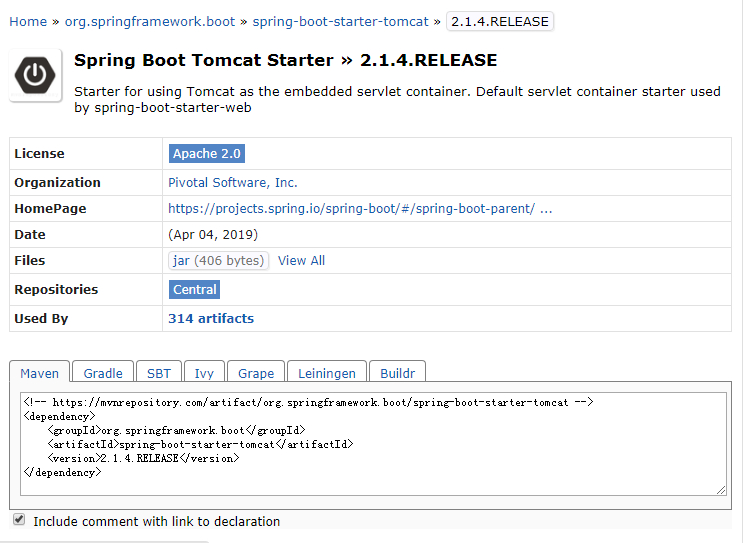
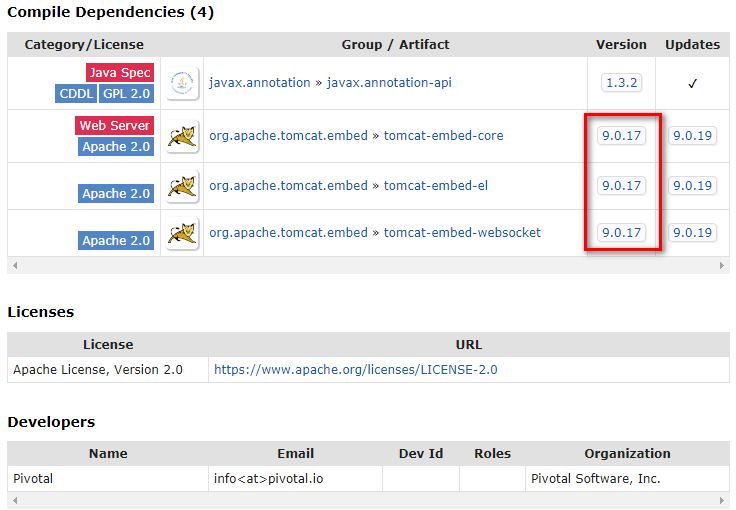
比如我们需要查Spring Boot 2.1.4-RELEASE的内嵌Tomcat版本, 可以打开链接:
https://mvnrepository.com/artifact/org.springframework.boot/spring-boot-starter-tomcat/2.1.4.RELEASE
如下图, 红框标记的就是tomcat的版本。
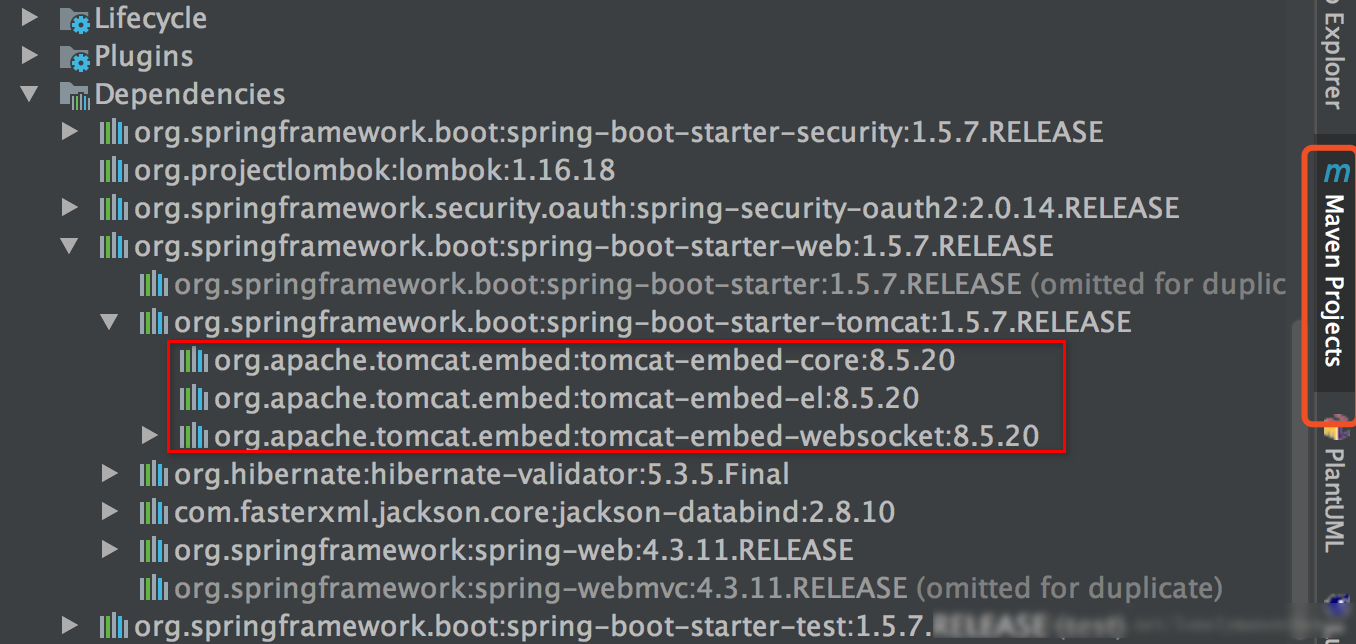
目前大家主要使用IDEA来进行开发,下面是IDEA查看Tomcat的版本:
Gradle可以采用以下命令打印依赖项:
./gradlew dependencies
数据结果示例:
...
|    +--- org.springframework.boot:spring-boot-starter-tomcat:2.1.0.RELEASE
|    |    +--- javax.annotation:javax.annotation-api:1.3.2
|    |    +--- org.apache.tomcat.embed:tomcat-embed-core:9.0.12
|    |    +--- org.apache.tomcat.embed:tomcat-embed-el:9.0.12
|    |    \--- org.apache.tomcat.embed:tomcat-embed-websocket:9.0.12
|    |         \--- org.apache.tomcat.embed:tomcat-embed-core:9.0.12
...
Maven可以采用以下命令打印依赖项:
mvn dependency:tree > output.txt # 输出到文件里
因为SpringBoot内嵌的Tomcat会伴随SpringBoot的升级而升级,所以可以根据需要选择合适的Tomcat版本,这种特别需要升级Tomcat版本时使用,当然还是要根据情况,因为升级SpringBoot的版本也是有成本的。
有时候我们需要在特定情况下使用特定的Tomcat版本,这时候总不能因为Tomcat就改变SpringBoot的版本,所以可以采用排除SpringBoot中的Tomcat包,然后手动指定Tomcat的版本,当然还要引入Tomcat相关的包。
compile('org.springframework.boot:spring-boot-starter-web') {
    exclude module: "spring-boot-starter-tomcat"
}
compile 'org.apache.tomcat.embed:tomcat-embed-core:+'
compile 'org.apache.tomcat.embed:tomcat-embed-el:+'
compile 'org.apache.tomcat.embed:tomcat-embed-logging-juli:+'
compile 'org.apache.tomcat.embed:tomcat-embed-websocket:+'
如果不指定版本,则会使用最新的Tomcat版本, 否则直接指定对应的版本号。
在 pom.xml文件里面添加一个标签<properties>,添加期望的版本。
<tomcat.version>8.0.30</tomcat.version>
添加必要的Jar包:
<dependency>
   <groupId>org.apache.tomcat</groupId>
   <artifactId>tomcat-juli</artifactId>
   <version>${tomcat.version}</version>
 </dependency>
<dependency>
    <groupId>org.apache.tomcat.embed</groupId>
    <artifactId>tomcat-embed-logging-juli</artifactId>
    <version>${tomcat.version}</version>
</dependency>
此内容由惯性聚合(RSS阅读器)自动聚合整理,仅供阅读参考。 原文来自 — 版权归原作者所有。