惯性聚合 高效追踪和阅读你感兴趣的博客、新闻、科技资讯
阅读原文 在惯性聚合中打开

推荐订阅源

D
Docker
爱范儿
爱范儿
T
The Exploit Database - CXSecurity.com
量子位
T
Tailwind CSS Blog
T
Threatpost
The GitHub Blog
The GitHub Blog
AWS News Blog
AWS News Blog
云风的 BLOG
云风的 BLOG
K
Kaspersky official blog
P
Proofpoint News Feed
博客园 - 司徒正美
L
LangChain Blog
T
Threat Research - Cisco Blogs
C
CERT Recently Published Vulnerability Notes
罗磊的独立博客
酷 壳 – CoolShell
酷 壳 – CoolShell
博客园 - 叶小钗
S
Secure Thoughts
The Last Watchdog
The Last Watchdog
Spread Privacy
Spread Privacy
H
Hacker News: Front Page
T
Troy Hunt's Blog
Cyber Security Advisories - MS-ISAC
Google DeepMind News
W
WeLiveSecurity
A
Arctic Wolf
Apple Machine Learning Research
cs.AI updates on arXiv.org
P
Proofpoint News Feed
T
Tor Project blog
T
The Blog of Author Tim Ferriss
I
Intezer
P
Privacy & Cybersecurity Law Blog
美团技术团队
N
Netflix TechBlog - Medium
博客园_首页
OSCHINA 社区最新新闻
OSCHINA 社区最新新闻
V
Vulnerabilities – Threatpost
Application and Cybersecurity Blog
G
Google Developers Blog
Attack and Defense Labs
T
Tenable Blog
月光博客
月光博客
Stack Overflow Blog
Stack Overflow Blog
J
Java Code Geeks
腾讯CDC
Microsoft Security Blog
A
About on SuperTechFans
Last Week in AI
Last Week in AI

博客园 - CalvinChu

How to upgrade pip on Debian Wheezy 指数数据解密,懂的都懂 OpenWRT and VPN Passthrough - CalvinChu 如何将 find 命令与 exec 一起使用 CentOS 7 下搭建 OpenVPN - CalvinChu How to get the ip ranges of domain esxi 直通sata控制器 Python requires an OpenSSL 1.0.2 or 1.1 compatible libssl with X509_VERIFY_P xRDP – Detected issues with Debian 11 – Oh No ! Something has gone wrong…. qemu-mips环境搭建跳坑指南 ImportError: libSM.so.6: cannot open shared object file: No such file or directory openwrt(lede)中,PPtP Client需要安装的软件包 OpenWrt中的Hotplug脚本 MAC OSX VPN自动添加静态路由 - CalvinChu fbprophet安装和使用 CentOS7安装iptables防火墙 CENTOS7下安装REDIS mysql忘记root密码解决办法 iptables命令(备忘)
vyos syslog配置
CalvinChu · 2025-10-29 · via 博客园 - CalvinChu

设置syslog服务器和端口

set system syslog host 10.1.1.2 port 514

设置记录全部内容

set system syslog console facility all

提交并保存

commit

save

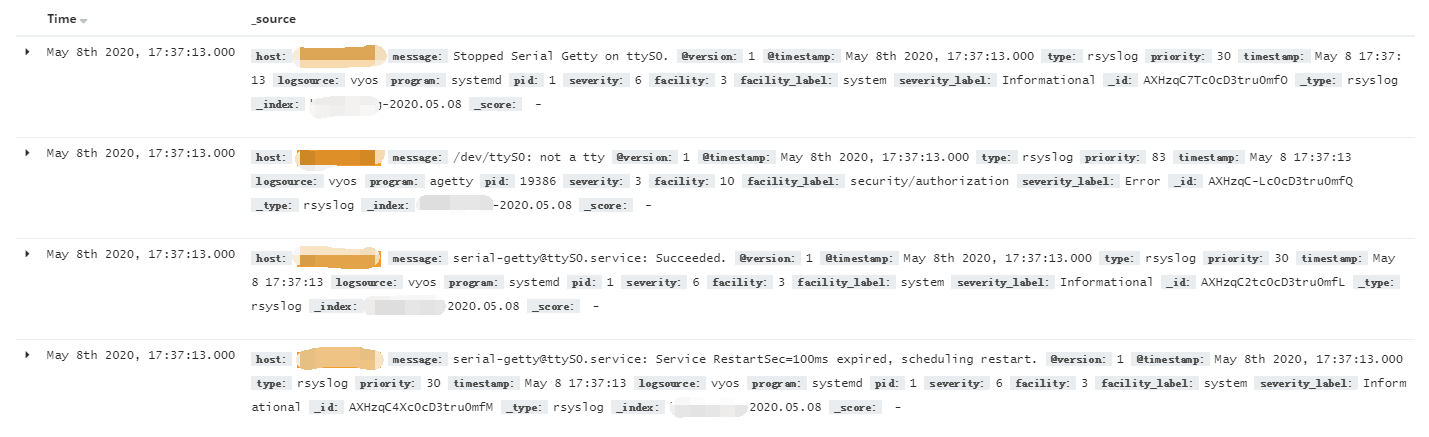
稍后即可在日志服务器上看到日志。

如需记录到文件,使用下列命令

set system syslog file syslogfile

posted @ 2025-10-29 22:15  CalvinChu  阅读(11)  评论(0)    收藏  举报