



惯性聚合 高效追踪和阅读你感兴趣的博客、新闻、科技资讯
阅读原文 在惯性聚合中打开

推荐订阅源

GbyAI
GbyAI
T
Tenable Blog
Webroot Blog
Webroot Blog
L
Lohrmann on Cybersecurity
S
Securelist
S
Schneier on Security
NISL@THU
NISL@THU
Know Your Adversary
Know Your Adversary
C
Cybersecurity and Infrastructure Security Agency CISA
T
The Exploit Database - CXSecurity.com
L
LINUX DO - 热门话题
C
CXSECURITY Database RSS Feed - CXSecurity.com
O
OpenAI News
I
Intezer
Threat Intelligence Blog | Flashpoint
TaoSecurity Blog
TaoSecurity Blog
S
Secure Thoughts
Application and Cybersecurity Blog
P
Privacy International News Feed
H
Hacker News: Front Page
N
Netflix TechBlog - Medium
M
MIT News - Artificial intelligence
博客园 - Franky
PCI Perspectives
PCI Perspectives
OSCHINA 社区最新新闻
OSCHINA 社区最新新闻
Microsoft Azure Blog
MongoDB | Blog
MongoDB | Blog
L
LangChain Blog
P
Proofpoint News Feed
S
Security Affairs
WordPress大学
WordPress大学
The Last Watchdog
The Last Watchdog
S
SegmentFault 最新的问题
小众软件
小众软件
F
Full Disclosure
博客园 - 叶小钗
cs.AI updates on arXiv.org
T
The Blog of Author Tim Ferriss
Simon Willison's Weblog
P
Palo Alto Networks Blog
Security Latest
Security Latest
P
Proofpoint News Feed
月光博客
月光博客
T
Tailwind CSS Blog
Scott Helme
Scott Helme
Hacker News - Newest:
Hacker News - Newest: "LLM"
Google Online Security Blog
T
Threat Research - Cisco Blogs
Help Net Security
Help Net Security
Project Zero
Project Zero

博客园 - 萧萧空间

Windows 2003,XP安装Windows Phone 7 从海量数据中找出中位数(转) 界面开发(五)--- 界面优化 界面开发(三)--- 设置窗体的Region 界面开发(二)--- NativeWindow 界面开发(一)--- Hook所有的窗体 界面开发概述 ExtJs扩展之GroupPropertyGrid ExtJs之带图片的下拉列表框 寻找第K大的数的方法总结 我自己的ColorSpy Office 2010 beta版安装 Java反编译工具JD ExtJs Grid Drag Drap Splash窗体(ProgressWindowForm修改) 异步窗体实现操作进度(ProgressWindow) 线程封装组件(BackgroundWorker)和线程(Thread) 多线程开发 NSIS 的使用心得
界面开发(四)--- 还窗体的新面貌
萧萧空间 · 2010-03-24 · via 博客园 - 萧萧空间

     前一篇给窗体设置了Region,将窗体的FormBorderStyle设置成了None,然后修改了窗体的显示区域Region。一个本来完好的窗体让我们设置成为了一个空白的没有任何色彩的窗体,这对我们的界面开发好像是背到而行,有点南辕北辙了。其实不然,只有将窗体上的所有原有的信息给去除掉,才能还原窗体的本来面貌,给窗体一个新面貌。

     这篇就对窗体的界面开发设计一个新面貌。

     我在界面开篇的开篇就已经说过,界面开发其实就是修改窗体的两个区域,Client Area和None Client Area,如下图:
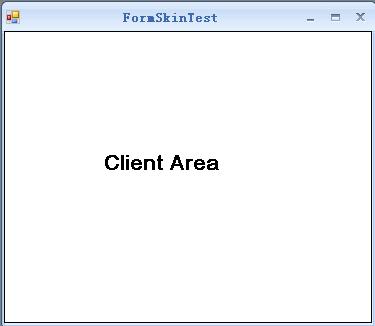
    

     而我们现在已经将窗体修改成了没有任何信息的窗体,如下图:
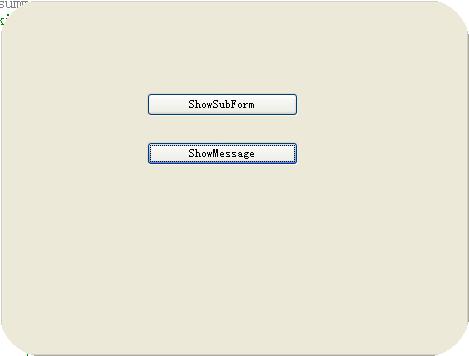
    

     现在我们要做的,就是在这个什么都没有的图上添加上我们自己的界面,将窗体的Client Area和None Client Area从新绘制让其有新的面貌。而他的绘制确实需要很多的GDI+知识。

     Client Area的绘画很简单,主要就是对窗体的背景色进行修改,这个对于C#开发人员就是一句话的事情,设置窗体的背景色就可以了。代码如下:

this._parentForm.BackColor = this._engine.SkinColor.Back;

     但是,对于None Client Area的绘画就比较麻烦,他不仅仅画的是颜色,还有窗体的标题栏、最大化、最小化、关闭按钮、窗体图标和窗体的边框,接下来就是一一对窗体的进行绘画。

     窗体的标题栏分为两大部分:窗体的图标和窗体的标题,绘画这些的第一步都是对窗体的绘画区域的设置。找到绘画的区域,然后使用GDI+进行绘画,具体的过程就是这样,代码如下:

#region NcPaint
/// <summary>
/// NcPaint
/// </summary>
/// <param name="form"></param>
/// <returns></returns>
private bool NcPaint(SkinningForm form, SkinEngine engine)
{
    
// Declared Filed
    bool result = true;
    IntPtr hdc 
= (IntPtr)0;
    Graphics g 
= null;
    Region region 
= null;
    IntPtr hrgn 
= (IntPtr)0;try
    {
        
// Get Rect
        RECT rectScreen = new RECT();
        NativeMethod.GetWindowRect(_parentForm.Handle, 
ref rectScreen);
        Rectangle rectBounds 
= rectScreen.ToRectangle();
        rectBounds.Offset(
-rectBounds.X, -rectBounds.Y);// prepare clipping
        Rectangle rectClip = rectBounds;
        region 
= new Region(rectClip);
        rectClip.Inflate(
-engine.SkinAppearance.BorderWidth, -engine.SkinAppearance.BorderWidth);
        rectClip.Y 
+= engine.SkinAppearance.CaptionHeight;
        rectClip.Height 
-= engine.SkinAppearance.CaptionHeight;// create graphics handle
        hdc = NativeMethod.GetDCEx(_parentForm.Handle, (IntPtr)0,
            (DCXFlags.DCX_CACHE 
| DCXFlags.DCX_CLIPSIBLINGS | DCXFlags.DCX_WINDOW));
        g 
= Graphics.FromHdc(hdc);// Apply clipping
        region.Exclude(rectClip);
        hrgn 
= region.GetHrgn(g);
        NativeMethod.SelectClipRgn(hdc, hrgn);
if (_bufferGraphics == null || _currentCacheSize != rectBounds.Size)
        {
            
if (_bufferGraphics != null)
                _bufferGraphics.Dispose();

            _bufferGraphics 

= _bufferContext.Allocate(g, new Rectangle(00,
                        rectBounds.Width, rectBounds.Height));
            _currentCacheSize 
= rectBounds.Size;
        }
// Get Caption Bounds
        Rectangle captionBounds = rectBounds;
        captionBounds.Height 
= this._engine.SkinAppearance.BorderWidth + this._engine.SkinAppearance.CaptionHeight;// Draw Caption
        engine.SkinAppearance.DrawCaptionBackground(g, captionBounds, this._formIsActive, this._engine);
        
// Draw Caption Icon
        if (this._parentForm.ShowIcon && this._parentForm.Icon != null)
        {
            DrawIcon(g);
        }
        
// Draw Caption Text
        DrawCaptionText(g, this._parentForm.Text, this._parentForm.Font);// Draw Caption Button
        DrawCaptionControlBox(g);// Draw Border
        engine.SkinAppearance.DrawBorder(g, rectBounds, engine);
    }
    
catch
    {
        result 
= false;
    }
// cleanup data
    if (hdc != (IntPtr)0)
    {
        NativeMethod.SelectClipRgn(hdc, (IntPtr)
0);
        NativeMethod.ReleaseDC(_parentForm.Handle, hdc);
    }
    
if (region != null && hrgn != (IntPtr)0)
        region.ReleaseHrgn(hrgn);
if (region != null)
        region.Dispose();
if (g != null)
        g.Dispose();
    
return result;
}
#endregion

      这个就完全绘制了窗体的边框。界面效果如下:


      代码下载地址:/Files/zhjp11/皮肤/SkinEngines20100324.rar