
惯性聚合 高效追踪和阅读你感兴趣的博客、新闻、科技资讯
阅读原文 在惯性聚合中打开

推荐订阅源

Google DeepMind News
S
Security Affairs
阮一峰的网络日志
阮一峰的网络日志
L
LangChain Blog
Microsoft Azure Blog
雷峰网
雷峰网
Recent Announcements
WordPress大学
WordPress大学
The GitHub Blog
The GitHub Blog
博客园_首页
The Cloudflare Blog
M
MIT News - Artificial intelligence
博客园 - 【当耐特】
MyScale Blog
MyScale Blog
S
SegmentFault 最新的问题
P
Proofpoint News Feed
Y
Y Combinator Blog
Jina AI
Jina AI
博客园 - 聂微东
A
About on SuperTechFans
Blog — PlanetScale
Blog — PlanetScale
博客园 - 司徒正美
G
Google Developers Blog
云风的 BLOG
云风的 BLOG
F
Full Disclosure
CTFtime.org: upcoming CTF events
Microsoft Security Blog
爱范儿
爱范儿
T
Tailwind CSS Blog
J
Java Code Geeks
Vercel News
Vercel News
钛媒体:引领未来商业与生活新知
钛媒体:引领未来商业与生活新知
Stack Overflow Blog
Stack Overflow Blog
罗磊的独立博客
小众软件
小众软件
酷 壳 – CoolShell
酷 壳 – CoolShell
T
The Blog of Author Tim Ferriss
cs.AI updates on arXiv.org
博客园 - 三生石上(FineUI控件)
W
WeLiveSecurity
PCI Perspectives
PCI Perspectives
Attack and Defense Labs
Exploit-DB.com RSS Feed
cs.CV updates on arXiv.org
宝玉的分享
宝玉的分享
IT之家
IT之家
Hacker News: Ask HN
Hacker News: Ask HN
The Register - Security
T
The Exploit Database - CXSecurity.com
T
Threat Research - Cisco Blogs

博客园 - 蝗虫的大腿

IOS UITest 初始化 ViewController wp8.1 sdk preview 预览版 windows phone 网络开发三部曲(一)各种包的各种抓法 Windows phone UI虚拟化和数据虚拟化(二) Windows phone UI虚拟化和数据虚拟化(一) LongListSelector 控件 在 wp7 和wp8中的不同之处 wp8 longlistselector 动态加载datatemplate windows phone 设计时 数据源 xna 触控操作 备忘 windows phone 在代码中生成ApplicationBar WP8多分辨率解决方案 wp8 模拟器启动失败的解决方法。 Xap 包装失败。未将对象引用设置到对象的实例。 解决办法 不同服务器数据库之间的数据操作 jquery UI dialog 和 asp.net 控件 出错 失效 - 蝗虫的大腿 在sql server 中执行带参数的存储过程及计算运行时间 对于 抽象类 接口 的理解 http错误列表 常用的js正则表达式 - 蝗虫的大腿 - 博客园
wp7 中Panorama控件 title 字体大小 样式的设置
蝗虫的大腿 · 2012-02-15 · via 博客园 - 蝗虫的大腿

如果我们建立一个新的Panorama控件.

如果title是中文默认会是下面这个样子,上面部分会被截断.

英文看起来还好.中文的话很不爽.
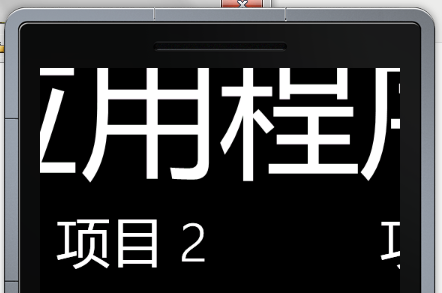

如果我们想把字体放小一些,或是像下移动一些.

我们可以编缉title的模板.


<controls:Panorama >
            <controls:Panorama.Title>
                <TextBlock Text="我的应用程序" FontSize="50" Margin="0,80,0,0" Height="60"></TextBlock>
            </controls:Panorama.Title>

其中margin我们需要设置的距上面大一些.否则我们看不到Title.

其它字体与高度我们就酌情设置就可能了.当然高度一定要比字体大些.

否则会显示部分.
这时会显示成如下所示.
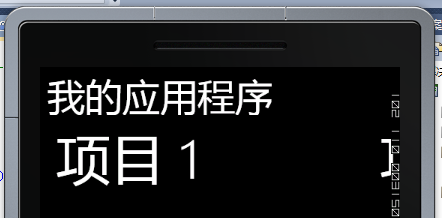
如果需要数据绑定.我们就弄成数据模板.

<controls:Panorama.TitleTemplate>
                <DataTemplate>
               <TextBlock Text="{Binding Content, RelativeSource={RelativeSource TemplatedParent}}"  FontSize="50" Margin="0,80,0,0" Height="60"></TextBlock>
                </DataTemplate>
            </controls:Panorama.TitleTemplate>

一样一样的.