

惯性聚合 高效追踪和阅读你感兴趣的博客、新闻、科技资讯
阅读原文 在惯性聚合中打开

推荐订阅源

Hugging Face - Blog
Hugging Face - Blog
Vercel News
Vercel News
C
Check Point Blog
G
Google Developers Blog
博客园 - 司徒正美
量子位
Engineering at Meta
Engineering at Meta
S
SegmentFault 最新的问题
Google DeepMind News
F
Fortinet All Blogs
A
About on SuperTechFans
美团技术团队
D
DataBreaches.Net
Stack Overflow Blog
Stack Overflow Blog
Jina AI
Jina AI
Y
Y Combinator Blog
奇客Solidot–传递最新科技情报
奇客Solidot–传递最新科技情报
Apple Machine Learning Research
J
Java Code Geeks
MongoDB | Blog
MongoDB | Blog
人人都是产品经理
人人都是产品经理
H
Hackread – Cybersecurity News, Data Breaches, AI and More
The Cloudflare Blog
U
Unit 42

博客园 - stone8386

微信调试工具,内网穿透工具,Localtunnel 使用 BackgroundService 创建 Windows 服务 centos8在更新yum源时提示失败 错误:为 repo ‘AppStream’下载元数据失败 c# 连接 sql server 数据库时报错,证书链是由不受信任的颁发机构颁发的。 锐浪报表 手工注册发布软件 - C/S报表开发 net 6 使用 加密sqlite 如何修复identity 2的默认登录路由中的错误 docker 启动 redis集群 android studio 生成 keystore 命令 identityserver4 对接钉钉 centos yum install 找不到软件包 docker 挂载文件出错 在linux 或docker中使用 system.drawing.common docker 发布到私有docker registry docker 不能访问外网 centos 网卡状态 ngxin 配置ssl Install Docker Compose docker registry
免COM DLL注册发布(绿色发布) - C/S报表开发
stone8386 · 2023-03-18 · via 博客园 - stone8386

#与VB.NET的COM免注册处理过程完全一致。以下讲解基于Grid++Report的C#例子“2.Normal”进行,默认安装在目录“C:\Grid++Report 6\Samples\CSharp\2.Normal”。

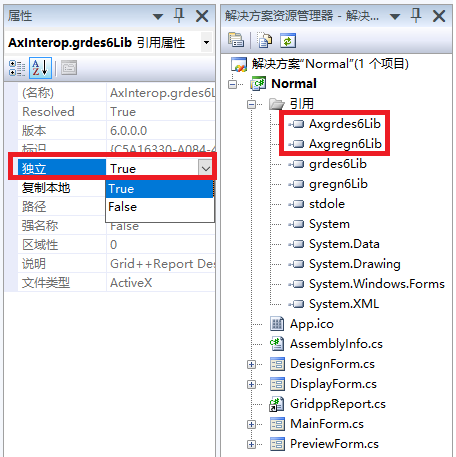
1、用VS打开解决方案后,展开项目下的“引用”节点,分别选中其下级的“Axgregn6Lib”与“Axgrdes6Lib”项的“独立”属性都设置为“true”,见下图。
2、生成release版本的程序。点运行开始编译,之后release目录里就会出现一个跟与EXE同名的*.manifest格式文件。打开生成目录(C:\Grid++Report 6\Samples\CSharp\2.Normal\bin\Release),可以看到如下文件:
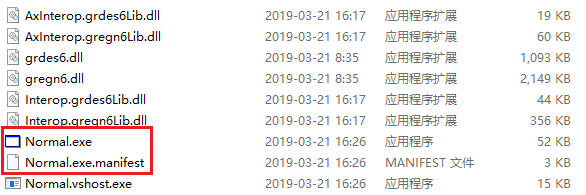
将这个目录下的文件以及程序需要依赖的数据文件一起发布,COM不需注册DLL即可正常运行。

特别提示:目前只能实现项目的目标平台为“x86”或“x64”才能正确发布。目标平台为“AnyCPU”时没法进行免DLL注册发布。