









SPAD – A central point for all SPOOL related tasks. Let’s start from here.
Target is to make sure you could use the SAP system to print directly. Don’t need to take down the content to local folder and manually print it out with printers configured on your laptop.
Most of the steps could be found here. Basically you need to start with creating an output device (the printer you selected when you trigger printing in SAP system).
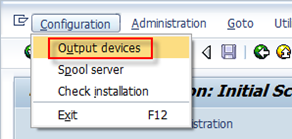
Then switch to change mode and choose “Create” to create a new printer in the SAP system.
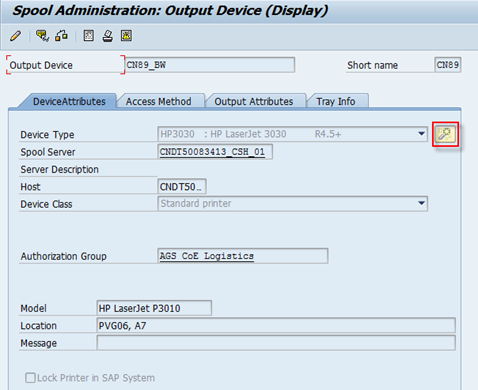
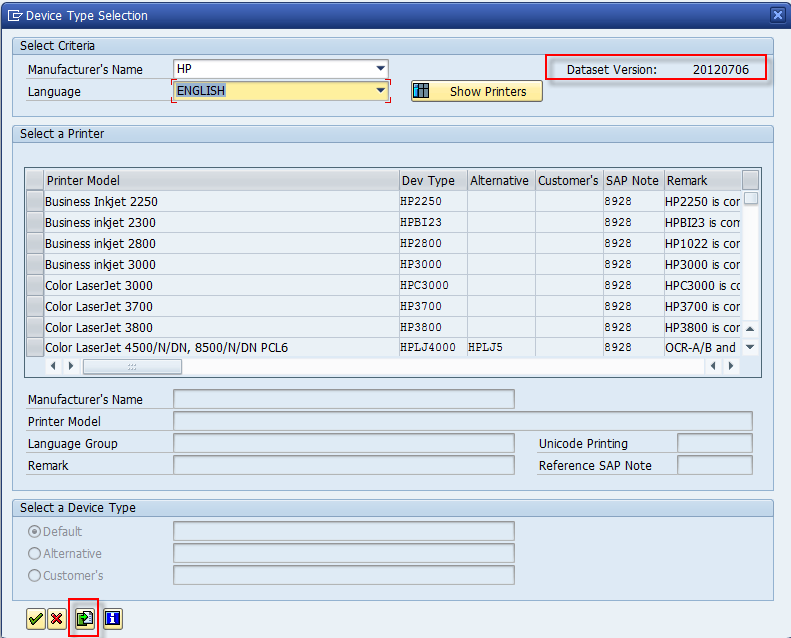
The device type is the printer’s type and the if the information is not maintained in the system, there is a wizard to help on the device type information. Note 1036961 provides how to get this information updated.
In the Access Method tab, you can maintain how the printer could triggered. And there are mainly two different ways.
Method 1 – Print remotely via network printer.
If you don’t maintain the printer locally on the client device, the system admin should be responsible to maintain the related server information.
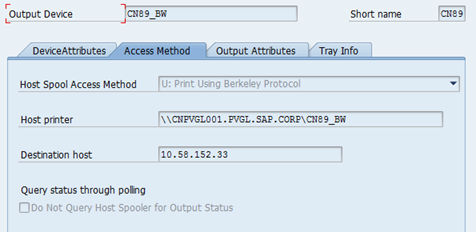
Method 2 – Print locally with the printer on your laptop.
In this way normally you could maintain the Host Printer as “__Default” so that the default printer on each client device could be matched. Here I maintain it as one of our office printer and that should work from most of my colleagues. So there is also no issue about the Host Printer name. However, if there is no proper printer maintained for other clients, spool requests using this printer will fail.
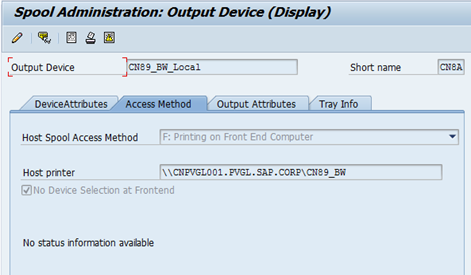
For the explanations of the terms above, you can see it at: http://www.way2sap.com/sap-article/how-to-configure-printer-on-sap-server-1495/
For trouble shooting, you could check SP01 the spool request status details and also you could check the dev_wp* trace for the SPO work process.
(The End)
Raymond Zhang
If you want to discuss with me about any idea, please contact me at raymond.zhang@sap.com
此内容由惯性聚合(RSS阅读器)自动聚合整理,仅供阅读参考。 原文来自 — 版权归原作者所有。