








How to use Megaport and Megaport Cloud Router for multicloud designs – from simple single-region to complex resilient multi-region architectures.
How to use Megaport and Megaport Cloud Router for multicloud designs – from simple single-region to complex resilient multi-region architectures.
When it comes to architecting cloud infrastructure to host business-critical applications, any enterprise should make sure they have measures in place to protect their organisation from experiencing an outage. A high-performance backup architecture could mean the difference between your mission-critical workloads running smoothly and major disruptions causing potential loss of data, customers, and revenue.
Some of the headaches you might experience when designing networks for hybrid and multicloud architectures include:
In order to solve for these potential issues, we’ll look at nine different design scenarios using Megaport and Megaport Cloud Router (MCR) that you can build. These range from a simple partially protected network to an end-to-end highly available resilient network for multicloud and hybrid cloud with an affordable price tag and with no lock-in contract.
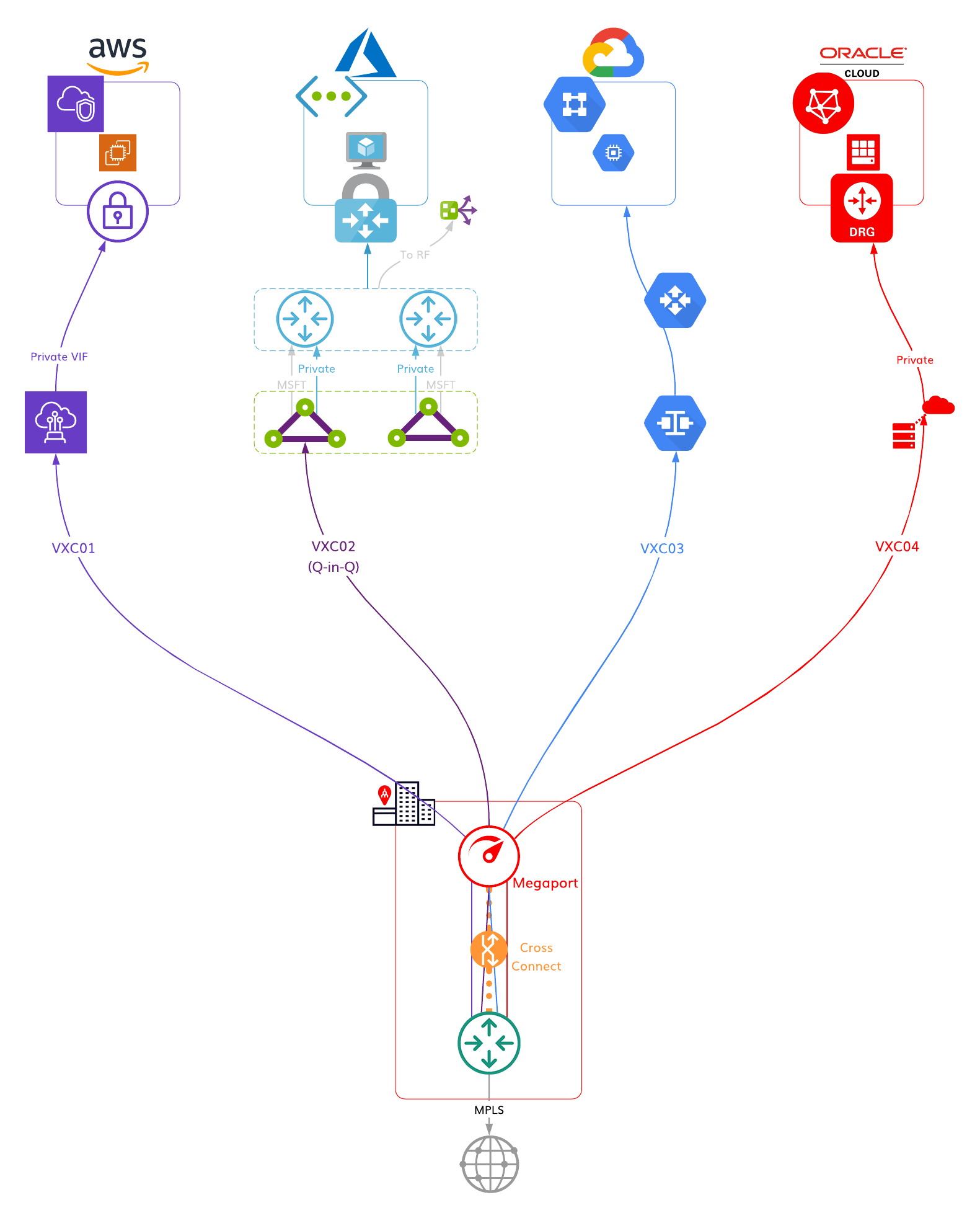
Single Megaport connecting to each CSP.
HA design
No
Multicloud
Yes
On-premises DC (Colo) or Office
Yes – 1 DC
On-premises geographically close to CSPs
Yes
Diverse regions
No
Note: If 802.1ad not supported, use Scenario 3 (MCR).
Megaport Technology Required
How many?
Megaport
Yes
1
Megaport Cloud Router (MCR)
No
VXC (Virtual Cross Connect) – Same Metro
Yes
4 (1 for each CSP)
VXC (Virtual Cross Connect) – Long Haul
No
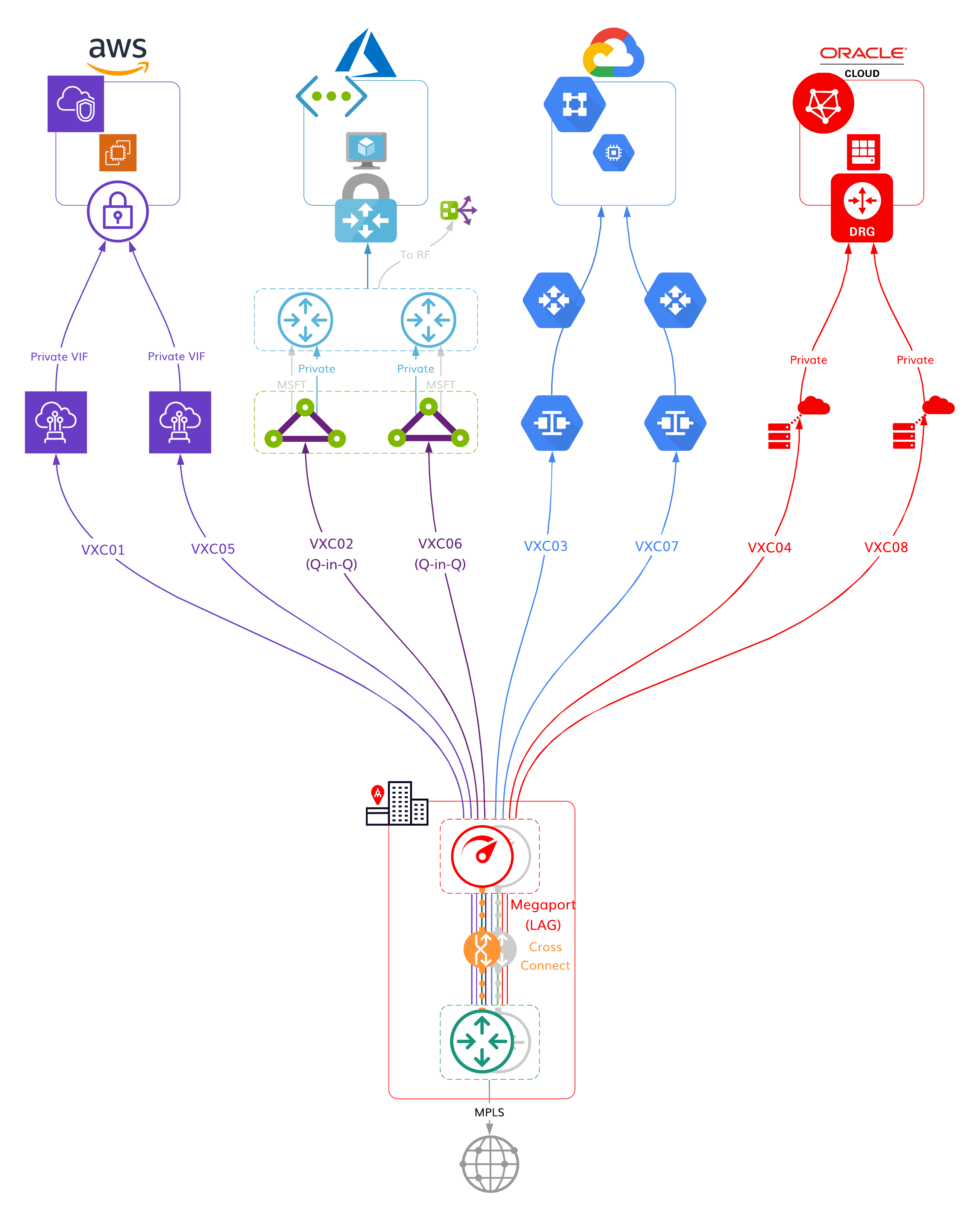
Dual Megaports configured as a LAG that connects to each CSP in an HA configuration.
HA design
Yes
Multicloud
Yes
On-premises DC (Colo) or Office
Yes – 1 DC
On-premises geographically close to CSPs
Yes
Diverse regions
No
Note: If 802.1ad not supported, use Scenario 3 (MCR).
Megaport Technology Required
How many?
Megaport
Yes
2 (in LAG)
Megaport Cloud Router (MCR)
No
VXC (Virtual Cross Connect) – Same Metro
Yes
8 (2 for each CSP)
VXC (Virtual Cross Connect) – Long Haul
No
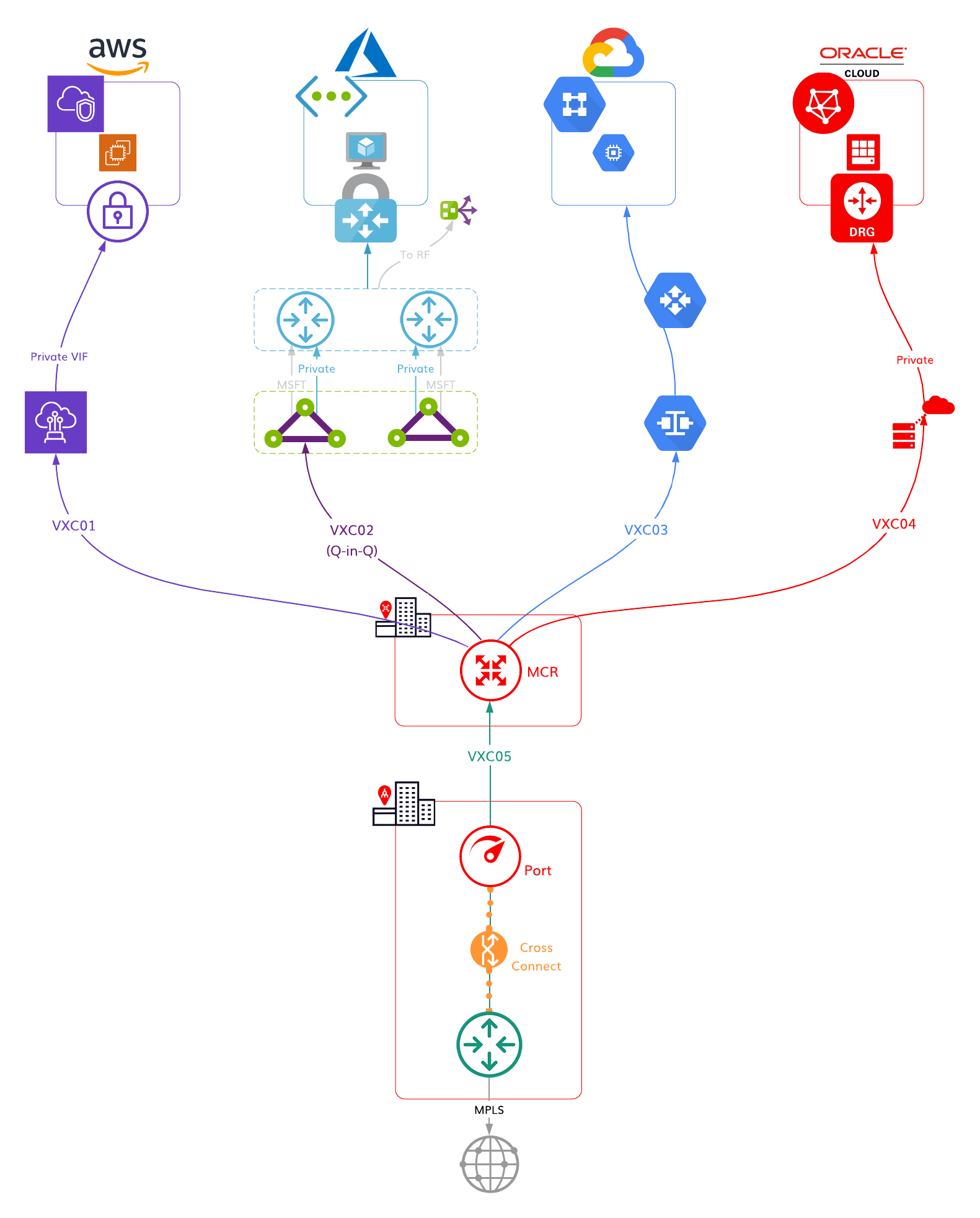
MCR as a hub that connects a single Megaport in a DC with CSPs.
HA design
Yes
Multicloud
Yes
On-premises DC (Colo) or Office
Yes – 1 DC
On-premises geographically close to CSPs
No
Diverse regions
No
Megaport Technology Required
How many?
Megaport
Yes
1
Megaport Cloud Router (MCR)
Yes
1
VXC (Virtual Cross Connect) – Same Metro
Yes
4 (1 for each CSP)
VXC (Virtual Cross Connect) – Long Haul
Yes
1
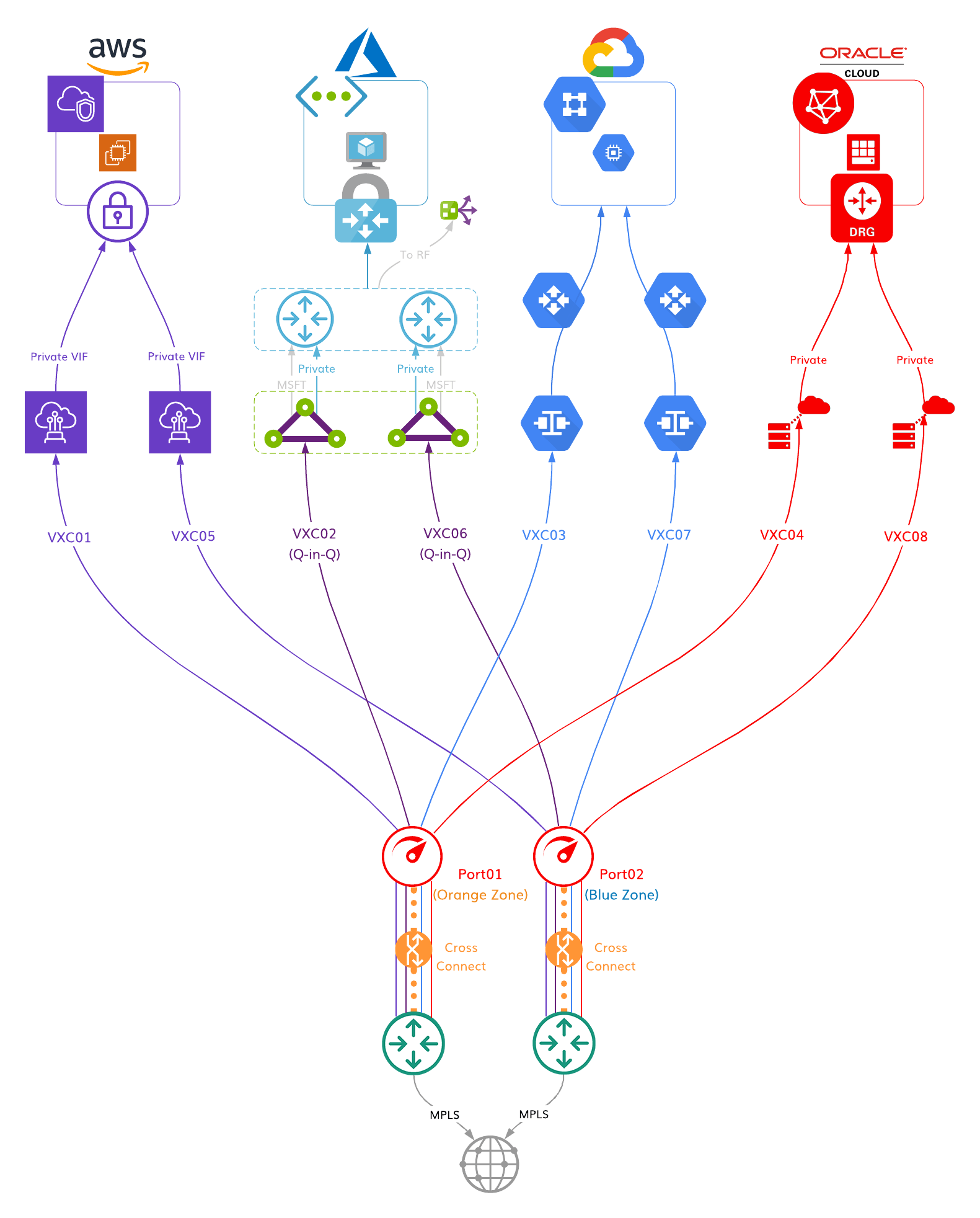
Megaport in each Diversity Zone connecting to each CSP in an HA configuration.
HA design
Yes
Multicloud
Yes
On-premises DC (Colo) or Office
Yes
On-premises geographically close to CSPs
Yes
Diverse regions
No
Note: If 802.1ad not supported, use MCR (Scenario 6).
Megaport Technology Required
How many?
Megaport
Yes
2 (4 in a LAG)
Megaport Cloud Router (MCR)
No
VXC (Virtual Cross Connect) – Same Metro
Yes
8 (2 for each CSP)
VXC (Virtual Cross Connect) – Long Haul
No
Dual MCRs as hubs that connect CSPs in an HA configuration without requiring on-premises infrastructure.
HA design
Yes
Multicloud
Yes
On-premises DC (Colo) or Office
No
On-premises geographically close to CSPs
N/A
Diverse regions
No
Megaport Technology Required
How many?
Megaport
No
Megaport Cloud Router (MCR)
Yes
2
VXC (Virtual Cross Connect) – Same Metro
Yes
8 (2 for each CSP)
VXC (Virtual Cross Connect) – Long Haul
No
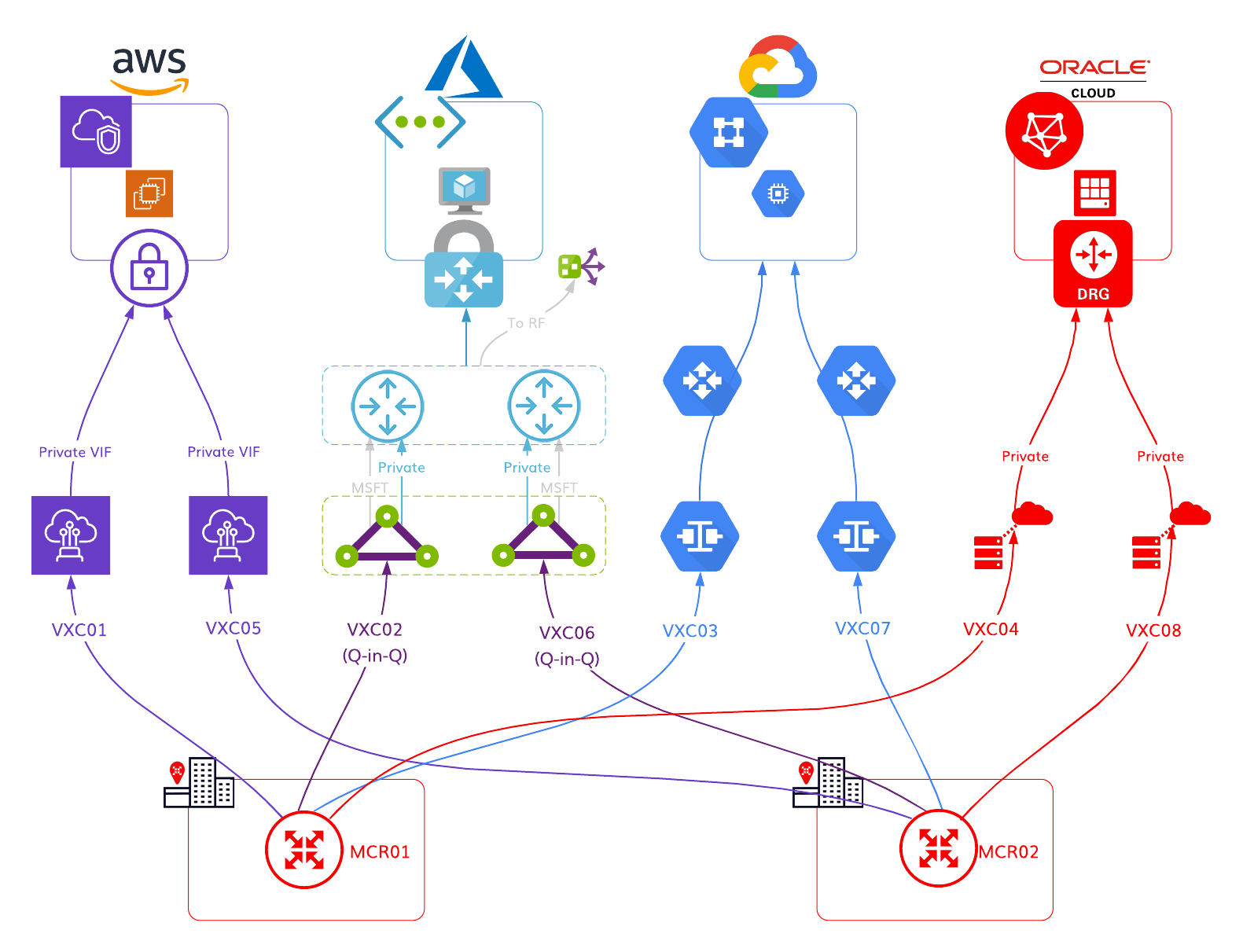
Dual MCRs as hubs that connect a DC with a Megaport in each Diversity Zone to CSPs in an HA configuration.
HA design
Yes
Multicloud
Yes
On-premises DC (Colo) or Office
Yes
On-premises geographically close to CSPs
No
Diverse regions
No
Megaport Technology Required
How many?
Megaport
Yes
2 (4 in a LAG)
Megaport Cloud Router (MCR)
Yes
2
VXC (Virtual Cross Connect) – Same Metro
Yes
8 (2 for each CSP)
VXC (Virtual Cross Connect) – Long Haul
Yes
2
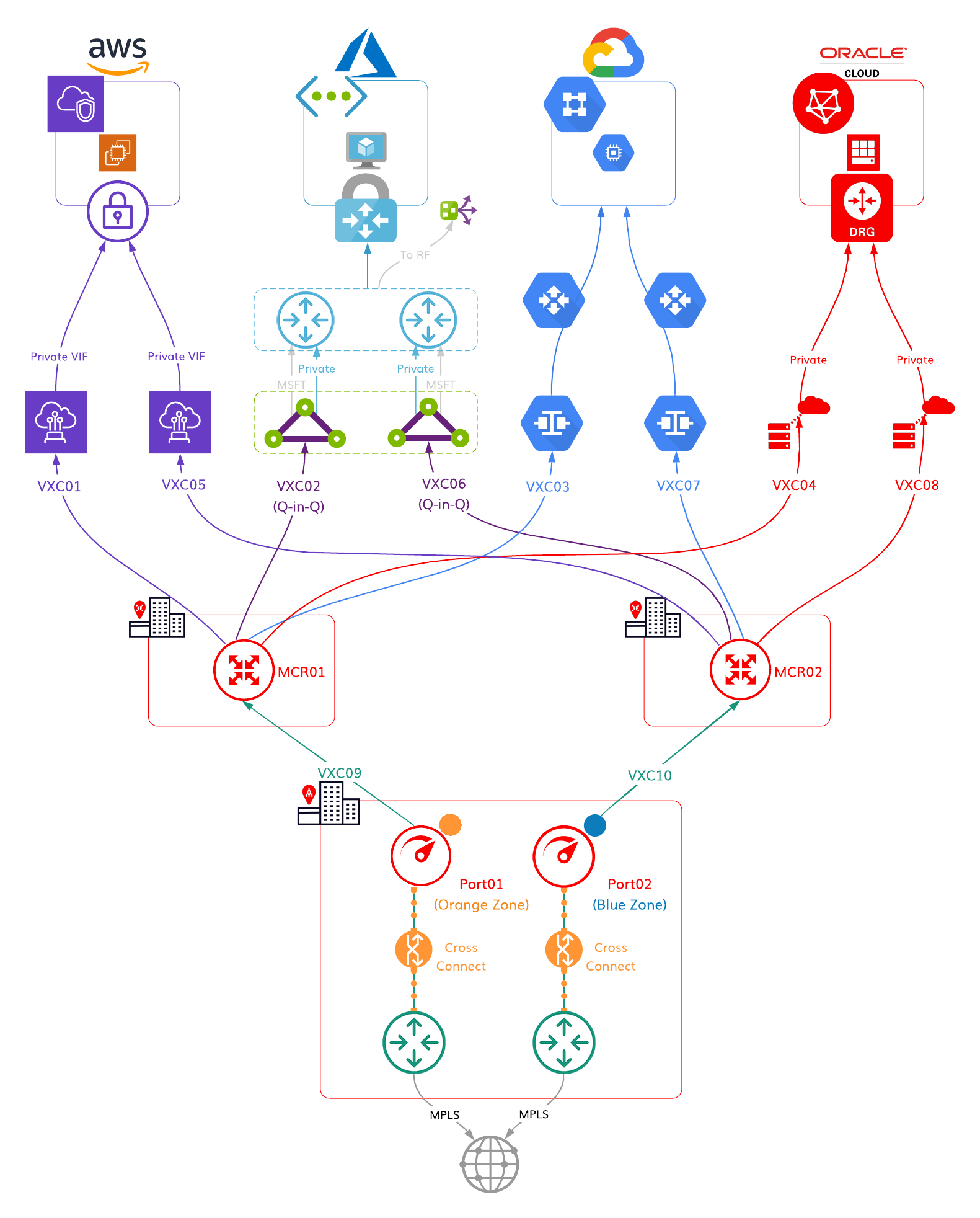
Single Megaport in each DC connecting to CSPs in HA configuration.
HA design
Yes
Multicloud
Yes
On-premises DC (Colo) or Office
Yes – 2 DCs
On-premises geographically close to CSPs
Yes
Diverse regions
Yes
Note: If 802.1ad not supported, use MCR (Scenario 8).
Megaport Technology Required
How many?
Megaport
Yes
2 (4 in a LAG)
Megaport Cloud Router (MCR)
No
VXC (Virtual Cross Connect) – Same Metro
Yes
8 (2 for each CSP)
VXC (Virtual Cross Connect) – Long Haul
No
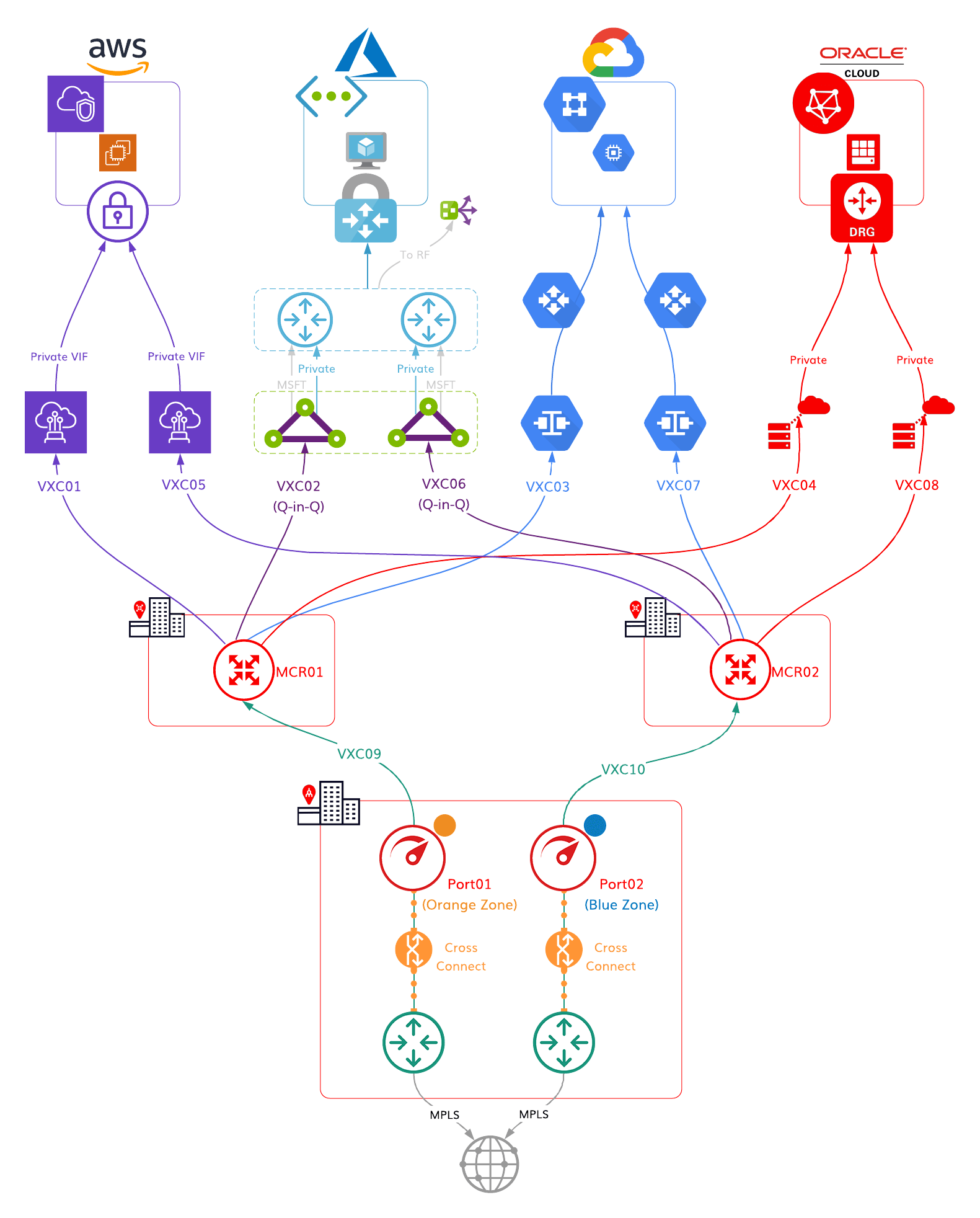
Dual MCRs as hubs that connect DCs with Megaports to CSPs in an HA configuration.
HA design
Yes
Multicloud
Yes
On-premises DC (Colo) or Office
Yes
On-premises geographically close to CSPs
N/A
Diverse regions
Yes
Megaport Technology Required
How many?
Megaport
Yes
2
Megaport Cloud Router (MCR)
Yes
2
VXC (Virtual Cross Connect) – Same Metro
Yes
8 (2 for each CSP)
VXC (Virtual Cross Connect) – Long Haul
Yes
2 (plus 2 optional)
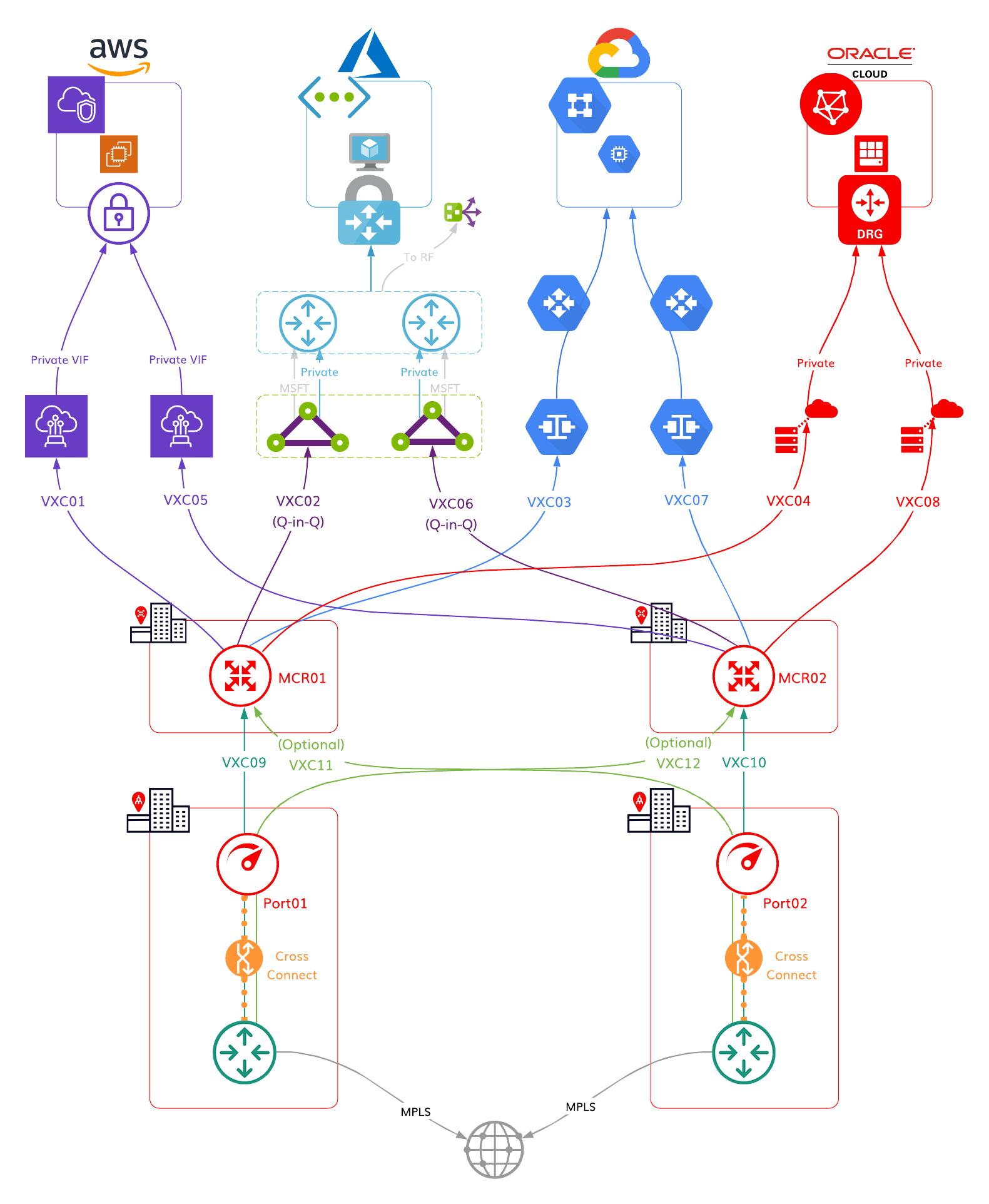
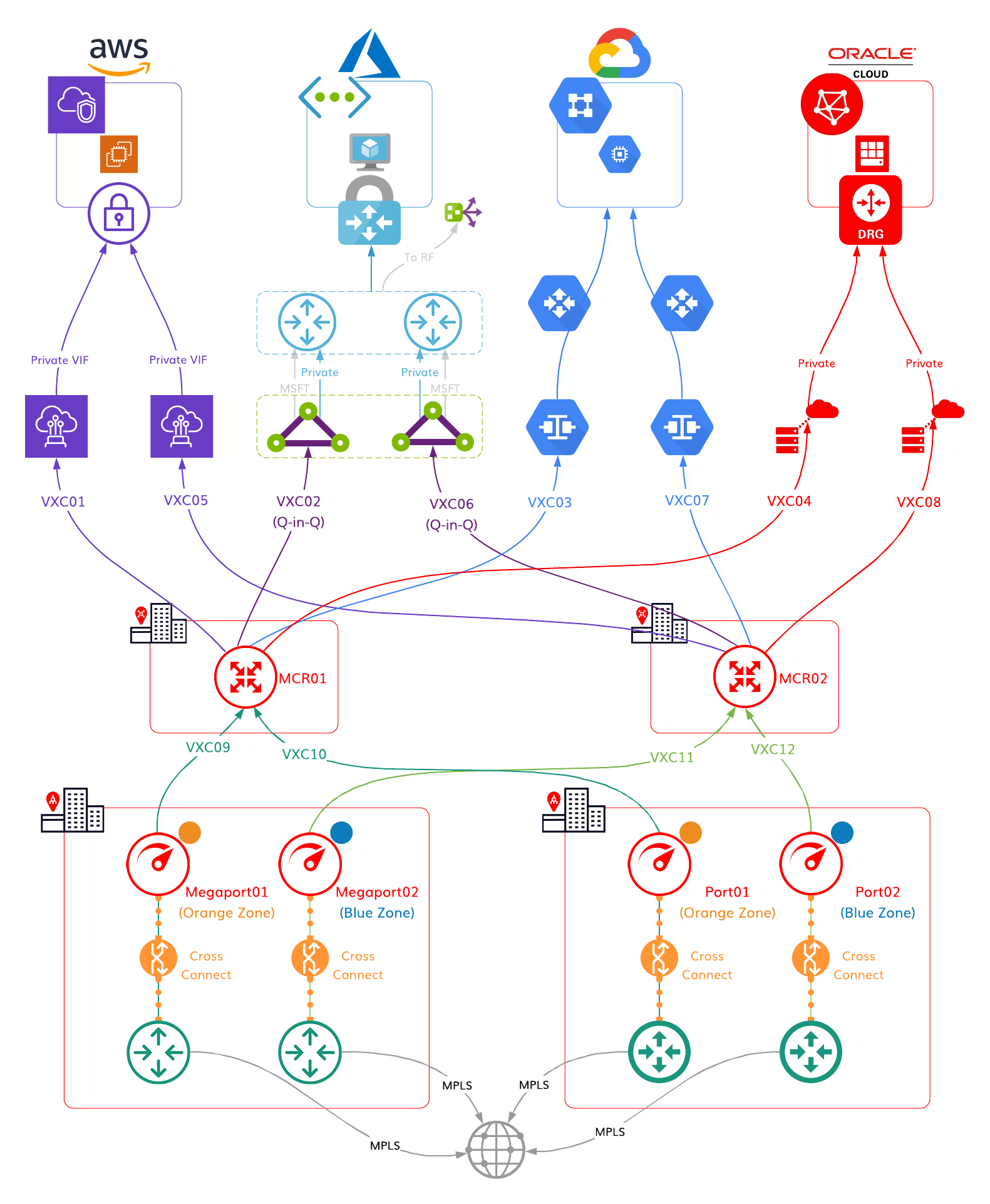
Dual MCRs as hubs that connect DCs with Megaports in different Diversity Zones to CSPs in an HA configuration.
HA design
Yes
Multicloud
Yes
On-premises DC (Colo) or Office
Yes – 2 DCs
On-premises geographically close to CSPs
No
Diverse regions
Yes
Megaport Technology Required
How many?
Megaport
Yes
4
Megaport Cloud Router (MCR)
Yes
2
VXC (Virtual Cross Connect) – Same Metro
Yes
8 (2 for each CSP)
VXC (Virtual Cross Connect) – Long Haul
Yes
4
Implementing a high availability strategy within your organisation means you reduce the risk that service outages can pose to your business continuity, profits, and reputation. Our connectivity specialists can provide design and support to ensure your organisation never goes dark.
Got questions? Visit our contact page and we’d be happy to help.
此内容由惯性聚合(RSS阅读器)自动聚合整理,仅供阅读参考。 原文来自 — 版权归原作者所有。